Skip to Content

Best Way to Transfer Data From Your Old iPhone to a New iPhone 13

by

If you've got a new iPhone 13 to replace your current iPhone, there are a few ways you can migrate your data across to the new device. You can restore your apps, data, and settings from your most recent iCloud backup, restore from a backup on your computer, or you can use device-to-device migration to transfer your data directly from your previous iPhone to your new one. There are currently known issues with restoring your data from a backup, so this article focuses on how to perform a wireless device-to-device migration.
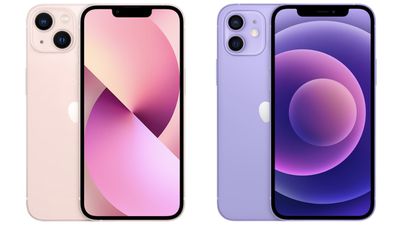
iphone 13 vs iphone 12
Without doubt, device-to-device migration will be the most convenient option for most owners of a new iPhone 13. It transfers over information like photos, app data, login credentials, device preferences and settings, and more. As with an ‌‌iCloud‌‌ backup, apps themselves are downloaded directly from the App Store rather than from your existing ‌iPhone‌. It may take a little longer than restoring from a backup, but the time saved from not having to log into all your apps again makes it worth the wait, which is why this process trumps the other transfer methods.

The following steps outline the Quick Start process that you can use to perform a wireless device-to-device migration. As always when transferring data between devices, make sure you have made a backup of your current iPhone, just in case anything untoward happens during the migration process.

It's also worth noting that if your current iPhone has an eSim plan, you'll be asked to "Transfer Cellular Plan" while setting up your iPhone 13: You can either select the numbers you want to transfer or opt to Decide Later to complete the plan transfer after you've set up your iPhone.

  1. Plug both iPhones into a power outlet, turn on your new iPhone 13 and place it near your current iPhone, which needs to be running iOS 12.4 or later for the transfer to work. The Quick Start screen will appear on your current iPhone and offer the option of using your Apple ID to set up your new device. Make sure that it's the ‌Apple ID‌ that you want to use, then tap Continue.
  2. Hold up your current iPhone and center the camera's viewfinder over the animation that appears on your iPhone 13. Wait for a message that says "Finish on New iPhone."
    set up iphone 13

  3. When prompted, enter your current passcode on your new iPhone 13.
  4. Follow the instructions to set up Face ID on your iPhone 13.
  5. Tap Transfer from iPhone to start transferring your data to your iPhone 13. You should be given the choice of whether to transfer some additional settings, such as Apple Pay and Siri, to your new iPhone.
  6. If you have an Apple Watch paired to your current iPhone, you'll be asked if you want to transfer your Apple Watch data and settings.
  7. Keep the two iPhones near each other and plugged into power until the data migration process is finished.
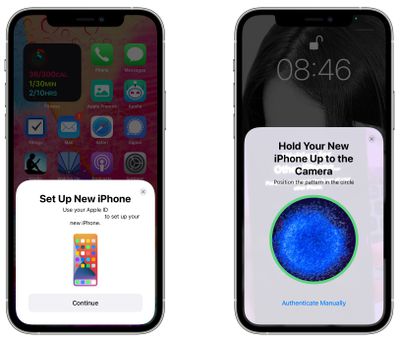
The amount of time that it takes to transfer data from one ‌iPhone‌ to another will vary based on what's on the existing ‌iPhone‌, but Apple provides a data transfer estimate on the main data transfer screen.

If the wireless network you're relying on is too slow, you can perform the data migration using a wired connection, but for that you'll need a Lightning to USB 3 Camera Adaptor and a Lightning to USB Cable. Connect the Camera Adaptor into your current iPhone, then plug the Lightning to USB Cable into your iPhone 13 and the other end into the adaptor. You'll then be able to follow the steps outlined above.

If you plan to sell or trade in your old iPhone to get a bit of extra cash, make sure to adequately erase everything on it to get it ready for its next owner.


Related Forum: iPhone

Top Rated Comments

bmodi Avatar
68 months ago
Also a restore is a "clean install". I think most misunderstand a "data transfer".
What it does is not to directly send everything from the old to the new. Just the settings get overtaken, which apps you had and so on. However all apps everything gets downloaded from the App Store like you would do it in case you do a manual setup. No difference. But overtaking it from the old Iphone will save you a lot of time!
Score: 8 Votes (Like | Disagree)
68 months ago
So at what stage do you swap the sim over?
Score: 5 Votes (Like | Disagree)
68 months ago
First time I experienced the 'device to device' migration by just holding the 2 phones next 2 each other 2 years ago with the iPhone 11Pro. By far the easiest most straightforward data transfer I've ever had. So much better than all the faff we used to have to endure backing everything up, plugging everything in etc.
Score: 4 Votes (Like | Disagree)
68 months ago
One great outcome for me was that the side-by-side transfer method allowed all of my music to be transferred - even the albums/songs I had ripped from CDs. Previously I had to use a third party app (e.g. iMazing) to transfer the music from a backup on my MacBook. The whole process took 45 minutes and was seamless. Well done Apple.
Score: 3 Votes (Like | Disagree)
68 months ago

I’m just going with a clean install. It’s slower overall but at least I get to control the order so the things I need are there first.
The only problem with clean installs is things like stickers or apps that aren't available anymore won't be available, even if you still use them on your current device. If you transfer, it keeps them. That might not be an issue for you, but I was bummed when I found some of the stuff that I was using didn't show up on my fresh install.
Score: 2 Votes (Like | Disagree)
68 months ago

what about the microsoft authenticator app? will it work either way you transfer?
Sadly no, both Microsoft and google authenticator did not transfer over my accounts using direct transfer.
Score: 2 Votes (Like | Disagree)

Popular Stories

apple design award 2025

Apple Announces 2025 Design Award Winners Ahead of WWDC 2025

Tuesday June 3, 2025 10:14 am PDT by
As we wait for WWDC to kick off next Monday, Apple today announced the winners of its annual Apple Design Awards, recognizing apps and games for their innovation, ingenuity, and technical achievement. The 2025 Apple Design Award winners are listed below, with one app and one game selected per category: Delight and Fun - CapWords (App) and Balatro (Game) Innovation - Play (App) and PBJ -...
1password deal blue

1Password Security Breach: What Was Accessed and What Wasn't

Wednesday November 25, 2026 1:09 pm PST by
Popular password management app 1Password today said it experienced a security breach earlier this month. 1Password says some customer names and email addresses were accessed, but no customer vault contents were compromised. On November 19, 1Password saw indications that an employee's GitHub account had been breached and began investigating. The company says the breached GitHub account was...
apple store down feature

Here's Why the Apple Store is Going Down

Thursday November 26, 2026 5:49 am PST by
Apple's online store is going down for a few hours on a rolling country-by-country basis right now, but do not get your hopes up for new products. Apple takes its online store down for a few hours ahead of Black Friday every year to tease its annual gift card offer with the purchase of select products. The store is down in Australia, New Zealand, and Thailand, right now, and it will...
Latest Stories
The 50+ Best Apple Black Friday Deals Still Available on AirPods, iPads, and More
6 hours ago
HomePod Mini 2 in (RED) Seemingly Spotted Ahead of Announcement
3 hours ago
Apple's M6 and PROLED MacBook Pro Reach New Low Prices for Black Friday
13 hours ago
The MacRumors Show: iPhone Air 2 and iPhone 18 Are Coming
13 hours ago
Apple Store in Brisbane Reopening Next Month With New Design
14 hours ago
The 60+ Best Black Friday Accessory Deals on iPhone Chargers, TVs, Headphones, and More
14 hours ago
GTA VI Now (Barely) Running on Apple Silicon Macs
15 hours ago
The Best Black Friday Streaming Deals on Apple TV, Disney+, and More
15 hours ago
Apple TV's 'Carême' Wins International Emmy for Best Drama
16 hours ago
iPhone 18 Production Delay Leaves Apple Little Time Before Launch
17 hours ago
The Best Black Friday AirPods Deals Still Available
9 hours ago
The Best Black Friday Deals on Apple Home Products
17 hours ago
The Best Black Friday iPhone Deals Still Available
9 hours ago
The Best Black Friday iPad Deals Still Available
9 hours ago
The Best Black Friday Apple Watch Deals Still Available
9 hours ago
The Best Black Friday AirTag Deals Still Available
9 hours ago
The Best Black Friday Mac Deals Still Available
9 hours ago
iPhone Share of US Smartphone Market Hits 57% as Rivals Slip
19 hours ago
iPhone 20 Pro Rumored to Feature 3D-Printed Titanium Frame
20 hours ago
Apple's Official 2026 Black Friday Offer Starts Rolling Out
2 days ago
Halide Adds Fill Light Feature for iPhone Duo
2 days ago
MacBook Air Black Friday Deals Now Live With Massive $399 Savings
2 days ago
Amazon Discounts All MacBook Neo Models by $99 for Black Friday
2 days ago
Kodak Launches Unique AirTag Rival With E-Ink Display
2 days ago
Here's Why the Apple Store is Going Down
2 days ago
Apple Still Working on Giant Foldable iPad That Could Cost $5,000
2 days ago
iPhones Dominate China's Weak Singles' Day Smartphone Sales
2 days ago
iPhone 20 Pro Could Feature Ceramic in Limited-Edition Model
2 days ago
Apple Faces Korean Regulator Review Over iPhone 16 AI Advertising
2 days ago
Apple Watch Ultra 4 Hits New Best-Ever Price of $649.99 for Black Friday
2 days ago
Related Apple News: Mac | South Africa | Sport | Ipad | Politics






























