Skip to Content

How to Track Your Sleep With Apple Watch

by

With iOS 16 and watchOS 9, Apple built out its sleep features with additional sleep tracking data and insights. Keep reading to learn how to set up sleep tracking for Apple Watch.
apple watch sleep tracking watchos 9
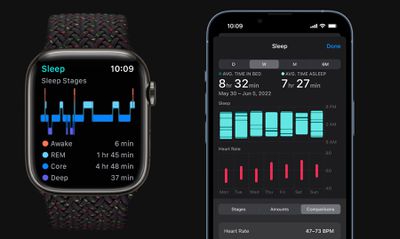
Apple enhanced the built-in Sleep app on the Apple Watch in a big way in watchOS 9, introducing Sleep Stages. With Sleep Stages, the Apple Watch is able to tell you how much time you spent in REM, Core, or Deep sleep during the night, along with the amount of time that you were awake.

You can also compare this data with the heart rate, respiratory rate, and (on Apple Watch 8 and Apple Watch Ultra models) wrist temperature measurements that your Apple Watch can take throughout the night.

To begin tracking your sleep with Apple Watch, you need to set up a sleep schedule on your iPhone or Apple Watch. The following steps show you how it's done.

How to Set a Sleep Schedule on iPhone

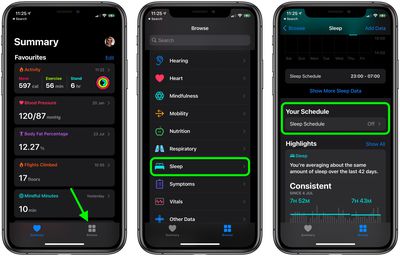
  1. Launch Apple's Health app on your iPhone.
  2. Tap the Browse tab in the bottom-right corner of the screen.
  3. Scroll down and select Sleep.
  4. Tap Sleep Schedule under "Your Schedule".
    health

  5. If Sleep Schedule is off, tap the switch to toggle it to the green ON position.
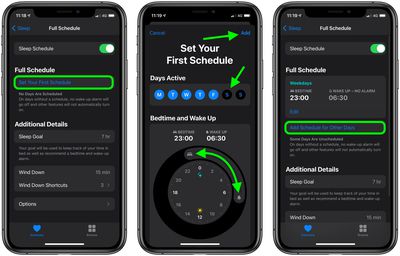
  6. Under "Full Schedule," tap Set Your First Schedule.
  7. Tap any of the blue circles under "Days Active" to disable Sleep Schedule on any days of the week.
  8. Using your finger, drag the ends of the sleep block to extend it around the clock graphic. This sets your sleep goal as well as your bedtime and wakeup time.
  9. Scroll down to reveal your Alarm options. Use the switch next to Wake Up Alarm to turn the alarm on/off. If you enabled the alarm, you can select the vibration type and sound you'd like to hear using Sounds & Haptics, adjust the volume using the slider, and allow for a snooze using the Snooze switch.
  10. Tap Add in the top-right corner when you're done.
  11. To add a different schedule for different days (the weekend, for example), tap Add Schedule for Other Days and customize your options as described in the previous steps.
    sleep
  12. Note that if this is your first time setting up a Sleep Schedule, after opening the Health app and navigating to the Sleep section, you'll need to tap on "Get Started" and set a sleep goal before you can set and adjust your sleep schedule.

How to Set a Sleep Schedule on Apple Watch

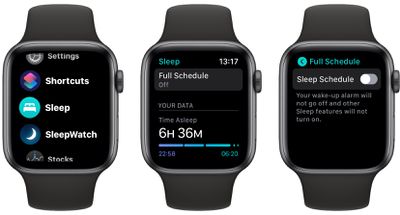
  1. Press the Digital Crown on your Apple Watch to open the App View.
  2. Launch the Sleep app.
  3. Tap Full Schedule.
  4. Tap the switch next to Sleep Schedule to toggle it to the green ON position.
    sleep

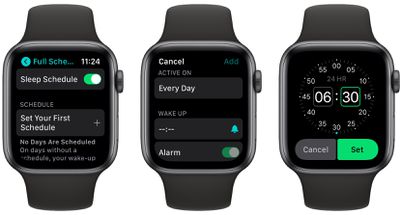
  5. Now tap Set Your First Schedule.

  6. If you only want this schedule to apply on certain days of the week, tap Every Day, then uncheck the days to exclude. Otherwise, tap the button below Wake Up, rotate the Digital Crown to select a wakeup time, then tap Set.
    sleep

  7. Use the switch next to Alarm to turn the alarm on/off. If you enabled the alarm, you can select the vibration type and sound you'd like to hear using the Sounds & Haptics button. Note that if your watch is in silent mode, your alarm will be replaced by a tap on the wrist.

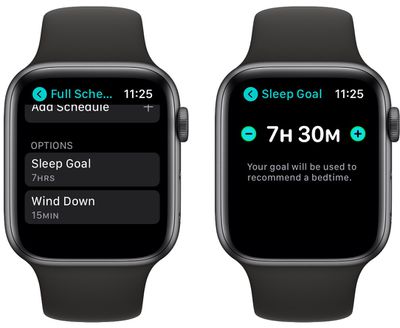
  8. Your suggested bedtime is based on your Sleep Goal, which you can edit by using the back button to return to the Full Schedule menu screen. From there, swipe down and tap Sleep Goal, and adjust the hours and minutes to suit.
    sleep

    How to View Sleep Tracking Data

    The Health app includes sleep comparison charts that show heart rate and respiratory rate so you can see how you're doing through the night. Here's how to find them on your iPhone.

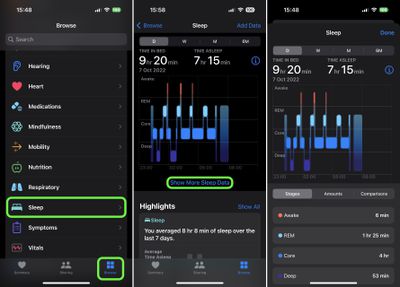
    1. Open the Health App.
    2. Tap the Browse tab, then select Sleep.
    3. Scroll down to see sleep tracking highlights, or view the full depth of insight data, including Stages, Amounts, and Comparisons, by tapping Show More Sleep Data below the sleep chart.

    health

    You can also view this data on your wrist by opening the Sleep app on your Apple Watch.

    Related Forum: Apple Watch
Popular Stories

apple watch series 3 design

Apple Offers Steps to Fix Daylight Saving Time Bug on Apple Watch

Sunday November 1, 2026 3:34 am PST by
Apple has published a support document describing what to do if your Apple Watch continues to show time that's off by one hour after daylight savings time changes. "This incorrect time appears only on the Always On display when your wrist is down," says Apple. "When you activate the display by tapping it or raising your wrist, the time changes to the correct hour." To fix the issue, Apple says ...

muse apple watch app

Meta's Muse AI Agent Comes to Apple Watch

Monday November 9, 2026 1:55 pm PST by
Meta today updated the Muse app for iOS to add Apple Watch support, which means Muse users can access the proactive AI agent from the watch. The app adds the Muse character to the watch with an option to text it, dictate text to it, or call it. There's also a Muse complication for quick access. Muse is Meta's personal AI agent that can complete tasks for users. It is available as a...

siri recap live rewind

watchOS 27.3 Brings Live Rewind and Siri Recap to Apple Watch

Tuesday November 3, 2026 10:35 am PST by
With the first beta of watchOS 27.3, Apple is introducing new Audio Intelligence features it previewed for the Apple Watch Series 12 and Ultra 4 earlier this year. Powered by the S11 chip, Audio Intelligence includes Live Rewind, Siri Recap, Sound Recognition, and Shazam Music Recognition. Sound Recognition and Shazam are already on the watch, but Live Rewind and Siri Recap are now available ...

Latest Stories
The 50+ Best Apple Black Friday Deals Still Available on AirPods, iPads, and More
10 hours ago
HomePod Mini 2 in (RED) Seemingly Spotted Ahead of Announcement
7 hours ago
Apple's M6 and PROLED MacBook Pro Reach New Low Prices for Black Friday
18 hours ago
The MacRumors Show: iPhone Air 2 and iPhone 18 Are Coming
18 hours ago
Apple Store in Brisbane Reopening Next Month With New Design
18 hours ago
The 60+ Best Black Friday Accessory Deals on iPhone Chargers, TVs, Headphones, and More
19 hours ago
GTA VI Now (Barely) Running on Apple Silicon Macs
19 hours ago
The Best Black Friday Streaming Deals on Apple TV, Disney+, and More
20 hours ago
Apple TV's 'Carême' Wins International Emmy for Best Drama
21 hours ago
iPhone 18 Production Delay Leaves Apple Little Time Before Launch
21 hours ago
The Best Black Friday AirPods Deals Still Available
13 hours ago
The Best Black Friday Deals on Apple Home Products
22 hours ago
The Best Black Friday iPhone Deals Still Available
13 hours ago
The Best Black Friday iPad Deals Still Available
13 hours ago
The Best Black Friday Apple Watch Deals Still Available


13 hours ago
The Best Black Friday AirTag Deals Still Available
13 hours ago
The Best Black Friday Mac Deals Still Available
13 hours ago
iPhone Share of US Smartphone Market Hits 57% as Rivals Slip
23 hours ago
iPhone 20 Pro Rumored to Feature 3D-Printed Titanium Frame
1 day ago
Apple's Official 2026 Black Friday Offer Starts Rolling Out
2 days ago
Halide Adds Fill Light Feature for iPhone Duo
2 days ago
MacBook Air Black Friday Deals Now Live With Massive $399 Savings
2 days ago
Amazon Discounts All MacBook Neo Models by $99 for Black Friday
2 days ago
Kodak Launches Unique AirTag Rival With E-Ink Display
2 days ago
Here's Why the Apple Store is Going Down
2 days ago
Apple Still Working on Giant Foldable iPad That Could Cost $5,000
2 days ago
iPhones Dominate China's Weak Singles' Day Smartphone Sales
2 days ago
iPhone 20 Pro Could Feature Ceramic in Limited-Edition Model
2 days ago
Apple Faces Korean Regulator Review Over iPhone 16 AI Advertising
2 days ago
Apple Watch Ultra 4 Hits New Best-Ever Price of $649.99 for Black Friday


2 days ago
Related Apple News: Foldable Iphone | Airpods 4 Release Date | Imac | Iphone 18 Pro Record Time Lapse Video 4k | Iphone Duo Take Selfies With Rear Cameras