Skip to Content

Top Five Time-Saving iPhone Tips: Searching Web Pages, Swipe to Delete in Calculator, and More

by

If you're looking to cut down on the amount of time you spend performing certain actions on your iPhone, there's usually a solution hidden in Apple's mobile operating system. Here are five quick iOS tips that once you start using will make you a lot more time-efficient in the long run.

This article assumes you're using an iPhone running iOS 11 or later, but some of these tips will work on iPad and earlier versions of Apple's mobile OS. Read on for more.

1. Search a Web Page

In Safari on iOS, there are two ways to search a web page for a specific word or phrase. One method is quicker than the other, although neither is necessarily immediately obvious.
search web page
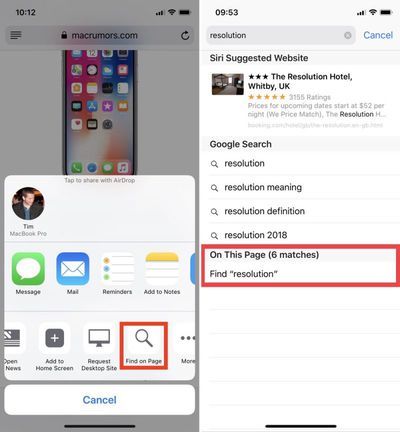
The first way involves tapping the Share icon (the square with an arrow pointing out of it), sliding your finger left along the bottom column, and tapping the Find on Page button, indicated by a magnifying glass. Start typing what you're looking for, and your search results will be returned automatically.

The second, faster method is to type your search term straight into Safari's address bar and then tap the On This Page option at the bottom of the suggestion list, after which you'll be able to tap through each occurrence of the term on the current page.

2. Swipe to Delete in the Calculator
calculator delete to swipe
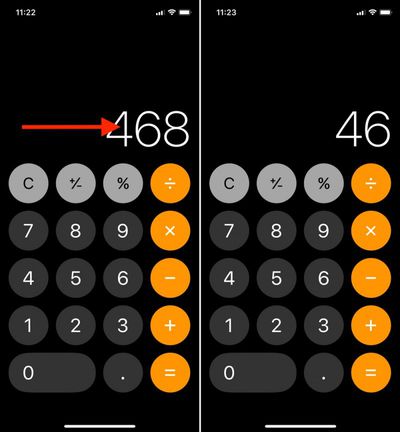
It's a common misconception that if you type the wrong number into the Calculator app, you have to start the whole sum all over again. Happily, that isn't the case: Simply swipe right or left with a finger across the number display to remove the last number you typed, and repeat the action if necessary to remove several numbers.

3. Access Deeper Control Center Options Sans 3D Touch
control center 1
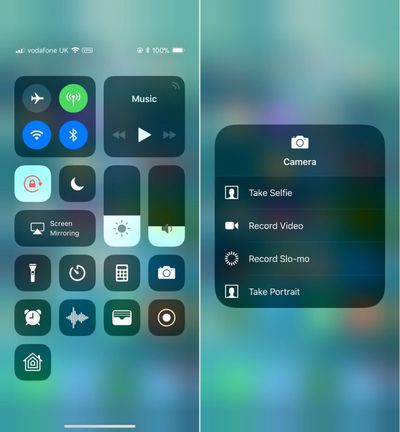
In iOS 11, the Control Center is designed to reveal deeper controls when the user hard-presses to activate 3D Touch – just try it on the camera button, for instance.

If you own an iPhone SE or an older iPhone that doesn't support 3D Touch gestures, it's still possible to access these more granular controls on any button that supports them by using a simple long press instead.

4. Quick-Switch Back From Numbers/Symbols to Letters

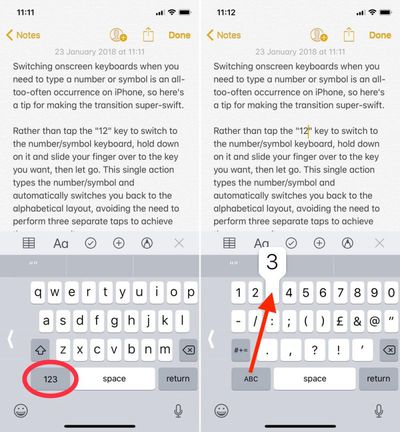
Switching onscreen keyboards when you need to type a number or symbol is an all-too-often occurrence on iPhone, so here's a tip for making the transition super-swift.
quick keyboard switch
Rather than tap the "123" key to switch to the number/symbol keyboard, hold down on it and slide your finger over to the key you want, then let go. This single action types the number/symbol and automatically switches you back to the alphabetical layout, avoiding the need to perform three separate taps to achieve the same result.

5. Clear All Notifications At Once
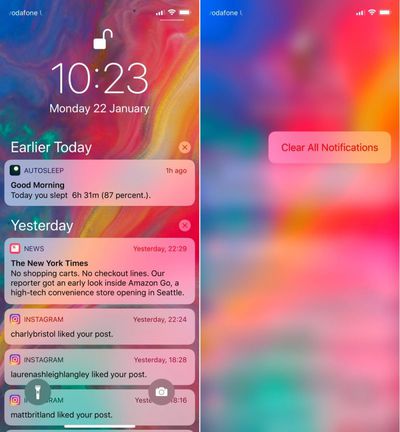
clear notifications 1
If you've got a bunch of notifications from earlier in the day or week that are clogging up your Notifications Screen, don't waste time clearing them one by one. Simply hard press on the first x icon you see on the right of the list. From there, you only need to select the Clear All Notifications 3D Touch option to make them instantly vanish.


Related Forum: iOS 11

Top Rated Comments

115 months ago
Huh.

I knew you could search from the address bar for Find on Page but I had no idea there was a share sheet option. I’ve just moved the icon to the first spot and I actually think I prefer it over typing in the address bar then scrolling down. TIL.
Score: 6 Votes (Like | Disagree)
115 months ago
I didn't know about the calculator trick. Thanks!
Score: 5 Votes (Like | Disagree)
RodThePlod Avatar
115 months ago
I’ve just moved the icon to the first spot and I actually think I prefer it over typing in the address bar then scrolling down. TIL.
Whoa!! I didn’t even realise you could reposition the icons in the share sheet! I’ve just done it now (works in a similar way to rearranging apps on the home screen for those who didn’t know).

Thank YOU anyjungleinguy for the tip.

This thread is full of goodness :)
Score: 3 Votes (Like | Disagree)
macduke Avatar
115 months ago
I search within websites so frequently that I sometimes wish I could add it as a button that is always visible. It would be neat to be able to replace something I use infrequently such as the bookmarks button for search or another shortcut. That would be a cool feature in iOS 12.
Score: 3 Votes (Like | Disagree)
OlliFlamme Avatar
115 months ago
Here’s a couple more..


* Multi-apps drag and drop
* “Hey siri, turn off all alarms”
* 3D touch on keyboard to move cursor freely

Likewise:


* multi-app closing: use two fingers after the tap hold for closing multiple apps.

Which makes me think: I find it pointless of :apple: not to have that action done in a similar way to iOS on iPad’s behaviour... numerous times, I just try to swipe close my apps on my phone, to realise that I need to first tap hold :confused:


* Swipe down on your home screen and calculate there, just as you would on your mac in the siri field. It is perfect for most calculations, and you have a natural typing behaviour. Also, you can check your full calculation query as well.


* Make a pdf of anything printable by giving the print command, force tap the print preview, and saving it...

Great tip on the single number 3 input. Woops
Score: 2 Votes (Like | Disagree)
iFanaddic Avatar
115 months ago
Here’s a couple more..


* Multi-apps drag and drop
* “Hey siri, turn off all alarms”
* 3D touch on keyboard to move cursor freely


Attachment Image

Attachment Image
Score: 2 Votes (Like | Disagree)

Popular Stories

apple design award 2025

Apple Announces 2025 Design Award Winners Ahead of WWDC 2025

Tuesday June 3, 2025 10:14 am PDT by
As we wait for WWDC to kick off next Monday, Apple today announced the winners of its annual Apple Design Awards, recognizing apps and games for their innovation, ingenuity, and technical achievement. The 2025 Apple Design Award winners are listed below, with one app and one game selected per category: Delight and Fun - CapWords (App) and Balatro (Game) Innovation - Play (App) and PBJ -...
1password deal blue

1Password Security Breach: What Was Accessed and What Wasn't

Wednesday November 25, 2026 1:09 pm PST by
Popular password management app 1Password today said it experienced a security breach earlier this month. 1Password says some customer names and email addresses were accessed, but no customer vault contents were compromised. On November 19, 1Password saw indications that an employee's GitHub account had been breached and began investigating. The company says the breached GitHub account was...
Apple 2026 Black Friday Event Hero

Apple's Official 2026 Black Friday Offer Starts Rolling Out

Thursday November 26, 2026 8:37 am PST by
Apple's annual four-day Black Friday through Cyber Monday shopping event is now live in Australia, New Zealand, and Thailand, and it will continue to roll out across Europe, the U.S., and Canada as the calendar turns to Friday, November 27 around the world. In the U.S., Apple's terms and conditions say the promotion begins on November 27 at 12 a.m. Pacific Time and ends on November 30 at...
Latest Stories
The 50+ Best Apple Black Friday Deals Still Available on AirPods, iPads, and More
10 hours ago
HomePod Mini 2 in (RED) Seemingly Spotted Ahead of Announcement
7 hours ago
Apple's M6 and PROLED MacBook Pro Reach New Low Prices for Black Friday
17 hours ago
The MacRumors Show: iPhone Air 2 and iPhone 18 Are Coming
17 hours ago
Apple Store in Brisbane Reopening Next Month With New Design
18 hours ago
The 60+ Best Black Friday Accessory Deals on iPhone Chargers, TVs, Headphones, and More
19 hours ago
GTA VI Now (Barely) Running on Apple Silicon Macs
19 hours ago
The Best Black Friday Streaming Deals on Apple TV, Disney+, and More
20 hours ago
Apple TV's 'Carême' Wins International Emmy for Best Drama
20 hours ago
iPhone 18 Production Delay Leaves Apple Little Time Before Launch
21 hours ago
The Best Black Friday AirPods Deals Still Available
13 hours ago
The Best Black Friday Deals on Apple Home Products
21 hours ago
The Best Black Friday iPhone Deals Still Available
13 hours ago
The Best Black Friday iPad Deals Still Available
13 hours ago
The Best Black Friday Apple Watch Deals Still Available
13 hours ago
The Best Black Friday AirTag Deals Still Available
13 hours ago
The Best Black Friday Mac Deals Still Available
13 hours ago
iPhone Share of US Smartphone Market Hits 57% as Rivals Slip
23 hours ago
iPhone 20 Pro Rumored to Feature 3D-Printed Titanium Frame
1 day ago
Apple's Official 2026 Black Friday Offer Starts Rolling Out
2 days ago
Halide Adds Fill Light Feature for iPhone Duo
2 days ago
MacBook Air Black Friday Deals Now Live With Massive $399 Savings
2 days ago
Amazon Discounts All MacBook Neo Models by $99 for Black Friday
2 days ago
Kodak Launches Unique AirTag Rival With E-Ink Display
2 days ago
Here's Why the Apple Store is Going Down
2 days ago
Apple Still Working on Giant Foldable iPad That Could Cost $5,000
2 days ago
iPhones Dominate China's Weak Singles' Day Smartphone Sales
2 days ago
iPhone 20 Pro Could Feature Ceramic in Limited-Edition Model
2 days ago
Apple Faces Korean Regulator Review Over iPhone 16 AI Advertising
2 days ago
Apple Watch Ultra 4 Hits New Best-Ever Price of $649.99 for Black Friday
2 days ago
Related Apple News: Iphone | Mac | Buyers Guide | Reviews | Entertainment






























