Skip to Content

How to Tell Which Mac Apps Are Optimized for Apple Silicon

by

Following the launch of Macs powered by Apple silicon, numerous third-party apps have been updated to ensure they are optimized to run on Apple's custom processors. Even if an app hasn't been updated, Apple's non-Intel Macs can still run them, thanks to Apple's Rosetta 2 translation layer. But how do you know which of your apps are running natively as Universal executables and which ones are using Rosetta emulation? Read on to find out.
m1 macs banner

Universal Apps Explained

When developers update their apps to run natively on Apple silicon, they use something called a Universal binary. Originally, Universal apps referred to executable files that run natively on both PowerPC or Intel Macs. At WWDC 2020 in June, however, Apple announced Universal 2, which allows apps to run on both Intel-based Macs and Apple silicon Macs.

If an app has yet to be updated to Universal 2, an Apple silicon Mac will still run it, but it will do so by converting the Intel x86-64 code using Rosetta 2 emulation software. Even when emulating x86 code under Rosetta 2, the Macs with Apple silicon generally run non-native apps faster than Intel-based Macs, but it's good to know which apps have been optimized for the advanced hardware inside your M1 Mac. Here's how.

How to Check for Universal Apps in macOS

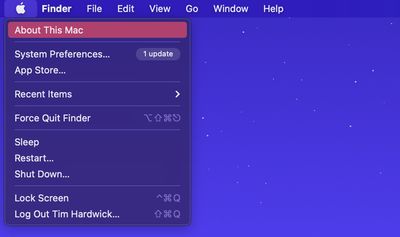
  1. Click the Apple symbol in the top-left corner of your Mac's menu bar and choose About This Mac.
    about this mac

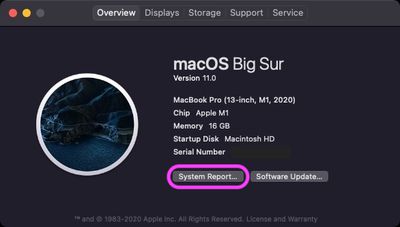
  2. In the "Overview" tab, click the System Report... button.
    about this mac overview copy

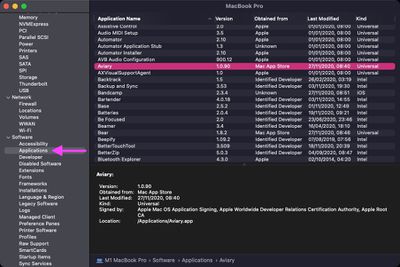
  3. In the System Report window, select Software -> Applications in the sidebar. In the Applications list that loads, look under the Kind column to see whether an app is a Universal binary or a non-native Intel executable.
    check for universal apps copy

In addition to the System Report list, you can check individual apps too: right-click an app's icon in Finder, then select Get Info from the contextual menu and look at its Kind under "General."

In addition to the above, iMazing has released a free app [Direct Link] that scans your macOS apps and displays their supported CPU architecture, while repo offers a free menu bar app called Silicon Info that lets you quickly view the architecture of the currently running application.
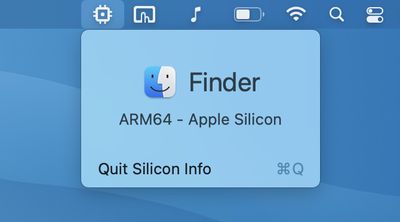
silicon info

Silicon Info menu bar app

You can also check if an app has been optimized for Apple silicon before you even install it, thanks to a website by Abdullah Diaa called Is Apple silicon ready? The site maintains an up-to-date database of apps indicating native ‌M1‌ support, Rosetta 2 only, and those that don't work at all.

It's worth noting that Apple considers Rosetta 2 to be a temporary solution for developers while they remake their existing Intel-based programs to run on Arm-based Macs, meaning they will eventually need to create Universal apps that work natively on both ‌‌Intel and Apple silicon‌‌ machines.

Apple ended support for OG Rosetta three years after its release to smooth the transition from PowerPC chips to Intel processors, so if a developer doesn't update their app eventually, it may become unusable on Apple silicon machines in the future.


Related Forum: macOS Big Sur

Top Rated Comments

yanksrock100 Avatar
78 months ago
Developer of the Silicon Info menu bar app here, so cool to see the app mentioned on MacRumors :)

I was tired of constantly opening Activity Monitor to see if my apps were running natively yet so I figured the menu bar was the quicker. Hope others find it useful too!

Cheers
Score: 13 Votes (Like | Disagree)
gpmcadam Avatar
78 months ago
If you open Activity Monitor and filter the processes by name, it also shows in the Architecture column either 'Apple' or 'Intel.'


Attachment Image
Score: 13 Votes (Like | Disagree)
78 months ago
I really do hope Rosetta 2 will stick around for much longer than the original Rosetta. Rosetta 1 was always slow on computers of the day, and consequently did not make for a great user experience. It was also licensed technology, and Apple presumably didn't want to keep paying the licensing fee.

Rosetta 2 was developed in-house, and it's super fast. And, perhaps even more importantly, there are far more Intel Mac apps than there ever were PPC apps (because Macs are more popular today), so we’d loose access to a much richer library of software.
Score: 10 Votes (Like | Disagree)
justperry Avatar
78 months ago

I get Universal binaries. It's easy. But sadly it also goes with double file sizes too.

It's OK for small apps but some exceed 3GB (Ableton Live for example). So basically the Universal app you need to download is 6GB instead of 3GB (and it also will occupy 6GB on your system).

I remember PPC/Intel Stripping tools which could strip the unneeded.
But that's not possible now with code signing - if you would strip it now, it just won't work.

Anyhow, I think devs should also provide separate ARM and Intel downloads.
This is not true, a binary is just part of the App package, a slimmed-down App will not magically give you back half of that App size.
There's a lot more in an App package than Binaries, like for instance images, supporting files, databases and so on.

Just an example below, this is Safari App package, look at the Safari binary size, there are more binaries in /Safari/Contents but not that many and not huge.

Edit: I just researched a bit more into the Safari App package, it's ~19 MB, slimming it down would not even save you 1 MB.
There are much bigger binaries but in my experience slimming down an App folder saves you max 10% of the total size, done that after going from PPC to Intel, lots of Universal Apps back than, there are still Universal Intel/PPC Apps.


Attachment Image
Score: 3 Votes (Like | Disagree)
78 months ago
i thought that Rosetta wasn't emulating but rather translating the app before running it?
Score: 2 Votes (Like | Disagree)
78 months ago
I get Universal binaries. It's easy. But sadly it also goes with double file sizes too.

It's OK for small apps but some exceed 3GB (Ableton Live for example). So basically the Universal app you need to download is 6GB instead of 3GB (and it also will occupy 6GB on your system).

I remember PPC/Intel Stripping tools which could strip the unneeded.
But that's not possible now with code signing - if you would strip it now, it just won't work.

Anyhow, I think devs should also provide separate ARM and Intel downloads.
Score: 2 Votes (Like | Disagree)

Popular Stories

grand theft auto iv

GTA VI Now (Barely) Running on Apple Silicon Macs

Friday November 27, 2026 7:46 am PST by
"Grand Theft Auto VI" can theoretically now run on Apple silicon Macs via unofficial community projects, despite Rockstar Games offering no official Mac version. Developers have adapted the Xbox Series version of the game to work on macOS unofficially, with some reporting that they can explore scenes and control the camera. Unfortunately, the projects remain experimental and performance is...
apple design award 2025

Apple Announces 2025 Design Award Winners Ahead of WWDC 2025

Tuesday June 3, 2025 10:14 am PDT by
As we wait for WWDC to kick off next Monday, Apple today announced the winners of its annual Apple Design Awards, recognizing apps and games for their innovation, ingenuity, and technical achievement. The 2025 Apple Design Award winners are listed below, with one app and one game selected per category: Delight and Fun - CapWords (App) and Balatro (Game) Innovation - Play (App) and PBJ -...
Apple 2026 Black Friday Event Hero

Apple's Official 2026 Black Friday Offer Starts Rolling Out

Thursday November 26, 2026 8:37 am PST by
Apple's annual four-day Black Friday through Cyber Monday shopping event is now live in Australia, New Zealand, and Thailand, and it will continue to roll out across Europe, the U.S., and Canada as the calendar turns to Friday, November 27 around the world. In the U.S., Apple's terms and conditions say the promotion begins on November 27 at 12 a.m. Pacific Time and ends on November 30 at...
Latest Stories
The 50+ Best Apple Black Friday Deals Still Available on AirPods, iPads, and More
29 minutes ago
HomePod Mini 2 in (RED) Seemingly Spotted Ahead of Announcement
10 hours ago
Apple's M6 and PROLED MacBook Pro Reach New Low Prices for Black Friday
21 hours ago
The MacRumors Show: iPhone Air 2 and iPhone 18 Are Coming
21 hours ago
Apple Store in Brisbane Reopening Next Month With New Design
21 hours ago
The 60+ Best Black Friday Accessory Deals on iPhone Chargers, TVs, Headphones, and More
22 hours ago
GTA VI Now (Barely) Running on Apple Silicon Macs
22 hours ago
The Best Black Friday Streaming Deals on Apple TV, Disney+, and More
23 hours ago
Apple TV's 'Carême' Wins International Emmy for Best Drama
1 day ago
iPhone 18 Production Delay Leaves Apple Little Time Before Launch
1 day ago
The Best Black Friday AirPods Deals Still Available
17 hours ago
The Best Black Friday Deals on Apple Home Products
1 day ago
The Best Black Friday iPhone Deals Still Available
17 hours ago
The Best Black Friday iPad Deals Still Available
17 hours ago
The Best Black Friday Apple Watch Deals Still Available
16 hours ago
The Best Black Friday AirTag Deals Still Available
16 hours ago
The Best Black Friday Mac Deals Still Available
16 hours ago
iPhone Share of US Smartphone Market Hits 57% as Rivals Slip
1 day ago
iPhone 20 Pro Rumored to Feature 3D-Printed Titanium Frame
1 day ago
Apple's Official 2026 Black Friday Offer Starts Rolling Out
2 days ago
Halide Adds Fill Light Feature for iPhone Duo
2 days ago
MacBook Air Black Friday Deals Now Live With Massive $399 Savings
2 days ago
Amazon Discounts All MacBook Neo Models by $99 for Black Friday
2 days ago
Kodak Launches Unique AirTag Rival With E-Ink Display
2 days ago
Here's Why the Apple Store is Going Down
2 days ago
Apple Still Working on Giant Foldable iPad That Could Cost $5,000
2 days ago
iPhones Dominate China's Weak Singles' Day Smartphone Sales
2 days ago
iPhone 20 Pro Could Feature Ceramic in Limited-Edition Model
2 days ago
Apple Faces Korean Regulator Review Over iPhone 16 AI Advertising
2 days ago
Apple Watch Ultra 4 Hits New Best-Ever Price of $649.99 for Black Friday
2 days ago
Related Apple News: Mac | Education | Business | Politics | Travel