Skip to Content

How to Set Up a System-Wide Word Count Service on Your Mac

by

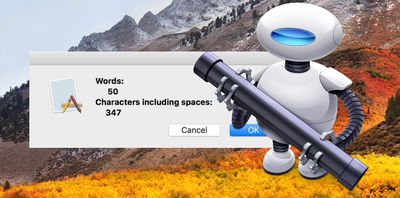
In this article, we're going to show you how to create a system-wide service that enables you to get an immediate word count and character count in TextEdit, Safari, Mail, or indeed any app on your Mac that lets you highlight text. It offers a handy home-made solution if you often find yourself pasting into a blank Word or Pages document for no other reason than to find out how many words are in a text selection.
word count automator service 2
The steps below will guide you through the process of creating your own word count service using the macOS Automator app. It's a simple procedure to follow and should only take five minutes, but if you'd rather use a third-party solution, then check out WordCounter, a free Mac menu bar utility from Onekerato.

How to Create a Word Count Service in Automator

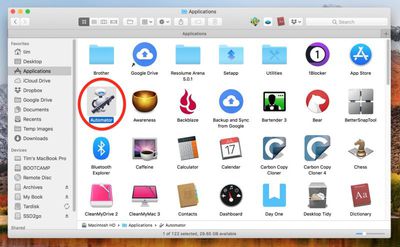
  1. Launch Automator from the Applications folder.
    1 Automator

  2. Click New Document.

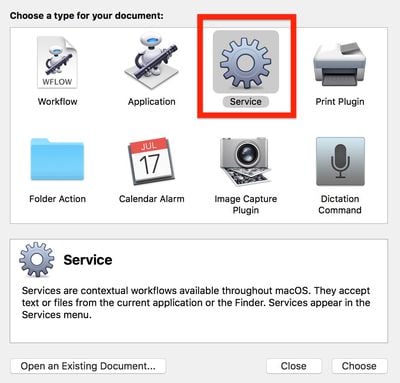
  3. Choose Service as the type of your document.
    2 Automator document type

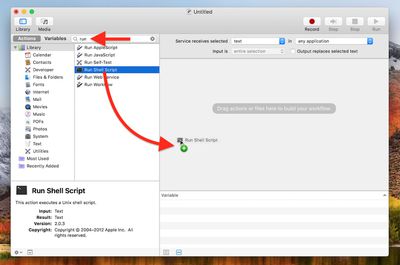
  4. Type "run" into the Library search field at the top of the Automator sidebar, then drag the Run Shell Script action into the empty workflow area.
    automator drag shell script

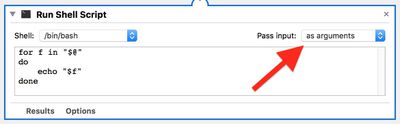
  5. In the Run Shell Script action window, change the Pass Input: option to as arguments using the dropdown menu.
    automator run shell script

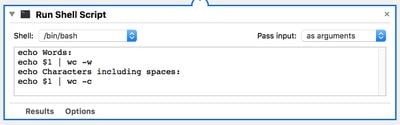
  6. Clear the text in the shell script box (highlight the text with your mouse cursor and hit Backspace) then copy and paste the following text into the same area:

    echo Words:

    echo $1 | wc -w

    echo Characters including spaces:

    echo $1 | wc -c
    automator word count script

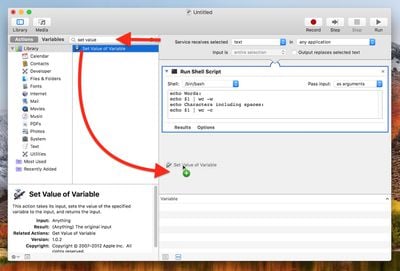
  7. Clear the Library search field at the top of the Automator sidebar and type "set value", then drag the Set Value of Variable action into the workflow area.
    automator set value of variable

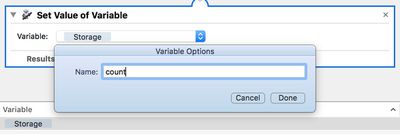
  8. Click the Variable: dropdown menu and select New Variable....

  9. In the blue dialog that appears, click inside the Name: input field. It may default to "storage", but you can rename it – we'll call it "count". Click Done, and you should now see "count" (or whichever name you used) appear in the variable list below the workflow area.
    automator variable name

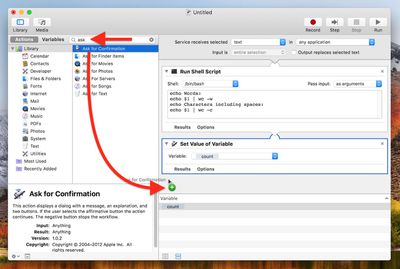
  10. Clear the Library search field at the top of the Automator sidebar again, and this time type "ask", then drag the Ask for Confirmation action into the workflow area.
    drag ask for confirm

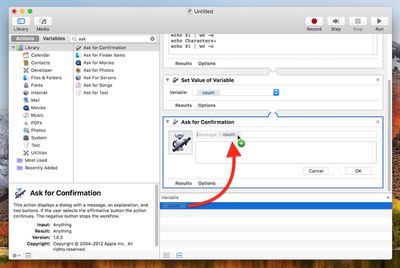
  11. Now, drag your "count" variable from the variable list up to the "Message" title in the Ask for Confirmation action.
    drag count variable

  12. In the Automator menu bar, select File -> Save..., call your new service "Word Count", and click Save.
Next time you want to get a word count and/or character count for some text you've highlighted, simply right-click (or Ctrl-click) on the text and select Services -> Word Count from the contextual dropdown menu.
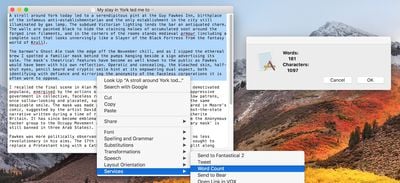
word count
You can assign a key shortcut to it for even faster access. To do so, launch System Preferences, select the Keyboard pane, and click the Shortcuts tab. Select Services from the sidebar and you should find Word Count near the bottom of the list. Just click it, select Add Shortcut, and finally, enter your custom key combination.
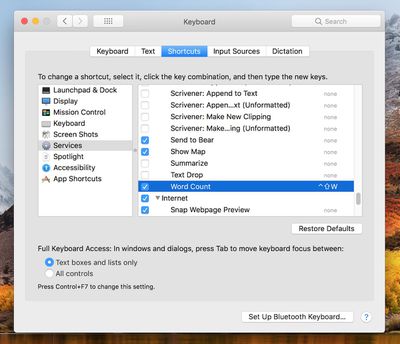

word count shortcut

Top Rated Comments

112 months ago
Srsly guys... I don't think I'll need this. But you rock! Keep these guides and tutorials coming!!! They are MUCH appreciated!
Score: 11 Votes (Like | Disagree)
112 months ago
Srsly guys... I don't think I'll need this. But you rock! Keep these guides and tutorials coming!!! They are MUCH appreciated!
Was gonna say exactly this till I saw your post. Reminds me of MacOXSHints.
[doublepost=1526030048][/doublepost]
Or get WordService for free from the App Store to give you text stats and so much more:
https://itunes.apple.com/app/wordservice/id899972312?mt=12
Maybe but this also teaches you stuff.
Score: 6 Votes (Like | Disagree)
fairuz Avatar
112 months ago
Automator is one of the many amazing productivity features in macOS that few know about. It's saved me so much time.
Score: 2 Votes (Like | Disagree)
IJ Reilly Avatar
112 months ago
Or get WordService for free from the App Store to give you text stats and so much more:
https://itunes.apple.com/app/wordservice/id899972312?mt=12
Beat me to it. I've used this indispensable collection of services for over 15 years. Can also be downloaded here:

https://www.macupdate.com/app/mac/10523/wordservice
[doublepost=1526061714][/doublepost]
Maybe but this also teaches you stuff.
I learned that I don't have to do it myself. ;)
Score: 2 Votes (Like | Disagree)
100 months ago
Has anyone actually checked how exact this is? I'm testing it now and the "characters including spaces" count seems to always be one more than it should be, regardless of the text or the program that I'm using the action in (e.g. safari, textedit, etc). Can anyone confirm if it's working 100% properly or not on their mac?

I know it's not a 'huge deal', and I can just manually deduct 1 myself, but it'd be interesting to know if anyone else is experiencing this and if so, if there's a way to get it exact. The exact character count is what I'm using this function for, because I use sites which limit titles & descriptions to exact character counts; and some sites, for some reason, don't actually tell you how many characters you've entered, just that you've "exceeded the maximum number of characters".

Thanks
Score: 1 Votes (Like | Disagree)
ArtOfWarfare Avatar
112 months ago
There are definitely existing Sublime plugins for word count. I'm using this one ('https://github.com/titoBouzout/WordCount')and it's great.

Of course. There's plenty of plugins for Sublime for anything lots of people need to do.

I was saying that, more generally, I write plugins for Sublime when I regularly need to do something with text in some specific way. As opposed to writing a MacOS service, where it'll only work on Macs.
Score: 1 Votes (Like | Disagree)

Popular Stories

apple design award 2025

Apple Announces 2025 Design Award Winners Ahead of WWDC 2025

Tuesday June 3, 2025 10:14 am PDT by
As we wait for WWDC to kick off next Monday, Apple today announced the winners of its annual Apple Design Awards, recognizing apps and games for their innovation, ingenuity, and technical achievement. The 2025 Apple Design Award winners are listed below, with one app and one game selected per category: Delight and Fun - CapWords (App) and Balatro (Game) Innovation - Play (App) and PBJ -...
Apple 2026 Black Friday Event Hero

Apple's Official 2026 Black Friday Offer Starts Rolling Out

Thursday November 26, 2026 8:37 am PST by
Apple's annual four-day Black Friday through Cyber Monday shopping event is now live in Australia, New Zealand, and Thailand, and it will continue to roll out across Europe, the U.S., and Canada as the calendar turns to Friday, November 27 around the world. In the U.S., Apple's terms and conditions say the promotion begins on November 27 at 12 a.m. Pacific Time and ends on November 30 at...
1password deal blue

1Password Security Breach: What Was Accessed and What Wasn't

Wednesday November 25, 2026 1:09 pm PST by
Popular password management app 1Password today said it experienced a security breach earlier this month. 1Password says some customer names and email addresses were accessed, but no customer vault contents were compromised. On November 19, 1Password saw indications that an employee's GitHub account had been breached and began investigating. The company says the breached GitHub account was...
Latest Stories
The 50+ Best Apple Black Friday Deals Still Available on AirPods, iPads, and More
2 hours ago
Here Are the Best Apple Black Friday Leftover Deals You Can Get Today
45 minutes ago
HomePod Mini 2 in (RED) Seemingly Spotted Ahead of Announcement
12 hours ago
Apple's M6 and PROLED MacBook Pro Reach New Low Prices for Black Friday
22 hours ago
The MacRumors Show: iPhone Air 2 and iPhone 18 Are Coming
23 hours ago
Apple Store in Brisbane Reopening Next Month With New Design
23 hours ago
The 60+ Best Black Friday Accessory Deals on iPhone Chargers, TVs, Headphones, and More
38 minutes ago
GTA VI Now (Barely) Running on Apple Silicon Macs
1 day ago
The Best Black Friday Streaming Deals on Apple TV, Disney+, and More
1 day ago
Apple TV's 'Carême' Wins International Emmy for Best Drama
1 day ago
iPhone 18 Production Delay Leaves Apple Little Time Before Launch
1 day ago
The Best Black Friday AirPods Deals Still Available
18 hours ago
The Best Black Friday Deals on Apple Home Products
1 day ago
The Best Black Friday iPhone Deals Still Available
18 hours ago
The Best Black Friday iPad Deals Still Available
18 hours ago
The Best Black Friday Apple Watch Deals Still Available
18 hours ago
The Best Black Friday AirTag Deals Still Available
18 hours ago
The Best Black Friday Mac Deals Still Available
18 hours ago
iPhone Share of US Smartphone Market Hits 57% as Rivals Slip
1 day ago
iPhone 20 Pro Rumored to Feature 3D-Printed Titanium Frame
1 day ago
Apple's Official 2026 Black Friday Offer Starts Rolling Out
2 days ago
Halide Adds Fill Light Feature for iPhone Duo
2 days ago
MacBook Air Black Friday Deals Now Live With Massive $399 Savings
2 days ago
Amazon Discounts All MacBook Neo Models by $99 for Black Friday
2 days ago
Kodak Launches Unique AirTag Rival With E-Ink Display
2 days ago
Here's Why the Apple Store is Going Down
2 days ago
Apple Still Working on Giant Foldable iPad That Could Cost $5,000
2 days ago
iPhones Dominate China's Weak Singles' Day Smartphone Sales
2 days ago
iPhone 20 Pro Could Feature Ceramic in Limited-Edition Model
2 days ago
Apple Faces Korean Regulator Review Over iPhone 16 AI Advertising
2 days ago
Related Apple News: Entertainment | Motoring | Lifestyle | Iphone | Iphone