Skip to Content

How to Stop Your Apple Watch From Launching the 'Now Playing' App When Audio Plays on Your iPhone

by

Most Apple Watch owners will recognize the "Now Playing" app – it automatically launches by default whenever you play audio through the Music or Podcasts app on your iPhone. A similar screen shows when you play audio through any third-party iPhone app that also has an Apple Watch extension, like Overcast, for example.

The Now Playing app provides quick access to playback controls on your wrist, as well as track options like Love/Dislike and Delete From Library. You can also turn the Crown on your Apple Watch to adjust volume, which is handy when you're listening on AirPods or other headphones that don't have built-in volume controls.
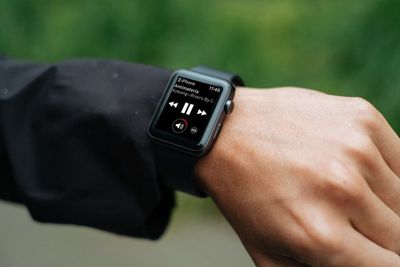
apple watch now playing screen
You might not like the way the Now Playing app automatically appears when you play audio on your iPhone. If you just want to see your watch face when you raise your wrist during audio playback, you can turn off the default behavior by following the first set of steps below.

You can still make it easy to access the Now Playing app without it automatically taking over the screen whenever you play audio. One solution is to add the Now Playing app to your Apple Watch's Dock, accessed with a press of the Side button. Another option is to enable the Now Playing watch face complication. Click the links to find out how.

How to Disable Auto-Launch Audio Apps on Apple Watch

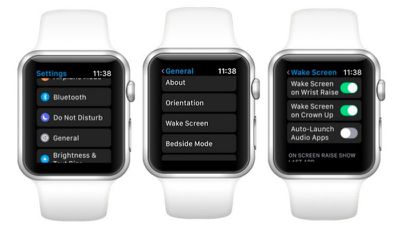
  1. Press the Crown on your Apple Watch to invoke the app launcher.

  2. Launch the Settings app.
    apple watch auto launch audio apps

  3. Tap General.

  4. Tap Wake Screen.

  5. Toggle off Auto-Launch Audio Apps.

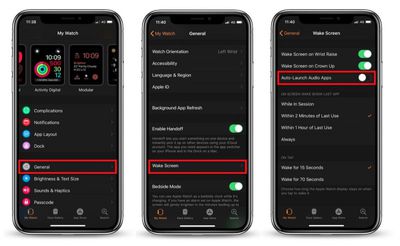
How to Disable Auto-Launch Audio Apps via iPhone

  1. Launch the Watch app on your iPhone.

  2. Tap General.
    auto launch audio watch app

  3. Scroll down and tap Wake Screen.

  4. Toggle off Auto-Launch Audio Apps.

How to Add 'Now Playing' to Your Apple Watch's Dock

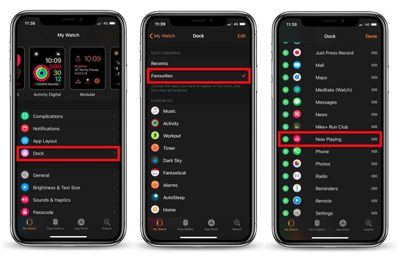
  1. Launch the Watch app on your iPhone.

  2. Tap Dock.

  3. Tap Favorites in the Dock Ordering section if it isn't already selected.
    apple watch now playing add to dock

  4. Tap Edit in the upper right corner of the screen.

  5. Scroll down to the Do Not Include section and tap the plus (+) symbol next to Now Playing to add it to the list of docked apps. Alternatively, drag the app into the Favorites list via the three-line button at the far right of the entry. (Note you can also use these buttons to control the arrangement of apps in the Dock.)

  6. Tap Done in the upper right of the screen.
How to Enable the 'Now Playing' Complication

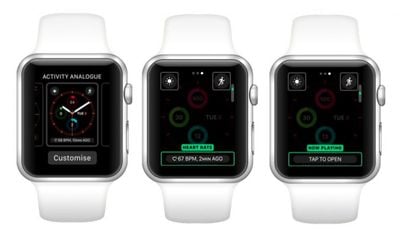
Before following these steps, make sure you're using a watch face that accepts text-based complications (Modular and Activity Digital are two such examples.)

  1. Hard press the watch face on your Apple Watch.

  2. Tap Customize.
    apple watch now playing complication

  3. Swipe left until the large text-based complication space is highlighted.

  4. Turn the Crown to scroll through the options until you get to the Now Playing complication (also shown as 'Tap to Open' in the text space).

  5. Press the Crown twice to set the complication and exit Customize mode.
Related Roundups: AirPods 5, Apple Watch 12
Related Forums: AirPods, Apple Watch

Top Rated Comments

112 months ago
Thank you, thank you, thank you! I might actually like my Apple Watch again. Whoever thought this was a good idea is clueless.
I love this feature.
Score: 4 Votes (Like | Disagree)
Ted13 Avatar
112 months ago
Thank you, thank you, thank you! I might actually like my Apple Watch again. Whoever thought this was a good idea is clueless.
Well it is my favorite app on the Apple Watch, I am immensely grateful it works the way it does by default. I listen to podcasts via Overcast every morning on the long dog walk with Air Pods, and the ability to instantly adjust volume via the crown, skip back/forward 30 secs, pause or play is things I do constantly - talking to people, load street noise, etc. etc. My phone never comes out of my pocket. Far and away the most useful feature on the Apple Watch
Score: 4 Votes (Like | Disagree)
112 months ago
Awesome thanks!

Now. How do I stop the ‘keep it up today’ activity notification I get every morning without disabling all activity notifications...
Watch app, Activity, turn off ‘Daily Coaching’
Score: 4 Votes (Like | Disagree)
steve217 Avatar
112 months ago
It would be nice to be able to enable 'Now Playing' based upon the paired device. For example, when the phone is streaming to the car, I don't need 'Now Playing' from the watch - I can use the car controls.

When the phone is streaming to my AirPods, then auto-'Now Playing' would be my preference.
Score: 4 Votes (Like | Disagree)
Wanted797 Avatar
112 months ago
Awesome thanks!

Now. How do I stop the ‘keep it up today’ activity notification I get every morning without disabling all activity notifications...
Score: 3 Votes (Like | Disagree)
goneeuro02 Avatar
68 months ago
Can we revisit this now that watchos8 is out? Wake Screen is no longer a setting.
Score: 1 Votes (Like | Disagree)

Popular Stories

airpods 5 new blue

Apple Releases New AirPods Firmware

Tuesday November 10, 2026 12:11 pm PST by
Apple today released new firmware for the AirPods Pro 2, AirPods Pro 3, AirPods 4, AirPods 5, and AirPods Max 2. The firmware has a build number of 9B47, up from 9A348/9A350. Apple has been beta testing the new firmware for the last several weeks. In a support document, Apple merely mentioned the new firmware contains "bug fixes and other improvements." Firmware updates can be downloaded...
apple watch series 3 design

Apple Offers Steps to Fix Daylight Saving Time Bug on Apple Watch

Sunday November 1, 2026 3:34 am PST by
Apple has published a support document describing what to do if your Apple Watch continues to show time that's off by one hour after daylight savings time changes. "This incorrect time appears only on the Always On display when your wrist is down," says Apple. "When you activate the display by tapping it or raising your wrist, the time changes to the correct hour." To fix the issue, Apple says ...
muse apple watch app

Meta's Muse AI Agent Comes to Apple Watch

Monday November 9, 2026 1:55 pm PST by
Meta today updated the Muse app for iOS to add Apple Watch support, which means Muse users can access the proactive AI agent from the watch. The app adds the Muse character to the watch with an option to text it, dictate text to it, or call it. There's also a Muse complication for quick access. Muse is Meta's personal AI agent that can complete tasks for users. It is available as a...
Latest Stories
The 50+ Best Apple Black Friday Deals Still Available on AirPods, iPads, and More
4 hours ago
HomePod Mini 2 in (RED) Seemingly Spotted Ahead of Announcement
1 hour ago
Apple's M6 and PROLED MacBook Pro Reach New Low Prices for Black Friday
11 hours ago
The MacRumors Show: iPhone Air 2 and iPhone 18 Are Coming
12 hours ago
Apple Store in Brisbane Reopening Next Month With New Design
12 hours ago
The 60+ Best Black Friday Accessory Deals on iPhone Chargers, TVs, Headphones, and More
13 hours ago
GTA VI Now (Barely) Running on Apple Silicon Macs
13 hours ago
The Best Black Friday Streaming Deals on Apple TV, Disney+, and More
14 hours ago
Apple TV's 'Carême' Wins International Emmy for Best Drama
14 hours ago
iPhone 18 Production Delay Leaves Apple Little Time Before Launch
15 hours ago
The Best Black Friday AirPods Deals Still Available
7 hours ago
The Best Black Friday Deals on Apple Home Products
16 hours ago
The Best Black Friday iPhone Deals Still Available
7 hours ago
The Best Black Friday iPad Deals Still Available
7 hours ago
The Best Black Friday Apple Watch Deals Still Available
7 hours ago
The Best Black Friday AirTag Deals Still Available
7 hours ago
The Best Black Friday Mac Deals Still Available
7 hours ago
iPhone Share of US Smartphone Market Hits 57% as Rivals Slip
17 hours ago
iPhone 20 Pro Rumored to Feature 3D-Printed Titanium Frame
19 hours ago
Apple's Official 2026 Black Friday Offer Starts Rolling Out
2 days ago
Halide Adds Fill Light Feature for iPhone Duo
2 days ago
MacBook Air Black Friday Deals Now Live With Massive $399 Savings
2 days ago
Amazon Discounts All MacBook Neo Models by $99 for Black Friday
2 days ago
Kodak Launches Unique AirTag Rival With E-Ink Display
2 days ago
Here's Why the Apple Store is Going Down
2 days ago
Apple Still Working on Giant Foldable iPad That Could Cost $5,000
2 days ago
iPhones Dominate China's Weak Singles' Day Smartphone Sales
2 days ago
iPhone 20 Pro Could Feature Ceramic in Limited-Edition Model
2 days ago
Apple Faces Korean Regulator Review Over iPhone 16 AI Advertising
2 days ago
Apple Watch Ultra 4 Hits New Best-Ever Price of $649.99 for Black Friday
2 days ago
Related Apple News: Business | Ipad | Politics | Iphone | Iphone