Skip to Content

How to Start an Activity Competition With a Friend in watchOS 5

by

In watchOS 5, there's a new Apple Watch activity feature that's designed to motivate people to work out and get active through competitions with friends.

You can challenge any friend to a seven-day competition on Apple Watch, with each person earning points for filling their rings each day.
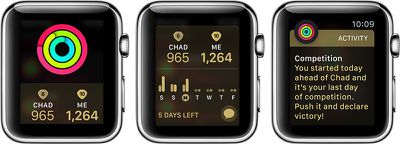
applewatchcompetition

How to Start a Competition

You can begin a competition on the Apple Watch itself or within the Activity app on the iPhone, with the latter method being the easiest way to get going.

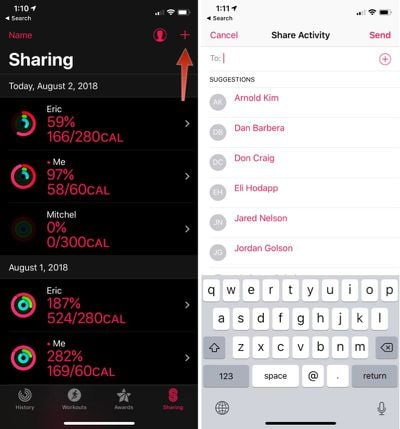
Before a competition can start, you need to be sharing your activity information with the person you're challenging, which you can do by following these steps:
activitysharing

  1. Open up the Activity app.
  2. Tap the Sharing tab.
  3. Press the "+" button to invite one or more contacts with an Apple Watch.
  4. Choose the "Send" button to send them an invite to share activity data with you.
  5. Wait for your friend to accept the invitation.

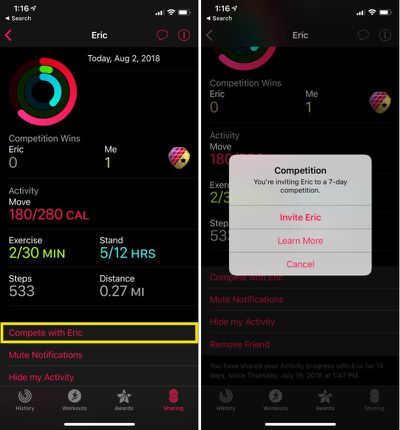
Once you're sharing data with someone, you can begin a competition. Again, this is easiest in the Activity app on the iPhone.
applewatchcompetition

  1. Open the Activity app.
  2. Tap the Sharing tab.
  3. Choose a friend you're sharing data with.
  4. Tap on "Compete with [friend's name]."
  5. Wait for your friend to accept the challenge.

You can invite friends you're already sharing with to competitions using the Apple Watch if preferred.

Just open the Activity app on Apple Watch, tap on a friend's name, and then tap "Compete" twice through the subsequent menus to launch a competition.

Competition Rules

Your friend will have 48 hours to respond to your invite, with a competition officially starting after 48 hours if the invite was accepted. Competitions will last for seven days, so if your competition started on a Saturday morning, for example, it will end on the following Friday evening.

Competitions start in the morning so no one is caught off guard and so each person has seven full days to complete all of their movement goals. You can have more than one competition going at once, but you can only compete with one person per competition, so you can't have three or more people competing together.

Each person earns points for closing the Stand ring, the Move ring, and the Exercise ring. Points are awarded for exceeding each goal and hitting additional move and exercise goals.

As with all activity sharing, you will receive notifications whenever your friend completes a workout. If you want to mute these notifications, open up the Activity app, choose the Sharing tab, select a competition, and the scroll down to the bottom of the screen to find the "Mute Notifications" option.

How Points Are Calculated

Each person participating in the competition receives one point for every percent added to the Stand, Move, and Exercise rings, with up to 600 points available to be earned per day.

So, for example, if you exceed your move goal by 300 percent, you'll receive 300 points for the day. Similar calculations are used for the stand and exercise options.

A total of 4,200 points can be earned for the week, with the award going to whoever earns the most points.

Checking on Your Competition Status

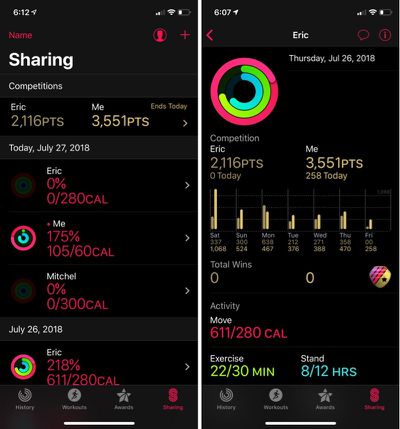
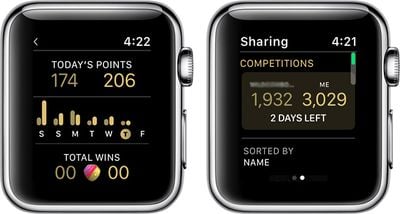
You can view how many points you have compared to the person you're competing with either through the Activity app on iPhone or the Activity app on Apple Watch.
applewatchcompetitionstatus 1
It's best to view this data on the iPhone because you can see more information about how the competition is going, with full data for each day of the competition available.
applewatchcompetitionstatus

  1. Open the Activity app.
  2. Select the Sharing tab.
  3. Tap the relevant competition listing under the "Competitions" header.

In this section of the Activity app, you can see the total of number of points each person has earned and then a breakdown of the points earned each day of the competition.

You can also see your friend's total movement, exercise, and stand rankings for the current day, plus steps and total distance traveled.

Sending Kudos

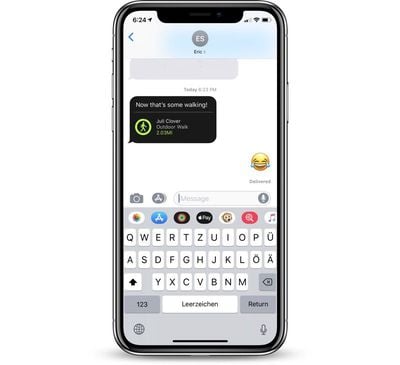
When your competitor completes a workout during the challenge, you'll get a notification, and you can send a message using the Apple Watch. You can also initiate conversations within the Activity App on the Apple Watch or the Activity app on iPhone by selecting the person's name and tapping on "Send Message."
applewatchcompetitionkudos

Winning a Competition

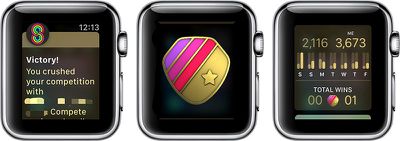
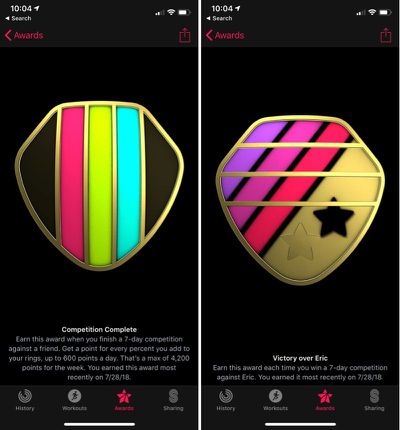
When you win a competition with a friend, you earn a badge for completing a competition and a separate badge for being victorious.
applewatchcompetitionend
From there, you can start a new challenge with the same friend, and under the sharing interface, you'll see your respective number of wins and losses.
applewatchcompetitionbadge
All of your badges can be viewed in the Activity app either on the Apple Watch or on the iPhone.

Related Roundup: Apple Watch 12
Buyer's Guide: Apple Watch (Buy Now)
Related Forum: Apple Watch

Top Rated Comments

109 months ago
The fact that these tutorials seem necessary is not a good look on the usability of the product...
Did you actually read it? There's nothing there that you couldn't have worked out yourself, MR is just highlighting the fact that it's a feature (and looking for some clicks as well, I reckon). The fact that this exists says precisely nothing about how usable the product is.
Score: 3 Votes (Like | Disagree)
drumcat Avatar
109 months ago
The fact that these tutorials seem necessary is not a good look on the usability of the product...
Score: 2 Votes (Like | Disagree)

Popular Stories

apple watch series 3 design

Apple Offers Steps to Fix Daylight Saving Time Bug on Apple Watch

Sunday November 1, 2026 3:34 am PST by
Apple has published a support document describing what to do if your Apple Watch continues to show time that's off by one hour after daylight savings time changes. "This incorrect time appears only on the Always On display when your wrist is down," says Apple. "When you activate the display by tapping it or raising your wrist, the time changes to the correct hour." To fix the issue, Apple says ...
muse apple watch app

Meta's Muse AI Agent Comes to Apple Watch

Monday November 9, 2026 1:55 pm PST by
Meta today updated the Muse app for iOS to add Apple Watch support, which means Muse users can access the proactive AI agent from the watch. The app adds the Muse character to the watch with an option to text it, dictate text to it, or call it. There's also a Muse complication for quick access. Muse is Meta's personal AI agent that can complete tasks for users. It is available as a...
siri recap live rewind

watchOS 27.3 Brings Live Rewind and Siri Recap to Apple Watch

Tuesday November 3, 2026 10:35 am PST by
With the first beta of watchOS 27.3, Apple is introducing new Audio Intelligence features it previewed for the Apple Watch Series 12 and Ultra 4 earlier this year. Powered by the S11 chip, Audio Intelligence includes Live Rewind, Siri Recap, Sound Recognition, and Shazam Music Recognition. Sound Recognition and Shazam are already on the watch, but Live Rewind and Siri Recap are now available ...
Latest Stories
The 50+ Best Apple Black Friday Deals Still Available on AirPods, iPads, and More
9 hours ago
HomePod Mini 2 in (RED) Seemingly Spotted Ahead of Announcement
6 hours ago
Apple's M6 and PROLED MacBook Pro Reach New Low Prices for Black Friday
16 hours ago
The MacRumors Show: iPhone Air 2 and iPhone 18 Are Coming
16 hours ago
Apple Store in Brisbane Reopening Next Month With New Design
17 hours ago
The 60+ Best Black Friday Accessory Deals on iPhone Chargers, TVs, Headphones, and More
17 hours ago
GTA VI Now (Barely) Running on Apple Silicon Macs
18 hours ago
The Best Black Friday Streaming Deals on Apple TV, Disney+, and More
18 hours ago
Apple TV's 'Carême' Wins International Emmy for Best Drama
19 hours ago
iPhone 18 Production Delay Leaves Apple Little Time Before Launch
20 hours ago
The Best Black Friday AirPods Deals Still Available
12 hours ago
The Best Black Friday Deals on Apple Home Products
20 hours ago
The Best Black Friday iPhone Deals Still Available
12 hours ago
The Best Black Friday iPad Deals Still Available
12 hours ago
The Best Black Friday Apple Watch Deals Still Available
12 hours ago
The Best Black Friday AirTag Deals Still Available
12 hours ago
The Best Black Friday Mac Deals Still Available
12 hours ago
iPhone Share of US Smartphone Market Hits 57% as Rivals Slip
22 hours ago
iPhone 20 Pro Rumored to Feature 3D-Printed Titanium Frame
23 hours ago
Apple's Official 2026 Black Friday Offer Starts Rolling Out
2 days ago
Halide Adds Fill Light Feature for iPhone Duo
2 days ago
MacBook Air Black Friday Deals Now Live With Massive $399 Savings
2 days ago
Amazon Discounts All MacBook Neo Models by $99 for Black Friday
2 days ago
Kodak Launches Unique AirTag Rival With E-Ink Display
2 days ago
Here's Why the Apple Store is Going Down
2 days ago
Apple Still Working on Giant Foldable iPad That Could Cost $5,000
2 days ago
iPhones Dominate China's Weak Singles' Day Smartphone Sales
2 days ago
iPhone 20 Pro Could Feature Ceramic in Limited-Edition Model
2 days ago
Apple Faces Korean Regulator Review Over iPhone 16 AI Advertising
2 days ago
Apple Watch Ultra 4 Hits New Best-Ever Price of $649.99 for Black Friday
2 days ago
Related Apple News: Macos | Iphone Duo Control Center Tap Access | Health | Ipad Deals | Author































