Skip to Content

How to Listen to Spatial Audio on a MacBook Pro

by

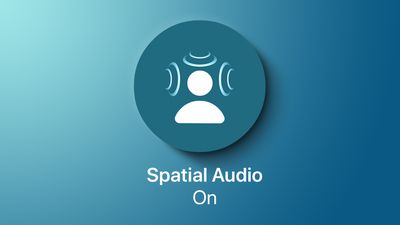
Spatial audio is a sonic feature exclusive to AirPods (3rd generation), AirPods Pro, Beats Fit Pro, and AirPods Max that adds surround sound to Apple's premium audio wearables. By utilizing dynamic head tracking, it brings a theater-like audio experience to the movie or video you're watching, so that it seems as if the sound is coming from all around you. This article explains how to listen to spatial audio on Mac.
spatialaudiofeature
Spatial audio uses the gyroscope and accelerometer in your ‌AirPods, AirPods Pro or AirPods Max‌ to track the motion of your head and the position of your ‌Mac‌. It then compares the motion data and maps the sound field to what's happening on the screen even as you move your head.

What You Need

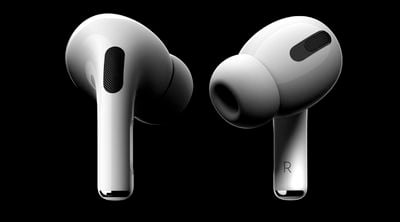
To take advantage of spatial audio on AirPods (3rd gen), Beats Fit Pro, AirPods Pro or AirPods Max, you'll need a MacBook Pro introduced in 2021. That includes:

  • 14-inch ‌MacBook Pro‌
  • 16-inch ‌MacBook Pro‌

You'll also need iOS 14 or iPadOS 14 or later installed on your iPhone or iPad if you intend to use it to update the firmware of your AirPods or AirPods Max.
AirPods Pro

Make Sure Your AirPods Firmware is Up to Date

While there's no clear cut way to upgrade the firmware of the AirPods, AirPods Pro and AirPods Max, with new firmware installed over-the-air when the AirPods are connected to a Mac or iOS device, putting your ‌‌AirPods‌‌ in the case, connecting them‌‌ to a power source, and then pairing the ‌‌headphones to a iPhone/‌iPad‌ or Mac should force the update after a short period of time.

Apple in September 2020 released the 3A283 firmware for AirPods that introduced spatial audio. Apple may have released newer firmware by the time you read this, but you can check your ‌AirPods firmware by following these steps:

  1. Make sure the ‌‌AirPods‌‌ or AirPods Max are connected to your iOS device.
  2. Open the Settings app.
  3. Tap General.
  4. Tap About.
  5. Tap AirPods or AirPods Max.
  6. Look at the number next to "Firmware version."

You can check AirPods and AirPods Max firmware on a Mac by connecting them to the Mac, clicking the Apple symbol in the menu bar, and selecting About This Mac -> System Report -> Hardware -> Bluetooth -> Devices. You should be able to see the information for your AirPods there.

Hoe to Activate or Deactivate Spatial Audio on Mac

  1. Make sure that you're wearing your AirPods Pro, AirPods Max, AirPods (3rd generation), or Beats Fit Pro, and that they're connected to your ‌MacBook Pro‌ over Bluetooth.
  2. Click the Control Center icon in the menu bar.
  3. Click Sound, then find your AirPods or Beats in the list (for example, "Tim's AirPods").
  4. Choose Spatial Audio while you're playing multichannel content recorded in Dolby Atmos. Choose Stereo Audio to switch back to normal stereo.

In Monterey, Apple has also included an audio feature called "Spatialize Stereo" that takes any non-Dolby stereo mix and creates a virtual spatial audio environment out of it. To access it, connect a pair of AirPods or AirPods Max headphones to your Mac and start playing some audio. Next, click the Control Center icon in the menu bar, and then click the Sound volume bar. You should see the option to Spatialize Stereo in the dropdown beneath your headphones.


Related Roundup: MacBook Pro
Buyer's Guide: MacBook Pro (Buy Now)
Related Forums: MacBook Pro, macOS Monterey

Popular Stories

MacBook Pro Glowing Apple Logo

'Backglow' Lets You Customize New MacBook Pro's Glowing Apple Logo

Saturday November 7, 2026 12:44 pm PST by
A new "Backglow" app created by designer Juan Buis lets you customize the illuminated Apple logo on the lid of the new MacBook Pro models. The free version of the app allows you to manually adjust the brightness level of the Apple logo, independent of the MacBook Pro's display brightness level. You can also turn it off entirely with a single click, rather than having to use Terminal....
MacBook Pro with PROLED XDR Display First Impressions Thumb

Hands-On With Apple's New OLED Touchscreen MacBook Pro

Friday November 6, 2026 2:05 pm PST by
Happy touch your Mac day! Apple's new PROLED MacBook Pro is now in the hands of customers. We picked up one of the new machines to get our greasy fingerprints all over that pristine OLED display. Subscribe to the MacRumors YouTube channel for more videos. It's been five years since Apple last redesigned the MacBook Pro, so it was due for an update. The PROLED MacBook Pro looks a lot like the...
MacBook Pro PROLED Touch 1

MacBook Pro PROLED XDR Reviews Are In: Is the Touchscreen Worth It?

Thursday November 5, 2026 7:35 am PST by
The first reviews of the new 14-inch and 16-inch MacBook Pro models with PROLED XDR displays have been published ahead of the laptops launching on Friday. One of the key new features is a touchscreen. Is it worth it, though? Here's what reviews say. The Verge's David Pierce said that, in his testing so far, touch input has not been something that "meaningfully changes the laptop...
Latest Stories
The 50+ Best Apple Black Friday Deals Still Available on AirPods, iPads, and More
2 hours ago
Here Are the Best Apple Black Friday Leftover Deals You Can Get Today
9 minutes ago
HomePod Mini 2 in (RED) Seemingly Spotted Ahead of Announcement
11 hours ago
Apple's M6 and PROLED MacBook Pro Reach New Low Prices for Black Friday
22 hours ago
The MacRumors Show: iPhone Air 2 and iPhone 18 Are Coming
22 hours ago
Apple Store in Brisbane Reopening Next Month With New Design
22 hours ago
The 60+ Best Black Friday Accessory Deals on iPhone Chargers, TVs, Headphones, and More
2 minutes ago
GTA VI Now (Barely) Running on Apple Silicon Macs
1 day ago
The Best Black Friday Streaming Deals on Apple TV, Disney+, and More
1 day ago
Apple TV's 'Carême' Wins International Emmy for Best Drama
1 day ago
iPhone 18 Production Delay Leaves Apple Little Time Before Launch
1 day ago
The Best Black Friday AirPods Deals Still Available
18 hours ago
The Best Black Friday Deals on Apple Home Products
1 day ago
The Best Black Friday iPhone Deals Still Available
18 hours ago
The Best Black Friday iPad Deals Still Available
18 hours ago
The Best Black Friday Apple Watch Deals Still Available
18 hours ago
The Best Black Friday AirTag Deals Still Available
18 hours ago
The Best Black Friday Mac Deals Still Available
18 hours ago
iPhone Share of US Smartphone Market Hits 57% as Rivals Slip
1 day ago
iPhone 20 Pro Rumored to Feature 3D-Printed Titanium Frame
1 day ago
Apple's Official 2026 Black Friday Offer Starts Rolling Out
2 days ago
Halide Adds Fill Light Feature for iPhone Duo
2 days ago
MacBook Air Black Friday Deals Now Live With Massive $399 Savings
2 days ago
Amazon Discounts All MacBook Neo Models by $99 for Black Friday
2 days ago
Kodak Launches Unique AirTag Rival With E-Ink Display
2 days ago
Here's Why the Apple Store is Going Down
2 days ago
Apple Still Working on Giant Foldable iPad That Could Cost $5,000
2 days ago
iPhones Dominate China's Weak Singles' Day Smartphone Sales
2 days ago
iPhone 20 Pro Could Feature Ceramic in Limited-Edition Model
2 days ago
Apple Faces Korean Regulator Review Over iPhone 16 AI Advertising
2 days ago
Related Apple News: Business | Iphone | South Africa | Lifestyle | Entertainment