Skip to Content

Siri Setting Apple Watch Timer Requests As Alarms - How to Fix

by

Whether you're busy cooking or just want to limit the amount of time you spend on a certain task, timers come in handy for all sorts of things. And the quicker you can set a timer, the more time you'll have to tend to whatever it is you're doing.
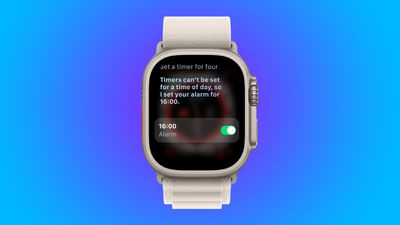
timer set as alarm watch siri
The usual go-to for achieving this on Apple Watch is via Siri. Users can ask ‌‌Siri‌‌ to set a timer by holding the watch up to their mouth and making the request. Pressing and holding the Digital Crown will also invoke ‌‌Siri‌, and it should be as simple as saying "set a timer for X minutes."

We say should intentionally here, because based on several recent reports from users, ‌Siri‌ is sometimes interpreting the request to set a timer as a request to set an alarm, which is clearly not what users want.

What appears to be happening is that ‌Siri‌ is often failing to hear the full request for a timer. So instead of hearing "Set a timer for four minutes," ‌Siri‌ is only picking up "Set a timer for four." ‌Siri‌, it seems, is missing the last word.

As a result, the response ‌Siri‌ gives is something like "Timers can't be set for a time of day, so I set your alarm for 4 a.m." In other words, the assistant is creating an alarm instead of a timer and automatically turning it on.

A timer failing to go off can be a genuine problem. But for a user who does not notice ‌Siri‌'s error (especially if they aren't looking at their watch's screen), not only are they not getting the requested timer, they are also likely to be rudely woken in the middle of the night.

How to Avoid Unwanted Alarms

One way to prevent ‌Siri‌ from missing the word "minutes" in your command is to rephrase your request by moving it from the end of the phrase to the middle. So rather than say "Set a timer for four minutes," say "set a four-minute timer" instead. That way, it can't be missed.

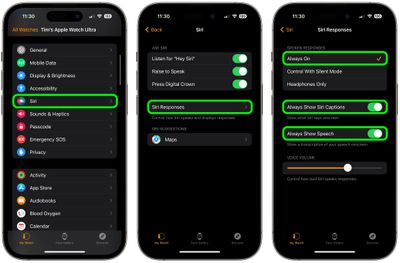
It's also worth turning on ‌Siri‌'s spoken response, captions, and the transcription of your speech.

  1. Open the Watch app on your iPhone.
  2. In the My Watch screen, select Siri -> Siri Responses.
  3. Under "Spoken Responses," tap Always On.
  4. Toggle on the switch next to Always Show Siri Captions.
  5. Toggle on the switch next to Always Show Speech.
settings

These options won't stop ‌Siri‌ from misinterpreting your timer requests as alarm commands. But they should help reduce the chance of you missing the assistant's mistakes until Apple can fix them in a future update.


Popular Stories

apple design award 2025

Apple Announces 2025 Design Award Winners Ahead of WWDC 2025

Tuesday June 3, 2025 10:14 am PDT by
As we wait for WWDC to kick off next Monday, Apple today announced the winners of its annual Apple Design Awards, recognizing apps and games for their innovation, ingenuity, and technical achievement. The 2025 Apple Design Award winners are listed below, with one app and one game selected per category: Delight and Fun - CapWords (App) and Balatro (Game) Innovation - Play (App) and PBJ -...
Apple 2026 Black Friday Event Hero

Apple's Official 2026 Black Friday Offer Starts Rolling Out

Thursday November 26, 2026 8:37 am PST by
Apple's annual four-day Black Friday through Cyber Monday shopping event is now live in Australia, New Zealand, and Thailand, and it will continue to roll out across Europe, the U.S., and Canada as the calendar turns to Friday, November 27 around the world. In the U.S., Apple's terms and conditions say the promotion begins on November 27 at 12 a.m. Pacific Time and ends on November 30 at...
1password deal blue

1Password Security Breach: What Was Accessed and What Wasn't

Wednesday November 25, 2026 1:09 pm PST by
Popular password management app 1Password today said it experienced a security breach earlier this month. 1Password says some customer names and email addresses were accessed, but no customer vault contents were compromised. On November 19, 1Password saw indications that an employee's GitHub account had been breached and began investigating. The company says the breached GitHub account was...
Latest Stories
The 50+ Best Apple Black Friday Deals Still Available on AirPods, iPads, and More
3 hours ago
Here Are the Best Apple Black Friday Leftover Deals You Can Get Today
2 hours ago
HomePod Mini 2 in (RED) Seemingly Spotted Ahead of Announcement
13 hours ago
Apple's M6 and PROLED MacBook Pro Reach New Low Prices for Black Friday
1 day ago
The MacRumors Show: iPhone Air 2 and iPhone 18 Are Coming
1 day ago
Apple Store in Brisbane Reopening Next Month With New Design
1 day ago
The 60+ Best Black Friday Accessory Deals on iPhone Chargers, TVs, Headphones, and More
2 hours ago
GTA VI Now (Barely) Running on Apple Silicon Macs
1 day ago
The Best Black Friday Streaming Deals on Apple TV, Disney+, and More
1 day ago
Apple TV's 'Carême' Wins International Emmy for Best Drama
1 day ago
iPhone 18 Production Delay Leaves Apple Little Time Before Launch
1 day ago
The Best Black Friday AirPods Deals Still Available
19 hours ago
The Best Black Friday Deals on Apple Home Products
1 day ago
The Best Black Friday iPhone Deals Still Available
19 hours ago
The Best Black Friday iPad Deals Still Available
19 hours ago
The Best Black Friday Apple Watch Deals Still Available
19 hours ago
The Best Black Friday AirTag Deals Still Available
19 hours ago
The Best Black Friday Mac Deals Still Available
19 hours ago
iPhone Share of US Smartphone Market Hits 57% as Rivals Slip
1 day ago
iPhone 20 Pro Rumored to Feature 3D-Printed Titanium Frame
1 day ago
Apple's Official 2026 Black Friday Offer Starts Rolling Out
2 days ago
Halide Adds Fill Light Feature for iPhone Duo
2 days ago
MacBook Air Black Friday Deals Now Live With Massive $399 Savings
2 days ago
Amazon Discounts All MacBook Neo Models by $99 for Black Friday
2 days ago
Kodak Launches Unique AirTag Rival With E-Ink Display
2 days ago
Here's Why the Apple Store is Going Down
2 days ago
Apple Still Working on Giant Foldable iPad That Could Cost $5,000
2 days ago
iPhones Dominate China's Weak Singles' Day Smartphone Sales
2 days ago
iPhone 20 Pro Could Feature Ceramic in Limited-Edition Model
2 days ago
Apple Faces Korean Regulator Review Over iPhone 16 AI Advertising
2 days ago
Related Apple News: Business | Iphone | Politics | Ipad | Education






























