Skip to Content

How to Sign Up for Apple TV+

by

Apple on November 1, 2019, launched its new streaming television service, which offers up original movies and TV shows for $4.99 per month or $49.99 per year, plus there's a free year of service for those who have recently purchased an Apple device.

You can use Apple TV+ on the iPhone, iPad, Mac, ‌Apple TV‌, and iPod touch in the ‌Apple TV‌ app, or visit tv.apple.com on the web, and all of these devices can also be used to sign up for a new subscription. You can also access ‌Apple TV‌ on the Roku, Amazon Fire TV, and some smart TVs from Samsung.

appletvplus 1
To sign up for an ‌Apple TV‌+ subscription, you're going to need an Apple ID, which you can sign up for right when creating a subscription or on Apple's Apple ID website. Make sure you're signed in to the ‌Apple TV‌ app on all of your devices with your ‌Apple ID‌.

You'll also want to make sure that whatever device you're signing up on is running the latest version of iOS, iPadOS, tvOS, or macOS, as ‌Apple TV‌+ requires iOS 13, iPadOS 13, tvOS 13, or macOS Catalina or later to work.

How to Sign Up for an Apple TV+ Subscription on the Web

appletvsignupweb

  1. Visit tv.apple.com in Safari, Chrome, or Firefox.
  2. Sign in with your ‌Apple ID‌.
  3. Click on "Start Your Free Trial."
  4. Follow the steps and enter your credit card information if required, then confirm your subscription.

Once you've activated your account on the web, you can watch ‌Apple TV‌+ on any of your Apple devices that are signed in to the same ‌Apple ID‌ account where the subscription is activated.

How to Sign Up for an Apple TV+ Subscription on iPhone or iPad
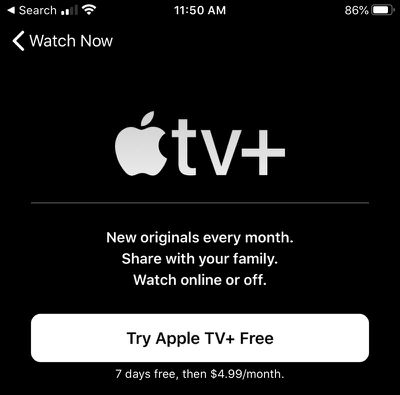
appletviphone

  1. Make sure you're signed in to your ‌Apple ID‌ on your iPhone or ‌iPad‌. You can do so in the Settings app or by tapping on your profile in the ‌Apple TV‌ app.
  2. Open up the ‌Apple TV‌ app.
  3. Swipe down to ‌Apple TV‌+ channel.
  4. Tap on "Try ‌Apple TV‌+ Free."
  5. Follow the steps to sign up for and confirm your subscription and activate a free trial.

How to Sign Up for an Apple TV+ Subscription on Mac
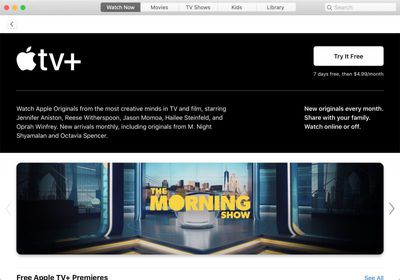
appletvmac

  1. Make sure you're signed in to your ‌Apple ID‌ on your Mac. You can do so through System Preferences or right in the TV app.
  2. Open the ‌Apple TV‌ app.
  3. Scroll down to ‌Apple TV‌+ channel.
  4. Click on "Try It Free."
  5. Follow the steps to sign up for and confirm your subscription and activate a free trial.

How to Sign Up for an Apple TV+ Subscription on Apple TV

  1. Make sure you're signed in to your ‌Apple ID‌ on your ‌Apple TV‌. You can do so in the Settings app.
  2. Open the ‌Apple TV‌ app.
  3. Use the remote to navigate down to the ‌Apple TV‌+ channel.
  4. Select "Try ‌Apple TV‌+ Free."
  5. Follow the steps to sign up for and confirm your subscription and activate a free trial.

How to Get Your Free Year of Apple TV+ With Device Purchase

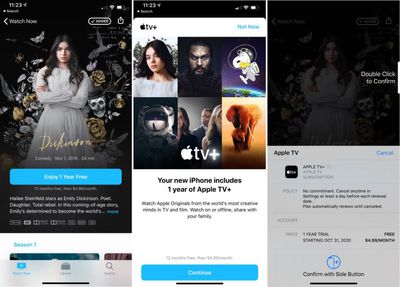
If you have an ‌Apple ID‌ that's associated with a purchase of an iPhone, ‌iPad‌, ‌Apple TV‌, iPod touch, or Mac after September 10, 2019, you can get a free one-year subscription to ‌Apple TV‌+.

appletvfreetrial
This should show up automatically when you go to sign up for an ‌Apple TV‌+ subscription following the steps above on your device of choice. Here are the steps to confirm a subscription:

  1. Open the ‌Apple TV‌ app on an iPhone, ‌iPad‌, or Mac, or visit the tv.apple.com website.
  2. Choose the "Enjoy 1 Year Free" option that pops up.
  3. Tap "Continue" on the screen that lists which device came with a free year of service.
  4. Confirm the purchase with ‌Apple ID‌ password, Face ID, or Touch ID depending on which device you're using.

These steps activate your free one year trial of ‌Apple TV‌+ for all family members that participate in Family Sharing. Multiple device purchases do not stack -- it's one free year per family.

Your subscription will automatically renew at the end of one year for $4.99 per month, and the subscription can be canceled at any time ahead of when you're charged. Make sure not to cancel an ‌Apple TV‌+ subscription early, however, as the free access ends immediately when you do so even if you still have time left.

You can use your subscription on any compatible Apple device where you're signed in to your ‌Apple ID‌, as can any family members who participate in Family Sharing.

What to Do If Your Free One-Year Trial Isn't Showing Up

If you recently purchased a new device but aren't seeing the above options to activate your free trial on an iPhone, here's what to do.
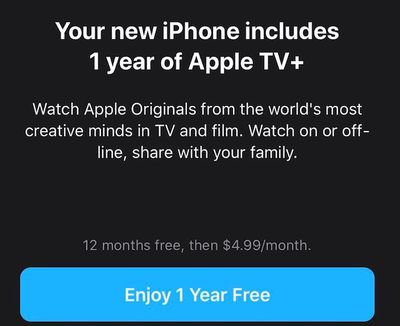
1 year free apple tv plus sub

  1. In Chrome, Safari, or Firefox, visit tv.apple.com.
  2. Sign in with your ‌Apple ID‌.
  3. Your free one-year trial offer should show up through the web interface.
  4. Click on Enjoy 1 Year Free and follow the steps.

After activating the free year option, you can access ‌Apple TV‌+ on any compatible device where you're signed in with your associated ‌Apple ID‌.

Popular Stories

Apple TV Silo

Apple TV Reportedly Planning 'Silo' Spinoff

Wednesday November 4, 2026 8:56 am PST by
Apple TV is developing a "Silo" spinoff tied to Hugh Howey's upcoming Silo book trilogy, according to Apple TV commentator and podcaster Sigmund Judge. He said pre-production will begin later this year, with the books expected next summer. Hiring has apparently begun and some sets remain standing after season four wrapped in March. The reported project would follow the show's fourth and final...
New Apple TV Logo

Black Friday Deal: Apple TV Streaming Service for $6.99/Month

Thursday November 19, 2026 1:54 pm PST by
A new Black Friday deal for Apple TV will be rolling out today. Until November 30 at 8 p.m. Pacific Time, new and qualified returning customers in the U.S. can subscribe to the Apple TV streaming service for $6.99 per month for up to six months, which is more than 50% off the regular price of $14.99 per month. No...
Pluribus Poster 0101

'Pluribus' Season 2 Reportedly Starts Production Today

Friday October 30, 2026 11:41 pm PDT by
Filming for the second season of Apple TV's "Pluribus" is expected to start today in Albuquerque, New Mexico, according to a report from Production List. The acclaimed sci-fi drama stars Rhea Seehorn and was created by Vince Gilligan. Its first season debuted on November 7, 2025, with a second season already commissioned. Apple has yet to announce when season two will...
Latest Stories
Here Are the Best Apple Black Friday Leftover Deals You Can Get Today
7 hours ago
HomePod Mini 2 in (RED) Seemingly Spotted Ahead of Announcement
19 hours ago
Apple's M6 and PROLED MacBook Pro Reach New Low Prices for Black Friday
1 day ago
The MacRumors Show: iPhone Air 2 and iPhone 18 Are Coming
1 day ago
Apple Store in Brisbane Reopening Next Month With New Design
1 day ago
The 60+ Best Black Friday Accessory Deals on iPhone Chargers, TVs, Headphones, and More
7 hours ago
GTA VI Now (Barely) Running on Apple Silicon Macs
1 day ago
The Best Black Friday Streaming Deals on Apple TV, Disney+, and More
1 day ago
Apple TV's 'Carême' Wins International Emmy for Best Drama
1 day ago
iPhone 18 Production Delay Leaves Apple Little Time Before Launch
1 day ago
The Best Black Friday AirPods Deals Still Available
1 day ago
The Best Black Friday Deals on Apple Home Products
1 day ago
The Best Black Friday iPhone Deals Still Available
1 day ago
The Best Black Friday iPad Deals Still Available
1 day ago
The Best Black Friday Apple Watch Deals Still Available
1 day ago
The Best Black Friday AirTag Deals Still Available
1 day ago
The Best Black Friday Mac Deals Still Available
1 day ago
iPhone Share of US Smartphone Market Hits 57% as Rivals Slip
1 day ago
iPhone 20 Pro Rumored to Feature 3D-Printed Titanium Frame
2 days ago
The 50+ Best Apple Black Friday Deals Still Available on AirPods, iPads, and More
9 hours ago
Apple's Official 2026 Black Friday Offer Starts Rolling Out
2 days ago
Halide Adds Fill Light Feature for iPhone Duo
2 days ago
MacBook Air Black Friday Deals Now Live With Massive $399 Savings
2 days ago
Amazon Discounts All MacBook Neo Models by $99 for Black Friday
2 days ago
Kodak Launches Unique AirTag Rival With E-Ink Display
2 days ago
Here's Why the Apple Store is Going Down
2 days ago
Apple Still Working on Giant Foldable iPad That Could Cost $5,000
2 days ago
iPhones Dominate China's Weak Singles' Day Smartphone Sales
2 days ago
iPhone 20 Pro Could Feature Ceramic in Limited-Edition Model
2 days ago
Apple Faces Korean Regulator Review Over iPhone 16 AI Advertising
2 days ago
Related Apple News: World News | Travel | Health | Mac | Culture