Skip to Content

How to Share Files Stored in Your iCloud Drive

by

iCloud AltYou can share files you've synced to iCloud with friends and colleagues who have an Apple ID using the step-by-step guide below. Whether you're sharing from a Mac or an iPhone, you'll be able to give people one-way access to the file, or allow them to modify the document if you're collaborating on a piece of work.

The sharing options you choose automatically sync across your devices, so you could, for example, share a file on Mac and change access permissions on your iPhone or on iCloud.com at a later time. The following steps assume Mac users are running macOS High Sierra or later and that iPhone or iPad owners are on iOS 11 or later.

How to Share iCloud Files From Your Mac

  1. Open a Finder window and locate the file in iCloud that you want to share. It could be in iCloud Drive or another folder that you sync to iCloud, such as Desktop or Documents.
  2. Click the file to highlight it.
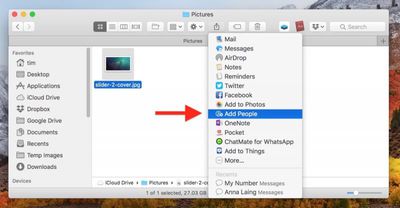
  3. Click the Share button and select Add People from the dropdown menu. Alternatively, right-click (or Ctrl-click) the file and select Share -> Add People.
    how to share icloud files on mac01

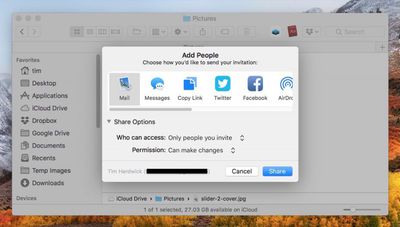
  4. Choose how you'd like to send your invitation to access the file. In our example, we're sharing a link via email. You can also click the chevron next to Share Options to control who can access the file (Only people you invite / Anyone with the link) and their permissions (Can make changes / View only).

  5. Click Share.
    how to share icloud files on mac02

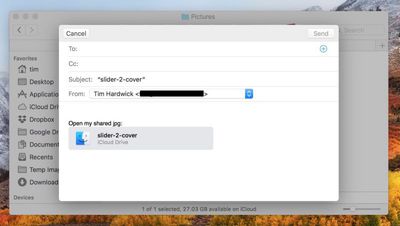
  6. Depending on how you chose to share the invitation, the relevant app will open containing a link to access the file. In our example, an email compose window appears, ready to add recipients and click Send.
    how to share icloud files on mac03

How to Share iCloud files on iPhone and iPad

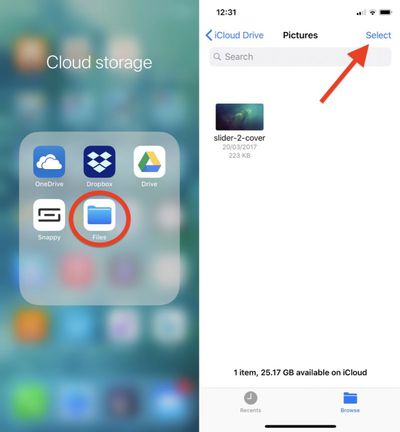
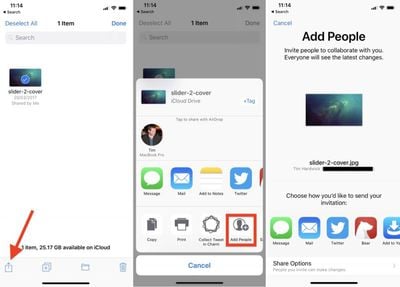
  1. Launch the Files app on your iPhone or iPad.
  2. Locate the file in iCloud Drive that you want to share.
    how to share icloud files ios 01

  3. Tap Select in the upper right of the screen.
  4. Tap the file to check it in the selection.
  5. Tap the Share icon in the lower left of the screen.
    how to share icloud files ios

  6. Tap Add People in the second row of the Share Sheet.
  7. Tap the method you'd like to use to send your invitation. You can also optionally tap Share Options to control who can access the file (Only people you invite / Anyone with the link) and their permissions (Can make changes / View only).
  8. Depending on how you chose to share the invitation, the relevant app will open containing a link to access the file, ready for you to share.
How to Change Access Rights to a Shared iCloud File

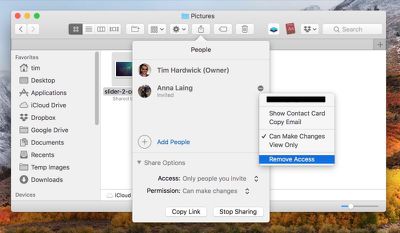
Changing file sharing permissions via Mac or iOS is easy. Once you've shared an iCloud file, the Add People option you used in the above steps is replaced with a Show People option. Selecting this will display who has access to the file, including an option to Stop Sharing the file completely.
how to share icloud files on mac05
If you're on Mac, click the dotted icon next to a person's name to reveal options to change their permissions or Remove Access. If you're on iPhone or iPad, simply tap a person in the People list to access the same options.

Top Rated Comments

mail4asim Avatar
108 months ago
I tried this when I bought a small business last year but the whole thing about sharing one file at a time wasn't good enough for me. I wanted Folders shared with multiple people, which OneDrive and Google Drive were able to do with a couple of clicks.
On top of this, Apple did not offer personalized email hosting, domain services etc like Google and Microsoft do. Needless to say, I ended up choosing Google. Apple still doesn't offer solutions for small businesses.
Score: 6 Votes (Like | Disagree)
B60boy Avatar
108 months ago
Besides a Folder share option iCloud Drive needs a "selective sync" option that the user controls like Dropbox, Google Drive and OneDrive. I can't believe that Apple does not let the user control what is sync'd to iCloud.
Score: 3 Votes (Like | Disagree)
Onexy Avatar
108 months ago
I still always go back to Dropbox and just right click whatever to simply copy a public link.
Score: 3 Votes (Like | Disagree)
timmyh Avatar
108 months ago
Could I do this on a folder and avoid multiplying this step for evvvvvvery file I want to share?
Crazy as it sounds, no, you can't. The method described above currently only works for individual files.

If you still want to use iCloud, you could try sharing a compressed zip containing several files, or creating a sparseimage file using Disk Utility and put files in that for sharing over icloud. If that doesn't work for you, I'd recommend another service.
Score: 3 Votes (Like | Disagree)
108 months ago
I'm a huge Mac geek and own my own two small businesses, both of which use Macs. BUT, because Apple still is eons behind building an up-to-date small business support (which I personally think we will never truly see), things like iCloud Drive is only in place for me to back up my Mac's desktops and some files. As far as file-sharing, my teams us Sync (sync.com) which is very much like Dropbox, but without the high price tag, plus zero-knowledge and end-to-end encryption. As a Mac guy, I have to highly recommend Sync over Google and Dropbox.
Score: 2 Votes (Like | Disagree)
Westside guy Avatar
108 months ago
I can’t believe the Apple still doesn’t let you share folders with other people...
Score: 2 Votes (Like | Disagree)

Popular Stories

General iCloud App Feature

Apple Says iCloud+ Plans Will Not Include Increased Siri AI Usage in UK

Tuesday November 17, 2026 7:07 am PST by
Apple on Monday announced that it is implementing daily usage limits on Siri AI and select other Apple Intelligence features that rely on "powerful server models" starting with iOS 27.3 and corresponding software updates, but increased access will be included with most iCloud+ plans at no additional cost in most countries, with one notable exception. In a support document, Apple said...
iCloud Link Harmful Content Feature 1

Apple Will Check Public iCloud Links for Harmful Content Starting in iOS 27.3

Wednesday November 4, 2026 11:12 am PST by
Apple says it will start checking public iCloud links for harmful content in iOS 27.3, iPadOS 27.3, macOS 27.3, and visionOS 27.3. Images in iCloud Photos and files in iCloud Drive shared using the "Anyone with the link" option will be "made accessible to Apple" for a content check. Apple doesn't define harmful content, but it could mean malware, malicious files, and/or child sexual abuse...
Siri AI Icon

Apple Continues to Say Some AI Features Will Have Fees for Extra Usage

Monday November 9, 2026 9:45 am PST by
Apple continues to advise customers that certain Apple Intelligence features that rely on its server-side Private Cloud Compute system have daily usage limits, with expanded access to such features to be "available for a fee in the future." Apple has repeatedly mentioned these upcoming fees in press releases over the past several months, but it has yet to provide any specific details about...
Latest Stories
Apple Now Aims to Repair Rather Than Replace iPhone Duos With Cracked Screens
2 hours ago
Here Are the Best Apple Black Friday Leftover Deals You Can Get Today
10 hours ago
HomePod Mini 2 in (RED) Seemingly Spotted Ahead of Announcement
22 hours ago
Apple's M6 and PROLED MacBook Pro Reach New Low Prices for Black Friday
1 day ago
The MacRumors Show: iPhone Air 2 and iPhone 18 Are Coming
1 day ago
Apple Store in Brisbane Reopening Next Month With New Design
1 day ago
The 60+ Best Black Friday Accessory Deals on iPhone Chargers, TVs, Headphones, and More
10 hours ago
GTA VI Now (Barely) Running on Apple Silicon Macs
1 day ago
The Best Black Friday Streaming Deals on Apple TV, Disney+, and More
1 day ago
Apple TV's 'Carême' Wins International Emmy for Best Drama
1 day ago
iPhone 18 Production Delay Leaves Apple Little Time Before Launch
2 days ago
The Best Black Friday AirPods Deals Still Available
1 day ago
The Best Black Friday Deals on Apple Home Products
2 days ago
The Best Black Friday iPhone Deals Still Available
1 day ago
The Best Black Friday iPad Deals Still Available
1 day ago
The Best Black Friday Apple Watch Deals Still Available
1 day ago
The Best Black Friday AirTag Deals Still Available
1 day ago
The Best Black Friday Mac Deals Still Available
1 day ago
iPhone Share of US Smartphone Market Hits 57% as Rivals Slip
2 days ago
iPhone 20 Pro Rumored to Feature 3D-Printed Titanium Frame
2 days ago
The 50+ Best Apple Black Friday Deals Still Available on AirPods, iPads, and More
2 hours ago
Apple's Official 2026 Black Friday Offer Starts Rolling Out
2 days ago
Halide Adds Fill Light Feature for iPhone Duo
2 days ago
MacBook Air Black Friday Deals Now Live With Massive $399 Savings
2 days ago
Amazon Discounts All MacBook Neo Models by $99 for Black Friday
2 days ago
Kodak Launches Unique AirTag Rival With E-Ink Display
2 days ago
Here's Why the Apple Store is Going Down
3 days ago
Apple Still Working on Giant Foldable iPad That Could Cost $5,000
3 days ago
iPhones Dominate China's Weak Singles' Day Smartphone Sales
3 days ago
iPhone 20 Pro Could Feature Ceramic in Limited-Edition Model
3 days ago
Related Apple News: Iphone Duo Activate Standby Mode When Not Charging | Apple Intelligence | World News | Mac | Antitrust