Skip to Content

How to Share Apple Watch Faces

by

If you have an Apple Watch, chances are you've spent some time customizing your watch faces. Apple lets you adjust colors, choose complications, and select backgrounds so you can get watch to look just how you like, and you can share your personalized watch faces with others, too.
2blood oxygen app
The ability to share watch faces with other people is a fun addition because it means you can impress your friends with your creations, and perhaps surprise someone who's new to Apple Watch by showing them just what's possible. You can also receive watch faces from others. It's easy to do, so keep reading to learn how it works.

How to Share a Watch Face With Someone

  1. On your Apple Watch, swipe to the face you want to share.
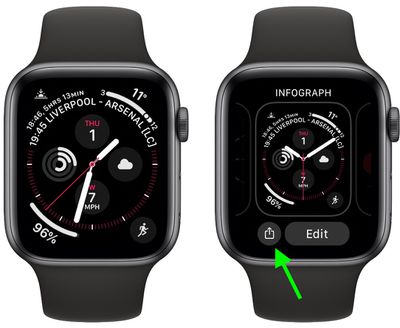
  2. Press and hold on the face until the Edit and Share buttons appear.
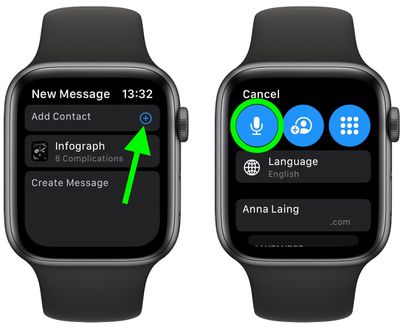
  3. Tap the Share button (it looks like a square with an arrow pointing out).
    1share apple watch face

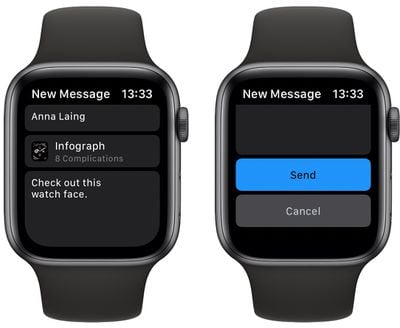
  4. Tap Add Contact.
  5. If the person you want to share the face with is in the list of favorites and recent contacts, tap their name. Alternately, tap the Dictate button and say their name, then select it from the list that appears.
    3share apple watch face

  6. Select one of the suggested text messages or use Dictate, Scribble, or emoji to create your own.
  7. Turn the Digital Crown to scroll down, then tap Send.
    2share apple watch face

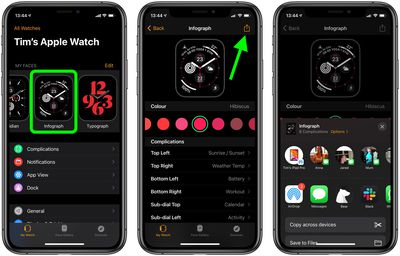
You can also share a watch face from your iPhone. Simply open the Watch app on your iPhone, select a watch face in the My Watch tab or the Face Gallery tab, tap the Share button, then tap how you want to share it. You can send watch faces using Messages, Mail, AirDrop, or third-party apps like WhatsApp.

watch

How to Share a Watch Face Online

You can also share watch faces online, via websites, blogs, and social media, although the process is a bit more convoluted. Here's how it works.

  1. Launch Watch app on your iPhone, then select the watch face you want to share.
  2. Tap the Share button, then select Mail.
  3. Email the watch face to yourself.
  4. Open the email message that you receive, then touch and hold on the .watchface attachment at the bottom of the message.
  5. Tap Share, then tap Save to Files.
  6. Select a location, then tap Save.
  7. Open the Files app and navigate to the .watchface file that you just saved.
  8. Touch and hold the .watchface file, then tap Share.
  9. Tap Add People.
  10. Tap Share Options, then tap Anyone with the link if you want anyone to be able to download the watch face.
  11. Tap the Back arrow to go back.
  12. Swipe left on the sharing app icons, then tap Copy Link.
  13. Use the link that you copied to share the watch face online.

How to Receive a Watch Face From Someone

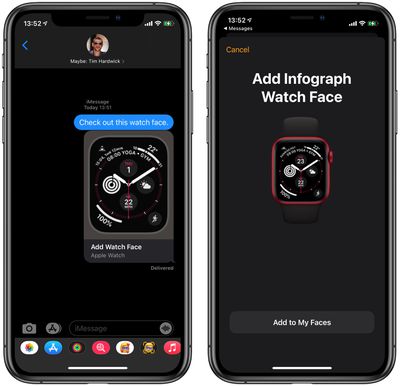
When someone shares a watch face with you, you'll receive a link in Messages, Mail, or another app. Here's what you need to do with it.

  1. On the iPhone that your Apple Watch is paired with, tap the shared watch face link.
  2. When the Watch app opens, tap Add to My Faces.
    watch face

  3. If there are any complications included in the watch face that you don't have the apps for, you'll be offered App Store links to download them. If you don't want the complication, select Continue Without This App and the face will be modified for your Apple Watch.

The shared face will be added to the My Faces section in the Watch app, and will appear on your Apple Watch when you select a watch face.

Related Roundups: watchOS 26, watchOS 27
Related Forum: Apple Watch

Top Rated Comments

aziatiklover Avatar
80 months ago
Can someone share their Hermes faces please?
Score: 5 Votes (Like | Disagree)
groove-agent Avatar
80 months ago
Even with the new faces there is still a limited combination.

Apple should allow developers to make faces and sell them on the store for $0.99 or something similar. This seems so obvious.

Maybe now that there's a dedicated watchOS store, this is in the works.
Score: 4 Votes (Like | Disagree)
magicschoolbus Avatar
80 months ago

Nope, already tried it. Do you think Apple is going to actually let you do that? I tried having my friend with his Nike watch share one of the Nike watch faces to my Series 6 Stainless steel watch. No such luck. It says "This watch face isn't available for your watch."


You can only share Hermes face to people that already have the Hermes watch. Same with Nike.
Wow, the faces are really that much on lockdown? A face store would make apple some serious $$$$.
Score: 1 Votes (Like | Disagree)
CarlJ Avatar
80 months ago

Can someone share their Hermes faces please?
Not gonna work. All this is sending is configuration data: "use the xyz watch face and put the abc complication in the left corner and the def complication in the right corner and make the background green". It's like a recipe.

If your watch gets something like that and the first step is, "use the Hermes watch face 1", and you don't have a Hermes watch, the watch will just say "nope".
Score: 1 Votes (Like | Disagree)
80 months ago

If you have an Apple Watch, chances are you've spent some time customizing your watch faces. Apple lets you adjust colors, choose complications, and select backgrounds so you can get watch to look just how you like, and in watchOS 7 you can share your personalized watch faces with others, too.


The ability to share watch faces with other people is a fun addition because it means you can impress your friends with your creations, and perhaps surprise someone who's new to Apple Watch by showing them just what's possible. You can also receive watch faces from others. It's easy to do, so keep reading to learn how it works.

How to Share a Watch Face With Someone

[LIST=1]
* On your Apple Watch, swipe to the face you want to share.
* Press and hold on the face until the Edit and Share buttons appear.
* Tap the Share button (it looks like a square with an arrow pointing out).


Tap Add Contact.
* If the person you want to share the face with is in the list of favorites and recent contacts, tap their name. Alternately, tap the Dictate button and say their name, then select it from the list that appears.


Select one of the suggested text messages or use Dictate, Scribble, or emoji to create your own.
* Turn the Digital Crown to scroll down, then tap Send.

You can also share a watch face from your iPhone. Simply open the Watch app on your iPhone, select a watch face in the My Watch tab or the Face Gallery tab, tap the Share button, then tap how you want to share it. You can send watch faces using Messages, Mail, AirDrop, or third-party apps like WhatsApp.


How to Share a Watch Face Online

You can also share watch faces online, via websites, blogs, and social media, although the process is a bit more convoluted. Here's how it works.
[LIST=1]
* Launch Watch app on your iPhone, then select the watch face you want to share.
* Tap the Share button, then select Mail.
* Email the watch face to yourself.
* Open the email message that you receive, then touch and hold on the .watchface attachment at the bottom of the message.
* Tap Share, then tap Save to Files.
* Select a location, then tap Save.
* Open the Files app and navigate to the .watchface file that you just saved.
* Touch and hold the .watchface file, then tap Share.
* Tap Add People.
* Tap Share Options, then tap Anyone with the link if you want anyone to be able to download the watch face.
* Tap the Back arrow to go back.
* Swipe left on the sharing app icons, then tap Copy Link.
* Use the link that you copied to share the watch face online.


How to Receive a Watch Face From Someone

When someone shares a watch face with you, you'll receive a link in Messages, Mail, or another app. Here's what you need to do with it.
[LIST=1]
* On the iPhone that your Apple Watch is paired with, tap the shared watch face link.
* When the Watch app opens, tap Add to My Faces.


If there are any complications included in the watch face that you don't have the apps for, you'll be offered App Store links to download them. If you don't want the complication, select Continue Without This App and the face will be modified for your Apple Watch.
The shared face will be added to the My Faces section in the Watch app, and will appear on your Apple Watch when you select a watch face.

Article Link: watchOS 7: How to Share Apple Watch Faces ('https://www.macrumors.com/how-to/share-apple-watch-faces/')
Can exclusive Apple Watch faces be shared like Nike watch faces or Hermès watch faces? For example, if I have a Nike Apple Watch and want to share a watch face that include an exclusive Nike complication, can I sent that to a friend and will they be able to view/use it?
Score: 1 Votes (Like | Disagree)

Popular Stories

siri recap live rewind

watchOS 27.3 Brings Live Rewind and Siri Recap to Apple Watch

Tuesday November 3, 2026 10:35 am PST by
With the first beta of watchOS 27.3, Apple is introducing new Audio Intelligence features it previewed for the Apple Watch Series 12 and Ultra 4 earlier this year. Powered by the S11 chip, Audio Intelligence includes Live Rewind, Siri Recap, Sound Recognition, and Shazam Music Recognition. Sound Recognition and Shazam are already on the watch, but Live Rewind and Siri Recap are now available ...
apple watch series 12 siri recap

Siri Recap Hands-On: Private, But Not Very Useful

Friday November 20, 2026 1:45 pm PST by
With the watchOS 27.3 beta, Apple started testing Siri Recap. Siri Recap lets the Series 12 and Ultra 4 Apple Watch models listen to conversations to generate a brief summary of what was discussed. Actual audio is sectioned off from apps, Apple, and the rest of the OS, and then discarded after a summary is generated. It's a privacy-forward way of tracking what's going on around you, but...
watchos 27

Apple Releases watchOS 27.2.1 and visionOS 27.2.1 With Security Fixes

Monday November 9, 2026 10:08 am PST by
Apple today released new watchOS 27.2.1 and visionOS 27.2.1 updates, with the software coming two weeks after the launch of watchOS 27.2 and visionOS 27.2. According to Apple's release notes, the watchOS update includes security fixes, while the visionOS 27.2.1 update includes security updates and bug fixes. The new software can be installed using the Settings app on each device. ...
Latest Stories
The 50+ Best Apple Black Friday Deals Still Available on AirPods, iPads, and More
5 hours ago
HomePod Mini 2 in (RED) Seemingly Spotted Ahead of Announcement
2 hours ago
Apple's M6 and PROLED MacBook Pro Reach New Low Prices for Black Friday
13 hours ago
The MacRumors Show: iPhone Air 2 and iPhone 18 Are Coming
13 hours ago
Apple Store in Brisbane Reopening Next Month With New Design
13 hours ago
The 60+ Best Black Friday Accessory Deals on iPhone Chargers, TVs, Headphones, and More
14 hours ago
GTA VI Now (Barely) Running on Apple Silicon Macs
14 hours ago
The Best Black Friday Streaming Deals on Apple TV, Disney+, and More
15 hours ago
Apple TV's 'Carême' Wins International Emmy for Best Drama
16 hours ago
iPhone 18 Production Delay Leaves Apple Little Time Before Launch
16 hours ago
The Best Black Friday AirPods Deals Still Available
9 hours ago
The Best Black Friday Deals on Apple Home Products
17 hours ago
The Best Black Friday iPhone Deals Still Available
9 hours ago
The Best Black Friday iPad Deals Still Available
8 hours ago
The Best Black Friday Apple Watch Deals Still Available
8 hours ago
The Best Black Friday AirTag Deals Still Available
8 hours ago
The Best Black Friday Mac Deals Still Available
8 hours ago
iPhone Share of US Smartphone Market Hits 57% as Rivals Slip
18 hours ago
iPhone 20 Pro Rumored to Feature 3D-Printed Titanium Frame
20 hours ago
Apple's Official 2026 Black Friday Offer Starts Rolling Out
2 days ago
Halide Adds Fill Light Feature for iPhone Duo
2 days ago
MacBook Air Black Friday Deals Now Live With Massive $399 Savings
2 days ago
Amazon Discounts All MacBook Neo Models by $99 for Black Friday
2 days ago
Kodak Launches Unique AirTag Rival With E-Ink Display
2 days ago
Here's Why the Apple Store is Going Down
2 days ago
Apple Still Working on Giant Foldable iPad That Could Cost $5,000
2 days ago
iPhones Dominate China's Weak Singles' Day Smartphone Sales
2 days ago
iPhone 20 Pro Could Feature Ceramic in Limited-Edition Model
2 days ago
Apple Faces Korean Regulator Review Over iPhone 16 AI Advertising
2 days ago
Apple Watch Ultra 4 Hits New Best-Ever Price of $649.99 for Black Friday
2 days ago
Related Apple News: Business | Entertainment | Reviews | Motoring | Local News