Skip to Content

How to Set Up Universal Control Between Mac and iPad

by

As of iPadOS 15.4 and macOS Monterey 12.3, Apple has introduced support for Universal Control, the long-awaited feature that's designed to allow multiple Macs and iPads to be controlled with a single mouse and keyboard.

universal control wwdc
Thanks to ‌Universal Control‌, you can use the same cursor and keyboard on any nearby Mac or ‌iPad‌ that's signed into your iCloud account. So, for example, if you have a MacBook Pro and an ‌‌iPad‌‌ next to it, your Mac's trackpad and keyboard can be used to navigate the ‌‌iPad‌‌. The same is true of the ‌‌iPad‌‌ if you have a keyboard attached.

The advent of ‌Universal Control‌ means you can now drag files from Mac to ‌‌iPad‌‌ and vice versa, although on ‌‌iPad‌‌, you will need to have the appropriate app open. If you're dragging a photo from Mac to ‌‌iPad‌‌, for example, you need to open Photos to transfer it –– it can't be placed on the Home screen. It's also worth noting that trackpad gestures for Mac do not work on ‌‌iPad‌‌.

‌Universal Control‌ should work automatically once you've installed macOS Monterey 12.3 and iPadOS 15.4 because the features are enabled by default, but there are settings that you might want to adjust or if you're not a fan, you might want to turn it off. These steps will also help if, for some reason, it's not turned on.

How to Set Up Universal Control on Mac

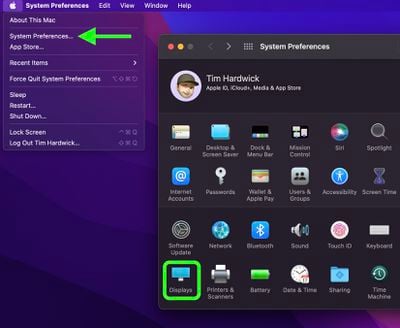
  1. Launch System Preferences from your Mac's Dock, from the Applications folder, or from the Apple menu bar ( -> System Preferences...).

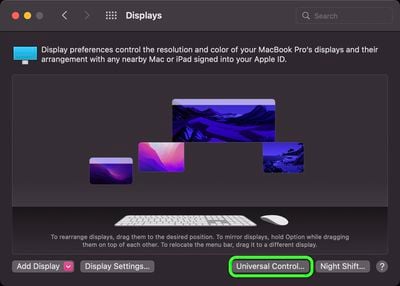
  2. Select Displays in the preferences panel.
    sys prefs

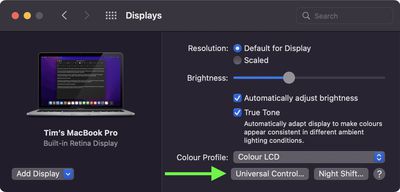
  3. Click Universal Control....
    sys-prefs

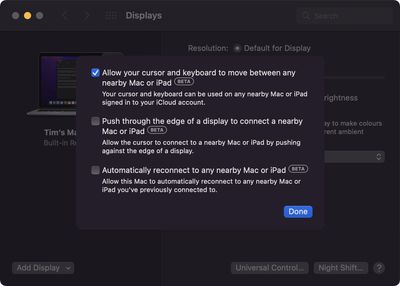
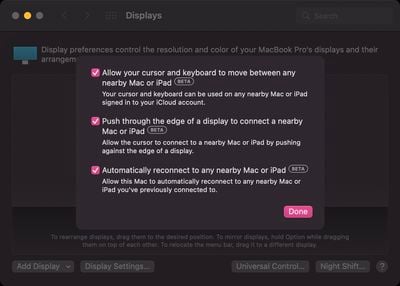
  4. Click the checkboxes to enable the following ‌Universal Control‌ features (the first is enabled by default): Allow your cursor and keyboard to move between any nearby Mac or iPad, Push through the edge of a display to connect a nearby Mac or iPad, and Automatically reconnect to any nearby Mac or iPad.
    sys-prefs

  5. Click Done.
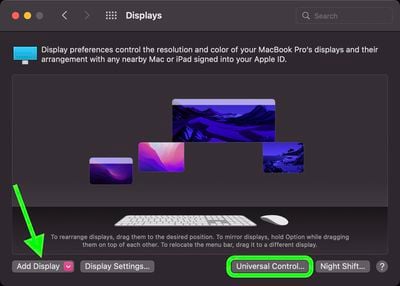
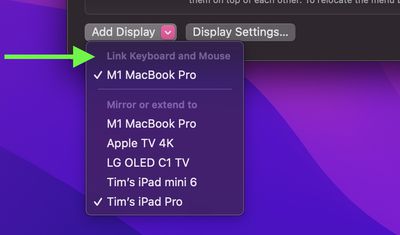
  6. Next, click Add Display.
    displays

  7. In the dropdown that appears, you'll see any nearby devices signed into the same Apple ID as your Mac. Click a device listed under "Link Keyboard and Mouse" to use it in ‌Universal Control‌ mode.
    sys-prefs

With ‌Universal Control‌ enabled, you'll now be able to adjust the arrangement of the displays in the Displays preference panel so that it matches the physical arrangement of your devices.

How to Set Up Universal Control on iPad

  1. Launch the Settings app on your ‌iPad‌.
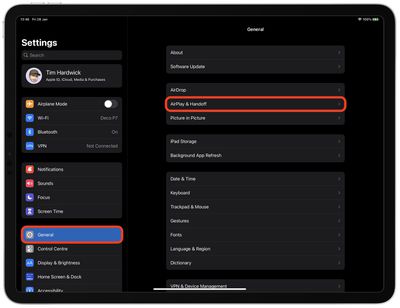
  2. Tap General in the sidebar.
  3. Tap AirPlay & Handoff in the menu window.
    settings

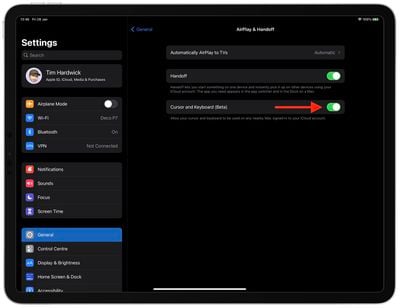
  4. Toggle on the switch next to Cursor and Keyboard (Beta).
    settings

How to Adjust or Disable Universal Control on Mac

  1. Launch System Preferences from your Mac's Dock, from the Applications folder, or from the Apple menu bar ( -> System Preferences...).
  2. Select Displays in the preferences panel.
    sys prefs

  3. Click Universal Control....
    displays

  4. Uncheck the boxes next to the following settings you want to disable: Allow your cursor and keyboard to move between any nearby Mac or iPad, Push through the edge of a display to connect a nearby Mac or iPad, and Automatically reconnect to any nearby Mac or iPad.
    displays

Note that ‌Universal Control‌ is still in beta as of writing, so there may be some hiccups when using it. In our testing it proved very stable, although we did run into an issue where we needed to restart the Mac to get it to work. If you have an issue getting ‌Universal Control‌ up and running after updating, restarting the Mac and the ‌iPad‌ might help.

Related Forums: iOS 15, macOS Monterey

Popular Stories

1password deal blue

1Password Security Breach: What Was Accessed and What Wasn't

Wednesday November 25, 2026 1:09 pm PST by
Popular password management app 1Password today said it experienced a security breach earlier this month. 1Password says some customer names and email addresses were accessed, but no customer vault contents were compromised. On November 19, 1Password saw indications that an employee's GitHub account had been breached and began investigating. The company says the breached GitHub account was...
apple design award 2025

Apple Announces 2025 Design Award Winners Ahead of WWDC 2025

Tuesday June 3, 2025 10:14 am PDT by
As we wait for WWDC to kick off next Monday, Apple today announced the winners of its annual Apple Design Awards, recognizing apps and games for their innovation, ingenuity, and technical achievement. The 2025 Apple Design Award winners are listed below, with one app and one game selected per category: Delight and Fun - CapWords (App) and Balatro (Game) Innovation - Play (App) and PBJ -...
ipad pro prime

Apple Has iPads Running macOS Internally, Says Gurman

Wednesday November 25, 2026 4:55 am PST by
Apple has iPads running macOS internally and has had them "for some time," according to Bloomberg's Mark Gurman, although he says no work is currently being done to bring the Mac operating system to iPads. Speaking on his latest Power On podcast, Gurman said there is "no work being done to consumerize macOS on the iPad." Rather, Apple will continue to bring Mac features and apps like Final Cut ...
Latest Stories
The 50+ Best Apple Black Friday Deals on AirPods, iPads, MacBooks, and More
38 minutes ago
Apple's M6 and PROLED MacBook Pro Reach New Low Prices for Black Friday
43 minutes ago
The MacRumors Show: iPhone Air 2 and iPhone 18 Are Coming
49 minutes ago
Apple Store in Brisbane Reopening Next Month With New Design
1 hour ago
The 60+ Best Black Friday Accessory Deals on iPhone Chargers, TVs, Headphones, and More
2 hours ago
GTA VI Now (Barely) Running on Apple Silicon Macs
2 hours ago
The Best Black Friday Streaming Deals on Apple TV, Disney+, and More
3 hours ago
Apple TV's 'Carême' Wins International Emmy for Best Drama
4 hours ago
iPhone 18 Production Delay Leaves Apple Little Time Before Launch
4 hours ago
The Best Black Friday AirPods Deals
5 hours ago
The Best Black Friday Deals on Apple Home Products
5 hours ago
The Best Black Friday iPhone Deals
5 hours ago
The Best Black Friday iPad Deals
5 hours ago
The Best Black Friday Apple Watch Deals
5 hours ago
The Best Black Friday AirTag Deals
5 hours ago
The Best Black Friday Mac Deals
6 hours ago
iPhone Share of US Smartphone Market Hits 57% as Rivals Slip
6 hours ago
iPhone 20 Pro Rumored to Feature 3D-Printed Titanium Frame
8 hours ago
Apple's Official 2026 Black Friday Offer Starts Rolling Out
1 day ago
Halide Adds Fill Light Feature for iPhone Duo
1 day ago
MacBook Air Black Friday Deals Now Live With Massive $399 Savings
1 day ago
Amazon Discounts All MacBook Neo Models by $99 for Black Friday
1 day ago
Kodak Launches Unique AirTag Rival With E-Ink Display
1 day ago
Here's Why the Apple Store is Going Down
1 day ago
Apple Still Working on Giant Foldable iPad That Could Cost $5,000
1 day ago
iPhones Dominate China's Weak Singles' Day Smartphone Sales
1 day ago
iPhone 20 Pro Could Feature Ceramic in Limited-Edition Model
1 day ago
Apple Faces Korean Regulator Review Over iPhone 16 AI Advertising
1 day ago
Apple Watch Ultra 4 Hits New Best-Ever Price of $649.99 for Black Friday
1 day ago
New Apple Store Opening in India, Download the Special Wallpaper Now
2 days ago
Related Apple News: Motoring | Sport | Reviews | Opinion | Local News