Skip to Content

How to Set Up Temperature and Humidity Automations on HomePod

by

In late January 2023, Apple released a HomePod 16.3 software update that adds humidity and temperature sensing to the second-generation HomePod and all ‌HomePod‌ mini models. This article explains how the features work and what you can do with them.
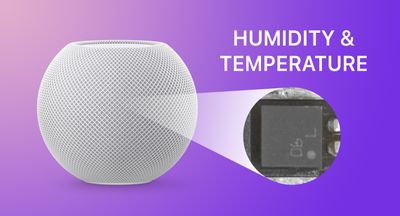
HomePod mini humiditytemperature feature
Apple's new second-generation ‌HomePod‌ features temperature and humidity sensors that can be used to measure the indoor climate. But that's not all. The new 16.3 ‌HomePod‌ software allows you to run automations based on these measurements.

What's more, the existing ‌HomePod‌ mini has a dormant temperature and humidity sensor that Apple activated with the 16.3 update, allowing the same temperature and humidity settings to be used for home automation and device activation purposes. (Sadly, that is not the case for the first-generation ‌HomePod‌.)

Below, we show you how the temperature and humidity sensor information appears in the Home app, and how you can add automations. In our example, after having installed the 16.3 software on a ‌HomePod‌ mini, we run through the steps needed to activate a thermostat to heat a room whenever it falls below 66.2 degrees Fahrenheit (19 degrees Celsius).

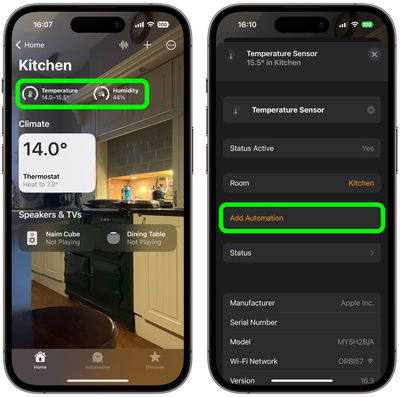
  1. Open the Home app and select the room where the ‌HomePod‌ mini or second-generation ‌HomePod‌ is located.
  2. After a short calibration phase on first use, the readouts at the top of the room menu provide live climate measurements. We're going to tap the Temperature readout.
  3. Tap the Temperature Sensor button in the pop-up menu to access the settings card.
  4. Tap Add Automation.
    home

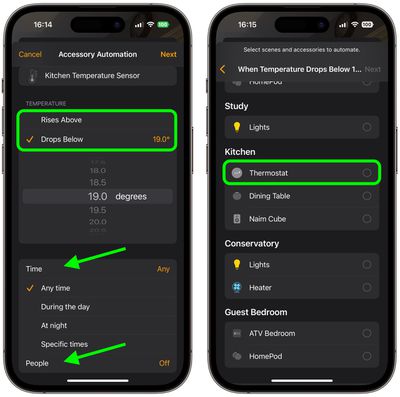
  5. Using the dial, choose a temperature level that activates the automation using the Rises Above and Drops Below options.
  6. Use the Time setting to choose from Any time, During the day, At night, or Specific times.
  7. Use the People setting to choose whether this automation should run based on When I am home or When I am not home. You can also turn this setting off.
  8. Tap Next, then select the accessory that you want to use with this automation. Here we're selecting Thermostat.
    home

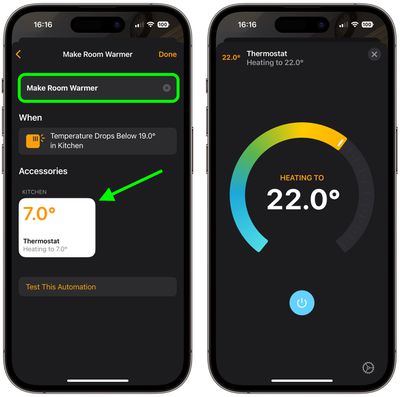
  9. Tap Next, then give your automation a name at the top of the menu and set your accessory to perform an action. Here, we're setting the thermostat to heat the kitchen to 71.6 degrees Fahrenheit, or 22 degrees Celsius.
  10. Tap Done, then tap the X to close the Temperature Sensor settings card.
    home

Our automation is now ready to activate the thermostat to heat the room whenever the temperature drops below the specified measurement. To complement the automation, we could create an additional one that turns off the thermostat when the room reaches a certain temperature.

This is just one example of some of the new features available with the ‌HomePod‌ 16.3 software update. The update also brings users the ability to add remastered ambient sounds to scenes, automations, and alarms, as well as the ability to use Siri to set recurring automations and find people who are in your Find My contacts.


Related Roundups: HomePod, HomePod mini 2

Top Rated Comments

50 months ago

They have a temperature sensor right next to a CPU?
It actually at the base, well away from the CPU: https://www.techhive.com/article/579285/the-homepod-mini-reportedly-has-a-secret-temperature-sensor.html
Score: 8 Votes (Like | Disagree)
50 months ago

eh, just use a smart thermostat.
Or a dumb thermostat. Setting a target temperature is literally what they do.

There's no need to set it when the temperature drops. Just set the minimum temperature and it'll activate when needed. If it's warmer, it will turn off on its own.

So what's the benefit of this complicated automation?
I mean, how often will it even activate? Only once, I guess. Because once the thermostat is set to 22°, it will stay that warm permanently, and it will never trigger again.
Score: 7 Votes (Like | Disagree)
50 months ago

Or a dumb thermostat. Setting a target temperature is literally what they do.

There's no need to set it when the temperature drops. Just set the minimum temperature and it'll activate when needed. If it's warmer, it will turn off on its own.

So what's the benefit of this complicated automation?
I mean, how often will it even activate? Only once, I guess. Because once the thermostat is set to 22°, it will stay that warm permanently, and it will never trigger again.
the 'target' temperature is not always fixed. scheduling? different temps time of day? temps based on weather?

it's really not that complicated.
Score: 6 Votes (Like | Disagree)
Will Co Avatar
50 months ago
You should also know that the HomeKit protocol, and in particular the conditional rules that are supported, is actually far richer and expansive than the functionality surfaced within the native Home app. For example, within the Home app, you cannot configure a rule that says "At Sunrise, turn on this water feature, but only if the temperature of my garden sensor is > 3 degC". There are similar looking things that come close, which you can create, but not one with that specific conditional structure. If you look at some of the third party apps available there is a heck of a lot more you can do with your HomeKit accessories. For example, using some of the tools you can configure more complex rules, such as the one above, and weirdly they will be displayed correctly by the Home app, although you cannot edit them. You would have thought that Apple, having defined the entire HomeKit protocol, would have created a UI that surfaces all of it. Seems that the UI team are still playing catch up with the rest of the HomeKit system.
Score: 6 Votes (Like | Disagree)
50 months ago

So what's the benefit of this complicated automation?
I mean, how often will it even activate? Only once, I guess. Because once the thermostat is set to 22°, it will stay that warm permanently, and it will never trigger again.
Presumably would have another one to turn it down once it hits a certain point, but yeah...could just use a regular thermostat. But... most people's thermostat is only one central location. They could put the HomePod in a room that gets colder quicker and use it to call for heat.

Also, let's not limit ourselves to thermostats. This could be used to shut the blinds when it starts getting warm, or to turn on some fans to move the air around.
Score: 5 Votes (Like | Disagree)
MrRom92 Avatar
50 months ago
This is awesome. One of my HomePod minis is in the bathroom, and I already have the exhaust fan hooked up to HomeKit. I often just ask siri to turn it on or off. But now I’ll probably be able to run automations to run the fan whenever the humidity in the room rises above a certain level and turn it off once the humidity in the room has dropped.
Score: 5 Votes (Like | Disagree)

Popular Stories

AirPods Max and HomePod mini Red Mock 2

Apple Bringing Back (PRODUCT)RED With Red HomePod Mini 2 and AirPods Max 2

Monday November 23, 2026 11:27 am PST by
Apple plans to release (PRODUCT)RED versions of the HomePod mini 2 and AirPods Max 2, reports Bloomberg. The new products will be part of Apple's annual fundraiser for The Global Fund to Fight AIDS, Tuberculosis and Malaria in developing countries. The red HomePod mini 2 and AirPods Max 2 could be introduced on World AIDS Day, which falls on Tuesday, December 1. The HomePod mini will have ...
AirPods Max and HomePod mini Red Mock 2

Apple to Release Four (RED) Products by Next Week

Tuesday November 24, 2026 6:33 am PST by
Bloomberg's Mark Gurman this week reported that Apple plans to release (PRODUCT)RED versions of the existing AirPods Max 2 and HomePod mini 2 on or around Tuesday, December 1, which is World AIDS Day. The new color will likely be the only change. AirPods Max 2 and HomePod mini 2 in (PRODUCT)RED (concept) Gurman said the (PRODUCT)RED version of the HomePod mini 2 will have a red mesh exterior, ...
Four HomePod Mini 2 Surround Sound

Does HomePod Mini 2 Have Improved Sound? Here's What Reviews Say

Wednesday November 4, 2026 6:52 am PST by
Apple's press release for the HomePod mini 2 last month touted "rich sound" and "advanced computational audio," but it did not explicitly mention if the second-generation model has better sound compared to the original. A few early reviews of the speaker, however, said that audio quality has in fact improved. Apple's tech specs pages for both the HomePod mini 2 and the original HomePod mini...
Latest Stories
The 50+ Best Apple Black Friday Deals Still Available on AirPods, iPads, and More
4 hours ago
Here Are the Best Apple Black Friday Leftover Deals You Can Get Today
3 hours ago
HomePod Mini 2 in (RED) Seemingly Spotted Ahead of Announcement
14 hours ago
Apple's M6 and PROLED MacBook Pro Reach New Low Prices for Black Friday
1 day ago
The MacRumors Show: iPhone Air 2 and iPhone 18 Are Coming
1 day ago
Apple Store in Brisbane Reopening Next Month With New Design
1 day ago
The 60+ Best Black Friday Accessory Deals on iPhone Chargers, TVs, Headphones, and More
3 hours ago
GTA VI Now (Barely) Running on Apple Silicon Macs
1 day ago
The Best Black Friday Streaming Deals on Apple TV, Disney+, and More
1 day ago
Apple TV's 'Carême' Wins International Emmy for Best Drama
1 day ago
iPhone 18 Production Delay Leaves Apple Little Time Before Launch
1 day ago
The Best Black Friday AirPods Deals Still Available
20 hours ago
The Best Black Friday Deals on Apple Home Products
1 day ago
The Best Black Friday iPhone Deals Still Available
20 hours ago
The Best Black Friday iPad Deals Still Available
20 hours ago
The Best Black Friday Apple Watch Deals Still Available
20 hours ago
The Best Black Friday AirTag Deals Still Available
20 hours ago
The Best Black Friday Mac Deals Still Available
20 hours ago
iPhone Share of US Smartphone Market Hits 57% as Rivals Slip
1 day ago
iPhone 20 Pro Rumored to Feature 3D-Printed Titanium Frame
1 day ago
Apple's Official 2026 Black Friday Offer Starts Rolling Out
2 days ago
Halide Adds Fill Light Feature for iPhone Duo
2 days ago
MacBook Air Black Friday Deals Now Live With Massive $399 Savings
2 days ago
Amazon Discounts All MacBook Neo Models by $99 for Black Friday
2 days ago
Kodak Launches Unique AirTag Rival With E-Ink Display
2 days ago
Here's Why the Apple Store is Going Down
2 days ago
Apple Still Working on Giant Foldable iPad That Could Cost $5,000
2 days ago
iPhones Dominate China's Weak Singles' Day Smartphone Sales
2 days ago
iPhone 20 Pro Could Feature Ceramic in Limited-Edition Model
2 days ago
Apple Faces Korean Regulator Review Over iPhone 16 AI Advertising
2 days ago
Related Apple News: Iphone Using Camera Control Button | Halide | Iphone 16 | Switchbot S20 And K11 Plus | Rockstar Games