Skip to Content

How to Set Up Express Transit With Apple Pay on iPhone and Apple Watch

by

Express Transit is an Apple Pay feature that lets you make a payment without unlocking your Apple Watch using Face ID or Touch ID. Thanks to Express Transit, you can now make a transaction at a transit gate just by tapping your iPhone or Apple Watch. But first you have to set it up. This article shows you how.

omny

Where Can I Use Express Transit?

Apple has a web page that it updates with the countries and regions that support the feature. As of writing, Express Transit works in the following places:

  • In mainland China with Beijing Transit cards and Shanghai Transit cards.
  • In Japan with all forms of transit that accept Suica.
  • In London with Transport for London (TfL).
  • In New York City with Metropolitan Transportation Authority (MTA) terminals at select stations.
  • In the San Francisco Bay Area with the Clipper card.
  • In Chicago with the Ventra card.
  • In Portland, Oregon, with all forms of transit that accept Hop Fastpass.

How to Set Up Express Transit on iPhone

To set up Express Transit, you need to be using an iPhone 6s or later with iOS 12.3 or later installed. You can check what software version your device is running by going to Settings -> General -> Software Update.

Obviously, you also need to have a registered at least one debit or credit card with ‌Apple Pay‌. That said, it's worth mentioning that not all banks support Express Transit, but you can find out if your bank does by following these steps.

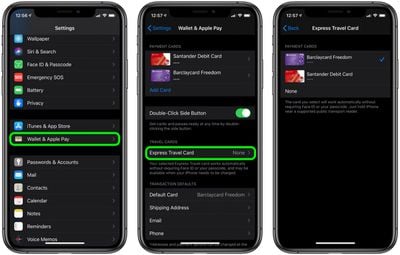
  1. Launch the Settings app on your iPhone.
  2. Tap Wallet & Apple Pay.
  3. Tap Express Travel Card.
  4. Tap one of your cards in the list to use it with Express Transit. A tick will appear next to the card you select. The default option is None.
  5. Authenticate your device using ‌Touch ID‌ or ‌Face ID‌.

settings
If your bank card doesn't support Express Transit, you'll get an error message telling you that the card is incompatible. If no error message appears, you're good to tap-and-go.

How to Set Up Express Transit on Apple Watch

You can also set up Express Transit to work on your watch, so long as it's running watchOS 5.2.1 or later. You can check what version you're running by going to General -> Software Update in the Watch app on your iPhone.

  1. Launch the Watch app on your iPhone.
  2. Tap Wallet & Apple Pay.
  3. Tap Express Travel Card.
  4. Tap one of your cards in the list to use it with Express Transit. A tick will appear next to the card you select. The default option is None.
  5. Authenticate by entering your passcode on your Apple Watch.
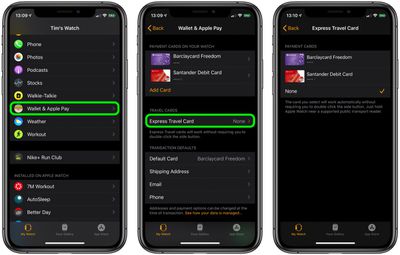
watch settings
If your bank card doesn't support Express Transit, you'll get an error message telling you that the card is incompatible. If no message appears, you're all set.

Related Roundup: Apple Pay

Popular Stories

Apple Pay Walmart Feature

Walmart App Rolls Back Apple Pay Support After Just Weeks

Tuesday November 24, 2026 12:14 pm PST by
Walmart recently added Apple Pay support to its iPhone app and website, but it removed the option just weeks later, according to Appleosophy's David Becker. The reason for this reversal is unknown. Walmart still accepts Apple Pay in its U.S. stores, after finally deciding to roll out tap-to-pay support earlier this year. We can confirm that we do not see Apple Pay on Walmart's website or in...
apple pay ad market mayhem

Apple Pay Ad Features Martial Arts Convenience Store Food Fight

Monday November 9, 2026 9:51 am PST by
Apple today shared a humorous new Apple Pay ad that promotes the benefit of the on-device payment option over cash and physical cards. The spot features a martial-arts-style food fight where a man runs into a convenience store to grab a weapon. He's followed by the other combatants, and everyone involved grabs a different food or beverage to fight with. The cashier makes everyone stop to...
apple design award 2025

Apple Announces 2025 Design Award Winners Ahead of WWDC 2025

Tuesday June 3, 2025 10:14 am PDT by
As we wait for WWDC to kick off next Monday, Apple today announced the winners of its annual Apple Design Awards, recognizing apps and games for their innovation, ingenuity, and technical achievement. The 2025 Apple Design Award winners are listed below, with one app and one game selected per category: Delight and Fun - CapWords (App) and Balatro (Game) Innovation - Play (App) and PBJ -...
Latest Stories
The 50+ Best Apple Black Friday Deals Still Available on AirPods, iPads, and More
9 hours ago
HomePod Mini 2 in (RED) Seemingly Spotted Ahead of Announcement
6 hours ago
Apple's M6 and PROLED MacBook Pro Reach New Low Prices for Black Friday
17 hours ago
The MacRumors Show: iPhone Air 2 and iPhone 18 Are Coming
17 hours ago
Apple Store in Brisbane Reopening Next Month With New Design
17 hours ago
The 60+ Best Black Friday Accessory Deals on iPhone Chargers, TVs, Headphones, and More
18 hours ago
GTA VI Now (Barely) Running on Apple Silicon Macs
19 hours ago
The Best Black Friday Streaming Deals on Apple TV, Disney+, and More
19 hours ago
Apple TV's 'Carême' Wins International Emmy for Best Drama
20 hours ago
iPhone 18 Production Delay Leaves Apple Little Time Before Launch
20 hours ago
The Best Black Friday AirPods Deals Still Available
13 hours ago
The Best Black Friday Deals on Apple Home Products
21 hours ago
The Best Black Friday iPhone Deals Still Available
13 hours ago
The Best Black Friday iPad Deals Still Available
13 hours ago
The Best Black Friday Apple Watch Deals Still Available
13 hours ago
The Best Black Friday AirTag Deals Still Available
13 hours ago
The Best Black Friday Mac Deals Still Available
13 hours ago
iPhone Share of US Smartphone Market Hits 57% as Rivals Slip
22 hours ago
iPhone 20 Pro Rumored to Feature 3D-Printed Titanium Frame
1 day ago
Apple's Official 2026 Black Friday Offer Starts Rolling Out
2 days ago
Halide Adds Fill Light Feature for iPhone Duo
2 days ago
MacBook Air Black Friday Deals Now Live With Massive $399 Savings
2 days ago
Amazon Discounts All MacBook Neo Models by $99 for Black Friday
2 days ago
Kodak Launches Unique AirTag Rival With E-Ink Display
2 days ago
Here's Why the Apple Store is Going Down
2 days ago
Apple Still Working on Giant Foldable iPad That Could Cost $5,000
2 days ago
iPhones Dominate China's Weak Singles' Day Smartphone Sales
2 days ago
iPhone 20 Pro Could Feature Ceramic in Limited-Edition Model
2 days ago
Apple Faces Korean Regulator Review Over iPhone 16 AI Advertising
2 days ago
Apple Watch Ultra 4 Hits New Best-Ever Price of $649.99 for Black Friday
2 days ago
Related Apple News: News | Entertainment | Mac | Politics | Culture