Skip to Content

How to Set Up an Apple Watch Using Family Setup

by

Family Setup is an Apple Watch feature in watchOS 7 that's designed to allow parents to set up Apple Watches for their children without them needing to own an iPhone as well.
watchOS7 tips family setup
‌Family Setup‌ is mainly aimed at families with children, but it can also be used to set up an Apple Watch for an older adult or anyone else who doesn't have an iPhone but wants to take advantage of the health and fitness features of Apple Watch.

This article explains how to set up an Apple Watch to be used by someone else via ‌Family Setup‌. First though, there are some requirements to ‌Family Setup‌ that you should be aware of.

What You'll Need for Family Setup

‌Family Setup‌ is designed to work with a GPS and Cellular enabled Apple Watch Series 4 or later that's running ‌watchOS 7‌. It is not compatible with earlier Apple Watch models nor with those that do not have a cellular connection.

Cellular Apple Watch models require their own cellular plan, the price of which can vary between network operators, but you can get a plan for $10 month with most carriers in the United States. Note that while a cellular Apple Watch is required to set up a watch under ‌Family Setup‌, it can be activated without using a cellular plan.

The main person setting up ‌Family Setup‌ must have an ‌iPhone‌ 6s or later with iOS 14 installed, and all participants will need an Apple ID and will need to be part of a Family Sharing setup.

These last two requirements can be worked out during the setup process, but activating them beforehand will make the setup process a lot faster. Below are links to some how-tos that will help you with these pre-requisites, followed by a step-by-step walkthrough to set up an Apple Watch for ‌Family Setup‌.

How to Set Up an Apple Watch for Family Setup

  1. Turn on the Apple Watch.
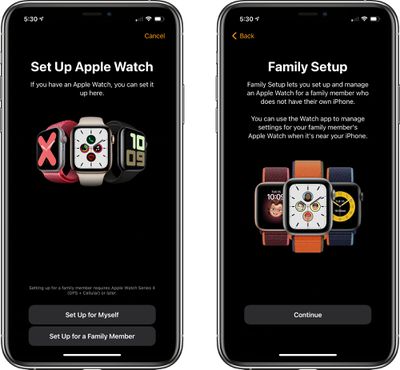
  2. Launch the Watch app on your iPhone and go to the Apple Watch setup screen.
  3. Choose Set Up for a Family Member.
    familysetup1

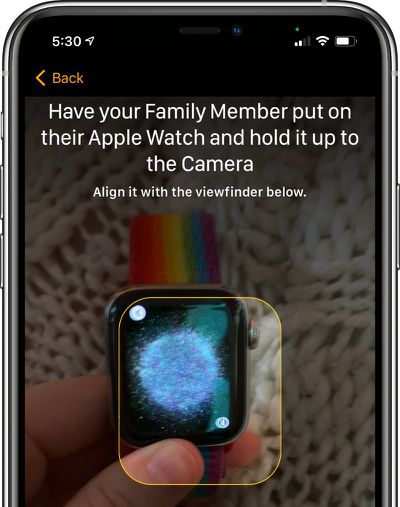
  4. Pair the Apple Watch with your ‌iPhone‌ by lining up the graphic on the watch's display with the ‌iPhone‌'s camera.
    applewatchfamilysetuppairing

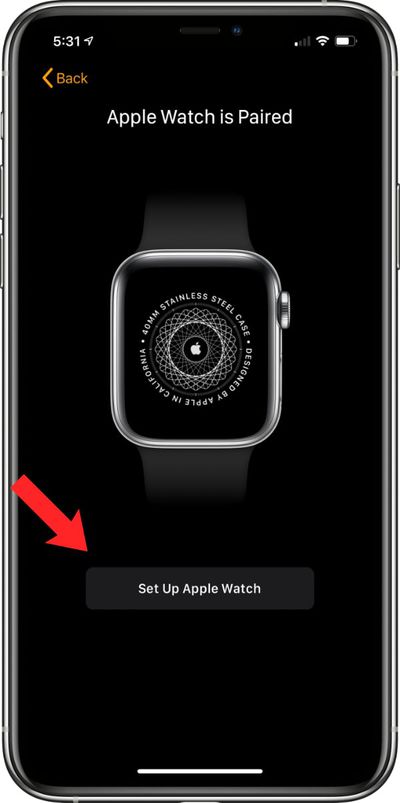
  5. Tap Set Up Apple Watch.
    setupapplewatchfamilysetup

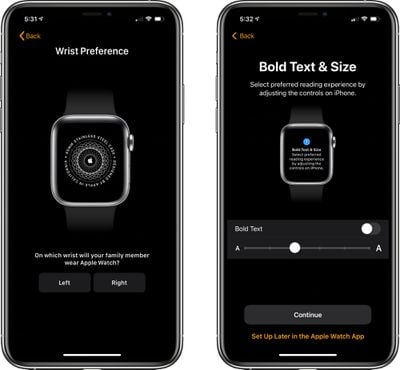
  6. Agree to the terms and conditions and select a wrist preference.
  7. Choose a text size for the Apple Watch, then select a passcode for unlocking it.
    familysetupapplewatchpreferences

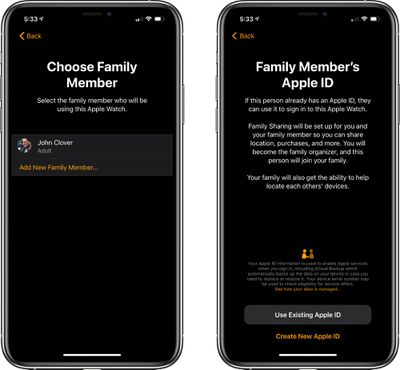
  8. Select the family member from your Family Sharing circle who will be using the Apple Watch. If the person is not a part of the Family Sharing group, you can choose to Add New Family Member and enter their ‌‌Apple ID‌‌.
    appleidfamilysetup

  9. If you chose the ‌‌Apple ID‌‌ route, you will need to go through some verification steps and enable two-factor authentication if it's not turned on. If you already had Family Sharing set up, enter the family member's ‌‌Apple ID‌‌ password to continue.
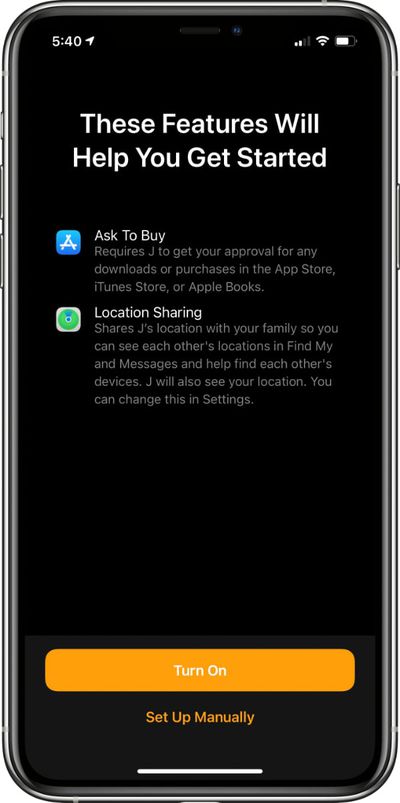
  10. Turn on Ask to Buy or Location Sharing if desired.
    familysetupgettingstarted

  11. Set up cellular and Wi-Fi access. Setting up cellular access will require going through your carrier/network operator, such as Verizon or Vodafone. This process can vary by carrier, but Apple and your carrier will walk you through the process on screen.
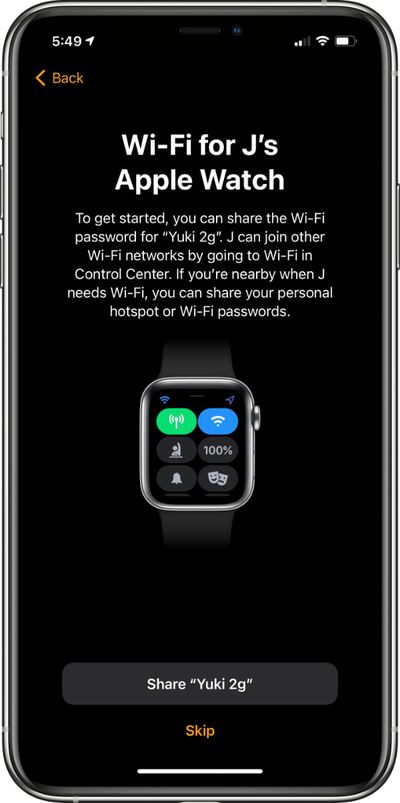
  12. You can also opt to set up cellular access at a later time and rely on Wi-Fi, but cellular is required for continual connectivity without an ‌iPhone‌. After setting up cellular or skipping it until later, tap the Share button to share your WiFi password with the Apple Watch.
    familysetupwifi

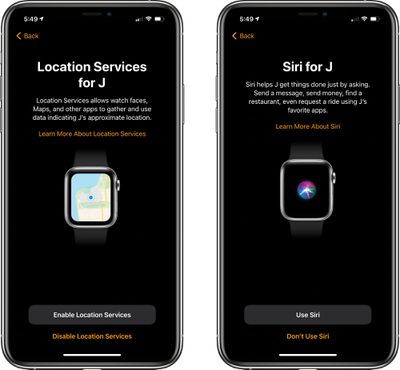
  13. Go through the additional setup screens for Location Sharing, Siri, analytics, and more.
    sirilocationservicesfamilysetup

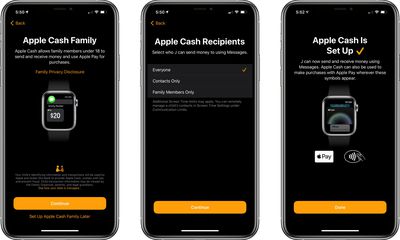
  14. Choose whether to set up Apple Cash Family, the feature that lets parents provide small amounts of cash to kids that can be used with Apple Pay for purchases. Parents can choose who their kids can send money to and receive money from. Agree to the Terms and Services, and confirm the legal name of your child.
    applecashfamilysetup

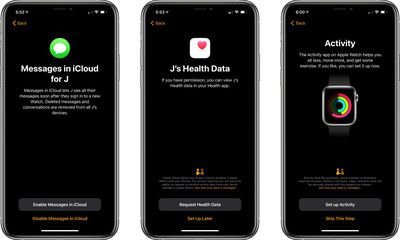
  15. Continue through the setup process, enabling or disabling additional services such as Messages in iCloud, Emergency SOS, Medical ID, Activity and route tracking options, Photos, trusted Contacts, Screen Time limits, Schooltime for limiting access during school hours, and a feature that lets parents view their children's health data, so daily activity can be monitored.
    evenmorefamilysetup

  16. After all of these settings are figured out, the Apple Watch will be ready to use and it will be listed under "Family Watches" in the Apple Watch app that belongs to the parent.
Apple offers parents quite a lot of control over what's enabled in ‌Family Setup‌ and how the Apple Watch functions. For an overview of what's available, be sure to check out our dedicated Family Setup guide.

Related Roundups: watchOS 26, watchOS 27
Related Forum: Apple Watch

Popular Stories

siri recap live rewind

watchOS 27.3 Brings Live Rewind and Siri Recap to Apple Watch

Tuesday November 3, 2026 10:35 am PST by
With the first beta of watchOS 27.3, Apple is introducing new Audio Intelligence features it previewed for the Apple Watch Series 12 and Ultra 4 earlier this year. Powered by the S11 chip, Audio Intelligence includes Live Rewind, Siri Recap, Sound Recognition, and Shazam Music Recognition. Sound Recognition and Shazam are already on the watch, but Live Rewind and Siri Recap are now available ...
apple watch series 12 siri recap

Siri Recap Hands-On: Private, But Not Very Useful

Friday November 20, 2026 1:45 pm PST by
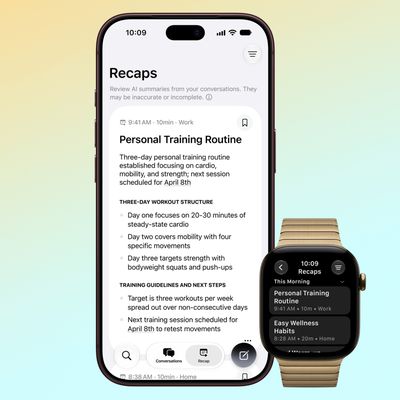
With the watchOS 27.3 beta, Apple started testing Siri Recap. Siri Recap lets the Series 12 and Ultra 4 Apple Watch models listen to conversations to generate a brief summary of what was discussed. Actual audio is sectioned off from apps, Apple, and the rest of the OS, and then discarded after a summary is generated. It's a privacy-forward way of tracking what's going on around you, but...
watchos 27

Apple Releases watchOS 27.2.1 and visionOS 27.2.1 With Security Fixes

Monday November 9, 2026 10:08 am PST by
Apple today released new watchOS 27.2.1 and visionOS 27.2.1 updates, with the software coming two weeks after the launch of watchOS 27.2 and visionOS 27.2. According to Apple's release notes, the watchOS update includes security fixes, while the visionOS 27.2.1 update includes security updates and bug fixes. The new software can be installed using the Settings app on each device. ...
Latest Stories
The 50+ Best Apple Black Friday Deals Still Available on AirPods, iPads, and More
2 hours ago
Here Are the Best Apple Black Friday Leftover Deals You Can Get Today
12 minutes ago
HomePod Mini 2 in (RED) Seemingly Spotted Ahead of Announcement
11 hours ago
Apple's M6 and PROLED MacBook Pro Reach New Low Prices for Black Friday
22 hours ago
The MacRumors Show: iPhone Air 2 and iPhone 18 Are Coming
22 hours ago
Apple Store in Brisbane Reopening Next Month With New Design
22 hours ago
The 60+ Best Black Friday Accessory Deals on iPhone Chargers, TVs, Headphones, and More
5 minutes ago
GTA VI Now (Barely) Running on Apple Silicon Macs
1 day ago
The Best Black Friday Streaming Deals on Apple TV, Disney+, and More
1 day ago
Apple TV's 'Carême' Wins International Emmy for Best Drama
1 day ago
iPhone 18 Production Delay Leaves Apple Little Time Before Launch
1 day ago
The Best Black Friday AirPods Deals Still Available
18 hours ago
The Best Black Friday Deals on Apple Home Products
1 day ago
The Best Black Friday iPhone Deals Still Available
18 hours ago
The Best Black Friday iPad Deals Still Available
18 hours ago
The Best Black Friday Apple Watch Deals Still Available
18 hours ago
The Best Black Friday AirTag Deals Still Available
18 hours ago
The Best Black Friday Mac Deals Still Available
18 hours ago
iPhone Share of US Smartphone Market Hits 57% as Rivals Slip
1 day ago
iPhone 20 Pro Rumored to Feature 3D-Printed Titanium Frame
1 day ago
Apple's Official 2026 Black Friday Offer Starts Rolling Out
2 days ago
Halide Adds Fill Light Feature for iPhone Duo
2 days ago
MacBook Air Black Friday Deals Now Live With Massive $399 Savings
2 days ago
Amazon Discounts All MacBook Neo Models by $99 for Black Friday
2 days ago
Kodak Launches Unique AirTag Rival With E-Ink Display
2 days ago
Here's Why the Apple Store is Going Down
2 days ago
Apple Still Working on Giant Foldable iPad That Could Cost $5,000
2 days ago
iPhones Dominate China's Weak Singles' Day Smartphone Sales
2 days ago
iPhone 20 Pro Could Feature Ceramic in Limited-Edition Model
2 days ago
Apple Faces Korean Regulator Review Over iPhone 16 AI Advertising
2 days ago
Related Apple News: Travel | News | Motoring | Technology | Mac