Skip to Content

macOS Quick Tip: Screenshot Straight to the Clipboard

by

There are several ways you can take screenshots on a Mac. Preview offers the option from its File menu. There's also a little screen capture app in the macOS Utilities folder called Screenshot. But the simplest and most common method is to use your Mac's built-in shortcut key combinations.
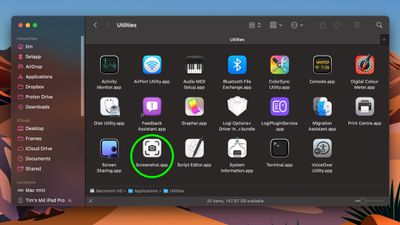
screenshot app 1
Taking a screenshot is as easy as hitting Shift-Command-3 to capture the whole screen, or Shift-Command-4 to capture a portion of the screen using the mouse cursor as a crosshair selection tool (a tap of the spacebar also turns it into a camera for capturing windows).

Screenshots taken using key shortcuts are typically saved on your desktop. However, if you tack the Control key onto either of these shortcuts, macOS will copy the captured image to the clipboard instead of saving it as a file on your desktop, which is useful if you want to paste it into an application that can edit or view images, or use Universal Clipboard to paste it on another Apple device.

In Preview, for example, Command-N creates a new document from the contents of the clipboard without you having to specify a filename until you're ready to save it. You can also access this function in Preview's menu bar (File ➝ New From Clipboard).


Top Rated Comments

Euge Avatar
20 months ago

There are just flat-out way too many modifier keys for these things. For a company like Apple that used to go out of their way to keep things simple by way of even eliminating buttons on our phones, it has always been ridiculous to figure out which finger salute you need to use to do certain things. Shift? Control? Option? Command? Maybe it's one of the 16 different combinations of them all together? There doesn't seem to be any rhyme or reason to which ones you need at any given time, and don't even get me started on trying to memorize the cute little icons they have for each of them, and the fact that sometimes instructions will only give you IKEA instructions on which combination to use...

Keep it simple, stupid!

While cool, damn is that the hardest key combo to hold while dragging a mouse. Why can't it be close to paste match style shft+ctrl+optn+cmd and maybe hold down right click until selection is made.
I don't know why MacRumors doesn't just suggest using cmd+shift+5

It's such a better interface to access all screenshot options.
Score: 13 Votes (Like | Disagree)
20 months ago

There are just flat-out way too many modifier keys for these things. For a company like Apple that used to go out of their way to keep things simple by way of even eliminating buttons on our phones, it has always been ridiculous to figure out which finger salute you need to use to do certain things. Shift? Control? Option? Command? Maybe it's one of the 16 different combinations of them all together? There doesn't seem to be any rhyme or reason to which ones you need at any given time, and don't even get me started on trying to memorize the cute little icons they have for each of them, and the fact that sometimes instructions will only give you IKEA instructions on which combination to use...

Keep it simple, stupid!
These keystrokes have been around for 20+ years. Apple isn't suddenly make it harder just recently.

These keystrokes used to be the _only_ way to capture screenshots (natively), but they more recently added the Screenshot app, as discussed in this article, for those that struggle with keystrokes.
Score: 12 Votes (Like | Disagree)
20 months ago
Better too many shortcuts than too few. Nobody forces you to use or memorize them. And for those of us who prefer keyboard control, having to use the mouse for more than we already do would suck.
Score: 10 Votes (Like | Disagree)
20 months ago
Since no one has mentioned it: you can also right-click the little screenshot preview for more options on what to do with it.


Attachment Image
Score: 7 Votes (Like | Disagree)
mrgraff Avatar
20 months ago

you dont need to hold all those keys while dragging shift-cmd 4 and released and you'll have a cursor on screen you can drag
And if you let go of the keys and then press spacebar, you can screenshot the window under the cursor. Hit spacebar again to toggle window/screen portion.
Score: 5 Votes (Like | Disagree)
20 months ago

While cool, damn is that the hardest key combo to hold while dragging a mouse. Why can't it be close to paste match style shft+ctrl+optn+cmd and maybe hold down right click until selection is made.
you dont need to hold all those keys while dragging shift-cmd 4 and released and you'll have a cursor on screen you can drag
Score: 4 Votes (Like | Disagree)

Popular Stories

apple design award 2025

Apple Announces 2025 Design Award Winners Ahead of WWDC 2025

Tuesday June 3, 2025 10:14 am PDT by
As we wait for WWDC to kick off next Monday, Apple today announced the winners of its annual Apple Design Awards, recognizing apps and games for their innovation, ingenuity, and technical achievement. The 2025 Apple Design Award winners are listed below, with one app and one game selected per category: Delight and Fun - CapWords (App) and Balatro (Game) Innovation - Play (App) and PBJ -...
Apple 2026 Black Friday Event Hero

Apple's Official 2026 Black Friday Offer Starts Rolling Out

Thursday November 26, 2026 8:37 am PST by
Apple's annual four-day Black Friday through Cyber Monday shopping event is now live in Australia, New Zealand, and Thailand, and it will continue to roll out across Europe, the U.S., and Canada as the calendar turns to Friday, November 27 around the world. In the U.S., Apple's terms and conditions say the promotion begins on November 27 at 12 a.m. Pacific Time and ends on November 30 at...
1password deal blue

1Password Security Breach: What Was Accessed and What Wasn't

Wednesday November 25, 2026 1:09 pm PST by
Popular password management app 1Password today said it experienced a security breach earlier this month. 1Password says some customer names and email addresses were accessed, but no customer vault contents were compromised. On November 19, 1Password saw indications that an employee's GitHub account had been breached and began investigating. The company says the breached GitHub account was...
Latest Stories
The 50+ Best Apple Black Friday Deals Still Available on AirPods, iPads, and More
4 hours ago
Here Are the Best Apple Black Friday Leftover Deals You Can Get Today
2 hours ago
HomePod Mini 2 in (RED) Seemingly Spotted Ahead of Announcement
14 hours ago
Apple's M6 and PROLED MacBook Pro Reach New Low Prices for Black Friday
1 day ago
The MacRumors Show: iPhone Air 2 and iPhone 18 Are Coming
1 day ago
Apple Store in Brisbane Reopening Next Month With New Design
1 day ago
The 60+ Best Black Friday Accessory Deals on iPhone Chargers, TVs, Headphones, and More
2 hours ago
GTA VI Now (Barely) Running on Apple Silicon Macs
1 day ago
The Best Black Friday Streaming Deals on Apple TV, Disney+, and More
1 day ago
Apple TV's 'Carême' Wins International Emmy for Best Drama
1 day ago
iPhone 18 Production Delay Leaves Apple Little Time Before Launch
1 day ago
The Best Black Friday AirPods Deals Still Available
20 hours ago
The Best Black Friday Deals on Apple Home Products
1 day ago
The Best Black Friday iPhone Deals Still Available
20 hours ago
The Best Black Friday iPad Deals Still Available
20 hours ago
The Best Black Friday Apple Watch Deals Still Available
20 hours ago
The Best Black Friday AirTag Deals Still Available
20 hours ago
The Best Black Friday Mac Deals Still Available
20 hours ago
iPhone Share of US Smartphone Market Hits 57% as Rivals Slip
1 day ago
iPhone 20 Pro Rumored to Feature 3D-Printed Titanium Frame
1 day ago
Apple's Official 2026 Black Friday Offer Starts Rolling Out
2 days ago
Halide Adds Fill Light Feature for iPhone Duo
2 days ago
MacBook Air Black Friday Deals Now Live With Massive $399 Savings
2 days ago
Amazon Discounts All MacBook Neo Models by $99 for Black Friday
2 days ago
Kodak Launches Unique AirTag Rival With E-Ink Display
2 days ago
Here's Why the Apple Store is Going Down
2 days ago
Apple Still Working on Giant Foldable iPad That Could Cost $5,000
2 days ago
iPhones Dominate China's Weak Singles' Day Smartphone Sales
2 days ago
iPhone 20 Pro Could Feature Ceramic in Limited-Edition Model
2 days ago
Apple Faces Korean Regulator Review Over iPhone 16 AI Advertising
2 days ago
Related Apple News: Forums | Ugreen Magflow Air Nexode Air | Apple Ai Strategy 2024 | Aqara W200 Thermostat | Iphone






























