Skip to Content

Save 7GB of iPhone Storage Just by Toggling This Switch

by

Apple this week released iOS 18.3, iPadOS 18.3, and macOS Sequoia 15.3, software updates that enable Apple Intelligence on supported devices by default. Whether you own an iPhone, iPad, Mac – or indeed all three – regardless of what you think about Apple Intelligence, there's one reason why you may want to disable Apple's AI features at the earliest opportunity: To reclaim storage.

apple intelligence black
Apple's marketing machine has made much of Apple Intelligence since its announcement at WWDC in June 2024. Apple brought the first features to compatible iPhones, iPads and Macs in October with a point update to iOS 18/iPadOS 18 and macOS Sequoia, followed by a further update in December that brought a more fleshed-out set of AI-powered features, with the most recent update adding some much-needed refinements.

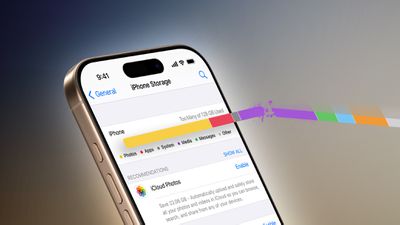
Despite the raft of updates, Apple Intelligence remains in beta, and in terms of the AI suite's current usefulness, opinions remain decidedly mixed. For some, however, when considering the relative worth of these features, the deciding factor will be their local storage overhead. According to Apple's support page, Apple Intelligence now requires 7GB of storage space. This number applies whether you're using an iPhone, iPad, or Mac.
iPhone Free Up Storage Feature Redux 1
That might sound like a lot, but it's one way that Apple is able to tout the privacy credentials of Apple Intelligence. Many of these features run locally, and in order to do so, they must download AI models to your device(s), which currently requires 7GB of storage. This means if you have an iPhone, iPad, and a Mac, it effectively equates to 21GB of storage across your devices that is being taken up by AI models that you may never even use.

But don't assume that 7GB is any sort of hard cap. In April, Apple is expected to release iOS 18.4 featuring some broad enhancements to Siri's AI capabilities, which will likely hike the storage requirement further. And that's not even taking into consideration the storage demands that iOS 19 will bring later this year...

AI or No AI? Time to Decide

Here's the deal. After updating to iOS 18.3, iPadOS 18.3, or macOS Sequoia 15.3, Apple Intelligence is an opt-out feature, not an opt-in feature. In other words, if you have updated – or plan to update – your devices to the new software, Apple Intelligence will be automatically enabled upon doing so.
iOS 18
Note that this still applies if you already disabled it in the previous point updates but then allowed the latest update welcome screens to steer you towards enabling Apple Intelligence again. If however you chose "Set Up Later" at the on-screen prompt, you have no action to take – these features will respect your prior decision and remain disabled. For everyone else, it's time to decide: Is Apple Intelligence really worth all those precious gigabytes?

Why Disabling Apple Intelligence Reclaims Storage

Apple Intelligence utilizes something called the MobileAsset framework to manage and deliver its machine learning models and related assets to your devices. This framework dynamically downloads and updates the necessary components, ensuring that your devices have access to the latest capabilities without requiring comprehensive system updates.

Thankfully, when you disable Apple Intelligence, the system identifies that the associated assets are no longer in use. The MobileAsset framework then purges these unused assets when additional space is required – optimizing and freeing up your local storage in the process. Here are the steps you need to take to ensure that happens.

macOS Sequoia Genmoji Feature

How to Disable Apple Intelligence

Disabling Apple Intelligence completely is simply a matter of flipping the associated switch on each supported device running the latest software. Compatible devices include any iPhone 16 model, iPhone 15 Pro and iPhone 15 Pro Max, any iPad with A17 Pro or M1 and later, and any Mac with M1 or later.

Disable Apple Intelligence on iPhone and iPad

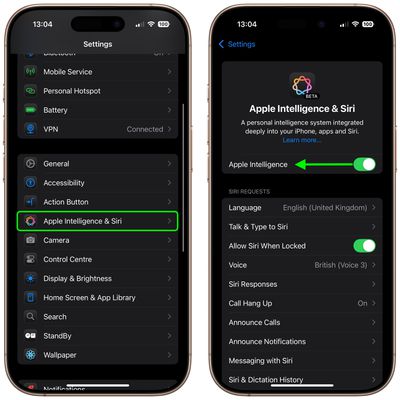
On iPhone and iPad, you can find it in Settings ➝ Apple Intelligence & Siri. Toggle off the switch next to Apple Intelligence.
settings

Disable Apple Intelligence on Mac

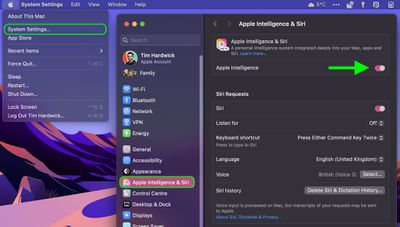
On Mac, open System Settings, select Apple Intelligence & Siri in the sidebar, then click the switch next to Apple Intelligence at the top of the menu window to toggle it off.
macos settings

What You Lose by Disabling Apple Intelligence

In iOS 18.2 or later, iPadOS 18.2 or later, and macOS Sequoia 15.2 or later, turning off Apple Intelligence will knock out the following features:

  • Genmoji
  • Image Playground
  • Image Wand in the Apple Pencil tool palette
  • Writing Tools
  • Clean Up in Photos
  • Create a Memory movie in Photos (not available in macOS)
  • Natural language search in Photos
  • Notification summaries
  • Reduce Interruptions Focus
  • Intelligent Breakthrough & Silencing in Focus
  • Priority messages in Mail
  • Smart Reply in Mail and Messages
  • Summaries in Mail and Messages
  • Siri enhancements, including product knowledge, more resilient request handling, new look and feel, more natural voice, the ability to type to Siri, and more
  • ChatGPT integration within Siri and Writing Tools

If you don't see any of the features listed above on your device, your specific model likely doesn't support Apple Intelligence, so you don't have anything to worry about.

Popular Stories

iOS 27

Apple Says iOS 27.3 Beta Coming Next Week

Friday October 30, 2026 2:45 pm PDT by
Apple today announced that the first iOS 27.3 developer beta will be released next week and enable some Apple Intelligence features in China. In a press release shared on the Apple Newsroom website in China, Apple said the beta will be released on Wednesday, November 4, but that likely means Tuesday, November 3 in the U.S. due to time zone differences. Apple said iOS 27.3 will then be...
General iCloud App Feature

Apple Says iCloud+ Plans Will Not Include Increased Siri AI Usage in UK

Tuesday November 17, 2026 7:07 am PST by
Apple on Monday announced that it is implementing daily usage limits on Siri AI and select other Apple Intelligence features that rely on "powerful server models" starting with iOS 27.3 and corresponding software updates, but increased access will be included with most iCloud+ plans at no additional cost in most countries, with one notable exception. In a support document, Apple said...
Siri AI Icon

Apple Continues to Say Some AI Features Will Have Fees for Extra Usage

Monday November 9, 2026 9:45 am PST by
Apple continues to advise customers that certain Apple Intelligence features that rely on its server-side Private Cloud Compute system have daily usage limits, with expanded access to such features to be "available for a fee in the future." Apple has repeatedly mentioned these upcoming fees in press releases over the past several months, but it has yet to provide any specific details about...
Latest Stories
Apple Now Aims to Repair Rather Than Replace iPhone Duos With Cracked Screens
2 hours ago
Here Are the Best Apple Black Friday Leftover Deals You Can Get Today
10 hours ago
HomePod Mini 2 in (RED) Seemingly Spotted Ahead of Announcement
22 hours ago
Apple's M6 and PROLED MacBook Pro Reach New Low Prices for Black Friday
1 day ago
The MacRumors Show: iPhone Air 2 and iPhone 18 Are Coming
1 day ago
Apple Store in Brisbane Reopening Next Month With New Design
1 day ago
The 60+ Best Black Friday Accessory Deals on iPhone Chargers, TVs, Headphones, and More
10 hours ago
GTA VI Now (Barely) Running on Apple Silicon Macs
1 day ago
The Best Black Friday Streaming Deals on Apple TV, Disney+, and More
1 day ago
Apple TV's 'Carême' Wins International Emmy for Best Drama
1 day ago
iPhone 18 Production Delay Leaves Apple Little Time Before Launch
2 days ago
The Best Black Friday AirPods Deals Still Available
1 day ago
The Best Black Friday Deals on Apple Home Products
2 days ago
The Best Black Friday iPhone Deals Still Available
1 day ago
The Best Black Friday iPad Deals Still Available
1 day ago
The Best Black Friday Apple Watch Deals Still Available
1 day ago
The Best Black Friday AirTag Deals Still Available
1 day ago
The Best Black Friday Mac Deals Still Available
1 day ago
iPhone Share of US Smartphone Market Hits 57% as Rivals Slip
2 days ago
iPhone 20 Pro Rumored to Feature 3D-Printed Titanium Frame
2 days ago
The 50+ Best Apple Black Friday Deals Still Available on AirPods, iPads, and More
2 hours ago
Apple's Official 2026 Black Friday Offer Starts Rolling Out
2 days ago
Halide Adds Fill Light Feature for iPhone Duo
2 days ago
MacBook Air Black Friday Deals Now Live With Massive $399 Savings
2 days ago
Amazon Discounts All MacBook Neo Models by $99 for Black Friday
2 days ago
Kodak Launches Unique AirTag Rival With E-Ink Display
2 days ago
Here's Why the Apple Store is Going Down
3 days ago
Apple Still Working on Giant Foldable iPad That Could Cost $5,000
3 days ago
iPhones Dominate China's Weak Singles' Day Smartphone Sales
3 days ago
iPhone 20 Pro Could Feature Ceramic in Limited-Edition Model
3 days ago
Related Apple News: Apple Events | Ipad | Iphone | Ipad | Iphone Duo New Features To Try First