Skip to Content

How to Control the Behavior of Screenshot Shortcuts in macOS

by

camera icon macos screenshotThere are several ways you can take screenshots on a Mac. Preview offers the option from its File menu. There's also a little screen capture app in the macOS Utilities folder called Grab. But the simplest and most common method is to use your Mac's built-in shortcut key combinations. Taking a screenshot is as easy as hitting Shift-Command-3 to capture the whole screen, or Shift-Command-4 to capture a portion of the screen using the mouse cursor as a crosshair selection tool (a tap of the spacebar also turns it into a camera for capturing windows).

If you tack the Control key onto either of these shortcuts, macOS copies the captured image to the clipboard, which is useful if you want to paste it into an application that can edit or view images. Otherwise, screenshots taken using key shortcuts are saved straight to your desktop. If you'd like to change that default save location to somewhere different, simply follow the steps below. You can also change the default file format that the screenshots are saved in by following these steps. The last section of this article offers some tips for taking more control of your screenshot selections, so be sure to check those out too.

How to Change Where Screenshots Get Saved in macOS

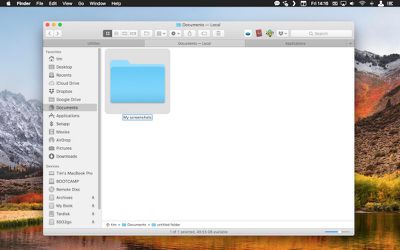
  1. Open a Finder window and press Shift-Command-N to create a new folder where you want your screenshots to be saved. Click the folder's name if you'd like to rename it.
    screenshot save location 1

  2. Launch the Terminal app (found in Applications/Utilities).

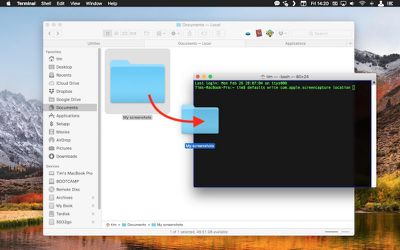
  3. Type in the following command and then press the spacebar, but don't hit Enter just yet: defaults write com.apple.screencapture location

  4. Now drag the folder you just created into the Terminal window. The folder's path should appear after the command you typed in. Press Enter.
    screenshot save location 2

Your captured images will now be saved in the designated folder whenever you use the screenshot shortcuts. Note: Do not delete this folder until you've changed the save location to somewhere else using the same Terminal command, or you'll run into issues. If you want to switch things back in future so that images are saved on your desktop again, simply input the Terminal command as above, but change the path to ~/Desktop.

How to Change the Default File Format of Screenshots

  1. Launch the Terminal app (found in Applications/Utilities).

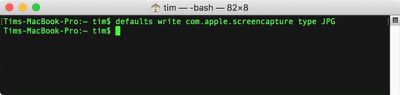
  2. To change the screenshot format to JPG, TIFF, GIF, PDF, or PNG, type in the command defaults write com.apple.screencapture type followed by a space, and then type the relevant format suffix. (We've used JPG in the example below.)
    screenshot format change

  3. Press Enter.

  4. Test if the command has been applied by taking a screenshot with Shift-Command-3. If the image is still being saved in the previous format, restart your Mac manually, or reboot by typing the Terminal command killall SystemUIServer and pressing Enter.
Tips for Taking Selection Screenshots

Tip: 1 When using the Shift-Command-4 shortcut combined with the spacebar to capture windows, you can eliminate the window's drop shadow from the screenshot by using Option-click instead of regular click.

Tip: 2 When using Shift-Command-4 to grab a portion of the screen, if you misjudge the initial point of your selection, hold down the spacebar before releasing the mouse button and you can reposition the entire selection area.

Tip: 3 When making a selection with Shift-Command-4, press the Option key before releasing the mouse button and move your mouse around to resize the dimensions of the selection area from its center point.

Tip: 4 When expanding a selection area with your mouse, hold down the Shift key to lock the dimensions of the area except for the direction that you're presently dragging in.
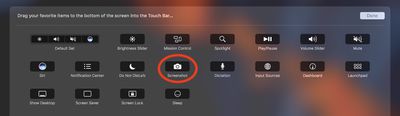
touch bar screenshot option
Bonus Tip: If you have a MacBook Pro with Touch Bar you can customize the Control Strip region to include a Screenshot button with selection options. Simply select System Preferences -> Keyboard -> Customize Control Strip, and drag the button onto the Touch Bar area.


Top Rated Comments

114 months ago
You can use Shift-Command-6 to capture the touch bar also...
Score: 10 Votes (Like | Disagree)
114 months ago
Keep doing these!
Score: 9 Votes (Like | Disagree)
114 months ago
I like the way that IOS saves screenshots automatically to an Album in photos called Screenshots. It would be really useful to have this automatic Screenshots album on the Mac as well. (For me at least)
Score: 3 Votes (Like | Disagree)
BrettArchibald Avatar
114 months ago
Tip: 1 When using the Shift-Command-4 shortcut combined with the spacebar to capture windows, you can eliminate the window's drop shadow from the screenshot by using Option-click instead of regular click.
Now this is handy, as I do Shift-Ctrl-Cmd-4-Spacebar many times throughout any given day, but I did not know that I could eliminate the dropshadow. This tip will save me plenty of time cropping it out in Photoshop!
Score: 3 Votes (Like | Disagree)
ikir Avatar
114 months ago
Touch bar is very handy for this
Score: 1 Votes (Like | Disagree)

Popular Stories

1password deal blue

1Password Security Breach: What Was Accessed and What Wasn't

Wednesday November 25, 2026 1:09 pm PST by
Popular password management app 1Password today said it experienced a security breach earlier this month. 1Password says some customer names and email addresses were accessed, but no customer vault contents were compromised. On November 19, 1Password saw indications that an employee's GitHub account had been breached and began investigating. The company says the breached GitHub account was...
apple design award 2025

Apple Announces 2025 Design Award Winners Ahead of WWDC 2025

Tuesday June 3, 2025 10:14 am PDT by
As we wait for WWDC to kick off next Monday, Apple today announced the winners of its annual Apple Design Awards, recognizing apps and games for their innovation, ingenuity, and technical achievement. The 2025 Apple Design Award winners are listed below, with one app and one game selected per category: Delight and Fun - CapWords (App) and Balatro (Game) Innovation - Play (App) and PBJ -...
ipad pro prime

Apple Has iPads Running macOS Internally, Says Gurman

Wednesday November 25, 2026 4:55 am PST by
Apple has iPads running macOS internally and has had them "for some time," according to Bloomberg's Mark Gurman, although he says no work is currently being done to bring the Mac operating system to iPads. Speaking on his latest Power On podcast, Gurman said there is "no work being done to consumerize macOS on the iPad." Rather, Apple will continue to bring Mac features and apps like Final Cut ...
Latest Stories
The 50+ Best Apple Black Friday Deals on AirPods, iPads, MacBooks, and More
4 hours ago
The 60+ Best Black Friday Accessory Deals on iPhone Chargers, TVs, Headphones, and More
35 minutes ago
GTA VI Now (Barely) Running on Apple Silicon Macs
55 minutes ago
The Best Black Friday Streaming Deals on Apple TV, Disney+, and More
2 hours ago
Apple TV's 'Carême' Wins International Emmy for Best Drama
2 hours ago
iPhone 18 Production Delay Leaves Apple Little Time Before Launch
3 hours ago
The Best Black Friday AirPods Deals
3 hours ago
The Best Black Friday Deals on Apple Home Products
4 hours ago
The Best Black Friday iPhone Deals
4 hours ago
The Best Black Friday iPad Deals
4 hours ago
The Best Black Friday Apple Watch Deals
4 hours ago
The Best Black Friday AirTag Deals
4 hours ago
The Best Black Friday Mac Deals
4 hours ago
iPhone Share of US Smartphone Market Hits 57% as Rivals Slip
5 hours ago
iPhone 20 Pro Rumored to Feature 3D-Printed Titanium Frame
6 hours ago
Apple's Official 2026 Black Friday Offer Starts Rolling Out
1 day ago
Halide Adds Fill Light Feature for iPhone Duo
1 day ago
MacBook Air Black Friday Deals Now Live With Massive $399 Savings
1 day ago
Amazon Discounts All MacBook Neo Models by $99 for Black Friday
1 day ago
Kodak Launches Unique AirTag Rival With E-Ink Display
1 day ago
Here's Why the Apple Store is Going Down
1 day ago
Apple Still Working on Giant Foldable iPad That Could Cost $5,000
1 day ago
iPhones Dominate China's Weak Singles' Day Smartphone Sales
1 day ago
iPhone 20 Pro Could Feature Ceramic in Limited-Edition Model
1 day ago
Apple Faces Korean Regulator Review Over iPhone 16 AI Advertising
1 day ago
Apple Watch Ultra 4 Hits New Best-Ever Price of $649.99 for Black Friday
1 day ago
New Apple Store Opening in India, Download the Special Wallpaper Now
2 days ago
Redesigned OLED MacBook Air Could Launch in 2027 or 2028
2 days ago
AirPods Pro 3 for $149 is One of The Best Black Friday Deals This Year
2 days ago
1Password Security Breach: What Was Accessed and What Wasn't
2 days ago
Related Apple News: Education | Technology | South Africa | News | Mac