Skip to Content

How to Make Web Pages in Safari for Mac Easier to Read

by

safari iconIn Apple's Safari web browser, there are several ways to make viewing web pages easier on the eyes. All of them involve adjusting the font size or the zoom level that Safari applies when it loads web page content, which can be helpful if you're using a small screen or a large display set at a high resolution.

To increase or decrease the zoom level of both text and images when viewing web pages in Safari, press Command and the + (plus) or - (minus) keys. You can also click on View in Safari's menu bar and select Zoom In or Zoom Out.

Alternatively, you can add zoom buttons to Safari's interface: Right-click (or Ctrl-click) on a space in the Safari toolbar and click Customize Toolbar.... Then drag the Zoom buttons in the dropdown to the space you just clicked on the toolbar. Click Done to finish.
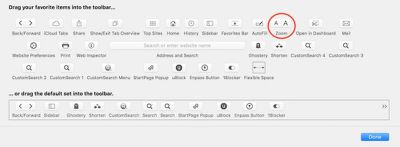
safari zoom buttons
If you want to keep images at the same size and only adjust web page font size on the fly, press Option-Command and the + or - keys. You can also hold down the Option key and click on View in the Safari menu bar, which changes the Zoom options to Make Text Bigger and Make Text Smaller.

Safari will remember your zoom and font size settings until you clear your History. To do so, click Safari in the menu bar, select Clear History..., then click the Clear History button.

Set the Zoom Level for a Specific Website

Once the zoom level is set up for a particular site, Safari applies it automatically whenever you visit it. Here's how it's done.

  1. Navigate to the site that you want to adjust the zoom level for.

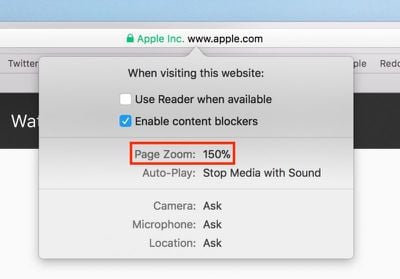
  2. Right-click on the URL or website name that appears in the address bar, and select Settings for This Website. Alternatively, click Safari in the menu bar and you'll see the same option just below Preferences.

  3. Click the Zoom Level percentage and select a new level from the dropdown menu. (Anything greater than 100 zooms in; anything less than 100 zooms out.)
    safari web page zoom

Set the Zoom Level for All Web Pages

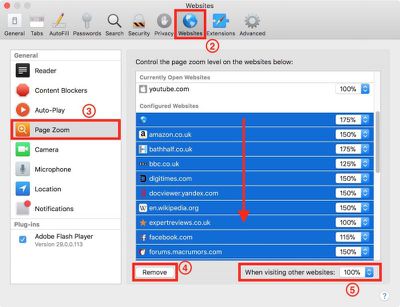
  1. In Safari's menu bar, select Safari -> Preferences....

  2. Click the Websites tab.

  3. Click Page Zoom in the General column.

  4. Clear any Configured Websites in the list by highlighting them all with your mouse button and then selecting Remove.

  5. Click the When visiting other websites pop-up menu and choose a percentage to suit.safari zoom all websites

Set Your Own Zoom Level With a Style Sheet

If none of Safari's zoom level increments sit right with your eyes, here's a way to set your own percentage.

  1. Open the TextEdit application.

  2. Click New Document.

  3. In TextEdit's menu bar, select Format -> Make Plain Text.

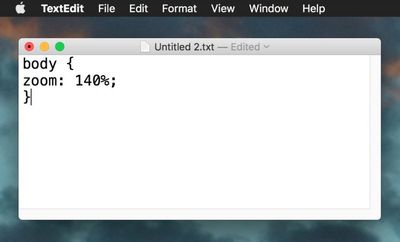
  4. Copy and paste the following CSS code into the file, changing the zoom number to your preferred percentage level:
    body {
    zoom: 140%;
    }

    safari zoom style sheet css

  5. In TextEdit's menu bar, select File -> Save....

  6. Name the file safari zoom.css or whatever you like, just make sure it retains a .css suffix.

  7. Choose a location for the file and click Save.

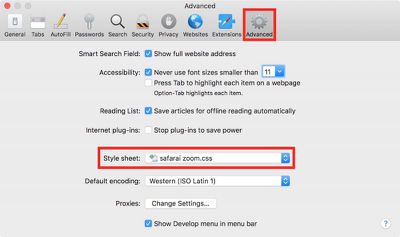
  8. Back in Safari, select Safari -> Preferences... in the menu bar.

  9. Select the Advanced tab.

  10. Click the Style sheet dropdown menu and select Other....

  11. Navigate to the location of your saved CSS file, select it, and click Choose.safari style sheet

From now on, Safari will default to the zoom level specified in your style sheet file, which you can edit at any time.

Force Websites to Use Bigger Font Sizes

Finally, there's an option in Safari that lets you force websites to display text using a minimum font size, without affecting the zoom level.

  1. In Safari's menu bar, select Safari -> Preferences....

  2. Select the Advanced tab.

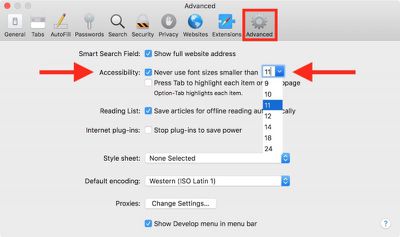
  3. In the Accessibility section, check the box next to Never use font sizes smaller than: and select a font size in the dropdown.safari font size limiter
Tag: Safari

Top Rated Comments

CarlJ Avatar
114 months ago
@MacRumors : There's also the feature (originally from Safari on iOS?) where you can two-finger double-tap on a column of text and Safari will zoom in on that column. I use that All. The. Time. It gets the part I want to look at right then, it's crazy easy to do, and you can switch back with the same gesture.

I also use the Cmd-Opt-+ sometimes, with Cmd-0 to reset to normal size (regardless of how many '+' or '-' you've done).
Score: 2 Votes (Like | Disagree)

Popular Stories

apple design award 2025

Apple Announces 2025 Design Award Winners Ahead of WWDC 2025

Tuesday June 3, 2025 10:14 am PDT by
As we wait for WWDC to kick off next Monday, Apple today announced the winners of its annual Apple Design Awards, recognizing apps and games for their innovation, ingenuity, and technical achievement. The 2025 Apple Design Award winners are listed below, with one app and one game selected per category: Delight and Fun - CapWords (App) and Balatro (Game) Innovation - Play (App) and PBJ -...
1password deal blue

1Password Security Breach: What Was Accessed and What Wasn't

Wednesday November 25, 2026 1:09 pm PST by
Popular password management app 1Password today said it experienced a security breach earlier this month. 1Password says some customer names and email addresses were accessed, but no customer vault contents were compromised. On November 19, 1Password saw indications that an employee's GitHub account had been breached and began investigating. The company says the breached GitHub account was...
apple store down feature

Here's Why the Apple Store is Going Down

Thursday November 26, 2026 5:49 am PST by
Apple's online store is going down for a few hours on a rolling country-by-country basis right now, but do not get your hopes up for new products. Apple takes its online store down for a few hours ahead of Black Friday every year to tease its annual gift card offer with the purchase of select products. The store is down in Australia, New Zealand, and Thailand, right now, and it will...
Latest Stories
The 50+ Best Apple Black Friday Deals Still Available on AirPods, iPads, and More
6 hours ago
HomePod Mini 2 in (RED) Seemingly Spotted Ahead of Announcement
3 hours ago
Apple's M6 and PROLED MacBook Pro Reach New Low Prices for Black Friday
14 hours ago
The MacRumors Show: iPhone Air 2 and iPhone 18 Are Coming
14 hours ago
Apple Store in Brisbane Reopening Next Month With New Design
14 hours ago
The 60+ Best Black Friday Accessory Deals on iPhone Chargers, TVs, Headphones, and More
15 hours ago
GTA VI Now (Barely) Running on Apple Silicon Macs
15 hours ago
The Best Black Friday Streaming Deals on Apple TV, Disney+, and More
16 hours ago
Apple TV's 'Carême' Wins International Emmy for Best Drama
17 hours ago
iPhone 18 Production Delay Leaves Apple Little Time Before Launch
17 hours ago
The Best Black Friday AirPods Deals Still Available
9 hours ago
The Best Black Friday Deals on Apple Home Products
18 hours ago
The Best Black Friday iPhone Deals Still Available
9 hours ago
The Best Black Friday iPad Deals Still Available
9 hours ago
The Best Black Friday Apple Watch Deals Still Available
9 hours ago
The Best Black Friday AirTag Deals Still Available
9 hours ago
The Best Black Friday Mac Deals Still Available
9 hours ago
iPhone Share of US Smartphone Market Hits 57% as Rivals Slip
19 hours ago
iPhone 20 Pro Rumored to Feature 3D-Printed Titanium Frame
21 hours ago
Apple's Official 2026 Black Friday Offer Starts Rolling Out
2 days ago
Halide Adds Fill Light Feature for iPhone Duo
2 days ago
MacBook Air Black Friday Deals Now Live With Massive $399 Savings
2 days ago
Amazon Discounts All MacBook Neo Models by $99 for Black Friday
2 days ago
Kodak Launches Unique AirTag Rival With E-Ink Display
2 days ago
Here's Why the Apple Store is Going Down
2 days ago
Apple Still Working on Giant Foldable iPad That Could Cost $5,000
2 days ago
iPhones Dominate China's Weak Singles' Day Smartphone Sales
2 days ago
iPhone 20 Pro Could Feature Ceramic in Limited-Edition Model
2 days ago
Apple Faces Korean Regulator Review Over iPhone 16 AI Advertising
2 days ago
Apple Watch Ultra 4 Hits New Best-Ever Price of $649.99 for Black Friday
2 days ago
Related Apple News: Mark Gurman | Bluetti Elite 10 Power Station | Is It Worth Buying A Titanium Apple Watch | Apple Watch Series 12 Vs Ultra 4 | Apple Watch Series 10 Rumors