Skip to Content

How to Use Safari's Private Browsing Mode

by

This article explains how to use Safari's Private Browsing mode, which prevents your browsing history from being logged on your Apple devices. It's a useful feature if you're buying gifts online for friends or family, for instance, and you don't want anyone with access to your devices to find out what you're up to.
safari icon blue banner
Of course, if you've already been browsing where you shouldn't have and didn't use Safari's dedicated privacy mode, don't worry – we'll also show you two different ways of deleting your existing browsing history. Keep reading to find out how.

Using Safari's Private Browsing Mode

Enabling Private Browsing limits Safari in three important ways: It prevents the browser from creating a history of the pages you visit, it stops AutoFill information like website usernames and passwords from being remembered, and any tabs you open won't be stored in iCloud.

Also, for added peace of mind when you browse privately, Safari automatically prevents cross-site tracking, and requests that sites and third-party content providers don't track you as a rule. Additionally, the privacy mode stops sites from modifying any information stored on your iOS device, and deletes cookies when you close the associated tab.

To enable Private Browsing in Safari, follow these steps.

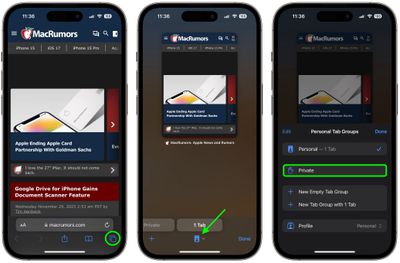
  1. Open Safari on your iPhone or iPad, tap the Pages icon (consisting of two squares) to bring up the open tabs view, and then tap the profile icon, centered at the bottom of the screen.
  2. Tap Private in the pop-up menu card to open a private tab. (You may have to authenticate with Face ID or your passcode.)
    safari

  3. When you're done browsing, return to the open tabs view, individually swipe any open tabs to close them if you wish.
  4. Tap the profile icon again, then choose your regular profile at the top. Your private browsing session is now cleared from memory.
Clearing Existing Browsing History

When you clear your browsing history on a device running iOS 11 or higher, the same logs are cleared on any other devices signed into your ‌iCloud‌ account. The following methods also clear all cookies and web data on the device you're currently using, although AutoFill information remains unchanged.

Method 1

The first method outlined below allows you to either limit the clearing of history, cookies and website data to a specific timeframe, or to delete your existing web history altogether.

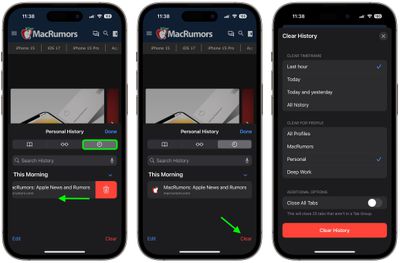
  1. Open Safari and with a tab open, tap the Bookmarks icon (the open book) located at the bottom of the screen.
  2. Tap the tab at the top of the screen with a clock symbol, and you'll see a history of your browsing activity.
  3. To remove instances of recorded visits to specific web pages, swipe leftwards across individual logs in the list and tap the red delete button that appears.
  4. To delete the entire browsing history list, tap Clear.
  5. Choose the timeframe to clear (Last hour, Today, Today and yesterday, or All history), choose the profile or select All Profiles, then tap Clear History.
safari

Method 2

The second method of wiping your browsing history might be considered the 'nuke' option, since it clears all history, cookies and website data on that device, regardless of when the sites were accessed.

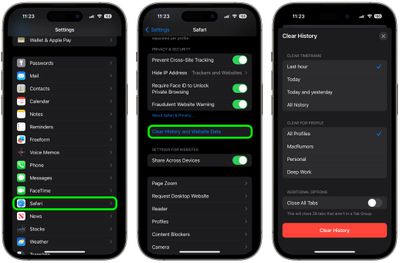
  1. Open the Settings app and scroll down to Safari in the list.
  2. Tap the "Clear History and Website Data" option near the bottom of the menu. (Note that this setting might be grayed out if there's already no history to clear or if parental controls are set for websites.)

  3. Choose the timeframe to clear (Last hour, Today, Today and yesterday, or All history), choose the profile or select All Profiles, then tap Clear History.
  4. Tap Clear History and Data in the pop-up menu to confirm.
    settings

And that's it. Note that these built-in Safari features only make you safer from discovery by other people in the same household.

If your privacy concerns extend to a desire for enhanced security and anonymity online, consider subscribing to a Virtual Private Network (VPN) service that offers an iOS client or supports OpenVPN (Private Internet Access and ProtonVPN are two popular options), and using a Tor-powered browser for iOS.


Tag: Safari

Top Rated Comments

keysofanxiety Avatar
115 months ago

This article explains how to use Safari's Private Browsing mode, which prevents your browsing history from being logged on your Apple devices. It's a useful feature if you're buying gifts online for friends or family, for instance, and you don't want anyone with access to your devices to find out what you're up to.
...yeah... yeah, that’s right... we use it for shopping...

In all seriousness, great article.
Score: 11 Votes (Like | Disagree)
testcard Avatar
115 months ago
“...buying gifts online for friends or family...”
That’s one euphemism I need to work into more conversations.
Score: 6 Votes (Like | Disagree)
puckhead193 Avatar
115 months ago
apple really should just change the name to what we really know what its used for already...
Score: 3 Votes (Like | Disagree)
testcard Avatar
115 months ago
I can really use this info, because I’m always “buying gifts”. ;) :cool:
Impressed that you can still manage to use a keyboard. ;)
Score: 2 Votes (Like | Disagree)
Hastings101 Avatar
115 months ago
Now no one will know I was using my iPhone to buy sex toys for my friends or family
Score: 2 Votes (Like | Disagree)
115 months ago

[doublepost=1517460866][/doublepost]Just saying...
Score: 1 Votes (Like | Disagree)

Popular Stories

apple design award 2025

Apple Announces 2025 Design Award Winners Ahead of WWDC 2025

Tuesday June 3, 2025 10:14 am PDT by
As we wait for WWDC to kick off next Monday, Apple today announced the winners of its annual Apple Design Awards, recognizing apps and games for their innovation, ingenuity, and technical achievement. The 2025 Apple Design Award winners are listed below, with one app and one game selected per category: Delight and Fun - CapWords (App) and Balatro (Game) Innovation - Play (App) and PBJ -...
Apple 2026 Black Friday Event Hero

Apple's Official 2026 Black Friday Offer Starts Rolling Out

Thursday November 26, 2026 8:37 am PST by
Apple's annual four-day Black Friday through Cyber Monday shopping event is now live in Australia, New Zealand, and Thailand, and it will continue to roll out across Europe, the U.S., and Canada as the calendar turns to Friday, November 27 around the world. In the U.S., Apple's terms and conditions say the promotion begins on November 27 at 12 a.m. Pacific Time and ends on November 30 at...
1password deal blue

1Password Security Breach: What Was Accessed and What Wasn't

Wednesday November 25, 2026 1:09 pm PST by
Popular password management app 1Password today said it experienced a security breach earlier this month. 1Password says some customer names and email addresses were accessed, but no customer vault contents were compromised. On November 19, 1Password saw indications that an employee's GitHub account had been breached and began investigating. The company says the breached GitHub account was...
Latest Stories
Here Are the Best Apple Black Friday Leftover Deals You Can Get Today
7 hours ago
HomePod Mini 2 in (RED) Seemingly Spotted Ahead of Announcement
18 hours ago
Apple's M6 and PROLED MacBook Pro Reach New Low Prices for Black Friday
1 day ago
The MacRumors Show: iPhone Air 2 and iPhone 18 Are Coming
1 day ago
Apple Store in Brisbane Reopening Next Month With New Design
1 day ago
The 60+ Best Black Friday Accessory Deals on iPhone Chargers, TVs, Headphones, and More
7 hours ago
GTA VI Now (Barely) Running on Apple Silicon Macs
1 day ago
The Best Black Friday Streaming Deals on Apple TV, Disney+, and More
1 day ago
Apple TV's 'Carême' Wins International Emmy for Best Drama
1 day ago
iPhone 18 Production Delay Leaves Apple Little Time Before Launch
1 day ago
The Best Black Friday AirPods Deals Still Available
1 day ago
The Best Black Friday Deals on Apple Home Products
1 day ago
The Best Black Friday iPhone Deals Still Available
1 day ago
The Best Black Friday iPad Deals Still Available
1 day ago
The Best Black Friday Apple Watch Deals Still Available
1 day ago
The Best Black Friday AirTag Deals Still Available
1 day ago
The Best Black Friday Mac Deals Still Available
1 day ago
iPhone Share of US Smartphone Market Hits 57% as Rivals Slip
1 day ago
iPhone 20 Pro Rumored to Feature 3D-Printed Titanium Frame
2 days ago
The 50+ Best Apple Black Friday Deals Still Available on AirPods, iPads, and More
8 hours ago
Apple's Official 2026 Black Friday Offer Starts Rolling Out
2 days ago
Halide Adds Fill Light Feature for iPhone Duo
2 days ago
MacBook Air Black Friday Deals Now Live With Massive $399 Savings
2 days ago
Amazon Discounts All MacBook Neo Models by $99 for Black Friday
2 days ago
Kodak Launches Unique AirTag Rival With E-Ink Display
2 days ago
Here's Why the Apple Store is Going Down
2 days ago
Apple Still Working on Giant Foldable iPad That Could Cost $5,000
2 days ago
iPhones Dominate China's Weak Singles' Day Smartphone Sales
2 days ago
iPhone 20 Pro Could Feature Ceramic in Limited-Edition Model
2 days ago
Apple Faces Korean Regulator Review Over iPhone 16 AI Advertising
2 days ago
Related Apple News: Business | South Africa | Sport | Local News | Mac






























