Skip to Content

Remotely Control Your iPhone Camera – No Apple Watch Needed

by

Remotely controlling the shutter on your iPhone's camera lets you include yourself in the photo while avoiding the limitations of a selfie. For example, it allows you to take a picture of a wider scene with you included in the frame, which is ideal for landscape shots or group photos. If your iPhone is on a tripod, taking the shot remotely also reduces the risk of camera shake. Here's how to do it – and you don't need an Apple Watch.
iphone12protriplelenscamera
There are more ways than one to take a picture on your iPhone remotely. If you have an Apple Watch, you can open the Camera Remote app that comes included in watchOS (see the second set of steps below). If you don't have an Apple Watch, here's how to use Voice Control.

Use Voice Control to Take a Photo

If you don't have an Apple Watch, don't worry. You can also use Voice Control to remotely control the camera on your iPhone. That's because you can trigger the camera shutter with the volume buttons, which can also be controlled with your voice. Here's how it works.

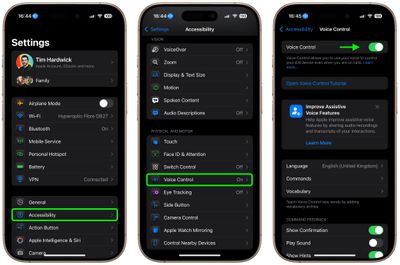
  1. Launch the Settings app and tap Accessibility.
  2. Tap Voice Control.
  3. Turn on the switch next to Voice Control so it's in the green ON position. (You should see a Voice Control active symbol and a little orange dot icon at the top of the screen indicating that Voice Control is using the microphone.)
  4. Next, launch the Camera app and line up your shot.
  5. When you're ready, say "Turn up the volume," to activate the camera's shutter and take the picture.
  6. When you're finished, you can disable Voice Control by toggling the switch again in Settings.
settings

Control Your iPhone's Camera With Apple Watch

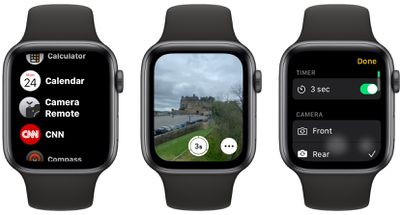
  1. Launch the Camera Remote app on your wrist.
  2. Position your iPhone to frame the shot you want to take.
  3. Tap the Shutter button on your Apple Watch screen.
camera remote
By default, the shot is taken after three seconds to give you time to move into position, but you can disable the time and control other settings including flash, and Live Photo by tapping the ellipsis (three dots) button. The menu that this calls up also lets you switch between the front and rear iPhone camera.

Final tip: If you're familiar with the Shortcuts app, you can find a shortcut in the Gallery called "Say Cheese" that lets you use Siri to control your iPhone's camera remotely. Once you've added it to your active shortcuts and given it permission to access your camera and microphone, you'll be able to take photos remotely by saying "Hey Siri, say cheese."


Top Rated Comments

Veinticinco Avatar
20 months ago
[LIST=1]
* [I]When you're ready, say "Turn up the volume," to activate the camera's shutter and take the picture.[/I]


Well, isn't that just super-intuitive...
Score: 25 Votes (Like | Disagree)
MacUserFella Avatar
20 months ago
“No Apple Watch Needed”

*proceeds to list Apple Watch camera method*
Score: 17 Votes (Like | Disagree)
diego.c Avatar
20 months ago
Me: "Hey Siri, say cheese."

Siri: Cheddar, Mozzarella, Brie...
Score: 12 Votes (Like | Disagree)
20 months ago
It should be easy as “hey Siri take a photo” after launching camera app. “Turn the volume up” doesn’t seem very nice to do it.
Score: 8 Votes (Like | Disagree)
mrgraff Avatar
20 months ago

Can’t I use AirPods to take photos remotely?
Sure, and you can also use a bluetooth shutter remote. The tip in this post isn't the only way.
Score: 8 Votes (Like | Disagree)
20 months ago


[LIST=1]
* When you're ready, say "Turn up the volume," to activate the camera's shutter and take the picture.


Well, isn't that just super-intuitive...
It may not be "super-intuitive" but it is awesome. Instead of knee-jerk dissing on some feature, consider embracing it instead.

Many thanks to MR for providing this excellent tip. I capture many images where for safety or for good image capture reasons manual shutter release is challenging, even with the very helpful Camera Control button.

Hint:
Using voice control means one's hands need not be adding movement to the process of releasing the shutter, which [if one can manage to keep the iPhone really still] means the camera app will not need to apply as much computational photography to the image capture, which means less of the "over processing" unskilled users like to unfairly blame on the iPhone. The other technique to minimize how much computational photography is required is to always keep the camera set to RAW capture. And to realize that less available light always means compromises to image capture.
Score: 6 Votes (Like | Disagree)

Popular Stories

apple design award 2025

Apple Announces 2025 Design Award Winners Ahead of WWDC 2025

Tuesday June 3, 2025 10:14 am PDT by
As we wait for WWDC to kick off next Monday, Apple today announced the winners of its annual Apple Design Awards, recognizing apps and games for their innovation, ingenuity, and technical achievement. The 2025 Apple Design Award winners are listed below, with one app and one game selected per category: Delight and Fun - CapWords (App) and Balatro (Game) Innovation - Play (App) and PBJ -...
1password deal blue

1Password Security Breach: What Was Accessed and What Wasn't

Wednesday November 25, 2026 1:09 pm PST by
Popular password management app 1Password today said it experienced a security breach earlier this month. 1Password says some customer names and email addresses were accessed, but no customer vault contents were compromised. On November 19, 1Password saw indications that an employee's GitHub account had been breached and began investigating. The company says the breached GitHub account was...
apple store down feature

Here's Why the Apple Store is Going Down

Thursday November 26, 2026 5:49 am PST by
Apple's online store is going down for a few hours on a rolling country-by-country basis right now, but do not get your hopes up for new products. Apple takes its online store down for a few hours ahead of Black Friday every year to tease its annual gift card offer with the purchase of select products. The store is down in Australia, New Zealand, and Thailand, right now, and it will...
Latest Stories
The 50+ Best Apple Black Friday Deals Still Available on AirPods, iPads, and More
41 minutes ago
Apple's M6 and PROLED MacBook Pro Reach New Low Prices for Black Friday
8 hours ago
The MacRumors Show: iPhone Air 2 and iPhone 18 Are Coming
8 hours ago
Apple Store in Brisbane Reopening Next Month With New Design
9 hours ago
The 60+ Best Black Friday Accessory Deals on iPhone Chargers, TVs, Headphones, and More
10 hours ago
GTA VI Now (Barely) Running on Apple Silicon Macs
10 hours ago
The Best Black Friday Streaming Deals on Apple TV, Disney+, and More
11 hours ago
Apple TV's 'Carême' Wins International Emmy for Best Drama
11 hours ago
iPhone 18 Production Delay Leaves Apple Little Time Before Launch
12 hours ago
The Best Black Friday AirPods Deals Still Available
4 hours ago
The Best Black Friday Deals on Apple Home Products
12 hours ago
The Best Black Friday iPhone Deals Still Available
4 hours ago
The Best Black Friday iPad Deals Still Available
4 hours ago
The Best Black Friday Apple Watch Deals Still Available
4 hours ago
The Best Black Friday AirTag Deals Still Available
4 hours ago
The Best Black Friday Mac Deals Still Available
4 hours ago
iPhone Share of US Smartphone Market Hits 57% as Rivals Slip
14 hours ago
iPhone 20 Pro Rumored to Feature 3D-Printed Titanium Frame
15 hours ago
Apple's Official 2026 Black Friday Offer Starts Rolling Out
1 day ago
Halide Adds Fill Light Feature for iPhone Duo
1 day ago
MacBook Air Black Friday Deals Now Live With Massive $399 Savings
1 day ago
Amazon Discounts All MacBook Neo Models by $99 for Black Friday
1 day ago
Kodak Launches Unique AirTag Rival With E-Ink Display
2 days ago
Here's Why the Apple Store is Going Down
2 days ago
Apple Still Working on Giant Foldable iPad That Could Cost $5,000
2 days ago
iPhones Dominate China's Weak Singles' Day Smartphone Sales
2 days ago
iPhone 20 Pro Could Feature Ceramic in Limited-Edition Model
2 days ago
Apple Faces Korean Regulator Review Over iPhone 16 AI Advertising
2 days ago
Apple Watch Ultra 4 Hits New Best-Ever Price of $649.99 for Black Friday
2 days ago
New Apple Store Opening in India, Download the Special Wallpaper Now
2 days ago
Related Apple News: Sport | South Africa | Travel | Mac | News





























