Skip to Content

How to Rebuild the Spotlight Index on Your Mac

by

macos spotlight icon e1542458658324Apple has enhanced Spotlight search in macOS in recent years, with the addition of Spotlight Suggestions allowing it to tap into a variety of online data sources like weather and sports. Nevertheless, helping you find apps, documents and other files stored on your Mac is still what Spotlight does best.

That's not to say its core function is infallible, however. If Spotlight can't find files that you know exist on your Mac, or if it stops prioritizing results based on your earlier searches, then it's probably a sign that your system's search index is damaged somehow.

If you're experiencing odd behavior when using Spotlight, you should try rebuilding its search database index. There are Terminal commands that will do the job, but you can achieve the same result via the regular macOS user interface in just a few quick steps. Here's how.

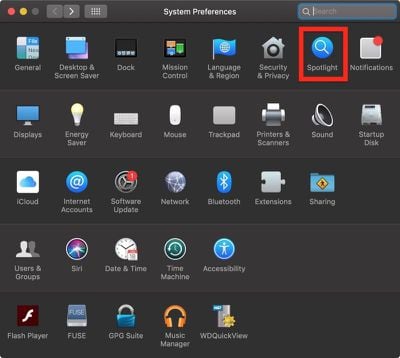
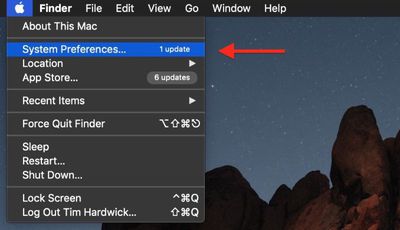
  1. Select System Preferences... from the Apple () menu at the top left of your screen.
    how to reindex spotlight00

  2. Click the Spotlight pane.
    how to reindex spotlight01

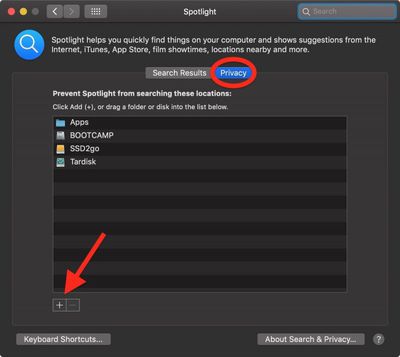
  3. Click the Privacy tab.
  4. Click the Add (+) button.
    how to reindex spotlight02

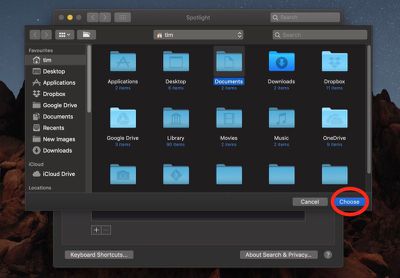
  5. Select the folder or disk whose index you wish to re-build, then click Choose. Alternatively, drag the folder or disk into the list. We've chosen Documents in our example.
    how to reindex spotlight03

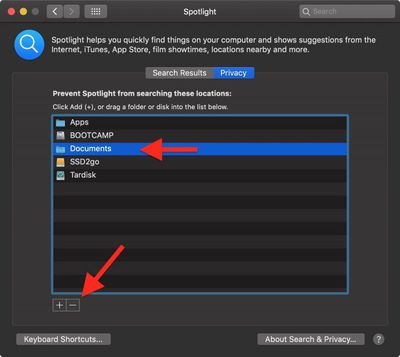
  6. In the same list, click the folder or disk that you just added and then click the Remove (-) button.
    how to reindex spotlight04

  7. Click the red traffic light button to close System Preferences.
Once you've completed these steps, Spotlight will begin reindexing the contents of the folder(s) or disk(s) you chose, which may take some time and a few processor cycles. Depending on which version of macOS you're running, you may see a rebuild progress indicator in Spotlight's menu bar item. With a bit of luck, your Spotlight problems will have been resolved once indexing is complete.

You can also perform a system-wide re-index of the Spotlight database, among many other optimizations, using Titanium Software's free Onyx utility, which is available for all recent versions of macOS.


Top Rated Comments

Weaselboy Avatar
105 months ago
You can also perform a system-wide re-index of the Spotlight database, among many other optimizations, using Titanium Software's free Onyx utility ('https://www.titanium-software.fr/en/onyx.html'), which is available for all recent versions of macOS.

You can also just run this command in Terminal and it will do a system-wide Spotlight reindex.

sudo mdutil -E /

I've tried this rebuild previously and found it did not change anything.
Anyone with different experience?
One issue I have noticed a Spotlight reindex will often fix is if you are getting an incorrect readout for Storage in System Report. If the Spotlight index is corrupted it will make that storage readout all wrong and a reindex can fix it.


Attachment Image
Score: 14 Votes (Like | Disagree)
105 months ago
It seems that Apple assumes Mac users only need to search Mac formatted drives that are connected directly to Mac computers running Mac OS. Forget about shared folders on Windows servers or read-only volumes such as NTFS drives or DVD media. Even with simple filename based searches, Mac OS 9 from 20 years ago or even Unix find seems to find filenames better than Spotlight when searching "non Apple approved" volumes.

Also, what search engine does Apple use on their own Support website? Trying to search for a simple phrase returns hundreds of pages of irrelevant results. It also seems like their website search uses implicit "OR" instead of "AND" for searches containing multiple words. It's pathetic that I have to use an external Google search to find stuff inside Apple's own website.
Score: 6 Votes (Like | Disagree)
macdaddy44 Avatar
105 months ago
This is a more extensive rebuild as it removes a possibly corrupt index database -

• mdutil -i off /
• sudo rm -rf /.Spotlight-V100
• sudo rm -rf /.Spotlight-V200
• mdutil -i on /
• mdutil -E /
Score: 6 Votes (Like | Disagree)
105 months ago
Onyx is a great utility, been using it for years. It also gives you access to enable a bunch of other hidden settings and options. For example, One option I like to enable is turning launchpad's background to greyscale. I find this makes it easier and faster to locate items on the launchpad that I don't frequently access.
Score: 5 Votes (Like | Disagree)
djlythium Avatar
105 months ago
I never knew this was possible.

I love these tutorials!
Score: 3 Votes (Like | Disagree)
105 months ago
when you combine spotlights PDF indexing with the Fujitsu Snapscan with OCR and coverflow, the results are amazeballs.

Apple should advertise this functionality. It’s an amazing paperless workflow. If apple added AI bill, business card, and receipt recognition to spotlight that would be even better.

That’s all I got to say about spotlight! Long live coverflow!
Score: 2 Votes (Like | Disagree)

Popular Stories

apple design award 2025

Apple Announces 2025 Design Award Winners Ahead of WWDC 2025

Tuesday June 3, 2025 10:14 am PDT by
As we wait for WWDC to kick off next Monday, Apple today announced the winners of its annual Apple Design Awards, recognizing apps and games for their innovation, ingenuity, and technical achievement. The 2025 Apple Design Award winners are listed below, with one app and one game selected per category: Delight and Fun - CapWords (App) and Balatro (Game) Innovation - Play (App) and PBJ -...
1password deal blue

1Password Security Breach: What Was Accessed and What Wasn't

Wednesday November 25, 2026 1:09 pm PST by
Popular password management app 1Password today said it experienced a security breach earlier this month. 1Password says some customer names and email addresses were accessed, but no customer vault contents were compromised. On November 19, 1Password saw indications that an employee's GitHub account had been breached and began investigating. The company says the breached GitHub account was...
Apple 2026 Black Friday Event Hero

Apple's Official 2026 Black Friday Offer Starts Rolling Out

Thursday November 26, 2026 8:37 am PST by
Apple's annual four-day Black Friday through Cyber Monday shopping event is now live in Australia, New Zealand, and Thailand, and it will continue to roll out across Europe, the U.S., and Canada as the calendar turns to Friday, November 27 around the world. In the U.S., Apple's terms and conditions say the promotion begins on November 27 at 12 a.m. Pacific Time and ends on November 30 at...
Latest Stories
The 50+ Best Apple Black Friday Deals Still Available on AirPods, iPads, and More
10 hours ago
HomePod Mini 2 in (RED) Seemingly Spotted Ahead of Announcement
7 hours ago
Apple's M6 and PROLED MacBook Pro Reach New Low Prices for Black Friday
17 hours ago
The MacRumors Show: iPhone Air 2 and iPhone 18 Are Coming
17 hours ago
Apple Store in Brisbane Reopening Next Month With New Design
18 hours ago
The 60+ Best Black Friday Accessory Deals on iPhone Chargers, TVs, Headphones, and More
18 hours ago
GTA VI Now (Barely) Running on Apple Silicon Macs
19 hours ago
The Best Black Friday Streaming Deals on Apple TV, Disney+, and More
19 hours ago
Apple TV's 'Carême' Wins International Emmy for Best Drama
20 hours ago
iPhone 18 Production Delay Leaves Apple Little Time Before Launch
21 hours ago
The Best Black Friday AirPods Deals Still Available
13 hours ago
The Best Black Friday Deals on Apple Home Products
21 hours ago
The Best Black Friday iPhone Deals Still Available
13 hours ago
The Best Black Friday iPad Deals Still Available
13 hours ago
The Best Black Friday Apple Watch Deals Still Available
13 hours ago
The Best Black Friday AirTag Deals Still Available
13 hours ago
The Best Black Friday Mac Deals Still Available
13 hours ago
iPhone Share of US Smartphone Market Hits 57% as Rivals Slip
23 hours ago
iPhone 20 Pro Rumored to Feature 3D-Printed Titanium Frame
1 day ago
Apple's Official 2026 Black Friday Offer Starts Rolling Out
2 days ago
Halide Adds Fill Light Feature for iPhone Duo
2 days ago
MacBook Air Black Friday Deals Now Live With Massive $399 Savings
2 days ago
Amazon Discounts All MacBook Neo Models by $99 for Black Friday
2 days ago
Kodak Launches Unique AirTag Rival With E-Ink Display
2 days ago
Here's Why the Apple Store is Going Down
2 days ago
Apple Still Working on Giant Foldable iPad That Could Cost $5,000
2 days ago
iPhones Dominate China's Weak Singles' Day Smartphone Sales
2 days ago
iPhone 20 Pro Could Feature Ceramic in Limited-Edition Model
2 days ago
Apple Faces Korean Regulator Review Over iPhone 16 AI Advertising
2 days ago
Apple Watch Ultra 4 Hits New Best-Ever Price of $649.99 for Black Friday
2 days ago
Related Apple News: South Africa | Reviews | Buyers Guide | Lifestyle | Opinion