Skip to Content

How to Add, Remove, and Rearrange Menu Bar Icons in macOS Mojave

by

The macOS menu bar is a great place for quickly accessing system and application functions using menu extras or "menulets", but it can get cluttered pretty quickly as more and more icons vie for a space there.

If the corner of your Mac's screen is fast becoming an eyesore, here are some quick and simple actions you can perform to bring order to the chaos, plus a few additional tips for making the most of Apple's menu bar extras.

How to Rearrange Icons in the Menu Bar

Plenty of menu bar icons offer useful shortcuts to app and system functions, and may take up permanent residence on your screen. But left to their own devices, the arrangement of said icons is likely to become haphazard. Fortunately, re-organizing them is simple, once you know how to do it.

  1. Hold down the Command (⌘) key.

  2. Hover your mouse cursor over the icon you want to move.

  3. Holding down the left mouse button, drag the icon into your preferred position on the menu bar. Other icons will step aside to make space for it.

  4. Let go of the left mouse button.

move menu bar icon
Note that the Notifications icon in macOS is designed to sit in the far right corner of the menu bar and cannot be moved elsewhere.

How to Remove System Icons From the Menu Bar

Icons linked to system controls can be easily removed from the menu bar in the following way:

  1. Hold down the Command (⌘) key.

  2. Hover your mouse cursor over the icon you want to remove.

  3. Holding down the left mouse button, drag the icon out of the menu bar and onto the desktop.

  4. Let go of the left mouse button.

remove menu bar icon
If the icon doesn't vanish with a "whoosh" sound, then it was likely put there by a third-party app you or another user installed. In that case, look for an option in the associated app's settings such as "Show in Menu Bar" and uncheck it.

How to Add System Icons to the Menu Bar

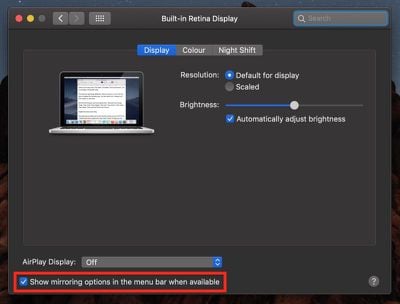
If you removed a system icon from the menu bar and would like it back, or if you'd like to add a fresh one, you can find options in the associated preference panes. For example, to reinstate the AirPlay icon in the menu bar:

  1. Click the apple symbol in the far left of the menu bar and select System Preferences....
  2. Select the Display preference pane.
  3. At the bottom of the pane, check the box to "Show mirroring options in the menu bar when available".
rearrange menu bar icons how to
Similar menu bar options relating to Sound volume, Bluetooth, Siri, Time Machine, and Accessibility status can be found in their respective preference panes. In addition to Wi-Fi status (listed below), the Network pane will also offer "menulet" options for things like modems and VPNs if you have them set up, while menu bar icons related to keyboard, battery, user account, and date/time are located less obviously in the following preference pane menus and tabs:

  • Keyboard -> Input Sources -> Show Input menu in menu bar.
  • Energy Saver -> Show battery status in menu bar.
  • Network -> Wi-Fi -> Show Wi-Fi status in menu bar.
  • Users & Groups -> Login Options -> Show fast user switching menu as Full Name / Account Name / Icon.
  • Date & Time -> Clock -> Show date and time in menu bar.

Menu Bar Extras

For one reason or another, some menulet options remain hidden in System Preferences by default. Interested users can find the full collection in the System folder: Open a Finder window, from the menu bar select Go -> Go to Folder..., and then navigate to /System/Library/CoreServices/Menu Extras.

Some of the extras in this folder are pretty obscure, but one or two might come in handy – like Eject if you use an optical drive, or Ink if you connect a graphics tablet to your Mac, for example. Just double-click any that look useful and they'll be added to the menu bar. They can be removed just as easily using the Command (⌘) key method described above.

Finally, users looking for a more comprehensive method of managing menu bar icons should consider third-party app Bartender 3 ($15).


Top Rated Comments

Westside guy Avatar
115 months ago
So, I already knew this - but... I wanted to say "Thank you!" to the author for writing a succinct, informative tutorial rather than an recording an eight-minute-long YouTube video!

Seriously, I get so tired of searching for information on some subject where the answer could be presented in 50 words of prose, but instead the search results page is littered with ridiculously long YouTube videos. The most ludicrous one I ever came across was a several-minute-long video that consisted of a live screen capture of some dude typing at the bash prompt! WHAT IS WRONG WITH THESE PEOPLE?
Score: 14 Votes (Like | Disagree)
MacDawg Avatar
115 months ago
Nice article, but I'm not sure people are wanting to move them as much as maybe remove them - I'm looking at you Creative Cloud
Why anyone would want to move them
I want to do both... move them and remove some of them (and hide others on a separate bar)
I just like things organized the way I want them and not the way the system organizes them

I use Bartender 3 now to have better control and accomplish what I want
Score: 8 Votes (Like | Disagree)
Schranke Avatar
115 months ago
Damm I have been using mac for many years now and I did not know this:eek:
Well it sure is helpful!
The more you know:apple:
Score: 6 Votes (Like | Disagree)
115 months ago
Nice article, but I'm not sure people are wanting to move them as much as maybe remove them - I'm looking at you Creative Cloud
Open Creative Cloud.
Click on those vertical dots (3 of them) on the icon in the Menu Bar - Prefferences
De-Select Launch at Login.

Do you mean this? If so - I hope it helps.
Score: 4 Votes (Like | Disagree)
maflynn Avatar
115 months ago
Nice article, but I'm not sure people are wanting to move them as much as maybe remove them - I'm looking at you Creative Cloud
Score: 4 Votes (Like | Disagree)
115 months ago
This has been around since OS X 10.2. BTW it doesn't work for all menu items so many will be frustrated when this doesn't work.
Allmost all of them work as of Sierra. Apple added this behaviour to third-party apps.
Score: 3 Votes (Like | Disagree)

Popular Stories

apple design award 2025

Apple Announces 2025 Design Award Winners Ahead of WWDC 2025

Tuesday June 3, 2025 10:14 am PDT by
As we wait for WWDC to kick off next Monday, Apple today announced the winners of its annual Apple Design Awards, recognizing apps and games for their innovation, ingenuity, and technical achievement. The 2025 Apple Design Award winners are listed below, with one app and one game selected per category: Delight and Fun - CapWords (App) and Balatro (Game) Innovation - Play (App) and PBJ -...
Apple 2026 Black Friday Event Hero

Apple's Official 2026 Black Friday Offer Starts Rolling Out

Thursday November 26, 2026 8:37 am PST by
Apple's annual four-day Black Friday through Cyber Monday shopping event is now live in Australia, New Zealand, and Thailand, and it will continue to roll out across Europe, the U.S., and Canada as the calendar turns to Friday, November 27 around the world. In the U.S., Apple's terms and conditions say the promotion begins on November 27 at 12 a.m. Pacific Time and ends on November 30 at...
apple store down feature

Here's Why the Apple Store is Going Down

Thursday November 26, 2026 5:49 am PST by
Apple's online store is going down for a few hours on a rolling country-by-country basis right now, but do not get your hopes up for new products. Apple takes its online store down for a few hours ahead of Black Friday every year to tease its annual gift card offer with the purchase of select products. The store is down in Australia, New Zealand, and Thailand, right now, and it will...
Latest Stories
Apple Now Aims to Repair Rather Than Replace iPhone Duos With Cracked Screens
2 hours ago
Here Are the Best Apple Black Friday Leftover Deals You Can Get Today
11 hours ago
HomePod Mini 2 in (RED) Seemingly Spotted Ahead of Announcement
22 hours ago
Apple's M6 and PROLED MacBook Pro Reach New Low Prices for Black Friday
1 day ago
The MacRumors Show: iPhone Air 2 and iPhone 18 Are Coming
1 day ago
Apple Store in Brisbane Reopening Next Month With New Design
1 day ago
The 60+ Best Black Friday Accessory Deals on iPhone Chargers, TVs, Headphones, and More
11 hours ago
GTA VI Now (Barely) Running on Apple Silicon Macs
1 day ago
The Best Black Friday Streaming Deals on Apple TV, Disney+, and More
1 day ago
Apple TV's 'Carême' Wins International Emmy for Best Drama
1 day ago
iPhone 18 Production Delay Leaves Apple Little Time Before Launch
2 days ago
The Best Black Friday AirPods Deals Still Available
1 day ago
The Best Black Friday Deals on Apple Home Products
2 days ago
The Best Black Friday iPhone Deals Still Available
1 day ago
The Best Black Friday iPad Deals Still Available
1 day ago
The Best Black Friday Apple Watch Deals Still Available
1 day ago
The Best Black Friday AirTag Deals Still Available
1 day ago
The Best Black Friday Mac Deals Still Available
1 day ago
iPhone Share of US Smartphone Market Hits 57% as Rivals Slip
2 days ago
iPhone 20 Pro Rumored to Feature 3D-Printed Titanium Frame
2 days ago
The 50+ Best Apple Black Friday Deals Still Available on AirPods, iPads, and More
3 hours ago
Apple's Official 2026 Black Friday Offer Starts Rolling Out
2 days ago
Halide Adds Fill Light Feature for iPhone Duo
2 days ago
MacBook Air Black Friday Deals Now Live With Massive $399 Savings
2 days ago
Amazon Discounts All MacBook Neo Models by $99 for Black Friday
2 days ago
Kodak Launches Unique AirTag Rival With E-Ink Display
3 days ago
Here's Why the Apple Store is Going Down
3 days ago
Apple Still Working on Giant Foldable iPad That Could Cost $5,000
3 days ago
iPhones Dominate China's Weak Singles' Day Smartphone Sales
3 days ago
iPhone 20 Pro Could Feature Ceramic in Limited-Edition Model
3 days ago
Related Apple News: Rumors | Iphone Duo Take Selfies With Rear Cameras | Bloomberg Com | Homepod Deals | Ipad Mini