Skip to Content

How to Protect Your Apple ID With Security Keys

by

Apple has introduced security keys as an additional step to help users protect their Apple ID accounts. Keep reading to learn why the alternative authentication method is the most secure method available and what you need to do to set it up.
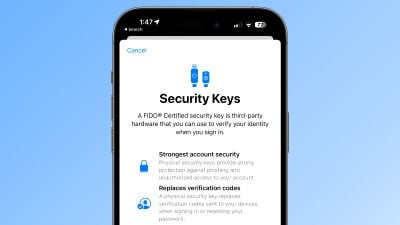
ios 16 3 security keys info

What Are Security Keys?

With the release of iOS 16.3, iPadOS 16.3, and macOS Ventura 13.2, Apple introduced support for security keys, or physical devices that can verify your ‌Apple ID‌ instead of a passcode.

Apple designed the feature for people who require additional protection from targeted attacks, such as phishing or social engineering scams.

The extra protection that security keys provide means that if someone had your ‌Apple ID‌ and your password, they still would not be able to access your account without your physical security key, which replaces the traditional verification code provided by two-factor authentication.

How Do Security Keys Work?

With a security key enabled, signing into an ‌Apple ID‌ requires entering your account's password and then using a security key to complete the two-factor authentication process, instead of the traditional six-digit verification code that is sent to another Apple device signed into the same account.

Why It's Worth Using Security Keys

It's worth noting from the outset that using physical security keys puts the onus on you to be careful not to lose them, otherwise you could permanently lose access to your Apple account. This is why Apple requires users to set up at least two security keys, and supports up to six in total.
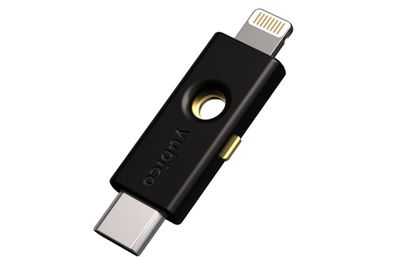
security keys
Having two physical security keys set up means you can keep them in more than one safe place. For example, you could keep one at home and one in your workplace, or you could keep one with you when traveling while the other one remains safe at home.

Once you have security keys set up, you can use them to sign in with your ‌Apple ID‌ on a new device or on the web, reset your ‌Apple ID‌ password, and add additional security keys or remove them from your account.

What You Can't Do With Security Keys

There are a few things worth noting that you can't do with security keys.

  • You can't use them to sign in to iCloud for Windows.
  • You can't sign in to older devices that can't be updated to a software version that supports security keys.
  • Security keys don't support child accounts and Managed Apple IDs.
  • Apple Watches that are paired with a family member's iPhone aren't supported.

Security Keys Worth Considering

Most security keys look similar to a typical USB thumb drive, with some options available with NFC for wireless use and others equipped with Lightning, USB-C, and/or USB-A ports for direct connectivity with iPhones, iPads, and Macs.

There are many options on the market when buying security keys, but the main things to consider when choosing one are that it is FIDO Certified and that it has a connector that works with your Apple devices. Some options recommended by Apple include:

Visit the FIDO Showcase website for a complete list of keys certified by the FIDO Alliance.

How to Enable Security Keys on iPhone and iPad

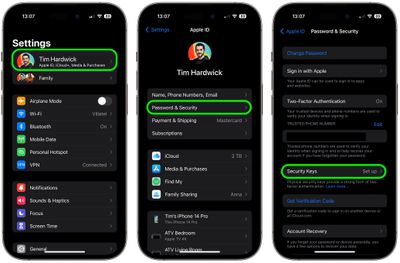
  1. Launch the Settings app on your iOS device.
  2. Tap your name in the ‌Apple ID‌ banner.
  3. Tap Password & Security.
  4. Tap Security Keys.
  5. Tap the blue Add Security Keys button and follow the on-screen instructions.
settings

You can remove security keys at any time by repeating the steps outlined above and tapping or clicking on Remove All Security Keys. Doing so causes your ‌Apple ID‌ to revert to using a traditional six-digit verification code for two-factor authentication.

How to Enable Security Keys on Mac

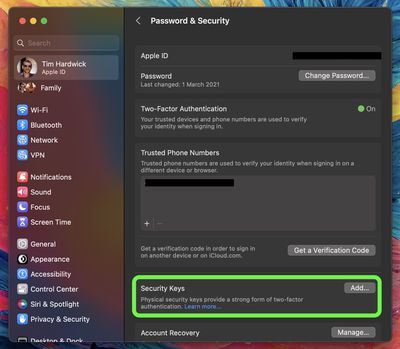
  1. Click the Apple symbol () in your Mac's menu bar and choose System Settings….
  2. Click your name at the top of the sidebar.
    settings

  3. Click Password & Security.
  4. In the "Security Keys" menu section, click Add…, then follow the onscreen instructions.
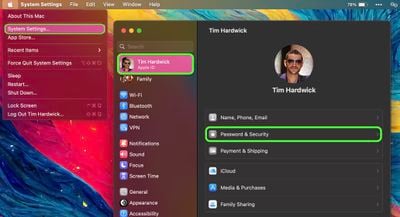
    settings

After following the above steps you will be given the opportunity to review the devices linked to your ‌Apple ID‌, with options to stay signed in to or log out of any associated Apple devices.

You can stop using security keys on your Mac by going to System Settings -> [your name] -> Password & Security. Click Security Keys, then click Remove All Security Keys. Doing so causes your ‌Apple ID‌ to revert to using a traditional six-digit verification code for two-factor authentication.

Top Rated Comments

F23 Avatar
46 months ago
Introducing the Apple Security Key for $199, we think you're going to love it.
Score: 17 Votes (Like | Disagree)
TheYayAreaLiving 🎗️ Avatar
46 months ago

Introducing the Apple Security Key for $199, we think you're going to love it.
I'm afraid it will be subscription-based :(. Apple's main focus is to generate money through Services nowadays :(
Score: 15 Votes (Like | Disagree)
antiprotest Avatar
46 months ago
Everything looks good until we find out Apple lets thieves use "shake to undo" to reset and switch to their own key.

And then everybody will have to use a screen time code to plug that hole too.
Score: 11 Votes (Like | Disagree)
centauratlas Avatar
46 months ago

I cannot tell you how many flash drives I have misplaced over the years, so I fear losing my security key and then I'm really screwed without anyone having to steal my device.

Am I missing something with this approach? How do the thieves bypass my second screen time pin without trying to crack the 4-digit pin? Is there a back door? I realize that it could take time to methodically run through the 10,000 combinations. Not the most secure I agree, but if it slows them down long enough for me to take action, then it's better than no security key and no password.

I'm just asking because I want to learn and know what I am up against.
Someone already answered this, but Apple needs additional steps to protect the AppleID. Some possibilities. Some/all could be optional:

1. 72 hour delay period before you are locked out - so you could back out of it from a different Apple Device, e.g. iPad.
2. Require FaceID/TouchID in addition to the password to reset it. And/or require the old password be entered to reset it.
3. Require confirmation on a different logged in Apple device, so it can't be done from the stolen device.
4. Sign phone out of iCloud for the paired iPhone from the Watch.
5. Or allow you to lock the paired phone from the Watch so that it needs a password AND confirmation from a different Apple device before they can do anything.

:-)
Score: 9 Votes (Like | Disagree)
Mr. Dee Avatar
46 months ago
Sorry, I’ll take my chances and just avoid using my passcode in public places.
Score: 9 Votes (Like | Disagree)
Apple_Robert Avatar
46 months ago
The security keys don't fully protect your Apple ID account. The keys are useless in protecting your Apple ID account if someone knows your phone passcode and takes control of your phone.
Score: 9 Votes (Like | Disagree)

Popular Stories

1password deal blue

1Password Security Breach: What Was Accessed and What Wasn't

Wednesday November 25, 2026 1:09 pm PST by
Popular password management app 1Password today said it experienced a security breach earlier this month. 1Password says some customer names and email addresses were accessed, but no customer vault contents were compromised. On November 19, 1Password saw indications that an employee's GitHub account had been breached and began investigating. The company says the breached GitHub account was...
apple design award 2025

Apple Announces 2025 Design Award Winners Ahead of WWDC 2025

Tuesday June 3, 2025 10:14 am PDT by
As we wait for WWDC to kick off next Monday, Apple today announced the winners of its annual Apple Design Awards, recognizing apps and games for their innovation, ingenuity, and technical achievement. The 2025 Apple Design Award winners are listed below, with one app and one game selected per category: Delight and Fun - CapWords (App) and Balatro (Game) Innovation - Play (App) and PBJ -...
ipad pro prime

Apple Has iPads Running macOS Internally, Says Gurman

Wednesday November 25, 2026 4:55 am PST by
Apple has iPads running macOS internally and has had them "for some time," according to Bloomberg's Mark Gurman, although he says no work is currently being done to bring the Mac operating system to iPads. Speaking on his latest Power On podcast, Gurman said there is "no work being done to consumerize macOS on the iPad." Rather, Apple will continue to bring Mac features and apps like Final Cut ...
Latest Stories
The 50+ Best Apple Black Friday Deals on AirPods, iPads, MacBooks, and More
2 hours ago
Apple's M6 and PROLED MacBook Pro Reach New Low Prices for Black Friday
2 hours ago
The MacRumors Show: iPhone Air 2 and iPhone 18 Are Coming
2 hours ago
Apple Store in Brisbane Reopening Next Month With New Design
2 hours ago
The 60+ Best Black Friday Accessory Deals on iPhone Chargers, TVs, Headphones, and More
3 hours ago
GTA VI Now (Barely) Running on Apple Silicon Macs
4 hours ago
The Best Black Friday Streaming Deals on Apple TV, Disney+, and More
4 hours ago
Apple TV's 'Carême' Wins International Emmy for Best Drama
5 hours ago
iPhone 18 Production Delay Leaves Apple Little Time Before Launch
6 hours ago
The Best Black Friday AirPods Deals
6 hours ago
The Best Black Friday Deals on Apple Home Products
6 hours ago
The Best Black Friday iPhone Deals
6 hours ago
The Best Black Friday iPad Deals
6 hours ago
The Best Black Friday Apple Watch Deals
7 hours ago
The Best Black Friday AirTag Deals
7 hours ago
The Best Black Friday Mac Deals
7 hours ago
iPhone Share of US Smartphone Market Hits 57% as Rivals Slip
7 hours ago
iPhone 20 Pro Rumored to Feature 3D-Printed Titanium Frame
9 hours ago
Apple's Official 2026 Black Friday Offer Starts Rolling Out
1 day ago
Halide Adds Fill Light Feature for iPhone Duo
1 day ago
MacBook Air Black Friday Deals Now Live With Massive $399 Savings
1 day ago
Amazon Discounts All MacBook Neo Models by $99 for Black Friday
1 day ago
Kodak Launches Unique AirTag Rival With E-Ink Display
1 day ago
Here's Why the Apple Store is Going Down
1 day ago
Apple Still Working on Giant Foldable iPad That Could Cost $5,000
1 day ago
iPhones Dominate China's Weak Singles' Day Smartphone Sales
1 day ago
iPhone 20 Pro Could Feature Ceramic in Limited-Edition Model
1 day ago
Apple Faces Korean Regulator Review Over iPhone 16 AI Advertising
1 day ago
Apple Watch Ultra 4 Hits New Best-Ever Price of $649.99 for Black Friday
1 day ago
New Apple Store Opening in India, Download the Special Wallpaper Now
2 days ago
Related Apple News: Opinion | Technology | Politics | Mac | Culture