Skip to Content

How to Use Night Shift in macOS Sierra 10.12.4

by

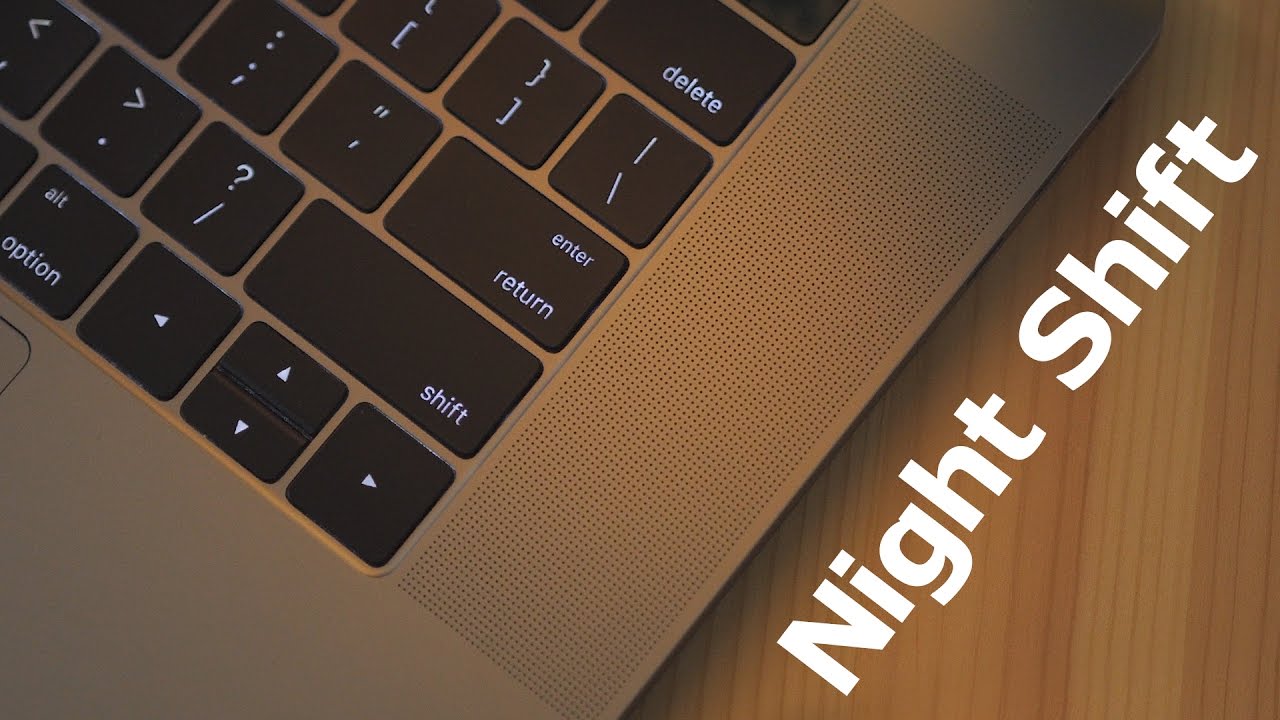
Night Shift, the feature first introduced in iOS devices with iOS 9.3, has expanded to the Mac with the release of 10.12.4. Night Shift is compatible with 2012 and newer Macs, so it won't work on older machines.

For those unfamiliar with Night Shift, it's designed to cut down on the amount of blue light you're exposed to during the evening by shifting the display of a Mac to a more yellow tone. Blue light is said to have a harmful effect on your circadian rhythm, making it harder to fall asleep and stay asleep.

Studies suggest that eliminating blue light exposure at night might help you sleep just a bit better, but it does significantly change the look of your display. Many Mac users have been using blue light reduction software f.lux for years now, but with Night Shift, there's no need to install an additional app because it's an operating system feature.

Turning On Night Shift

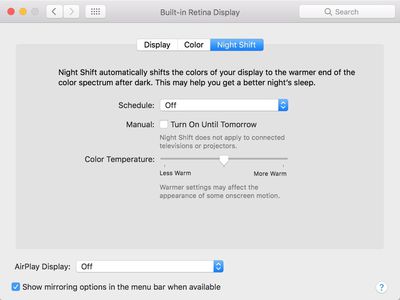
Night Shift's controls can be a little bit difficult to find when you go to use the feature for the first time. The Night Shift options are located in the display section of System Preferences.
nightshiftoptions

  1. Click on the Apple icon in the menu bar and select System Preferences.
  2. Choose the "Displays" icon.
  3. There are three tabs in this menu: Display, Color, and Night Shift. Choose Night Shift.
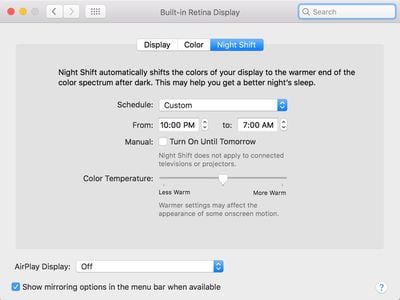
  4. From the "Schedule" option, choose either "Sunset to Sunrise" or "Custom."

As the name suggests, the "Sunset to Sunrise" option causes Night Shift to turn on automatically each night when the sun sets and turn off when the sun rises. It's based on your local sunset and sunrise times. This option requires your location to be enabled in Security & Privacy Preferences so your Mac knows where you are in the world.

The "Custom" option lets you choose a specific start and end time for Night Shift to turn on. With a custom setting, it will turn on and off at the same time each night based on the time that you choose.
nightshiftcustom

Adjusting Color Temperature

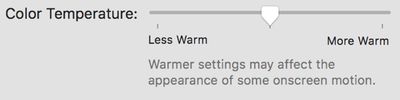
In the same section System Preferences that's used to turn Night Shift on, there's also an option to adjust the color temperature of the feature to your liking.
nightshiftcolortemperature
By default, the temperature is set to the middle, but if you drag the slider to the left, you'll get more blue light, and if you drag it to the right, you'll get a deeper yellow shade with less blue light.

Apple warns that using the warmer end of the spectrum could affect the appearance of some onscreen motion.

Night Shift Quick Toggle

If you want to manually enable or disable Night Shift, there are two ways to do it. You can use the "Manual" setting in System Preferences to force Night Shift to turn on, or you can use the Notification Center, which is quicker. For the Notification Center:

  1. Click on the Notification Center menu bar icon, which is denoted by three lines. It'll open to the Today view. nightshiftnotificationcenter
  2. Scroll up to the top of the Notification Center.
  3. Click on the "Night Shift" toggle to turn the feature on or turn it off.
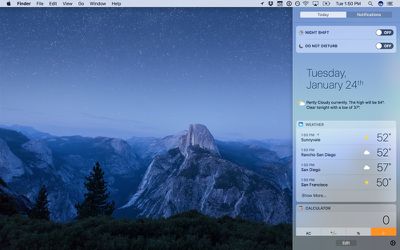
Choosing one of the manual toggle options when Night Shift is off will toggle it on until sunrise (or a custom set time) no matter what time it is. Toggling it off will turn it off completely.

Siri

Siri, introduced in macOS Sierra, can be used to turn Night Shift on or off. Click the Siri button in the menu bar or the dock and say "Turn on Night Shift" or "Turn off Night Shift" to control the Night Shift feature.
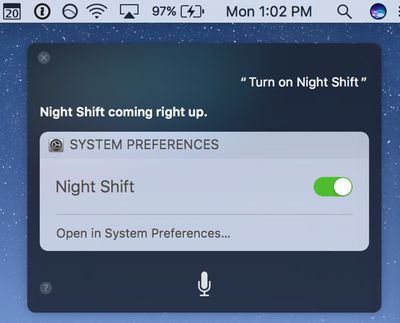
nightshiftsiri

External Monitors

Night Shift extends to external displays that are connected to your Mac, shifting the temperature to a warmer tone to match the Mac's display. It is not an individual option that can be applied to a display, but rather mirrors the Mac setting.

Night Shift does not extend to connected televisions or projectors, however, nor does it always work reliably with an external display.

Compatibility

Night Shift works with Macs manufactured in 2012 and later and it is not available on older machines. A full list of devices that support Night Shift is below:

  • MacBook (Early 2015 or newer)
  • MacBook Air (Mid 2012 or newer)
  • MacBook Pro (Mid 2012 or newer)
  • Mac mini (Late 2012 or newer)
  • iMac (Late 2012 or newer)
  • Mac Pro (Late 2013 or newer)
  • Apple LED Cinema Display
  • Apple Thunderbolt Display
  • LG UltraFine 5K Display
  • LG UltraFine 4K Display

Limitations

There is no option to toggle Night Shift on and off for specific apps, so if you wanted to be able to do something like turn Night Shift off when you use Photoshop or watch videos, there's no way to do it. It's all or nothing.


Related Forum: macOS Sierra

Top Rated Comments

126 months ago
Correct me if I'm wrong but it doesn't seem to work on older MacBook Pros, I can't find the Night Shift tab on my late 2011 13" MacBook Pro.
Not wrong ... Apple are intentionally devaluing older hardware ... no actual reason for this missing feature ... flux has been working fine on my 2010 MBP a long time ... the hardware can handle it ... unless Apple are saying that their engineers cannot do what flux clearly can!!!

It used to be that hardware was not intentionally made obsolete in terms of features ... unless there was no choice.
Score: 11 Votes (Like | Disagree)
ryanmcv Avatar
126 months ago
I was able to turn on Night Shift on my late 2010 Air using instructions I found on https://pikeralpha.wordpress.com/2017/01/30/4398/

So far it works.
Thanks for the link! Used the instructions to enable Night Shift on my 15" MacBook Pro (Early 2011). It works perfectly! I created a step-by-step guide to make things a bit clearer.

View the steps here:

https://pikeralpha.wordpress.com/2017/01/30/4398/#comment-9146
Score: 6 Votes (Like | Disagree)
graycrow Avatar
126 months ago
I was able to turn on Night Shift on my late 2010 Air using instructions I found on https://pikeralpha.wordpress.com/2017/01/30/4398/

So far it works.
Score: 4 Votes (Like | Disagree)
126 months ago
It's a little odd that the headline feature replicates the actions of a free app that's been around for years
This always happens. I usually prefer Apple's own implantation of said new features though.
Score: 4 Votes (Like | Disagree)
faded_glory Avatar
126 months ago
I can understand features that require more up to date versions of bluetooth, etc, not working on older Macs, but this is about people's sleep and therefore their health. So to disable it on on older Macs is grotesquely cynical.
Seriously disappointed with Apple over this.
Score: 3 Votes (Like | Disagree)
graycrow Avatar
126 months ago

I see an opportunity for an app. You could cobble this up for pre-2012 Macs. You could do it in Applescript... if the time is x or later then change the hue of the monitor so that it's the same pink as nightshift. SURELY somebody has already done this?
It's called f.lux.
Score: 3 Votes (Like | Disagree)

Popular Stories

apple design award 2025

Apple Announces 2025 Design Award Winners Ahead of WWDC 2025

Tuesday June 3, 2025 10:14 am PDT by
As we wait for WWDC to kick off next Monday, Apple today announced the winners of its annual Apple Design Awards, recognizing apps and games for their innovation, ingenuity, and technical achievement. The 2025 Apple Design Award winners are listed below, with one app and one game selected per category: Delight and Fun - CapWords (App) and Balatro (Game) Innovation - Play (App) and PBJ -...
Apple 2026 Black Friday Event Hero

Apple's Official 2026 Black Friday Offer Starts Rolling Out

Thursday November 26, 2026 8:37 am PST by
Apple's annual four-day Black Friday through Cyber Monday shopping event is now live in Australia, New Zealand, and Thailand, and it will continue to roll out across Europe, the U.S., and Canada as the calendar turns to Friday, November 27 around the world. In the U.S., Apple's terms and conditions say the promotion begins on November 27 at 12 a.m. Pacific Time and ends on November 30 at...
1password deal blue

1Password Security Breach: What Was Accessed and What Wasn't

Wednesday November 25, 2026 1:09 pm PST by
Popular password management app 1Password today said it experienced a security breach earlier this month. 1Password says some customer names and email addresses were accessed, but no customer vault contents were compromised. On November 19, 1Password saw indications that an employee's GitHub account had been breached and began investigating. The company says the breached GitHub account was...
Latest Stories
The 50+ Best Apple Black Friday Deals Still Available on AirPods, iPads, and More
3 hours ago
Here Are the Best Apple Black Friday Leftover Deals You Can Get Today
2 hours ago
HomePod Mini 2 in (RED) Seemingly Spotted Ahead of Announcement
13 hours ago
Apple's M6 and PROLED MacBook Pro Reach New Low Prices for Black Friday
23 hours ago
The MacRumors Show: iPhone Air 2 and iPhone 18 Are Coming
23 hours ago
Apple Store in Brisbane Reopening Next Month With New Design
1 day ago
The 60+ Best Black Friday Accessory Deals on iPhone Chargers, TVs, Headphones, and More
2 hours ago
GTA VI Now (Barely) Running on Apple Silicon Macs
1 day ago
The Best Black Friday Streaming Deals on Apple TV, Disney+, and More
1 day ago
Apple TV's 'Carême' Wins International Emmy for Best Drama
1 day ago
iPhone 18 Production Delay Leaves Apple Little Time Before Launch
1 day ago
The Best Black Friday AirPods Deals Still Available
19 hours ago
The Best Black Friday Deals on Apple Home Products
1 day ago
The Best Black Friday iPhone Deals Still Available
19 hours ago
The Best Black Friday iPad Deals Still Available
19 hours ago
The Best Black Friday Apple Watch Deals Still Available
19 hours ago
The Best Black Friday AirTag Deals Still Available
19 hours ago
The Best Black Friday Mac Deals Still Available
19 hours ago
iPhone Share of US Smartphone Market Hits 57% as Rivals Slip
1 day ago
iPhone 20 Pro Rumored to Feature 3D-Printed Titanium Frame
1 day ago
Apple's Official 2026 Black Friday Offer Starts Rolling Out
2 days ago
Halide Adds Fill Light Feature for iPhone Duo
2 days ago
MacBook Air Black Friday Deals Now Live With Massive $399 Savings
2 days ago
Amazon Discounts All MacBook Neo Models by $99 for Black Friday
2 days ago
Kodak Launches Unique AirTag Rival With E-Ink Display
2 days ago
Here's Why the Apple Store is Going Down
2 days ago
Apple Still Working on Giant Foldable iPad That Could Cost $5,000
2 days ago
iPhones Dominate China's Weak Singles' Day Smartphone Sales
2 days ago
iPhone 20 Pro Could Feature Ceramic in Limited-Edition Model
2 days ago
Apple Faces Korean Regulator Review Over iPhone 16 AI Advertising
2 days ago
Related Apple News: South Africa | Health | Lifestyle | World News | Entertainment






























