Skip to Content

Complete Guide to Using AirPods Pro's Newest Features

by

With last year's release of iOS 17, Apple introduced new features for second-generation AirPods Pro, such as Adaptive Audio, the ability mute/unmute yourself when on a phone call, and more.
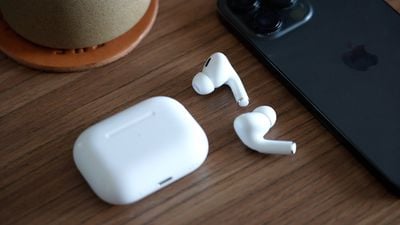
airpods pro 2 thumbnail
Keep reading to learn what use cases the new noise control features are designed for, and how you can control them in iOS 17 when your iPhone is connected to AirPods Pro 2 with updated firmware. To skip to a specific feature, hit one of the links below.

The new features are available on iPhones running iOS 17 when paired with second-generation AirPods Pro updated with the latest firmware. That includes second-generation AirPods Pro with the new USB-C MagSafe Charging Case, as well as second-generation AirPods Pro with the Lightning ‌MagSafe‌ Charging Case.

Check Your AirPods Pro Firmware

Apple does not offer instructions on how to upgrade AirPods software, but firmware is generally installed over-the-air while the ‌‌AirPods‌‌ are connected to an iOS device. Putting the ‌‌‌‌‌AirPods‌‌‌‌‌ in the case, connecting the ‌‌‌‌‌AirPods‌‌‌‌‌ to a power source, and then pairing the ‌‌‌‌‌AirPods‌‌‌‌‌ to an iOS device or Mac should force the update.

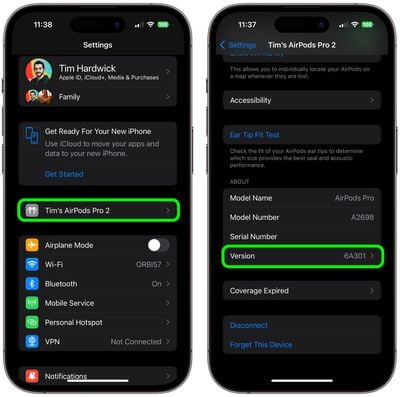
You can check your‌ ‌‌‌‌‌‌‌AirPods Pro‌‌‌‌‌‌‌‌ firmware by connecting them to your iPhone and following these steps:

  1. Open the Settings app.
  2. Tap [your name]'s AirPods Pro.
  3. Scroll down to the "About" section.
  4. Look for the Version number.

settings

If your AirPods Pro are updated with the latest version number (6E188 as of March 2024) you're ready to enjoy the new features in iOS 17.

Adaptive Audio

When the second-generation ‌AirPods Pro‌ were introduced, their Adaptive Transparency feature offered a new way to reduce loud environmental noise for more comfortable everyday listening.

Adaptive Audio, or Adaptive Noise Control, takes that approach to the next level by dynamically blending the existing Transparency and Active Noise Cancellation modes together to deliver the best audio experience in the moment. Adaptive Audio tailors the noise control as you move between different environments and interactions.

airpods pro adaptive audio
This way, loud or distracting noises surrounding, such as the sound of a leaf blower, are automatically reduced, while other noises, like the sudden beep of a car horn, will still be audible.

To enable or disable Adaptive Audio on AirPods Pro, connect them to your iPhone and follow one of these series of steps.

Method 1:

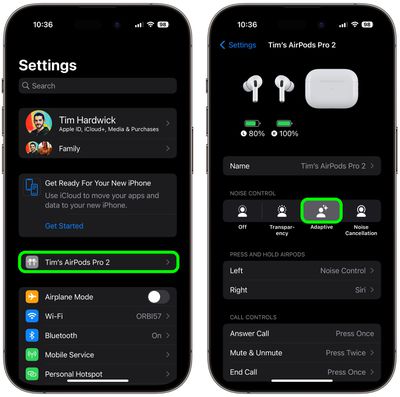
  1. Open Settings.
  2. Tap [your name]'s AirPods Pro.
  3. Under "Noise Control," tap Adaptive.

settings

Method 2:

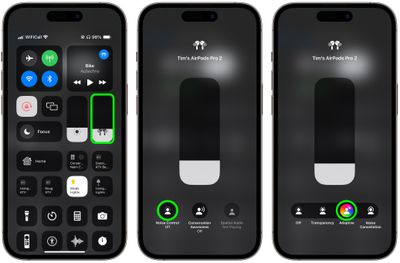
  1. Bring up the Control Center from your iPhone by swiping down from the upper right corner of the screen (on an ‌iPhone‌ with a Home button, swipe up from the bottom of the screen).
  2. Long press on the AirPods Pro volume slider.
  3. Tap the Noise Control button.
  4. Select Adaptive.

settings

Button Control

You can also switch to Adaptive Audio with a long button press, but first you need to assign it to your AirPods Pro 2 controls, like so:

  1. Open Settings.
  2. Tap [your name]'s AirPods Pro.
  3. Under "Press and Hold AirPods," tap Left or Right.
  4. Select Noise Control, then check Adaptive. You can also check Noise Cancellation and/or Transparency to switch between these modes using the same button, or check Off to turn off Noise Control using another long press.
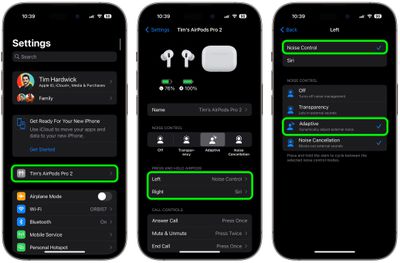
settings

Conversation Awareness

Conversation Awareness is able to detect when someone starts talking to you, and will lower the volume of the audio you're listening to and cut down on background noise accordingly.

airpods pro conversation boost
Conversation Awareness also helps when you're on a call, by reducing noise around you while you speak. As a sub-component of Adaptive Audio, this feature also enhances the voices in front of you so you can hear what's going on.

To enable or disable Conversation Awareness, connect your AirPods Pro 2 to your iPhone and follow these steps.

  1. Open Settings.
  2. Tap [your name]'s AirPods Pro.
  3. Scroll down to the "Audio" section and toggle on/off the switch next to Conversation Awareness.
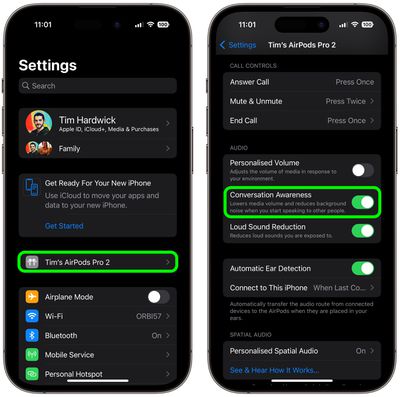
settings

Personalized Volume

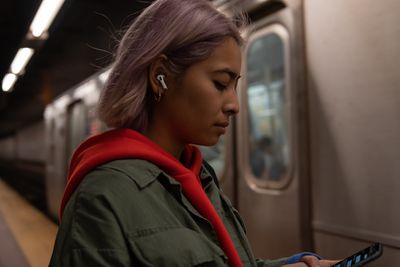
Similar to Adaptive Audio, Personalized Volume uses machine learning to fine-tune your listening experience by understanding environmental conditions and listening preferences.
airpods pro person
Thanks to this feature, your ‌‌iPhone‌‌ is able to learn more about the volume that you prefer over time, and will tweak it as necessary to match your desired sound level.
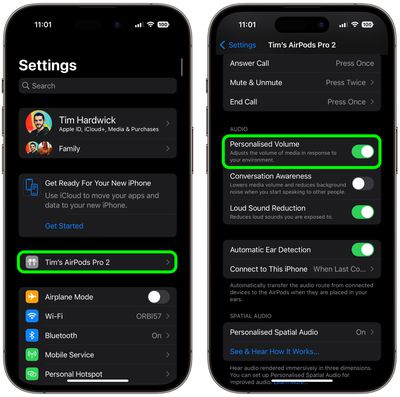
To enable or disable Personalized Volume, connect your AirPods Pro 2 to your iPhone and follow these steps.

  1. Open Settings.
  2. Tap [your name]'s AirPods Pro.
  3. Scroll down to "Audio" and toggle on/off the switch next to Personalized Volume.
settings

Mute Controls

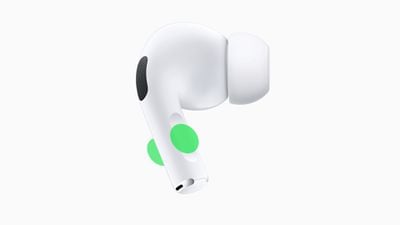
Prior to the release of iOS 17, ‌AirPods Pro‌ did not include an assignable on-board mute function. Thankfully, that's no longer the case. If you press the stem of your ‌‌AirPods Pro‌‌ earbuds, you will be able to mute and unmute yourself while you're on a call.
airpods pro 2 mute
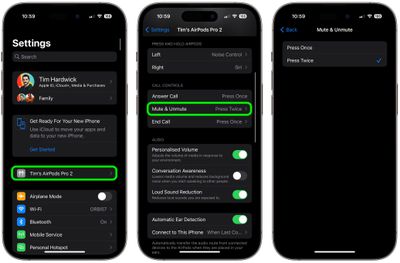
You can assign mute and unmute call controls to activate with a single press or a double press of the button on your AiPods Pro 2. Connect your AirPods Pro 2 to your iPhone and follow these steps to set your preference.

  1. Open Settings.
  2. Tap [your name]'s AirPods Pro.
  3. Scroll down to "Call Controls", then tap Mute & Unmute.
  4. Select either Press Once or Press Twice.
settings

Other AirPods Changes

AirPods have been criticized in the past for sluggish performance when attempting to automatically switch between Apple devices. Fortunately, ‌‌AirPods Pro‌‌ 2 automatically switch between Apple devices much quicker in ‌‌iOS 17 and later‌‌.

Hey Siri vs Siri
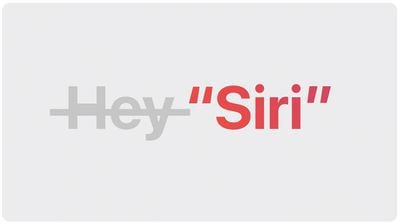
And don't forget, Apple has simplified the voice command to invoke Siri on iPhones running iOS 17 and this also works with second-generation ‌AirPods Pro‌. Instead of "Hey ‌‌Siri‌‌," you can simply say "‌‌Siri‌‌" to activate the voice assistant when wearing your AirPods. You can also issue multiple queries and commands in succession without having to say "‌‌Siri‌‌" again.

Related Roundup: AirPods Pro 3
Buyer's Guide: AirPods Pro (Neutral)
Related Forum: AirPods

Top Rated Comments

42 months ago
I used Conversation Awareness for about 10 minutes before turning it off.

It takes about 4-5 seconds to start the audio back up after it has paused it. If it was quicker maybe it would better but I find it too slow.
Score: 9 Votes (Like | Disagree)
abatabia Avatar
42 months ago
Which feature will keep my AirPods Pro 2 case from draining to nothing once a day now, while Apple support telling me that’s normal behavior. This happened, mind you, with them sitting on my shelf, not being used. Never happened with any previous AirPods I ever owned. Can’t say I’m thrilled with this, or the decline in Apple support.
Score: 7 Votes (Like | Disagree)
fwmireault Avatar
42 months ago

Basically all of those features create unpredictable behavior and negatively affect hearing experience, rather than an easy “on” or “off”. Apple has no way to know what matters the most at any given moment regardless. Trying to outsmart the complexity of the real world is just pointless.
Transparency mode and Active noise cancellation are still an option. If Adaptative audio doesn't work for you, just don't use it. I tried it over the weekend and I quite like it. I'm all for providing options and letting customers making their own choices.
Score: 6 Votes (Like | Disagree)
Shirasaki Avatar
42 months ago
Basically all of those features create unpredictable behavior and negatively affect hearing experience, rather than an easy “on” or “off”. Apple has no way to know what matters the most at any given moment regardless. Trying to outsmart the complexity of the real world is just pointless.
Score: 5 Votes (Like | Disagree)
42 months ago
Does the mute feature work if on a web call, such as Skype or even in a chat such as Discord? It’s not as useful if it’s only for phone calls.
Score: 4 Votes (Like | Disagree)
42 months ago
I don't want my music to get quieter if I have a conversation; I want my music to stop playing. Until they allow that, I don't have any interest in conversation awareness.
Score: 3 Votes (Like | Disagree)

Popular Stories

airpods 5 new blue

Apple Releases New AirPods Firmware

Tuesday November 10, 2026 12:11 pm PST by
Apple today released new firmware for the AirPods Pro 2, AirPods Pro 3, AirPods 4, AirPods 5, and AirPods Max 2. The firmware has a build number of 9B47, up from 9A348/9A350. Apple has been beta testing the new firmware for the last several weeks. In a support document, Apple merely mentioned the new firmware contains "bug fixes and other improvements." Firmware updates can be downloaded...
Apple Glasses Blue Feature

Apple's Smart Glasses Strategy Hinges on Siri and iPhone Apps

Sunday November 15, 2026 9:55 am PST by
Apple plans to unveil its first smart glasses at WWDC in June 2027 and begin shipping them before the end of the year, according to Bloomberg's Mark Gurman. In the latest edition of his "Power On" newsletter, Gurman shared new details about the glasses' design, charging system, and Siri features. Current prototypes of the glasses, internally code-named "N50," are reportedly slightly...
apple design award 2025

Apple Announces 2025 Design Award Winners Ahead of WWDC 2025

Tuesday June 3, 2025 10:14 am PDT by
As we wait for WWDC to kick off next Monday, Apple today announced the winners of its annual Apple Design Awards, recognizing apps and games for their innovation, ingenuity, and technical achievement. The 2025 Apple Design Award winners are listed below, with one app and one game selected per category: Delight and Fun - CapWords (App) and Balatro (Game) Innovation - Play (App) and PBJ -...
Latest Stories
Here Are the Best Apple Black Friday Leftover Deals You Can Get Today
5 hours ago
HomePod Mini 2 in (RED) Seemingly Spotted Ahead of Announcement
17 hours ago
Apple's M6 and PROLED MacBook Pro Reach New Low Prices for Black Friday
1 day ago
The MacRumors Show: iPhone Air 2 and iPhone 18 Are Coming
1 day ago
Apple Store in Brisbane Reopening Next Month With New Design
1 day ago
The 60+ Best Black Friday Accessory Deals on iPhone Chargers, TVs, Headphones, and More
5 hours ago
GTA VI Now (Barely) Running on Apple Silicon Macs
1 day ago
The Best Black Friday Streaming Deals on Apple TV, Disney+, and More
1 day ago
Apple TV's 'Carême' Wins International Emmy for Best Drama
1 day ago
iPhone 18 Production Delay Leaves Apple Little Time Before Launch
1 day ago
The Best Black Friday AirPods Deals Still Available
23 hours ago
The Best Black Friday Deals on Apple Home Products
1 day ago
The Best Black Friday iPhone Deals Still Available
23 hours ago
The Best Black Friday iPad Deals Still Available
23 hours ago
The Best Black Friday Apple Watch Deals Still Available
23 hours ago
The Best Black Friday AirTag Deals Still Available
23 hours ago
The Best Black Friday Mac Deals Still Available
23 hours ago
iPhone Share of US Smartphone Market Hits 57% as Rivals Slip
1 day ago
iPhone 20 Pro Rumored to Feature 3D-Printed Titanium Frame
1 day ago
The 50+ Best Apple Black Friday Deals Still Available on AirPods, iPads, and More
7 hours ago
Apple's Official 2026 Black Friday Offer Starts Rolling Out
2 days ago
Halide Adds Fill Light Feature for iPhone Duo
2 days ago
MacBook Air Black Friday Deals Now Live With Massive $399 Savings
2 days ago
Amazon Discounts All MacBook Neo Models by $99 for Black Friday
2 days ago
Kodak Launches Unique AirTag Rival With E-Ink Display
2 days ago
Here's Why the Apple Store is Going Down
2 days ago
Apple Still Working on Giant Foldable iPad That Could Cost $5,000
2 days ago
iPhones Dominate China's Weak Singles' Day Smartphone Sales
2 days ago
iPhone 20 Pro Could Feature Ceramic in Limited-Edition Model
2 days ago
Apple Faces Korean Regulator Review Over iPhone 16 AI Advertising
2 days ago
Related Apple News: Macbook Air | Iphone 18 Pro | Productred | Apple Watch Series 12 Ultra 4 | Apple Ai Strategy 2024