Skip to Content

How to Make Your iPhone Screen Less Bright in Bed

by

Most of us stare at our iPhones for far too long, and this constant exposure to a bright screen can strain our eyes, especially in low-light conditions or during the twilight hours. That's where the ability to dim your iPhone screen beyond the standard brightness settings becomes a game-changer.
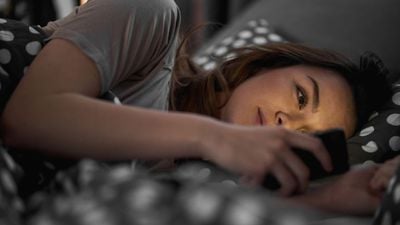
iphone in bed
If the screen of your iPhone or iPad is too bright for comfort, the usual solution is to go to Settings ➝ Display & Brightness and drag the Brightness slider to the left, or open Control Center and adjust the corresponding setting from there. However, if the lowest setting offered by the Brightness level just isn't dim enough for you, there's another way to make your screen even darker.

This feature is particularly useful if you find yourself needing to use your device in dark environments, such as in a bedroom where a partner is sleeping, or in a dimly lit theater. It's also a boon for anyone with light sensitivity, providing a more comfortable viewing experience that minimizes eye strain and fatigue. Let's look at how to set it up below.

Reduce White Point

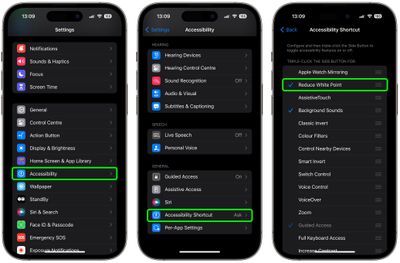
  1. Open Settings on your iPhone.
  2. Select Accessibility from the list of options.
  3. Scroll down and select Accessibility Shortcut.
  4. Tap Reduce White Point, then drag it up near the top of the list using the three lines icon.
settings

Now that's set up, simply triple-click your iPhone's Side button to display the Accessibility Shortcut menu, then tap Reduce White Point.
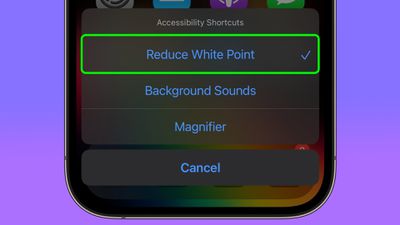
reduce white point
Your iPhone display will now be dimmer than the dimmest setting offered by the standard Brightness level.

Reset White Point

To return the white point to its normal level, simply triple-click the Side button again and tap Reduce White Point to uncheck it.

Adjust White Point

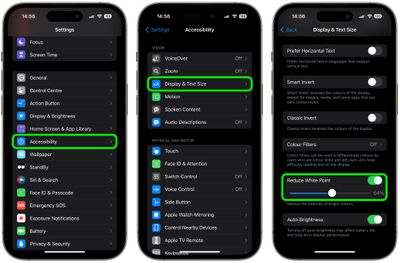
If the White Point is still too bright (or too dim), you can adjust it manually: In Settings, go to Accessibility ➝ Display & Text Size, then scroll down and turn on the switch next to Reduce White Point.
settings
This will reveal a slider that you can move left or right to change the brightness level.

Trigger Reduced White Point at Bedtime

It's possible to make the Reduced White Point setting come on when Bedtime starts, or when your Sleep focus is enabled. This offers an automated approach to minimizing screen brightness, which is particularly beneficial for winding down before bedtime.

Blue light is known for its potential to disrupt natural sleep patterns by inhibiting the production of melatonin, a hormone crucial for sleep regulation. That makes an automation especially useful if you have a habit of reading or browsing on your iPhone as part of your nighttime routine, allowing you to do so without significantly impacting your sleep quality. Here's how it's done.

  1. Open the Shortcuts app, then tap the + icon in the top-right corner of the screen.
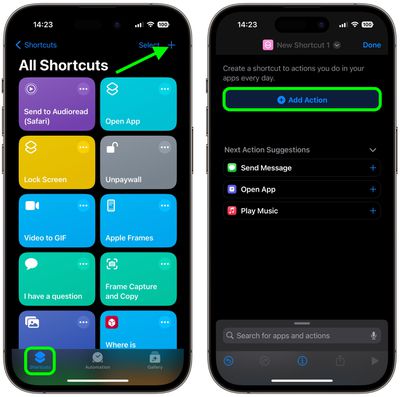
  2. Tap Add Action.
    shortcuts

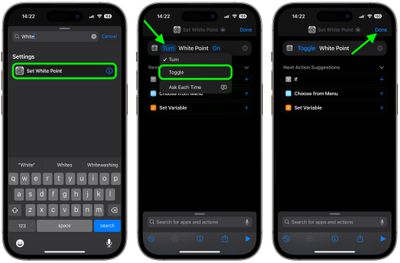
  3. Type "White Point" in the search field, then choose Set White Point when it appears below.
  4. Tap the blue "Turn" text, then choose Toggle from the dropdown menu.
  5. Tap Done in the top-right corner of the screen.
    shortcuts

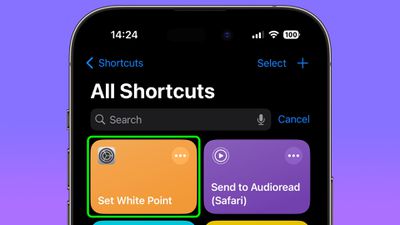
After following the above steps, you should see your new "Set White Point" shortcut in the Shortcuts menu.
shortcuts
The Shortcut is now ready to use in a new custom automation. It's easy to make, just follow these steps.

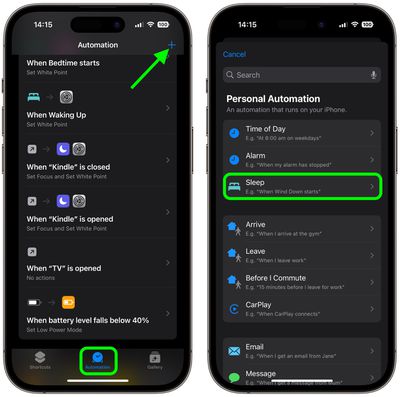
  1. In the Shortcuts app, select the Automation tab, then tap the + icon in the top-right corner of the screen.
  2. Under "Personal Automation," choose Sleep.
    shortcuts

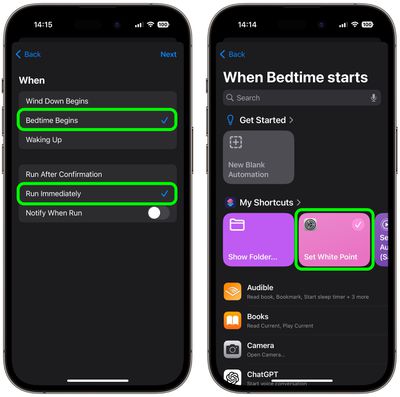
  3. On the "When" screen, choose Bedtime Begins and Run Immediately, then tap Next.
  4. On the "When Bedtime Starts" screen, choose your custom Set White Point shortcut.
    shortcuts

You're all done. In the future, when Bedtime starts or when you enable the Sleep focus, your screen's white point will be automatically reduced.

Trigger White Point When Bedtime Ends

To make sure the white point on your iPhone's display is reset when bedtime ends in the morning, you just have to create an additional automation. This basically involves the same steps you just used to create the first custom automation, except instead of choosing Bedtime Begins in step 3, select Waking Up. Here are those steps again for your convenience, but with a modified step 3.

  1. In the Shortcuts app, select the Automation tab, then tap the + icon in the top-right corner of the screen.
  2. Under "Personal Automation," choose Sleep.
  3. On the "When" screen, choose Waking Up and Run Immediately, then tap Next.
  4. On the "When Bedtime Starts" screen, choose your custom Set White Point shortcut.
That's it! The white point on your iPhone display will now return to normal when your bedtime ends.


Top Rated Comments

34 months ago
Or….hear me out…

Don’t use your phone in bed. It screws up your sleep. 🤷‍♂️
Score: 29 Votes (Like | Disagree)
34 months ago
Great feature - I had no idea this existed. However I take great exception to the phrase "or in a dimly lit theater"! No one should ever be getting their phone out there - it's just rude to everyone around you.
Score: 15 Votes (Like | Disagree)
antiprotest Avatar
34 months ago
Is this better than the zoom filter method?

Accessibility > Zoom > Zoom Filter > Low Light
Score: 9 Votes (Like | Disagree)
34 months ago
Or you can make it even more dim by actually disconnecting from your electronics while in bed and turn them off......
Score: 7 Votes (Like | Disagree)
TheGhostWalker Avatar
34 months ago
I've been using this for a long while now. Instead of using a shortcut, I have a triple press of the lock button to enable it. Super quick and easy to enable and disable

Accessibility → Accessibility Shortcut → Reduce White Point
Score: 4 Votes (Like | Disagree)
Le0M Avatar
34 months ago

Or….hear me out…

Don’t use your phone in bed. It screws up your sleep. 🤷‍♂️
Actually, I found out that reading an ebook while lying down puts me to sleep in no time.
Score: 3 Votes (Like | Disagree)

Popular Stories

apple design award 2025

Apple Announces 2025 Design Award Winners Ahead of WWDC 2025

Tuesday June 3, 2025 10:14 am PDT by
As we wait for WWDC to kick off next Monday, Apple today announced the winners of its annual Apple Design Awards, recognizing apps and games for their innovation, ingenuity, and technical achievement. The 2025 Apple Design Award winners are listed below, with one app and one game selected per category: Delight and Fun - CapWords (App) and Balatro (Game) Innovation - Play (App) and PBJ -...
1password deal blue

1Password Security Breach: What Was Accessed and What Wasn't

Wednesday November 25, 2026 1:09 pm PST by
Popular password management app 1Password today said it experienced a security breach earlier this month. 1Password says some customer names and email addresses were accessed, but no customer vault contents were compromised. On November 19, 1Password saw indications that an employee's GitHub account had been breached and began investigating. The company says the breached GitHub account was...
Apple 2026 Black Friday Event Hero

Apple's Official 2026 Black Friday Offer Starts Rolling Out

Thursday November 26, 2026 8:37 am PST by
Apple's annual four-day Black Friday through Cyber Monday shopping event is now live in Australia, New Zealand, and Thailand, and it will continue to roll out across Europe, the U.S., and Canada as the calendar turns to Friday, November 27 around the world. In the U.S., Apple's terms and conditions say the promotion begins on November 27 at 12 a.m. Pacific Time and ends on November 30 at...
Latest Stories
The 50+ Best Apple Black Friday Deals Still Available on AirPods, iPads, and More
11 hours ago
HomePod Mini 2 in (RED) Seemingly Spotted Ahead of Announcement
8 hours ago
Apple's M6 and PROLED MacBook Pro Reach New Low Prices for Black Friday
18 hours ago
The MacRumors Show: iPhone Air 2 and iPhone 18 Are Coming
18 hours ago
Apple Store in Brisbane Reopening Next Month With New Design
19 hours ago
The 60+ Best Black Friday Accessory Deals on iPhone Chargers, TVs, Headphones, and More
20 hours ago
GTA VI Now (Barely) Running on Apple Silicon Macs
20 hours ago
The Best Black Friday Streaming Deals on Apple TV, Disney+, and More
21 hours ago
Apple TV's 'Carême' Wins International Emmy for Best Drama
21 hours ago
iPhone 18 Production Delay Leaves Apple Little Time Before Launch
22 hours ago
The Best Black Friday AirPods Deals Still Available
14 hours ago
The Best Black Friday Deals on Apple Home Products
22 hours ago
The Best Black Friday iPhone Deals Still Available
14 hours ago
The Best Black Friday iPad Deals Still Available
14 hours ago
The Best Black Friday Apple Watch Deals Still Available
14 hours ago
The Best Black Friday AirTag Deals Still Available
14 hours ago
The Best Black Friday Mac Deals Still Available
14 hours ago
iPhone Share of US Smartphone Market Hits 57% as Rivals Slip
1 day ago
iPhone 20 Pro Rumored to Feature 3D-Printed Titanium Frame
1 day ago
Apple's Official 2026 Black Friday Offer Starts Rolling Out
2 days ago
Halide Adds Fill Light Feature for iPhone Duo
2 days ago
MacBook Air Black Friday Deals Now Live With Massive $399 Savings
2 days ago
Amazon Discounts All MacBook Neo Models by $99 for Black Friday
2 days ago
Kodak Launches Unique AirTag Rival With E-Ink Display
2 days ago
Here's Why the Apple Store is Going Down
2 days ago
Apple Still Working on Giant Foldable iPad That Could Cost $5,000
2 days ago
iPhones Dominate China's Weak Singles' Day Smartphone Sales
2 days ago
iPhone 20 Pro Could Feature Ceramic in Limited-Edition Model
2 days ago
Apple Faces Korean Regulator Review Over iPhone 16 AI Advertising
2 days ago
Apple Watch Ultra 4 Hits New Best-Ever Price of $649.99 for Black Friday
2 days ago
Related Apple News: Entertainment | Motoring | Buyers Guide | Health | Technology






























