Skip to Content

Mastering the Mac App Switcher: Essential Tips and Hidden Tricks

by

Most long-time macOS users will be aware of the Application Switcher. It's invoked using the Command+Tab keyboard shortcut, and lists all of the apps currently running on your Mac, enabling you to quickly switch between them.
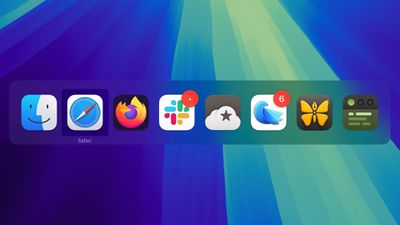
macos app switcher
In this article, we'll run through the Mac App Switcher's most basic functions, and then highlight some of our favorite lesser-known App Switcher tricks that you're bound to find useful once you're familiar with it.

Basic Functions of the App Switcher

When you hold Command and press Tab, the App Switcher overlay appears above all other open windows on your desktop, and remains visible until you release the Command key. Letting go switches you to the last active app, prior to the one you were just using. As you might expect, repeating this action switches you back to the previous active app (you'll see the order change in the row of apps).

app switcher
Repeatedly tapping Tab with the Command key held down cycles you through the list of apps in the App Switcher from left to right, while releasing Command takes you to the selected app. If you continue to hold down Command and press the Tilde (~), the selection moves from right to left.

You can also press the right and left arrow keys to move the selection box forwards and backwards. A two-finger drag on a trackpad does the same thing, or you can use your mouse cursor to highlight an app in the list and then click to select it.

Bring Back a Minimized App

While the App Switcher allows you to cycle through open apps, selecting an app with minimized windows doesn't automatically restore those windows. To do that, activate the App Switcher and navigate through the row of icons. With the desired app highlighted, press and hold the Option key, then release the Command key. This action should restore the minimized window of the app in question.

Show All Windows and Select Between Them

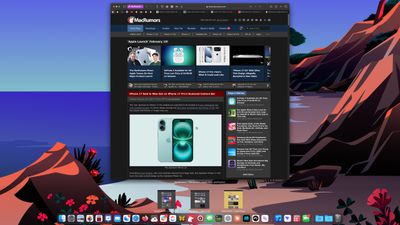
If you press the up or down arrow keys with an icon highlighted in the App Switcher overlay, Exposé will be activated for the selected app, which causes all of its windows to be displayed on screen. (Pressing the 1 key achieves the same result.) Note: Unless you have multiple displays, this won't work if the app is in fullscreen mode.
safari
Open windows are shown front and center, while minimized windows (assuming you are not using Stage Manager) appear along the bottom of the Dock. You can use the arrow keys to switch between them and press Enter to open the one you want, or simply select one using your mouse cursor in the usual way.

Drag and Drop Files

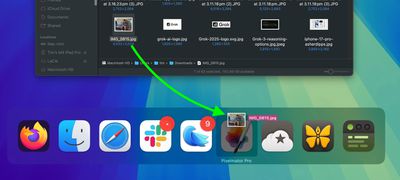
An oft-overlooked function of the App Switcher is its ability to open files. Simply begin to drag a file from a Finder window, then invoke the App Switcher and drag the file onto the relevant app icon in the overlay. Let go of the file and it should open in the selected app.
finder

Close and Hide Apps Via the App Switcher

Pressing the H key in the App Switcher hides all the windows of the selected app (pressing the H key again reveals them). Try cycling through the overlay with the Tab key and tap H as you go – it's a neat way to quickly clear a space on a desktop cluttered with windows. This method streamlines window management by avoiding minimization. By invoking the App Switcher again you can switch back to the hidden app.

Lastly, highlighting an icon in the App Switcher and tapping Q has to be one of the fastest ways to individually quit open Mac apps, and probably qualifies as our favorite App Switcher trick. Do you know any App Switcher functions we haven't covered here? Let us know in the comments.


Top Rated Comments

23 months ago
Nice little write up. I didn't realize there were so many ways to cycle through the apps in switcher. I always used shift+tab to cycle from right to left. It also never occurred to me to drag and drop files onto the switcher. I've always just used the Dock or a second Finder window to show the destination app.
Score: 14 Votes (Like | Disagree)
Unity451 Avatar
23 months ago

The shift key used to reverse the order but I guess they moved it to the Tilda key now?
⌘ + Shift + Tab still goes in reverse. That's what I use.
Score: 13 Votes (Like | Disagree)
23 months ago
Always nice to discover a new trick with something you've used for 20 years!
Score: 10 Votes (Like | Disagree)
bricefr Avatar
23 months ago
Nice article. I have learned something today, thanks.
Score: 8 Votes (Like | Disagree)
23 months ago
One more key to consider is the W key that will close the foremost window of the application highlighted in the App Switcher. Handy if you are presenting, want to switch to that app, but remember the foremost window is not one you want to present.
Score: 5 Votes (Like | Disagree)
23 months ago
hot damn, '~' where have you been my whole life
Score: 4 Votes (Like | Disagree)

Popular Stories

apple design award 2025

Apple Announces 2025 Design Award Winners Ahead of WWDC 2025

Tuesday June 3, 2025 10:14 am PDT by
As we wait for WWDC to kick off next Monday, Apple today announced the winners of its annual Apple Design Awards, recognizing apps and games for their innovation, ingenuity, and technical achievement. The 2025 Apple Design Award winners are listed below, with one app and one game selected per category: Delight and Fun - CapWords (App) and Balatro (Game) Innovation - Play (App) and PBJ -...
1password deal blue

1Password Security Breach: What Was Accessed and What Wasn't

Wednesday November 25, 2026 1:09 pm PST by
Popular password management app 1Password today said it experienced a security breach earlier this month. 1Password says some customer names and email addresses were accessed, but no customer vault contents were compromised. On November 19, 1Password saw indications that an employee's GitHub account had been breached and began investigating. The company says the breached GitHub account was...
Apple 2026 Black Friday Event Hero

Apple's Official 2026 Black Friday Offer Starts Rolling Out

Thursday November 26, 2026 8:37 am PST by
Apple's annual four-day Black Friday through Cyber Monday shopping event is now live in Australia, New Zealand, and Thailand, and it will continue to roll out across Europe, the U.S., and Canada as the calendar turns to Friday, November 27 around the world. In the U.S., Apple's terms and conditions say the promotion begins on November 27 at 12 a.m. Pacific Time and ends on November 30 at...
Latest Stories
The 50+ Best Apple Black Friday Deals Still Available on AirPods, iPads, and More
10 hours ago
HomePod Mini 2 in (RED) Seemingly Spotted Ahead of Announcement
8 hours ago
Apple's M6 and PROLED MacBook Pro Reach New Low Prices for Black Friday
18 hours ago
The MacRumors Show: iPhone Air 2 and iPhone 18 Are Coming
18 hours ago
Apple Store in Brisbane Reopening Next Month With New Design
18 hours ago
The 60+ Best Black Friday Accessory Deals on iPhone Chargers, TVs, Headphones, and More
19 hours ago
GTA VI Now (Barely) Running on Apple Silicon Macs
20 hours ago
The Best Black Friday Streaming Deals on Apple TV, Disney+, and More
20 hours ago
Apple TV's 'Carême' Wins International Emmy for Best Drama
21 hours ago
iPhone 18 Production Delay Leaves Apple Little Time Before Launch
22 hours ago
The Best Black Friday AirPods Deals Still Available
14 hours ago
The Best Black Friday Deals on Apple Home Products
22 hours ago
The Best Black Friday iPhone Deals Still Available
14 hours ago
The Best Black Friday iPad Deals Still Available
14 hours ago
The Best Black Friday Apple Watch Deals Still Available
14 hours ago
The Best Black Friday AirTag Deals Still Available
14 hours ago
The Best Black Friday Mac Deals Still Available
14 hours ago
iPhone Share of US Smartphone Market Hits 57% as Rivals Slip
23 hours ago
iPhone 20 Pro Rumored to Feature 3D-Printed Titanium Frame
1 day ago
Apple's Official 2026 Black Friday Offer Starts Rolling Out
2 days ago
Halide Adds Fill Light Feature for iPhone Duo
2 days ago
MacBook Air Black Friday Deals Now Live With Massive $399 Savings
2 days ago
Amazon Discounts All MacBook Neo Models by $99 for Black Friday
2 days ago
Kodak Launches Unique AirTag Rival With E-Ink Display
2 days ago
Here's Why the Apple Store is Going Down
2 days ago
Apple Still Working on Giant Foldable iPad That Could Cost $5,000
2 days ago
iPhones Dominate China's Weak Singles' Day Smartphone Sales
2 days ago
iPhone 20 Pro Could Feature Ceramic in Limited-Edition Model
2 days ago
Apple Faces Korean Regulator Review Over iPhone 16 AI Advertising
2 days ago
Apple Watch Ultra 4 Hits New Best-Ever Price of $649.99 for Black Friday
2 days ago
Related Apple News: Iphone | Entertainment | Mac | Sport | Opinion






























