Skip to Content

iPhone Duo: Open Two Apps Side by Side and Lock Them As an App Pair

by

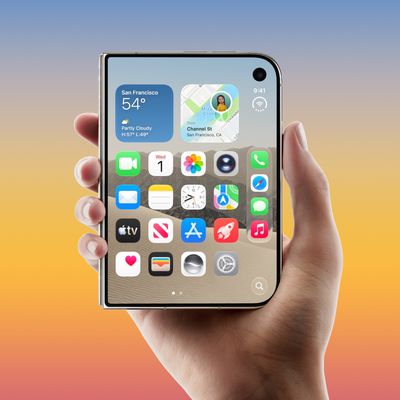
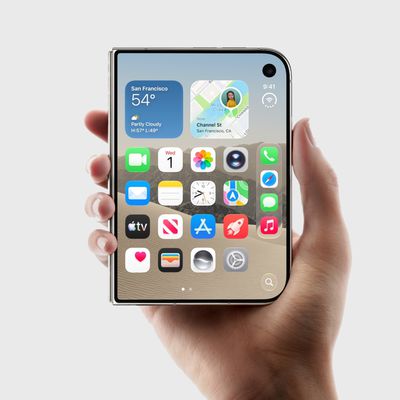
iPhone Duo is the first iPhone that can run two apps on the screen at the same time. Unfold the phone in landscape orientation, and Split View puts two apps side by side on the 7.6-inch inner display. It's especially handy for things like keeping Messages open next to Maps, or Safari next to Notes. Indeed, if there's an app combination that you use often, you can lock two together as an app pair, and they will always launch together. Here's how to do both.
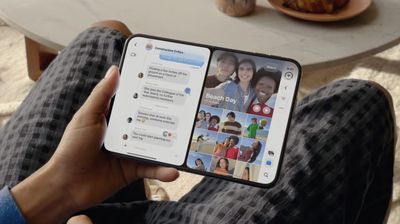
iphone duo split screen scaled e1789143118947

Open Two Apps in Split View

The way it currently works, Split View can be invoked on the iPhone Duo's inner display in landscape orientation. Here are the two ways to start it.

From an App You're Already Using:

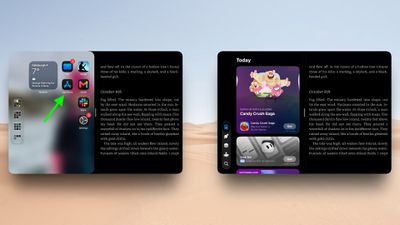
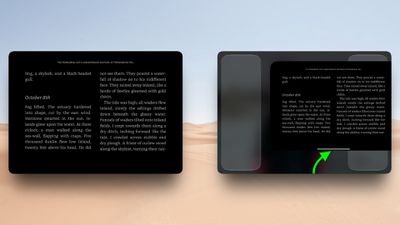
  1. Swipe up from the bottom of the screen, pause in the center, then keep dragging the app toward the left or right edge. The app will settle into that half of the screen, and the Home Screen will appear on the other half.
    kindle

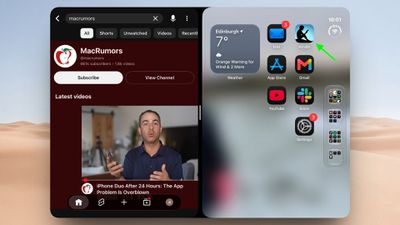
  2. Now select the second app you want to open. You can tap its icon from the Home Screen, swipe down to search for it, or swipe leftwards to find it in the App Library.
  3. Tap the second app, and it will appear alongside the first.
    app store

From the Home Screen or App Library:

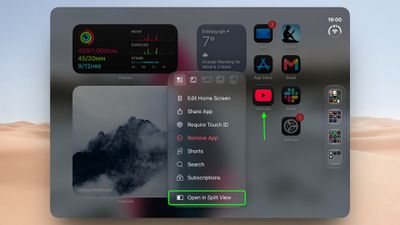
  1. Touch and hold an app icon, then tap Open in Split View.
    split view

  2. Tap the second app you want to open alongside it from the Home Screen, or using swipe-down search or the App Library.
    split view

We've found that in certain cases, two windows of the same app also work. Apps that support multiple windows include Safari, Mail, Notes and Files. Simply open the app in Split View, tap its icon again on the Home Screen or in App Library, and a second window opens beside the first. This way, you can have two webpages open at once, or your inbox next to a draft. It's pretty neat.

To swap the two apps around, just swipe up from the bottom of either app, pause in the center, then drag it to the opposite side.

Lock Two Apps as an App Pair

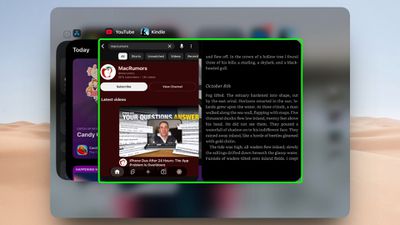
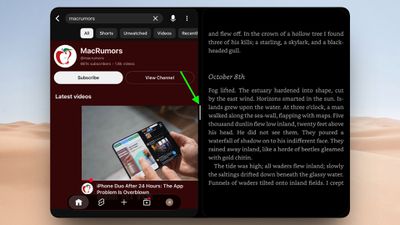
  1. With both apps open in Split View, tap the divider between them.
    lock pair

  2. There isn't really a second step – that's essentially it. The apps are now paired, and the next time you open either one, the other one will open with it automatically.
    locked pair

To unpair them at any time, just drag the divider in the center, all the way to the left or right edge of the screen. The app you push off will close, while the other will return to full screen.

Worth Knowing

Unlike in iPadOS, the app split on iPhone Duo is fixed at 50/50. So if you're used to Split View on iPad, remember that you can't drag the divider to give one app more room. Also, only one app can play audio at a time, so it's not like you can scroll two video feeds side by side and expect to get sound from both.
Related Roundup: iPhone Duo
Buyer's Guide: iPhone Duo (Buy Now)
Related Forum: iPhone

Top Rated Comments

BC2009 Avatar
5 weeks ago

I can’t deny that the iPhone Duo can be a handy and practical device, but definitely not $2k worth for me.

By the way, now that I’m seeing the video, I can tell that iPad OS 26 and its new multi-window interface was the foundation for the multi-tasking interface of the Duo.
Gruber calls the iPhone Duo's multitasking the best tablet multitasking by far -- saying it puts ALL iterations of the iPad multitasking to shame. I will be honest, I find iPad multitasking cumbersome and annoying and 99% of the time and leave it turned off. Very rarely when using the iPad Air with the Smart Keyboard (usually on vacation) I will turn on the multi-window multitasking and use my iPad kinda like a macBook. The only other iPad multitasking I ever found useful was the Split View with one app using like 1/3 of the screen and the other app taking 2/3 of the screen.
Score: 7 Votes (Like | Disagree)
sigmasirrus Avatar
5 weeks ago

Gruber calls the iPhone Duo's multitasking the best tablet multitasking by far -- saying it puts ALL iterations of the iPad multitasking to shame. I will be honest, I find iPad multitasking cumbersome and annoying and 99% of the time and leave it turned off. Very rarely when using the iPad Air with the Smart Keyboard (usually on vacation) I will turn on the multi-window multitasking and use my iPad kinda like a macBook. The only other iPad multitasking I ever found useful was the Split View with one app using like 1/3 of the screen and the other app taking 2/3 of the screen.
I wish they would bring back Split View. The new multitasking is so hard to use and a big step back.
Score: 5 Votes (Like | Disagree)
5 weeks ago

what happens to your pinned apps when you rotate to portrait? does it pick one to show? what if you rotate back to landscape? are they restored?
It will show the active app when you rotate to portrait. When flipped back to horizontal it will then show the two apps Side by side.
Score: 4 Votes (Like | Disagree)
code-m Avatar
5 weeks ago
AndroidOS, welcome to the multi-tasking iOS! Better late than never. 😅
Score: 3 Votes (Like | Disagree)
5 weeks ago

Gruber calls the iPhone Duo's multitasking the best tablet multitasking by far -- saying it puts ALL iterations of the iPad multitasking to shame. I will be honest, I find iPad multitasking cumbersome and annoying and 99% of the time and leave it turned off. Very rarely when using the iPad Air with the Smart Keyboard (usually on vacation) I will turn on the multi-window multitasking and use my iPad kinda like a macBook. The only other iPad multitasking I ever found useful was the Split View with one app using like 1/3 of the screen and the other app taking 2/3 of the screen.
The traffic lights are too small.
There’s gotta be a better way.
Score: 2 Votes (Like | Disagree)
code-m Avatar
5 weeks ago

I just want to see it fit in some pockets!
More surprised there is no body strap accessory. 😅
Score: 2 Votes (Like | Disagree)

Popular Stories

iPhone Duo Outer Display Hand

Apple Aiming to Upgrade the iPhone Duo in Four Ways

Sunday November 15, 2026 8:42 am PST by
Bloomberg's Mark Gurman today said Apple has four goals for future iPhone Duo models: Face ID, an Action button, a telephoto camera, and a thinner-and-lighter design. Gurman said Apple has already developed iPhone Duo 2 prototypes with Face ID on the outer display, but it is "running out of time" to finalize the feature for that model, so it might not arrive until the iPhone Duo...
iPhone Duo Display Cracking

Apple Alerts Stores to iPhone Duo's Display Cracking Issue

Friday October 30, 2026 3:20 pm PDT by
In a memo shared with Apple Stores and Apple Authorized Service Providers this week, and later obtained by MacRumors, Apple provided technicians with guidance on how to diagnose and address the iPhone Duo's inner display cracking issue. If a customer reports the issue, Apple advised technicians to inspect the iPhone Duo and repair or replace it in accordance with their standard procedures....
iphone duo yellow hand

Apple Adds Facial Unlock Option on iPhone Duo in iOS 27.3

Monday November 16, 2026 10:17 am PST by
Apple today added a new option for unlocking the iPhone Duo using the front-facing camera, giving device users multiple ways to access their content. The feature is available in the second iOS 27.3 beta. The option to unlock with facial recognition is only available on the Lock Screen, and authentication via Touch ID is still needed for Apple Pay purchases, adding passwords and logins, and...
Latest Stories
The 50+ Best Apple Black Friday Deals Still Available on AirPods, iPads, and More
3 hours ago
Here Are the Best Apple Black Friday Leftover Deals You Can Get Today
2 hours ago
HomePod Mini 2 in (RED) Seemingly Spotted Ahead of Announcement
13 hours ago
Apple's M6 and PROLED MacBook Pro Reach New Low Prices for Black Friday
1 day ago
The MacRumors Show: iPhone Air 2 and iPhone 18 Are Coming
1 day ago
Apple Store in Brisbane Reopening Next Month With New Design
1 day ago
The 60+ Best Black Friday Accessory Deals on iPhone Chargers, TVs, Headphones, and More
2 hours ago
GTA VI Now (Barely) Running on Apple Silicon Macs
1 day ago
The Best Black Friday Streaming Deals on Apple TV, Disney+, and More
1 day ago
Apple TV's 'Carême' Wins International Emmy for Best Drama
1 day ago
iPhone 18 Production Delay Leaves Apple Little Time Before Launch
1 day ago
The Best Black Friday AirPods Deals Still Available
19 hours ago
The Best Black Friday Deals on Apple Home Products
1 day ago
The Best Black Friday iPhone Deals Still Available
19 hours ago
The Best Black Friday iPad Deals Still Available
19 hours ago
The Best Black Friday Apple Watch Deals Still Available
19 hours ago
The Best Black Friday AirTag Deals Still Available
19 hours ago
The Best Black Friday Mac Deals Still Available
19 hours ago
iPhone Share of US Smartphone Market Hits 57% as Rivals Slip
1 day ago
iPhone 20 Pro Rumored to Feature 3D-Printed Titanium Frame
1 day ago
Apple's Official 2026 Black Friday Offer Starts Rolling Out
2 days ago
Halide Adds Fill Light Feature for iPhone Duo
2 days ago
MacBook Air Black Friday Deals Now Live With Massive $399 Savings
2 days ago
Amazon Discounts All MacBook Neo Models by $99 for Black Friday
2 days ago
Kodak Launches Unique AirTag Rival With E-Ink Display
2 days ago
Here's Why the Apple Store is Going Down
2 days ago
Apple Still Working on Giant Foldable iPad That Could Cost $5,000
2 days ago
iPhones Dominate China's Weak Singles' Day Smartphone Sales
2 days ago
iPhone 20 Pro Could Feature Ceramic in Limited-Edition Model
2 days ago
Apple Faces Korean Regulator Review Over iPhone 16 AI Advertising
2 days ago
Related Apple News: Travel | South Africa | Technology | Health | Entertainment