Skip to Content

iPhone 14: How Crash Detection Works and How to Turn It Off

by

With the launch of iPhone 14 and new Apple Watch models, Apple introduced a new safety feature called Crash Detection. Keep reading to learn what it is, how it works, and how to turn it on and off.
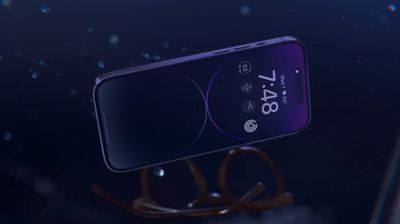
crash detection 1

What Is Crash Detection?

Crash Detection is designed to detect severe car crashes in passenger cars. If you're in a severe crash and unresponsive, your Apple device can automatically call emergency services on your behalf.

How Does Crash Detection Work?

While you're driving or you're a passenger in a motor vehicle, the motion sensor with a high dynamic range gyroscope and high-g accelerometer, GPS, barometer, microphone, and advanced motion algorithms work together in your iPhone or Apple Watch to accurately detect a crash.

When a severe crash is detected, an alert displays on your Apple Watch or iPhone display for 10 seconds. If you're still responsive, you can swipe the screen to call emergency services immediately or dismiss the alert if you don't need to contact them. If after 10 seconds you haven't interacted with your Apple device, a 10-second countdown will start. When it ends, emergency services are contacted.
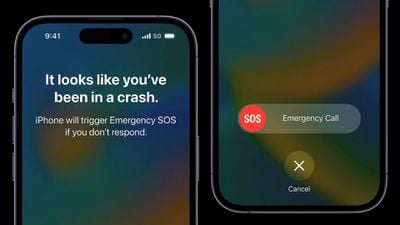
iphone 14 pro car crash detection
When emergency services pick up, the following audio message from Siri begins playing on a loop with five seconds of silence between each replay: "The owner of this iPhone was in a severe car crash and is not responding to their phone." ‌Siri‌ will then relay your estimated location with latitude and longitude and search radius both to emergency services and through your device's speaker.

The message is loudest the first time it is played, after which other replays have a reduced volume in case you are able to speak to emergency services. The message continues to repeat until you tap the Stop Recorded Message button or the call ends.

If you have emergency contacts set up, they will also be notified of the crash after another 10-second countdown, and if you have configured Medical ID information, a slider will appear on the Lock Screen for quick access.
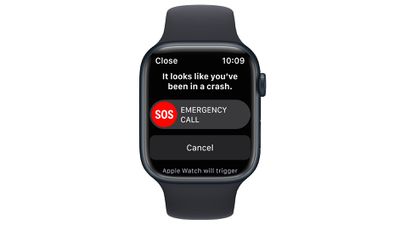
apple watch series 8 crash detection

What Kinds of Crashes Can It Detect?

According to Apple, Crash Detection can detect front impacts, side impacts, rear-end collisions, and rollovers.

Which Apple Devices Support Crash Detection?

Crash Detection is supported on the following iPhone and Apple Watch models.

  • iPhone 14
  • iPhone 14 Plus
  • iPhone 14 Pro
  • iPhone 14 Pro Max
  • Apple Watch SE (2nd Generation)
  • Apple Watch Series 8
  • Apple Watch Ultra

How to Enable Crash Detection

No setup is required. Crash Detection is enabled by default on the above supported devices, so you don't need to do a thing. If you're concerned that the feature could mistakenly register a crash and call emergency services, you can disable it by following the steps below.

How to Disable Crash Detection

  1. Launch the Settings app on your iPhone.
  2. Scroll down and tap through to Emergency SOS.
  3. Under "Crash Detection," toggle off the switch next to Call After Severe Crash.
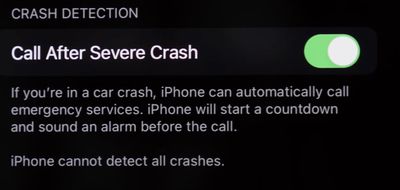
settings
If ever you want to enable the feature, simply toggle on the switch again in Settings.

Related Forums: Apple Watch, iPhone

Top Rated Comments

ProfessionalFan Avatar
55 months ago
When did people become so skeptical and negative of every single thing?

This sounds like a great and useful feature that hopefully nobody here ever needs.

I see no valid reason to disable it.
Score: 14 Votes (Like | Disagree)
55 months ago

Yep. Turning this off.

I really cannot conceive of a point in my city life where a crash that is severe enough that I would need this, and no one else would've called already, if I weren't conscious. I've had too many automated things "butt-dial"... last thing I need is for this to crash detect that I threw groceries on the counter and get the cops to my home.
What absolute nonsense. If you're literally launching your groceries from a trebuchet or something, this'll be one feature that will be very hard to get a false positive on. The feature relies on gyroscopic, microphone, accelerometer, GPS and barometric inputs to trigger it - you won't get all five by slamming your groceries down or putting it in your pocket.
Score: 14 Votes (Like | Disagree)
55 months ago

I really cannot conceive of a point in my city life where a crash that is severe enough that I would need this, and no one else would've called already
Single car crash, no witnesses–maybe at night or in a sparsely populated area. Groceries will not trigger it.
Score: 11 Votes (Like | Disagree)
The Game 161 Avatar
55 months ago
lol zero reason to turn it off
Score: 6 Votes (Like | Disagree)
55 months ago
It’s literally no reason to turn this off. The same people that would turn this off probably don’t wear seatbelts and disable the airbags in their car. Can’t fix stupid.
Score: 5 Votes (Like | Disagree)
PsykX Avatar
55 months ago
Maybe if you don't care about your life, you can turn it off.
Even if it consumes a bit of battery, I'll keep it on :)
Score: 5 Votes (Like | Disagree)

Popular Stories

apple watch series 3 design

Apple Offers Steps to Fix Daylight Saving Time Bug on Apple Watch

Sunday November 1, 2026 3:34 am PST by
Apple has published a support document describing what to do if your Apple Watch continues to show time that's off by one hour after daylight savings time changes. "This incorrect time appears only on the Always On display when your wrist is down," says Apple. "When you activate the display by tapping it or raising your wrist, the time changes to the correct hour." To fix the issue, Apple says ...
muse apple watch app

Meta's Muse AI Agent Comes to Apple Watch

Monday November 9, 2026 1:55 pm PST by
Meta today updated the Muse app for iOS to add Apple Watch support, which means Muse users can access the proactive AI agent from the watch. The app adds the Muse character to the watch with an option to text it, dictate text to it, or call it. There's also a Muse complication for quick access. Muse is Meta's personal AI agent that can complete tasks for users. It is available as a...
siri recap live rewind

watchOS 27.3 Brings Live Rewind and Siri Recap to Apple Watch

Tuesday November 3, 2026 10:35 am PST by
With the first beta of watchOS 27.3, Apple is introducing new Audio Intelligence features it previewed for the Apple Watch Series 12 and Ultra 4 earlier this year. Powered by the S11 chip, Audio Intelligence includes Live Rewind, Siri Recap, Sound Recognition, and Shazam Music Recognition. Sound Recognition and Shazam are already on the watch, but Live Rewind and Siri Recap are now available ...
Latest Stories
Here Are the Best Apple Black Friday Leftover Deals You Can Get Today
5 hours ago
HomePod Mini 2 in (RED) Seemingly Spotted Ahead of Announcement
16 hours ago
Apple's M6 and PROLED MacBook Pro Reach New Low Prices for Black Friday
1 day ago
The MacRumors Show: iPhone Air 2 and iPhone 18 Are Coming
1 day ago
Apple Store in Brisbane Reopening Next Month With New Design
1 day ago
The 60+ Best Black Friday Accessory Deals on iPhone Chargers, TVs, Headphones, and More
5 hours ago
GTA VI Now (Barely) Running on Apple Silicon Macs
1 day ago
The Best Black Friday Streaming Deals on Apple TV, Disney+, and More
1 day ago
Apple TV's 'Carême' Wins International Emmy for Best Drama
1 day ago
iPhone 18 Production Delay Leaves Apple Little Time Before Launch
1 day ago
The Best Black Friday AirPods Deals Still Available
22 hours ago
The Best Black Friday Deals on Apple Home Products
1 day ago
The Best Black Friday iPhone Deals Still Available
22 hours ago
The Best Black Friday iPad Deals Still Available
22 hours ago
The Best Black Friday Apple Watch Deals Still Available
22 hours ago
The Best Black Friday AirTag Deals Still Available
22 hours ago
The Best Black Friday Mac Deals Still Available
22 hours ago
iPhone Share of US Smartphone Market Hits 57% as Rivals Slip
1 day ago
iPhone 20 Pro Rumored to Feature 3D-Printed Titanium Frame
1 day ago
The 50+ Best Apple Black Friday Deals Still Available on AirPods, iPads, and More
6 hours ago
Apple's Official 2026 Black Friday Offer Starts Rolling Out
2 days ago
Halide Adds Fill Light Feature for iPhone Duo
2 days ago
MacBook Air Black Friday Deals Now Live With Massive $399 Savings
2 days ago
Amazon Discounts All MacBook Neo Models by $99 for Black Friday
2 days ago
Kodak Launches Unique AirTag Rival With E-Ink Display
2 days ago
Here's Why the Apple Store is Going Down
2 days ago
Apple Still Working on Giant Foldable iPad That Could Cost $5,000
2 days ago
iPhones Dominate China's Weak Singles' Day Smartphone Sales
2 days ago
iPhone 20 Pro Could Feature Ceramic in Limited-Edition Model
2 days ago
Apple Faces Korean Regulator Review Over iPhone 16 AI Advertising
2 days ago
Related Apple News: Stop Siri Search Accessing Iphone Apps | South Africa | Lifestyle | Nimble Wally Stretch | Iphone Duo Smart Take Group Photos































