Skip to Content

How to Use the New iPad Dock in iOS 11

by

iOS 11 is an update that brings a much improved user experience to the iPad, and front and center is a new dock. The new dock not only houses far more apps, much like the dock on the Mac, but it also much improves multitasking by allowing iPad users to quickly open apps and switch between them.
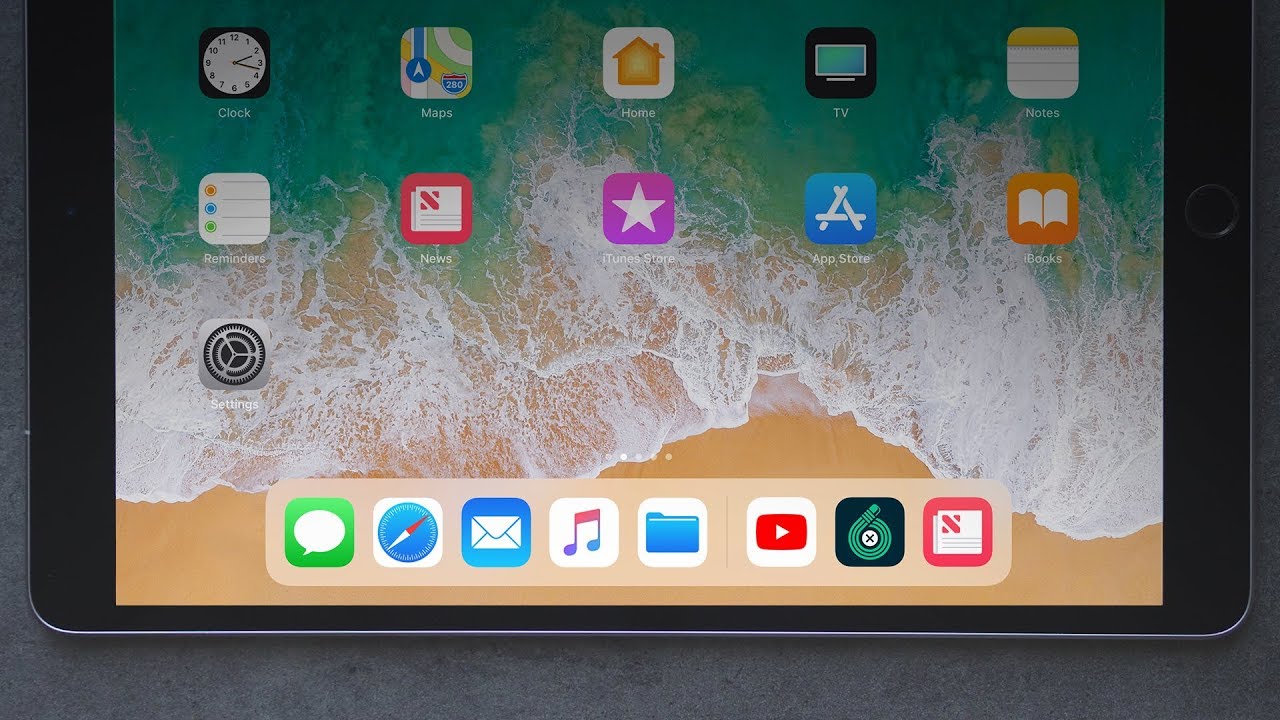

The dock is persistent and can be pulled up within any app at any time with an upwards swipe, a gesture that used to be reserved for the Control Center. A swipe up now opens up the dock, but you can still get to the Control Center and the App Switcher (now one and the same) by continuing to pull in an upwards direction. Swipe downwards to hide the dock.
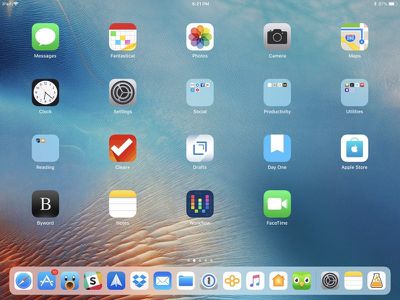
ios11dock

Adding and Removing Apps on the Dock

There's only one step required to add an app to the dock. Simply hold a finger over any app on your display for a second and then drag it down to the dock. This will add the app's icon to the dock.
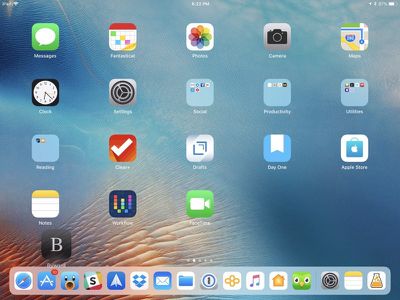
ios11dockdragging
The dock can hold anywhere from 11 (iPad mini) to 15 (12.9-inch iPad Pro) apps in total on this side of the dock, more than double the number that fit in the dock in earlier versions of iOS.

Removing an app is done in the same way. Press and hold on the icon of the app you want to remove and then drag it up and off of the dock.

Hiding or Displaying Recently Used Apps

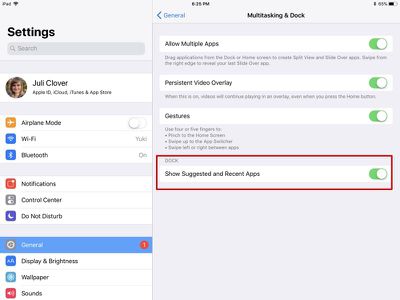
Along with the 11–15 apps you can add to the dock, there are three app slots reserved for your recently used apps, apps that pop up because of Handoff functionality, and apps that are suggested based on your app usage habits. Recently used apps and suggested apps can be turned off. Here's how:

  1. Open the Settings app.
  2. Select "General."
  3. Choose "Multitasking & Dock." ios11docksettings
  4. Toggle off "Show Suggested and Recent Apps."
Launching Apps and Multitasking with the Dock

Launching an app is as simple as tapping it, and because the dock can be brought up within any app, it's also useful for switching between apps.

Switching between apps using the dock is done through bringing the dock up with a swipe within any app and then tapping another app.
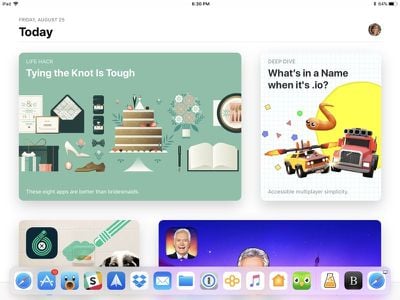
dockinapp
Beyond simply switching between apps, the dock can be used with Split View and Slide Over multitasking. When an app is open, drag another app up from the dock to open a second app that is overlaid on the first. This isn't technically a Slide Over window -- it's just a pop up over the first app, but it can be used simultaneously with the app it overlays.
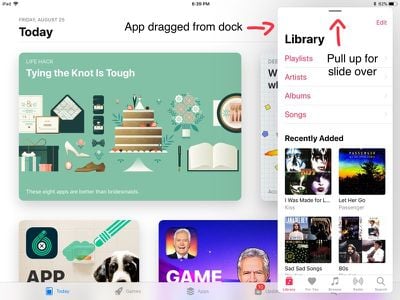
dockmultitasking
Convert the second app into a Slide Over multitasking window by swiping upwards at the top of the app on the gray line. From there, the Slide Over view can be pulled into a Split View by pulling the gray bar dividing the two apps to the left. You can switch between Slide Over and Split View by dragging the bar to the left or the right.
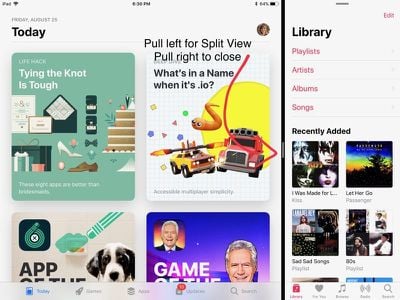
dockslideovertosplitview
When using a multitasking view, you can switch between the two apps that are open by swiping to bring up the dock and then pulling a new app into one of the windows.
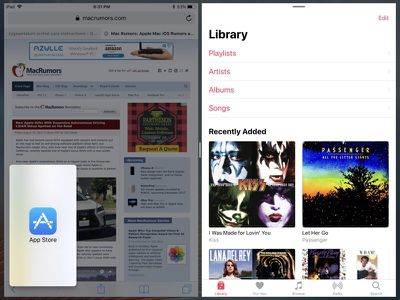
dockswappingapps
You can close one of the apps that's open by pulling the bar all the way to the left or the right of the screen, depending on which app you want to close.

Bringing Up App Files from the Dock

The iPad doesn't support 3D Touch, but a similar gesture can be used with the Files app on the dock. To access this feature, long press on the Files app to bring up a 3D Touch-style window.
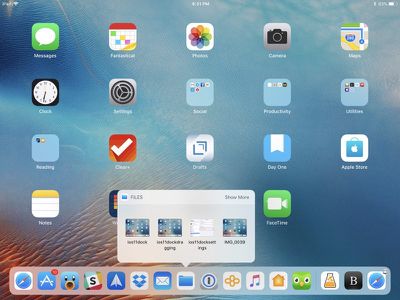
dockios11files
After you press the Files app and the window is open, it'll stay open even after you move your finger. It lists all of your most recent files, which you can drag from the app without having to open it.

Accessing the Dock from a Keyboard

To bring up the dock when you have a physical keyboard like the Smart Keyboard connected, just press Command + Option + D.

Compatibility

While all iPads capable of running iOS 11 have access to the new dock, the split-screen drag and drop functionality is limited to iPads that have support for split screen functionality.

Slide Over, which allows you to interact with an app without quitting the one you have open, is available on the iPad mini 2 and later, the iPad Air and later, the fifth-generation iPad, and all iPad Pro models.

Split View, which is true multitasking and allows you to use two apps side by side, is available on the iPad mini 4, the iPad Air 2, the fifth-generation iPad, and all iPad Pro models.


Related Forum: iOS 11

Top Rated Comments

jayducharme Avatar
120 months ago
There is definitely a learning curve.
I completely agree. I'm currently on information overload with iOS 11. There are so many new features and so many ways of doing things, it's going to be months before I'm familiar with all of them.

Well, time to get cracking....
Score: 2 Votes (Like | Disagree)
Traverse Avatar
120 months ago
I can't wait to get home and install it later today!
Score: 1 Votes (Like | Disagree)

Popular Stories

apple design award 2025

Apple Announces 2025 Design Award Winners Ahead of WWDC 2025

Tuesday June 3, 2025 10:14 am PDT by
As we wait for WWDC to kick off next Monday, Apple today announced the winners of its annual Apple Design Awards, recognizing apps and games for their innovation, ingenuity, and technical achievement. The 2025 Apple Design Award winners are listed below, with one app and one game selected per category: Delight and Fun - CapWords (App) and Balatro (Game) Innovation - Play (App) and PBJ -...
1password deal blue

1Password Security Breach: What Was Accessed and What Wasn't

Wednesday November 25, 2026 1:09 pm PST by
Popular password management app 1Password today said it experienced a security breach earlier this month. 1Password says some customer names and email addresses were accessed, but no customer vault contents were compromised. On November 19, 1Password saw indications that an employee's GitHub account had been breached and began investigating. The company says the breached GitHub account was...
apple store down feature

Here's Why the Apple Store is Going Down

Thursday November 26, 2026 5:49 am PST by
Apple's online store is going down for a few hours on a rolling country-by-country basis right now, but do not get your hopes up for new products. Apple takes its online store down for a few hours ahead of Black Friday every year to tease its annual gift card offer with the purchase of select products. The store is down in Australia, New Zealand, and Thailand, right now, and it will...
Latest Stories
The 50+ Best Apple Black Friday Deals Still Available on AirPods, iPads, and More
9 hours ago
HomePod Mini 2 in (RED) Seemingly Spotted Ahead of Announcement
6 hours ago
Apple's M6 and PROLED MacBook Pro Reach New Low Prices for Black Friday
17 hours ago
The MacRumors Show: iPhone Air 2 and iPhone 18 Are Coming
17 hours ago
Apple Store in Brisbane Reopening Next Month With New Design
17 hours ago
The 60+ Best Black Friday Accessory Deals on iPhone Chargers, TVs, Headphones, and More
18 hours ago
GTA VI Now (Barely) Running on Apple Silicon Macs
18 hours ago
The Best Black Friday Streaming Deals on Apple TV, Disney+, and More
19 hours ago
Apple TV's 'Carême' Wins International Emmy for Best Drama
19 hours ago
iPhone 18 Production Delay Leaves Apple Little Time Before Launch
20 hours ago
The Best Black Friday AirPods Deals Still Available
12 hours ago
The Best Black Friday Deals on Apple Home Products
21 hours ago
The Best Black Friday iPhone Deals Still Available
12 hours ago
The Best Black Friday iPad Deals Still Available
12 hours ago
The Best Black Friday Apple Watch Deals Still Available
12 hours ago
The Best Black Friday AirTag Deals Still Available
12 hours ago
The Best Black Friday Mac Deals Still Available
12 hours ago
iPhone Share of US Smartphone Market Hits 57% as Rivals Slip
22 hours ago
iPhone 20 Pro Rumored to Feature 3D-Printed Titanium Frame
1 day ago
Apple's Official 2026 Black Friday Offer Starts Rolling Out
2 days ago
Halide Adds Fill Light Feature for iPhone Duo
2 days ago
MacBook Air Black Friday Deals Now Live With Massive $399 Savings
2 days ago
Amazon Discounts All MacBook Neo Models by $99 for Black Friday
2 days ago
Kodak Launches Unique AirTag Rival With E-Ink Display
2 days ago
Here's Why the Apple Store is Going Down
2 days ago
Apple Still Working on Giant Foldable iPad That Could Cost $5,000
2 days ago
iPhones Dominate China's Weak Singles' Day Smartphone Sales
2 days ago
iPhone 20 Pro Could Feature Ceramic in Limited-Edition Model
2 days ago
Apple Faces Korean Regulator Review Over iPhone 16 AI Advertising
2 days ago
Apple Watch Ultra 4 Hits New Best-Ever Price of $649.99 for Black Friday
2 days ago
Related Apple News: Politics | South Africa | Entertainment | Travel | Ipad






























