Skip to Content

iOS 18.1: Remove Unwanted Objects From Your Photos

by

Say you've captured a stunning sunset at the beach, but there's a trash can ruining the foreground. Or maybe you've taken the perfect family portrait, only to later realize there's a stranger in the background. With iOS 18.1's new Clean Up tool, Apple aims to make such photo frustrations a thing of the past. Here's how it works.
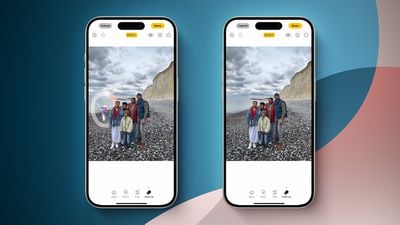
iOS 18 Photos Clean Up Feature 1
Clean Up uses Apple Intelligence to analyze your photos and intelligently remove unwanted elements while preserving the natural look of your images. Granted it's not quite as powerful as desktop editing tools, but it brings impressive object removal capabilities right to your iPhone, letting you fix photo distractions in seconds rather than spending time and money on complex editing software.

Clean Up is particularly clever when it comes to automatic detection – it can identify obvious unwanted elements in your photos and suggest removing them with a single tap. But even when you need to make manual selections, the process is pretty straightforward.

How to Use Clean Up in iOS 18.1

Here's how to use Clean Up to enhance your photos:

  1. In the Photos app, select a photo that you'd like to clean up.
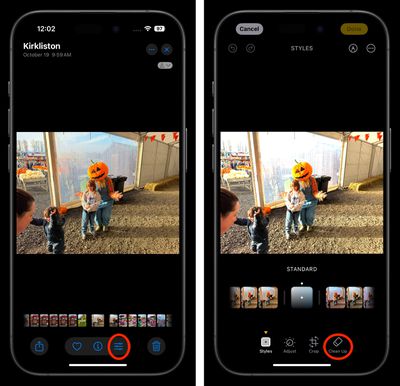
  2. Tap the Edit button (the three horizontal sliders).
  3. Tap Clean Up. (The tool may need to download the first time you select it, but it won't take long.)
    photos

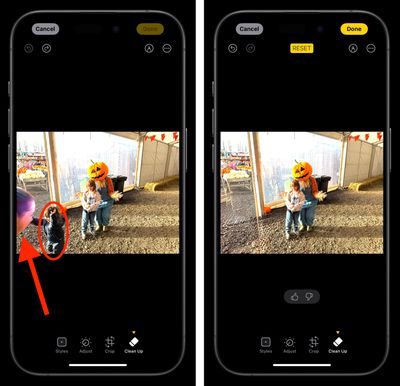
  4. If any object has a luminescent glow in the picture, Clean Up has identified it for potential removal – tap to select it, or tap, brush, or circle something else you want to remove. If it makes your selection easier, pinch to pan and zoom.
  5. Tap Done to finish.
    photos

Getting the Best Results

Clean Up performs best when working with smaller objects set against clear, uncluttered backgrounds. That's not to say it can't handle various editing tasks, but it's mainly designed for removing unwanted elements from the background of your photos rather than making major foreground alterations. For example, removing a street sign from behind your subject might work, but trying to remove someone from the front of a crowded group shot likely won't produce the results you're hoping for.

There are a few limitations to keep in mind. The tool isn't compatible with Live Photos (using Clean Up automatically disables Live Photo functionality). You can't use Clean Up on videos either. All other types of images, including screenshots and older photos not taken with your iPhone, are fair game though.

For transparency, Apple adds a note to the photo's metadata indicating AI editing has been applied. And don't worry about making mistakes – all Clean Up edits are fully reversible by tapping Edit and selecting Revert to Original.


Popular Stories

apple design award 2025

Apple Announces 2025 Design Award Winners Ahead of WWDC 2025

Tuesday June 3, 2025 10:14 am PDT by
As we wait for WWDC to kick off next Monday, Apple today announced the winners of its annual Apple Design Awards, recognizing apps and games for their innovation, ingenuity, and technical achievement. The 2025 Apple Design Award winners are listed below, with one app and one game selected per category: Delight and Fun - CapWords (App) and Balatro (Game) Innovation - Play (App) and PBJ -...
Apple 2026 Black Friday Event Hero

Apple's Official 2026 Black Friday Offer Starts Rolling Out

Thursday November 26, 2026 8:37 am PST by
Apple's annual four-day Black Friday through Cyber Monday shopping event is now live in Australia, New Zealand, and Thailand, and it will continue to roll out across Europe, the U.S., and Canada as the calendar turns to Friday, November 27 around the world. In the U.S., Apple's terms and conditions say the promotion begins on November 27 at 12 a.m. Pacific Time and ends on November 30 at...
1password deal blue

1Password Security Breach: What Was Accessed and What Wasn't

Wednesday November 25, 2026 1:09 pm PST by
Popular password management app 1Password today said it experienced a security breach earlier this month. 1Password says some customer names and email addresses were accessed, but no customer vault contents were compromised. On November 19, 1Password saw indications that an employee's GitHub account had been breached and began investigating. The company says the breached GitHub account was...
Latest Stories
The 50+ Best Apple Black Friday Deals Still Available on AirPods, iPads, and More
2 hours ago
Here Are the Best Apple Black Friday Leftover Deals You Can Get Today
9 minutes ago
HomePod Mini 2 in (RED) Seemingly Spotted Ahead of Announcement
11 hours ago
Apple's M6 and PROLED MacBook Pro Reach New Low Prices for Black Friday
22 hours ago
The MacRumors Show: iPhone Air 2 and iPhone 18 Are Coming
22 hours ago
Apple Store in Brisbane Reopening Next Month With New Design
22 hours ago
The 60+ Best Black Friday Accessory Deals on iPhone Chargers, TVs, Headphones, and More
2 minutes ago
GTA VI Now (Barely) Running on Apple Silicon Macs
1 day ago
The Best Black Friday Streaming Deals on Apple TV, Disney+, and More
1 day ago
Apple TV's 'Carême' Wins International Emmy for Best Drama
1 day ago
iPhone 18 Production Delay Leaves Apple Little Time Before Launch
1 day ago
The Best Black Friday AirPods Deals Still Available
18 hours ago
The Best Black Friday Deals on Apple Home Products
1 day ago
The Best Black Friday iPhone Deals Still Available
18 hours ago
The Best Black Friday iPad Deals Still Available
18 hours ago
The Best Black Friday Apple Watch Deals Still Available
18 hours ago
The Best Black Friday AirTag Deals Still Available
18 hours ago
The Best Black Friday Mac Deals Still Available
18 hours ago
iPhone Share of US Smartphone Market Hits 57% as Rivals Slip
1 day ago
iPhone 20 Pro Rumored to Feature 3D-Printed Titanium Frame
1 day ago
Apple's Official 2026 Black Friday Offer Starts Rolling Out
2 days ago
Halide Adds Fill Light Feature for iPhone Duo
2 days ago
MacBook Air Black Friday Deals Now Live With Massive $399 Savings
2 days ago
Amazon Discounts All MacBook Neo Models by $99 for Black Friday
2 days ago
Kodak Launches Unique AirTag Rival With E-Ink Display
2 days ago
Here's Why the Apple Store is Going Down
2 days ago
Apple Still Working on Giant Foldable iPad That Could Cost $5,000
2 days ago
iPhones Dominate China's Weak Singles' Day Smartphone Sales
2 days ago
iPhone 20 Pro Could Feature Ceramic in Limited-Edition Model
2 days ago
Apple Faces Korean Regulator Review Over iPhone 16 AI Advertising
2 days ago
Related Apple News: Reviews | Opinion | Sport | Travel | Health