Skip to Content

iOS 26 Screenshots: Turn Off Full-Screen Previews

by

Apple has modified the screenshot experience in iOS 26 to accommodate Visual Intelligence and its new Liquid Glass aesthetic. Taking a screenshot is still done by pressing the Side button and Volume Up button on your iPhone, but the interface has been redesigned, while there's another change that might slow down your workflow if you're used to the streamlined approach taken in iOS 18 and earlier.
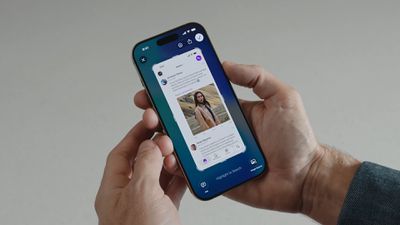
iOS 26 Screenshots

Why You Might Want to Switch Back

If you regularly use Apple's screen capture tools in iOS 18, you'll know that screenshots appear as small thumbnails in the bottom-left corner that you can quickly tap to edit and save or ignore. This lets you continue using your iPhone without interruption, while still giving you the option to markup and/or share a screenshot when required.

In contrast, the new full-screen preview mode in iOS 26 displays your screenshot across the entire display by default, complete with editing tools and Visual Intelligence options at the bottom. While this gives you immediate access to cropping, markup, and AI-powered features, it may feel intrusive compared to iOS 18's approach.

Disabling Full-Screen Previews

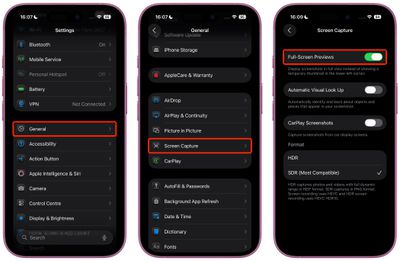
When you take your first screenshot after updating to iOS 26, you should see an on-screen prompt asking if you'd like to "Switch to Thumbnail View." If you missed this opportunity or accidentally tapped "Not Now," you can still revert to the old thumbnail approach, thanks to a new settings menu:

  1. Open Settings on your iPhone.
  2. Tap General.
  3. Select Screen Capture.
  4. Toggle off Full-Screen Previews.

settings

Once disabled, screenshots will revert to the familiar iOS 18 behavior, appearing as temporary thumbnails in the bottom-left corner. You can still access all editing features by tapping the thumbnail when you need them, or you can review the images later in the Photos app.

Additional Screenshot Options

While you're in Screen Capture settings, you'll also find new options for enabling HDR screenshots (saved in HEIF image format), a CarPlay Screenshots toggle for when your iPhone is connected to CarPlay, and Visual Lookup (iPhone 15 Pro and newer models only).


Top Rated Comments

18 months ago

It would be nice if Apple allowed the ability to take screenshots, but also have the option of NOT saving the screenshot to the photo library

This would be useful for when you’re looking to share information with friends or family, but not necessarily want to save that screenshot to your photo library
iOS 18 does have this option. After tapping 'Done' there is a 'Copy and Delete' option, which is perfect for your use case (which is also often a use case for me).
Score: 11 Votes (Like | Disagree)
jz0309 Avatar
18 months ago
Thank you1 I love these type of articles!
Score: 9 Votes (Like | Disagree)
Justin Cymbal Avatar
18 months ago

Additional Screenshot Options

While you're in Screen Capture settings, you'll also find new options for enabling HDR screenshots (saved in HEIF image format), a CarPlay Screenshots toggle for when your iPhone is connected to CarPlay, and Visual Lookup (iPhone 15 Pro and newer models only).

It would be nice if Apple allowed the ability to take screenshots, but also have the option of NOT saving the screenshot to the photo library

This would be useful for when you’re looking to share information with friends or family, but not necessarily want to save that screenshot to your photo library
Score: 6 Votes (Like | Disagree)
jayducharme Avatar
18 months ago

good grief, I just tell Siri to take a screenshot..
"Here's what I found for screenshots on the web."

I have a slightly different problem: I inadvertently take screenshots just by picking up the phone. I wish Apple had left the power button on the top of the device, rather than opposite the volume buttons (though I realize that's inconvenient with ginormous phones).
Score: 4 Votes (Like | Disagree)
Moonjumper Avatar
18 months ago
I'd like the option to just capture the screen and have no preview, going straight to saving to Photos, just like it used to be. I'd also like the same on Mac, which is where I notice the difference most. The click and carry on flow has gone. I'm not saying it should be the default, but it should be an option.
Score: 4 Votes (Like | Disagree)
18 months ago
I am a heavy screenshot user but it isn't obvious to me - just from reading - that the change needs to be undone. Always good to have a setting to turn it off and a tutorial on how to do that, but I will try the new default behavior first. I am not a dev so waiting for the public beta to drop.
Score: 4 Votes (Like | Disagree)

Popular Stories

apple design award 2025

Apple Announces 2025 Design Award Winners Ahead of WWDC 2025

Tuesday June 3, 2025 10:14 am PDT by
As we wait for WWDC to kick off next Monday, Apple today announced the winners of its annual Apple Design Awards, recognizing apps and games for their innovation, ingenuity, and technical achievement. The 2025 Apple Design Award winners are listed below, with one app and one game selected per category: Delight and Fun - CapWords (App) and Balatro (Game) Innovation - Play (App) and PBJ -...
1password deal blue

1Password Security Breach: What Was Accessed and What Wasn't

Wednesday November 25, 2026 1:09 pm PST by
Popular password management app 1Password today said it experienced a security breach earlier this month. 1Password says some customer names and email addresses were accessed, but no customer vault contents were compromised. On November 19, 1Password saw indications that an employee's GitHub account had been breached and began investigating. The company says the breached GitHub account was...
apple store down feature

Here's Why the Apple Store is Going Down

Thursday November 26, 2026 5:49 am PST by
Apple's online store is going down for a few hours on a rolling country-by-country basis right now, but do not get your hopes up for new products. Apple takes its online store down for a few hours ahead of Black Friday every year to tease its annual gift card offer with the purchase of select products. The store is down in Australia, New Zealand, and Thailand, right now, and it will...
Latest Stories
The 50+ Best Apple Black Friday Deals Still Available on AirPods, iPads, and More
6 hours ago
HomePod Mini 2 in (RED) Seemingly Spotted Ahead of Announcement
3 hours ago
Apple's M6 and PROLED MacBook Pro Reach New Low Prices for Black Friday
14 hours ago
The MacRumors Show: iPhone Air 2 and iPhone 18 Are Coming
14 hours ago
Apple Store in Brisbane Reopening Next Month With New Design
14 hours ago
The 60+ Best Black Friday Accessory Deals on iPhone Chargers, TVs, Headphones, and More
15 hours ago
GTA VI Now (Barely) Running on Apple Silicon Macs
15 hours ago
The Best Black Friday Streaming Deals on Apple TV, Disney+, and More
16 hours ago
Apple TV's 'Carême' Wins International Emmy for Best Drama
17 hours ago
iPhone 18 Production Delay Leaves Apple Little Time Before Launch
17 hours ago
The Best Black Friday AirPods Deals Still Available
10 hours ago
The Best Black Friday Deals on Apple Home Products
18 hours ago
The Best Black Friday iPhone Deals Still Available
10 hours ago
The Best Black Friday iPad Deals Still Available
10 hours ago
The Best Black Friday Apple Watch Deals Still Available
10 hours ago
The Best Black Friday AirTag Deals Still Available
10 hours ago
The Best Black Friday Mac Deals Still Available
10 hours ago
iPhone Share of US Smartphone Market Hits 57% as Rivals Slip
19 hours ago
iPhone 20 Pro Rumored to Feature 3D-Printed Titanium Frame
21 hours ago
Apple's Official 2026 Black Friday Offer Starts Rolling Out
2 days ago
Halide Adds Fill Light Feature for iPhone Duo
2 days ago
MacBook Air Black Friday Deals Now Live With Massive $399 Savings
2 days ago
Amazon Discounts All MacBook Neo Models by $99 for Black Friday
2 days ago
Kodak Launches Unique AirTag Rival With E-Ink Display
2 days ago
Here's Why the Apple Store is Going Down
2 days ago
Apple Still Working on Giant Foldable iPad That Could Cost $5,000
2 days ago
iPhones Dominate China's Weak Singles' Day Smartphone Sales
2 days ago
iPhone 20 Pro Could Feature Ceramic in Limited-Edition Model
2 days ago
Apple Faces Korean Regulator Review Over iPhone 16 AI Advertising
2 days ago
Apple Watch Ultra 4 Hits New Best-Ever Price of $649.99 for Black Friday
2 days ago
Related Apple News: Motoring | Ipad | Mac | World News | Education