Skip to Content

iOS 26: Screen and Filter Messages From Unknown Senders

by

In iOS 26, Apple has introduced enhanced message filtering that gives you more control over unwanted texts, separating spam messages from unknown senders into distinct categories. Here's how to set up and use these new filtering options to keep your Messages app clutter-free.
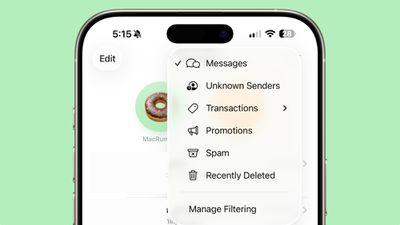
ios 26 messages filtering

Enable Message Filtering Settings

Before you can filter messages from unknown senders in iOS 26, you need to enable the filtering options in your Messages settings.

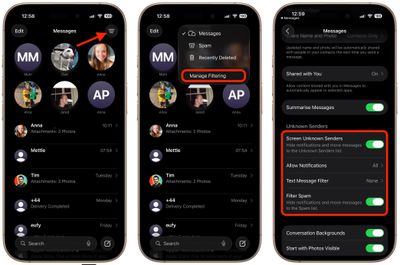
  1. Open the Messages app on your iPhone.
  2. Tap the filter menu icon (three horizontal lines) in the top-right corner.
  3. Select Manage Filtering. This takes you directly to the Messages section in Settings.
  4. Toggle on Screen Unknown Senders to enable filtering.
messages

Once activated, "Unknown Senders" will appear as an option in the Messages app's filter menu.

Configure Additional Filtering Options

While you're in the message filtering settings, you'll find several other options worth configuring:

  • Allow Notifications lets you choose whether to receive alerts for certain messages from unknown senders, such as verification codes.
  • Text Message Filter provides additional screening options (this setting may not appear unless you have a third-party app with message filtering extensions installed, depending on your region and carrier).
  • Filter Spam is enabled by default and automatically routes suspected spam to a separate folder.
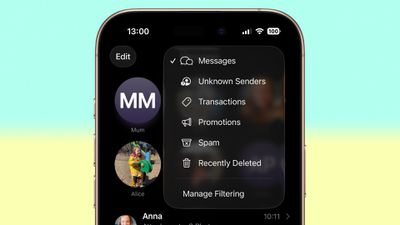
messages filter menu full ios

If the Text Message Filter option appears, selecting it will add "Transactions" and "Promotions" to your filter menu, giving you even more granular control over business-related messages.

Review Messages From Unknown Senders

Once filtering is active, messages from contacts not saved in your address book automatically go to the Unknown Senders section. You'll see a number in brackets next to Unknown Senders in the filter menu indicating new messages, but you won't receive disruptive alerts.

To access these filtered messages, tap the filter menu icon and select Unknown Senders. From here, you can review messages and take action on legitimate senders.
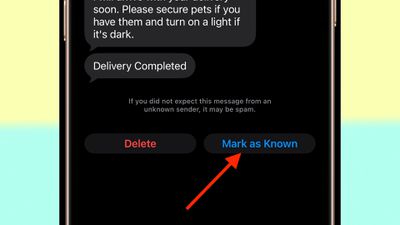
unknown message sender mark as known
Tap any message thread to view its contents. At the bottom of the conversation, you'll see a blue Mark as Known button. Tapping this ensures future messages from that number appear in your main Messages list.

Alternatively, tap the phone number at the top of the conversation to add the sender directly to your Contacts app. Both approaches prevent future messages from this sender being filtered to Unknown Senders.

Recover Spam Messages

By default, messages that iOS 26 classifies as spam are automatically moved to the Spam folder.

To recover a legitimate message that was incorrectly filtered, open the Spam section from the filter menu, tap the message you want to recover, then tap Not Spam. The message will move back to your main Messages list, and future messages from that sender won't be filtered as spam.

If spam filtering isn't working for you as intended, you can turn off the Filter Spam toggle in the Messages app's Settings menu.


Top Rated Comments

15 months ago
Too bad it doesn't work like this with the Apple Watch, defeating the purpose.... My phone hides these like I want but the notifications still fly into my wrist.0
Score: 3 Votes (Like | Disagree)
15 months ago

Too bad it doesn't work like this with the Apple Watch, defeating the purpose.... My phone hides these like I want but the notifications still fly into my wrist.0
Agreed. If I’m wearing my Apple Watch I get spam phone calls and texts but not on the phone. I turned off all messages and calls on watch for now as I rarely use my watch for texts or calls anyway. The check box that says mirror phone doesn’t help either.
Score: 2 Votes (Like | Disagree)
tgwaste Avatar
15 months ago
This entire feature is complete and absolute garbage. I knew Apple wouldn’t do it right.

It’s not hard: give me a way to add strings of text. If it matches I never see it anywhere.

But of course Crapple won’t do that.
Score: 1 Votes (Like | Disagree)
15 months ago

See my post above ('https://forums.macrumors.com/threads/ios-26-screen-and-filter-messages-from-unknown-senders.2467489/post-34178598'), considering the above quote.
Advertising a random app did nothing to address the question I asked.
Score: 1 Votes (Like | Disagree)
15 months ago
Think it will be very useful for me especially taking control of notifications from unknown senders. Will have to try it out after updating.
Score: 1 Votes (Like | Disagree)
15 months ago

Agreed. If I’m wearing my Apple Watch I get spam phone calls and texts but not on the phone. I turned off all messages and calls on watch for now as I rarely use my watch for texts or calls anyway. The check box that says mirror phone doesn’t help either.
One sure way to prevent it. Do not have that feature if possible.

It would be a little difficult though to not use at all because it is not even there.

Other ways yes but not a guarantee to work always or at all.
Score: 1 Votes (Like | Disagree)

Popular Stories

apple design award 2025

Apple Announces 2025 Design Award Winners Ahead of WWDC 2025

Tuesday June 3, 2025 10:14 am PDT by
As we wait for WWDC to kick off next Monday, Apple today announced the winners of its annual Apple Design Awards, recognizing apps and games for their innovation, ingenuity, and technical achievement. The 2025 Apple Design Award winners are listed below, with one app and one game selected per category: Delight and Fun - CapWords (App) and Balatro (Game) Innovation - Play (App) and PBJ -...
Apple 2026 Black Friday Event Hero

Apple's Official 2026 Black Friday Offer Starts Rolling Out

Thursday November 26, 2026 8:37 am PST by
Apple's annual four-day Black Friday through Cyber Monday shopping event is now live in Australia, New Zealand, and Thailand, and it will continue to roll out across Europe, the U.S., and Canada as the calendar turns to Friday, November 27 around the world. In the U.S., Apple's terms and conditions say the promotion begins on November 27 at 12 a.m. Pacific Time and ends on November 30 at...
1password deal blue

1Password Security Breach: What Was Accessed and What Wasn't

Wednesday November 25, 2026 1:09 pm PST by
Popular password management app 1Password today said it experienced a security breach earlier this month. 1Password says some customer names and email addresses were accessed, but no customer vault contents were compromised. On November 19, 1Password saw indications that an employee's GitHub account had been breached and began investigating. The company says the breached GitHub account was...
Latest Stories
The 50+ Best Apple Black Friday Deals Still Available on AirPods, iPads, and More
1 hour ago
HomePod Mini 2 in (RED) Seemingly Spotted Ahead of Announcement
11 hours ago
Apple's M6 and PROLED MacBook Pro Reach New Low Prices for Black Friday
21 hours ago
The MacRumors Show: iPhone Air 2 and iPhone 18 Are Coming
21 hours ago
Apple Store in Brisbane Reopening Next Month With New Design
22 hours ago
The 60+ Best Black Friday Accessory Deals on iPhone Chargers, TVs, Headphones, and More
23 hours ago
GTA VI Now (Barely) Running on Apple Silicon Macs
23 hours ago
The Best Black Friday Streaming Deals on Apple TV, Disney+, and More
1 day ago
Apple TV's 'Carême' Wins International Emmy for Best Drama
1 day ago
iPhone 18 Production Delay Leaves Apple Little Time Before Launch
1 day ago
The Best Black Friday AirPods Deals Still Available
17 hours ago
The Best Black Friday Deals on Apple Home Products
1 day ago
The Best Black Friday iPhone Deals Still Available
17 hours ago
The Best Black Friday iPad Deals Still Available
17 hours ago
The Best Black Friday Apple Watch Deals Still Available
17 hours ago
The Best Black Friday AirTag Deals Still Available
17 hours ago
The Best Black Friday Mac Deals Still Available
17 hours ago
iPhone Share of US Smartphone Market Hits 57% as Rivals Slip
1 day ago
iPhone 20 Pro Rumored to Feature 3D-Printed Titanium Frame
1 day ago
Apple's Official 2026 Black Friday Offer Starts Rolling Out
2 days ago
Halide Adds Fill Light Feature for iPhone Duo
2 days ago
MacBook Air Black Friday Deals Now Live With Massive $399 Savings
2 days ago
Amazon Discounts All MacBook Neo Models by $99 for Black Friday
2 days ago
Kodak Launches Unique AirTag Rival With E-Ink Display
2 days ago
Here's Why the Apple Store is Going Down
2 days ago
Apple Still Working on Giant Foldable iPad That Could Cost $5,000
2 days ago
iPhones Dominate China's Weak Singles' Day Smartphone Sales
2 days ago
iPhone 20 Pro Could Feature Ceramic in Limited-Edition Model
2 days ago
Apple Faces Korean Regulator Review Over iPhone 16 AI Advertising
2 days ago
Apple Watch Ultra 4 Hits New Best-Ever Price of $649.99 for Black Friday
2 days ago
Related Apple News: Business | Mac | Politics | Opinion | South Africa






























