Skip to Content

iOS 27: Access the New iPhone Recovery Screen

by

Since iOS 26, a malfunctioning iPhone has been able to boot itself into Recovery Assistant, with no Mac or PC required. However, you could only get there if your device failed to start up and dropped into recovery on its own.
recovery screen%402x scaled
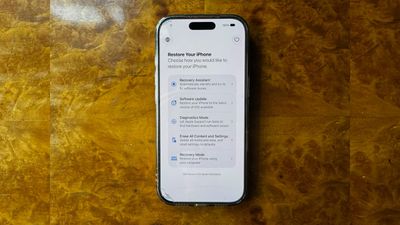
In iOS 27, now available to download, Apple has removed that limitation, and you can now manually boot into a Mac-style recovery screen whenever you like.

The new recovery mode lets you troubleshoot, update, or erase your device without necessarily plugging it into anything. It can connect automatically to a known Wi-Fi network, and it shows your battery percentage in the corner of the screen. Here's how to access it.

How to Boot Into Recovery Mode

Accessing the recovery mode is similar to the equivalent mode on Apple silicon Macs, and it works the same way on iPads running iPadOS 27.

  1. Turn off your iPhone, then wait about a minute to ensure it has fully shut down.
  2. Press and hold the Side button. The Apple logo will appear as it normally does during startup – continue holding the button and you'll see "Continue holding for recovery...".
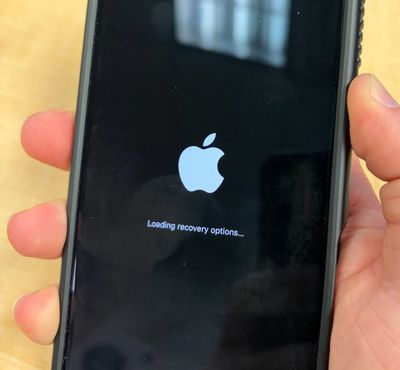
  3. Release the button when "Loading recovery options..." appears.

Your iPhone will then boot into the new recovery screen instead of loading iOS.
loading recovery options

What the Recovery Options Do

The recovery screen offers five options:

  • Recovery Assistant: Automatically scans for software issues and attempts to fix them without requiring further input.
  • Software Update: Installs the latest version of iOS available for your device, which can help if a failed update has left your iPhone stuck in a boot loop.
  • Diagnostics Mode: Runs diagnostics to check for hardware and software issues, and can recommend repairs if needed.
  • Erase All Content and Settings: Completely wipes your iPhone, just like the equivalent option in the Settings app.
  • Recovery Mode: Puts your iPhone into the traditional recovery mode for restoring it with a Mac or PC, without requiring the usual button-press sequence.

On newer iPhone models, there's also a sixth hidden option. While on the recovery screen, if you press and hold the Side button again, a popup menu will appear showing the option Nearby Device Recovery. This lets you restore your iPhone using another Apple device close by, similar to an existing recovery feature that debuted on iPhone 16 models.

Exiting the Recovery Screen

To leave recovery mode, tap the power button in the top-right corner of the screen and confirm that you want to restart. Alternatively, press and hold the physical Side button and choose Restart or Shut Down.

You shouldn't need the new recovery screen often, but it's worth knowing the button sequence now in case a beta goes wrong or a failed update bricks your iPhone. iOS 27 was released on September 14, 2026.

Related Roundups: iOS 27, iPadOS 27
Related Forum: iOS 27

Top Rated Comments

litmag01 Avatar
19 weeks ago
Move over sliced bread! This is kind of one of those things that should have been available since the Phone launch. Ok at least since they moved to their own chips.

Apple has really done well to work itself into the ARM architecture, and pave the way to a unified style of OS across all devices.
Score: 9 Votes (Like | Disagree)
cogitodexter Avatar
19 weeks ago
I hope the 'erase content and settings' is protected behind biometric authentication - otherwise that's going to be rather useful for thieves.
Score: 6 Votes (Like | Disagree)
pigeonguy Avatar
19 weeks ago

I hope the 'erase content and settings' is protected behind biometric authentication - otherwise that's going to be rather useful for thieves.
It doesn’t disable activation lock, so it doesn’t matter.
Score: 4 Votes (Like | Disagree)
19 weeks ago

It doesn’t disable activation lock, so it doesn’t matter.
Thank you, good point. I too was concerned about this.

Still a rough prank/mean thing to do to someone.

But as they say, physical access is total access.
Score: 3 Votes (Like | Disagree)
19 weeks ago
Good to have this option and ability to use a nearby device to recover will be very useful, if required.
Score: 2 Votes (Like | Disagree)
boswald Avatar
19 weeks ago
This will be great for techs and novices alike. I agree with another poster - this should've been there a long time ago. But as they say, "better late than never!"
Score: 2 Votes (Like | Disagree)

Popular Stories

iphone duo yellow hand

Apple Adds Facial Unlock Option on iPhone Duo in iOS 27.3

Monday November 16, 2026 10:17 am PST by
Apple today added a new option for unlocking the iPhone Duo using the front-facing camera, giving device users multiple ways to access their content. The feature is available in the second iOS 27.3 beta. The option to unlock with facial recognition is only available on the Lock Screen, and authentication via Touch ID is still needed for Apple Pay purchases, adding passwords and logins, and...
bug security vulnerability issue fix larry

Here's What Apple Fixed in iOS 27.2.1 and macOS 27.2.1

Monday November 9, 2026 3:07 pm PST by
The iOS 27.2.1, iPadOS 27.2.1, and macOS 27.2.1 updates Apple released today fix a handful of security vulnerabilities. With the security fixes implemented, it's a good idea to update as soon as you can. A bug with iMessage could let a remote attacker join a group chat to receive its messages, and another could let users see messages sent before they joined a group chat. Most of the...
iOS 27

Apple Releases iOS 27.2.1 With Bug Fixes

Monday November 9, 2026 10:09 am PST by
Apple today released iOS 27.2.1, a minor update to the iOS 27 operating system. iOS 27.2.1 comes two weeks after the launch of iOS 27.2. iOS 27.2.1 includes addresses bugs and patches security vulnerabilities according to Apple's release notes for the update. You can download iOS 27.2.1 over the air by going to Settings > General > Software Update. Apple has also released iOS 26.7.3...
Latest Stories
The 50+ Best Apple Black Friday Deals Still Available on AirPods, iPads, and More
4 hours ago
HomePod Mini 2 in (RED) Seemingly Spotted Ahead of Announcement
56 minutes ago
Apple's M6 and PROLED MacBook Pro Reach New Low Prices for Black Friday
11 hours ago
The MacRumors Show: iPhone Air 2 and iPhone 18 Are Coming
11 hours ago
Apple Store in Brisbane Reopening Next Month With New Design
12 hours ago
The 60+ Best Black Friday Accessory Deals on iPhone Chargers, TVs, Headphones, and More
13 hours ago
GTA VI Now (Barely) Running on Apple Silicon Macs
13 hours ago
The Best Black Friday Streaming Deals on Apple TV, Disney+, and More
14 hours ago
Apple TV's 'Carême' Wins International Emmy for Best Drama
14 hours ago
iPhone 18 Production Delay Leaves Apple Little Time Before Launch
15 hours ago
The Best Black Friday AirPods Deals Still Available
7 hours ago
The Best Black Friday Deals on Apple Home Products
16 hours ago
The Best Black Friday iPhone Deals Still Available
7 hours ago
The Best Black Friday iPad Deals Still Available
7 hours ago
The Best Black Friday Apple Watch Deals Still Available
7 hours ago
The Best Black Friday AirTag Deals Still Available
7 hours ago
The Best Black Friday Mac Deals Still Available
7 hours ago
iPhone Share of US Smartphone Market Hits 57% as Rivals Slip
17 hours ago
iPhone 20 Pro Rumored to Feature 3D-Printed Titanium Frame
18 hours ago
Apple's Official 2026 Black Friday Offer Starts Rolling Out
2 days ago
Halide Adds Fill Light Feature for iPhone Duo
2 days ago
MacBook Air Black Friday Deals Now Live With Massive $399 Savings
2 days ago
Amazon Discounts All MacBook Neo Models by $99 for Black Friday
2 days ago
Kodak Launches Unique AirTag Rival With E-Ink Display
2 days ago
Here's Why the Apple Store is Going Down
2 days ago
Apple Still Working on Giant Foldable iPad That Could Cost $5,000
2 days ago
iPhones Dominate China's Weak Singles' Day Smartphone Sales
2 days ago
iPhone 20 Pro Could Feature Ceramic in Limited-Edition Model
2 days ago
Apple Faces Korean Regulator Review Over iPhone 16 AI Advertising
2 days ago
Apple Watch Ultra 4 Hits New Best-Ever Price of $649.99 for Black Friday
2 days ago
Related Apple News: Ipad | Iphone | Reviews | South Africa | Opinion