Skip to Content

How to Access and Set Up Parental Controls in iOS 12

by

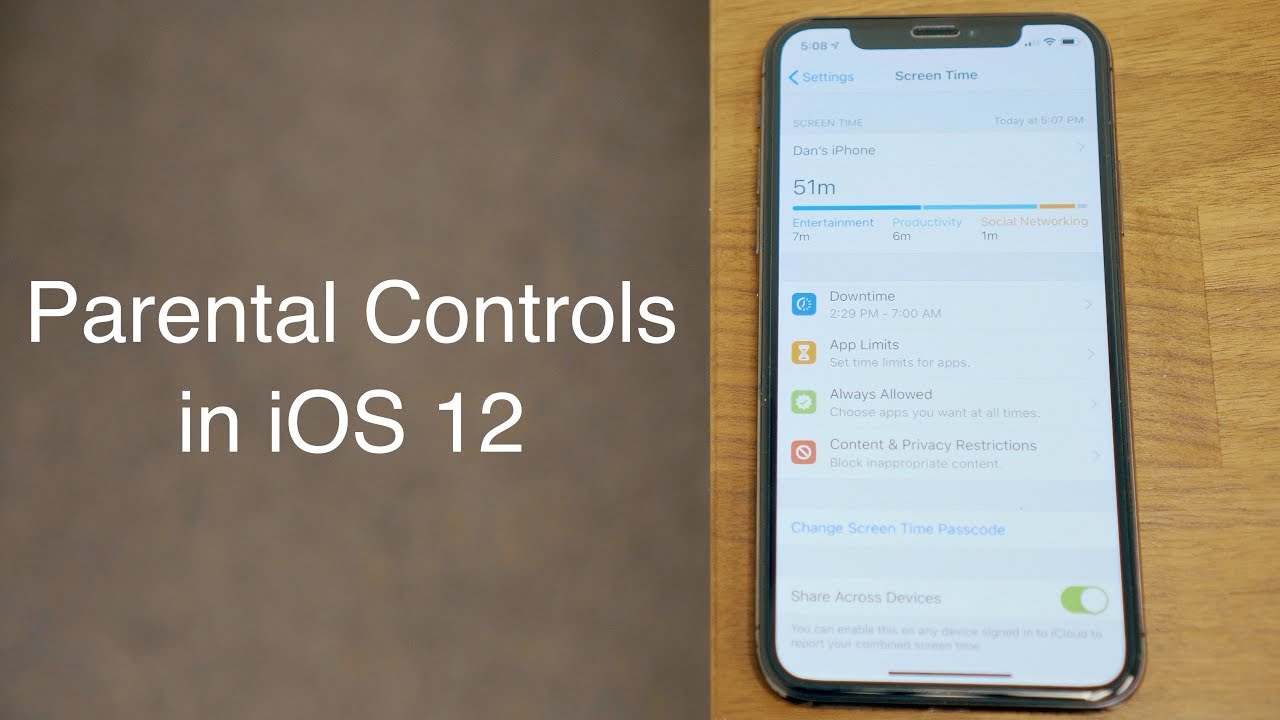
With Screen Time, Apple has introduced a robust set of parental control options in iOS 12, giving parents a way to monitor and limit the amount of time children are spending on their iOS devices, within specific apps, and more.

Screen Time works via Family Sharing, so as long as your children are part of your Family in the Family Sharing settings, you'll be able to view and control their Screen Time options.
Turning Screen Time On

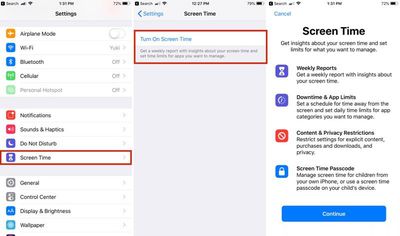
You'll need to turn on and set up Screen Time on all devices owned and used by your children, which is done in the Screen Time section of the Settings app.
turnonscreentime
Here's how to do it:

  1. Open up the Settings app.
  2. Navigate to the Screen Time section."
  3. Choose "Turn on Screen Time."
  4. When you see the introductory screen asking whether this is your iPhone or your child's iPhone, select "This is My Child's iPhone."

From here, you can choose to set Downtime, which is a set period of time in which your child will be allowed or disallowed from using the iPhone, or App Limits, which will restrict certain app categories. At setup, you can also choose Content and Privacy settings, which are further explained below.

If you want to change Downtime and App Limits selections for your child, you will be able to do so at any time by going to the Settings app and selecting Screen Time on the child's device.

A child's Screen Time settings are also accessible on the parent's device for making changes remotely, available by tapping on a child's name in the Screen Time section of the Settings app, listed under the parent's own Screen Time usage.

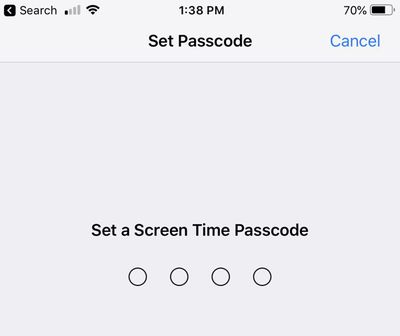
All of your App Limits, Downtime, and Content Restrictions are protected via a passcode that must be entered to grant more usage time to children when limits have been reached. This also prevents children from changing their own Screen Time settings.
screentimepasscode

Using Downtime

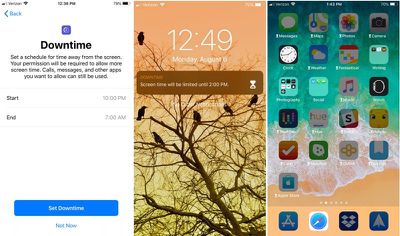
Downtime sets a schedule that allows you to choose when your child can and cannot use their iPhone or iPad. You can, for example, choose to restrict access to iOS devices from 10:00 p.m. at bedtime until 7:00 a.m. in the morning, or choose something that limits hours even further, such as during school.
ios12downtime
With Downtime, you can opt to block the device at Downtime, which prevents apps from being used entirely sans parental permission or choose for a less restrictive feature that allows children to turn off Downtime themselves or get 15 more minutes of usage before another reminder about Downtime restrictions.
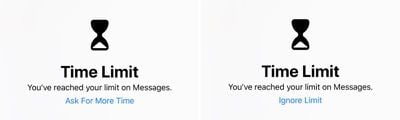
applimitsblocking

Downtime and App Limits with blocking turned on at left and blocking turned off at right

Most parents will likely want to turn on blocking for Downtime to prevent apps from being used entirely, but the non-blocking option is useful for more responsible children where all parents want to do is offer up a reminder that apps shouldn't be used at certain times.

During Downtime, all apps on the iPhone are grayed out with little hourglass locks on them, letting children know that time limits have been reached. The exception is certain apps that are always allowed in case of emergency, such as the phone.

Using App Limits

App Limits allow you to finely control how much time your kids spend using certain categories of apps.

With App Limits, you can set restrictions on All Apps & Categories, Social Networking, Games, Entertainment, Creativity, Productivity, Education, Reading & Reference, Health & Fitness, and Other.
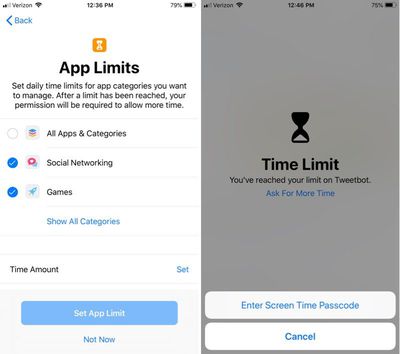
applimits
So, for example, if you want to limit the amount of time a child is spending on Snapchat and mobile games, you can set an App Limit for those categories for an hour or two.

After the App Limit has been reached, children won't be able to further access those app categories without asking for express parental permission. Apps will be locked with an hourglass symbol and a passcode will be required to enable more time.

As with Downtime, you can set less restrictive rules that serve as more of a reminder by turning off blocking with App Limits.

Always Allowed Apps

With Downtime and App Limits, you can set certain apps to "Always Allowed" to let children access them at all times even when Downtime and App Limits are enabled.

By default, Apple marks Phone, Messages, FaceTime, and Maps as always available apps, but you can select any apps that you want through the Always Allowed app interface, accessible under "Always Allowed" in the Screen Time section of Settings on a child's device.
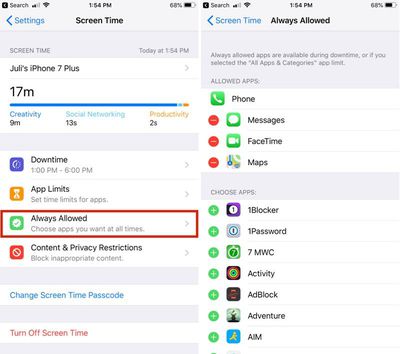
screentimealwaysallowed
You can also remove access to all apps, including Messages, with the exception of the phone, which remains available to children in case of emergency.

Always Allowed is ideal if you want your kids to be able to use certain educational or communication apps at anytime while leaving other apps inaccessible.

Selecting Content Restrictions

Apple has always offered Content Restrictions for parents to limit access to music, movies, TV shows, and apps that are inappropriate for younger children, but these parental controls now live under the Screen Time section of the Settings app alongside the other Screen Time options.
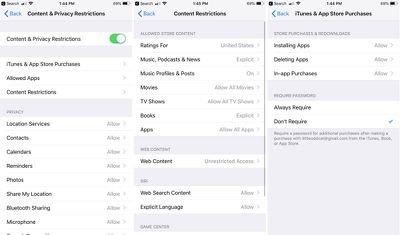
contentrestrictions1
In the Content & Privacy Restrictions section of Screen Time on a child's device, you can do things like limit App Store purchases, prevent kids from deleting apps, disallow access to certain apps, and set age restrictions on entertainment content.

You can also set privacy settings for everything from location to advertising preferences, so, for example, if you wanted to make sure you can always access your child's location, you can turn on Location Services and select Share My Location.
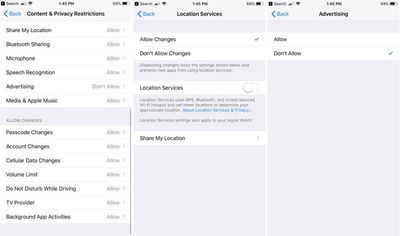
contentrestrictions2
There are even options that prevent children from changing the passcode on their device, restrict account changes, limit volume, and automatically turn on Do Not Disturb While Driving.

Accessing Content & Privacy restrictions requires an adult to input a Content & Privacy passcode, which prevents children from changing these settings.


Top Rated Comments

rjohnstone Avatar
109 months ago
Loaded iOS 12 beta on my daughter's iPod to try this out .
She hates me now. My job is done. :p
Score: 3 Votes (Like | Disagree)
keifer.street Avatar
109 months ago
At present, you can completely bypass the screen time passcode to remove Content and Privacy Restrictions (e.g. to disable the blocking adult porn websites) by searching for ‘Restrictions’ in the Settings app as it takes you to a shortcut straight to the setting that allows you to disable it and doesn’t require a user to input the screen time passcode.

This is a major security backdoor which totally invalidates the feature in its entirety and the bug is present in the most recent Beta 6 (public beta 5) build.

I have submitted a bug report to Apple a few days ago, but it was not addressed in today’s new build yet.
Score: 2 Votes (Like | Disagree)
m0sher Avatar
109 months ago
As a parent this is a great tool that should’ve been included with phones long time ago based on how volatile the net can be for children.

Unfortunately for me, it’s a little too late, my youngest is 18 years old. :)
Score: 2 Votes (Like | Disagree)
109 months ago
Nice feature but my kids found a simple way to prevent this.
They edited their birthdate in their iCloud-Accounts. From 13 to 18 and from 14 to 18.
Now I can't do anything about that as only they can login and change it. Why is it even possible that minor family members can change their birth dates?
Score: 1 Votes (Like | Disagree)
109 months ago
I don't see this going down well. Once the kid sees a friend's iPhone/iPad that's unrestricted— there's going to be some splainin to do back home.
Score: 1 Votes (Like | Disagree)
109 months ago
But still no way for parents to set a maximum allowed system sound volume.

(Which happens to be the only parental control feature I need.)
Limit volume is there.
Score: 1 Votes (Like | Disagree)

Popular Stories

apple design award 2025

Apple Announces 2025 Design Award Winners Ahead of WWDC 2025

Tuesday June 3, 2025 10:14 am PDT by
As we wait for WWDC to kick off next Monday, Apple today announced the winners of its annual Apple Design Awards, recognizing apps and games for their innovation, ingenuity, and technical achievement. The 2025 Apple Design Award winners are listed below, with one app and one game selected per category: Delight and Fun - CapWords (App) and Balatro (Game) Innovation - Play (App) and PBJ -...
Apple 2026 Black Friday Event Hero

Apple's Official 2026 Black Friday Offer Starts Rolling Out

Thursday November 26, 2026 8:37 am PST by
Apple's annual four-day Black Friday through Cyber Monday shopping event is now live in Australia, New Zealand, and Thailand, and it will continue to roll out across Europe, the U.S., and Canada as the calendar turns to Friday, November 27 around the world. In the U.S., Apple's terms and conditions say the promotion begins on November 27 at 12 a.m. Pacific Time and ends on November 30 at...
1password deal blue

1Password Security Breach: What Was Accessed and What Wasn't

Wednesday November 25, 2026 1:09 pm PST by
Popular password management app 1Password today said it experienced a security breach earlier this month. 1Password says some customer names and email addresses were accessed, but no customer vault contents were compromised. On November 19, 1Password saw indications that an employee's GitHub account had been breached and began investigating. The company says the breached GitHub account was...
Latest Stories
The 50+ Best Apple Black Friday Deals Still Available on AirPods, iPads, and More
3 hours ago
Here Are the Best Apple Black Friday Leftover Deals You Can Get Today
2 hours ago
HomePod Mini 2 in (RED) Seemingly Spotted Ahead of Announcement
13 hours ago
Apple's M6 and PROLED MacBook Pro Reach New Low Prices for Black Friday
23 hours ago
The MacRumors Show: iPhone Air 2 and iPhone 18 Are Coming
23 hours ago
Apple Store in Brisbane Reopening Next Month With New Design
1 day ago
The 60+ Best Black Friday Accessory Deals on iPhone Chargers, TVs, Headphones, and More
2 hours ago
GTA VI Now (Barely) Running on Apple Silicon Macs
1 day ago
The Best Black Friday Streaming Deals on Apple TV, Disney+, and More
1 day ago
Apple TV's 'Carême' Wins International Emmy for Best Drama
1 day ago
iPhone 18 Production Delay Leaves Apple Little Time Before Launch
1 day ago
The Best Black Friday AirPods Deals Still Available
19 hours ago
The Best Black Friday Deals on Apple Home Products
1 day ago
The Best Black Friday iPhone Deals Still Available
19 hours ago
The Best Black Friday iPad Deals Still Available
19 hours ago
The Best Black Friday Apple Watch Deals Still Available
19 hours ago
The Best Black Friday AirTag Deals Still Available
19 hours ago
The Best Black Friday Mac Deals Still Available
19 hours ago
iPhone Share of US Smartphone Market Hits 57% as Rivals Slip
1 day ago
iPhone 20 Pro Rumored to Feature 3D-Printed Titanium Frame
1 day ago
Apple's Official 2026 Black Friday Offer Starts Rolling Out
2 days ago
Halide Adds Fill Light Feature for iPhone Duo
2 days ago
MacBook Air Black Friday Deals Now Live With Massive $399 Savings
2 days ago
Amazon Discounts All MacBook Neo Models by $99 for Black Friday
2 days ago
Kodak Launches Unique AirTag Rival With E-Ink Display
2 days ago
Here's Why the Apple Store is Going Down
2 days ago
Apple Still Working on Giant Foldable iPad That Could Cost $5,000
2 days ago
iPhones Dominate China's Weak Singles' Day Smartphone Sales
2 days ago
iPhone 20 Pro Could Feature Ceramic in Limited-Edition Model
2 days ago
Apple Faces Korean Regulator Review Over iPhone 16 AI Advertising
2 days ago
Related Apple News: Health | Sport | Business | Mac | Lifestyle






























