Skip to Content

Messages in iOS 10: How to Install and Use Sticker Packs

by

In iOS 10, the simple Messages app you're familiar with has transformed from a bare bones texting platform into a fun, interactive communication service that takes advantage of games, apps, drawings, stickers, message effects, and more.

Following in the footsteps of apps like Facebook and Line, Apple is delving into stickers in a big way, giving iOS users new ways of expressing themselves. Like the real thing, Stickers in iOS can be stuck onto messages or images, or sent by themselves, and they can be resized, rotated, and stuck to other stickers for fun layering effects.


Installing Sticker Packs

Sticker packs can be installed as standalone applications through the iMessage App Store or they can be downloaded as add-ons to full iOS apps, but either way, getting them onto your device uses these steps.
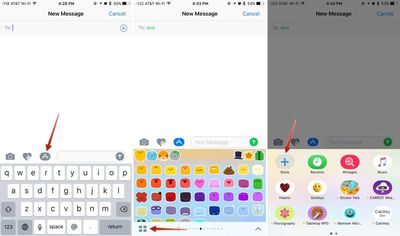
openingmessagesappstore

  1. Open an existing conversation thread in Messages or start a new conversation.
  2. Tap on the App Store icon next to the conversation box and then tap on the four dots to open your app drawer, which houses all installed apps.
  3. Tap the "+" icon to access the iMessage App Store.
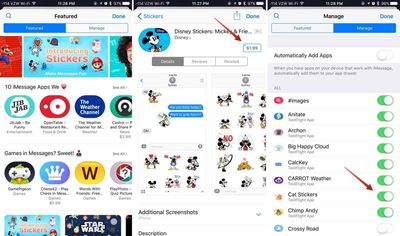
  4. In the "Featured" section, tap "Get" or and then "Install" to download a sticker pack, or tap on the purchase price to buy an pack that costs money. Passwords and Touch ID authentication are required, just as in the standard App Store.
  5. Tap on the "Manage" tab to install sticker packs (or other apps) that are available as iOS add-ons. Installation is done by setting the toggle to on (green), while removing an a sticker pack is done by turning the toggle off.

    messagesappstorestickers

  6. OPTIONAL: In the "Manage" tab, toggle on "Automatically Add Apps" to let all iOS apps that have an iMessage component install in Messages automatically.
  7. Click "Done." The newly installed sticker pack is now available in your app drawer. Access it by opening the app drawer (four dots icon) or swiping left or right through your installed apps.
Sticker Basics

Stickers are displayed in place of the iOS keyboard, just like emoji. Sending a sticker to someone is as simple as tapping it, which puts it in the message field. From there, tap the up arrow to send a sticker. It's simple, and essentially the same process as sending a standard text message or an emoji.
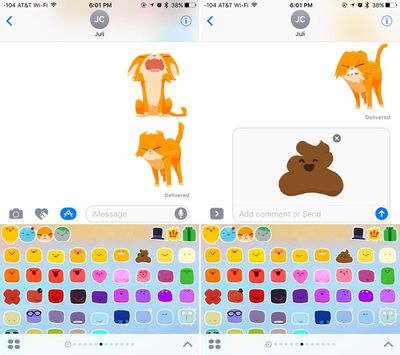
sendingstickers

Layering, Resizing, and Rotating Stickers

The neat thing about stickers is that they can be layered over incoming text messages, photos, GIFs, or other stickers, so you can use them to react to content your friends send you.
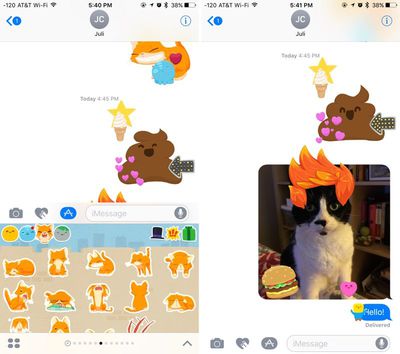
layeredstickers
Stickers must be placed on an incoming chat bubble of some sort and can't be placed randomly in the messages field, and stickers can only be added to other stickers after the first sticker has been sent, so it's not possible to layer multiple stickers together when composing a message.

To layer:

  1. Navigate to the sticker pack you want to use.
  2. Select a sticker. Instead of tapping it, place a finger on the sticker and drag it up to the messages window.
  3. Drag the sticker to where you want to place it on a message bubble, photo, or existing sticker.

You can put as many stickers as you like on a photo or an existing sticker, so you and your friends can take turns embellishing photos and creating sticker collages. Stickers from different sticker packs can be mixed together in one field — just swipe between packs to change stickers.

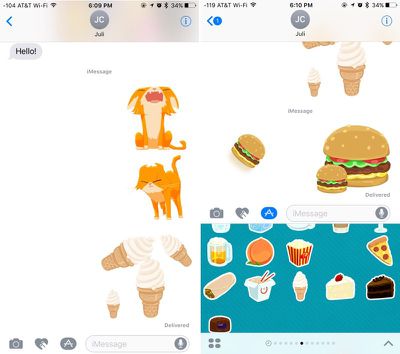
Stickers can be resized or rotated before they're placed, a feature that's especially useful when you want to accent a photo. To make stickers bigger or smaller, as you drag them up to the messages field to place them somewhere, add another finger to the screen and use pinch gesture to expand or contract them.
rotatedandresizedstickers
Rotating stickers is done in the same way. As you hold a sticker above the screen before placing it, use two fingers to twist it around, changing its orientation. Make sure not to let go when rotating or resizing, as removing your finger releases the sticker and it can no longer be edited.

Managing and Deleting Stickers

There are several gestures that can be used to manage your stickers. A single tap will display a sticker full screen, as will a 3D Touch press on the iPhone 6s and later.
deletingstickers
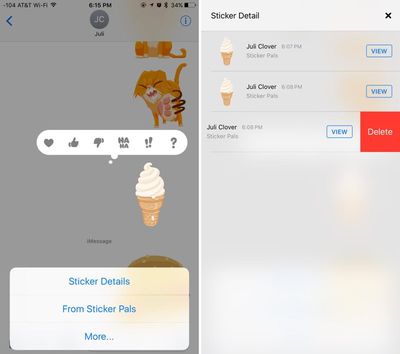
Use a long press on a sticker to bring up your message reaction menu and a set of management options. This menu displays where a sticker is from so you can download the sticker pack from the iMessage App Store if it's not already installed, and it has tools for deleting layered stickers. To delete:

  1. Long press on a layered sticker or a sticker that's been placed on an incoming message or photo.
  2. Choose the "Sticker Detail" option. All stickers that have been placed on a particular photo, message, or initial sticker will be displayed.
  3. On the sticker you want to delete, swipe to the left and choose then tap the "Delete" button.
  4. The sticker is removed from your device and from the device of the person you were communicating with and you're now free to add additional stickers.

Sticker Compatibility

Stickers are only going to display appropriately on devices running iOS 10 and macOS Sierra, so sending stickers to friends who are using Android devices or older versions of iOS won't work quite the same. On these devices, stickers are simply displayed as an image or GIF might be displayed and all layering is ignored.

Sticker packs can be created using Xcode with no coding experience required, so not only are developers going to be coming out with sticker packs, but artists can make them too. Expect to see hundreds of available sticker packs in the near future in addition to the built-in Hearts, Smileys, Hands, and Classic Mac stickers made available by Apple.


Related Forum: iOS 10

Top Rated Comments

ArtOfWarfare Avatar
133 months ago
How do I remove all this garbage?

I'm fine with receiving it, but I want to send text messages and pictures and nothing else. How do I remove the apps button, the drawing button, and the voice button?

I don't think I'm at all alone in this. My wife, who uses Snapchat, doesn't want all this crap in her messaging app. If someone using snapchat doesn't want it, I can't imagine who does.

I feel like Apple risks losing a lot of people who will shift over to Skype or WeChat or something, just so they can have a simpler messaging experience.
Score: 7 Votes (Like | Disagree)
Traverse Avatar
133 months ago
Is there a way to hide this stuff? I think it's laughable that the text bar is only like 0.4" now
Score: 6 Votes (Like | Disagree)
Traverse Avatar
133 months ago
Already there are complaints complaints complaints :rolleyes:
Because not everyone likes it and there appears to be no easy way to hide it. It's too in your face.
Score: 3 Votes (Like | Disagree)
10littlebirds Avatar
133 months ago
iOS 9.3.5 (still installable - for a short time)

Does the text bar stay that short after you start typing?
No, the text bar expands as soon as you start typing. It's just a matter of getting used to seeing something different when you enter into a new text. You can also swipe left at the edge of the bar to hide camera/art/sticker options if it is distracting. I believe you have to do that with each new text though. Hope that helps.
Score: 2 Votes (Like | Disagree)
appledefenceforce Avatar
133 months ago
Already there are complaints complaints complaints :rolleyes:
Score: 2 Votes (Like | Disagree)
jonnysods Avatar
133 months ago
Is there a way to hide this stuff? I think it's laughable that the text bar is only like 0.4" now
I want to know too. Less is more for me, this change is kind of whacky and un-Apple like.
Score: 1 Votes (Like | Disagree)

Popular Stories

apple design award 2025

Apple Announces 2025 Design Award Winners Ahead of WWDC 2025

Tuesday June 3, 2025 10:14 am PDT by
As we wait for WWDC to kick off next Monday, Apple today announced the winners of its annual Apple Design Awards, recognizing apps and games for their innovation, ingenuity, and technical achievement. The 2025 Apple Design Award winners are listed below, with one app and one game selected per category: Delight and Fun - CapWords (App) and Balatro (Game) Innovation - Play (App) and PBJ -...
Apple 2026 Black Friday Event Hero

Apple's Official 2026 Black Friday Offer Starts Rolling Out

Thursday November 26, 2026 8:37 am PST by
Apple's annual four-day Black Friday through Cyber Monday shopping event is now live in Australia, New Zealand, and Thailand, and it will continue to roll out across Europe, the U.S., and Canada as the calendar turns to Friday, November 27 around the world. In the U.S., Apple's terms and conditions say the promotion begins on November 27 at 12 a.m. Pacific Time and ends on November 30 at...
apple store down feature

Here's Why the Apple Store is Going Down

Thursday November 26, 2026 5:49 am PST by
Apple's online store is going down for a few hours on a rolling country-by-country basis right now, but do not get your hopes up for new products. Apple takes its online store down for a few hours ahead of Black Friday every year to tease its annual gift card offer with the purchase of select products. The store is down in Australia, New Zealand, and Thailand, right now, and it will...
Latest Stories
Apple Now Aims to Repair Rather Than Replace iPhone Duos With Cracked Screens
1 hour ago
Here Are the Best Apple Black Friday Leftover Deals You Can Get Today
10 hours ago
HomePod Mini 2 in (RED) Seemingly Spotted Ahead of Announcement
21 hours ago
Apple's M6 and PROLED MacBook Pro Reach New Low Prices for Black Friday
1 day ago
The MacRumors Show: iPhone Air 2 and iPhone 18 Are Coming
1 day ago
Apple Store in Brisbane Reopening Next Month With New Design
1 day ago
The 60+ Best Black Friday Accessory Deals on iPhone Chargers, TVs, Headphones, and More
10 hours ago
GTA VI Now (Barely) Running on Apple Silicon Macs
1 day ago
The Best Black Friday Streaming Deals on Apple TV, Disney+, and More
1 day ago
Apple TV's 'Carême' Wins International Emmy for Best Drama
1 day ago
iPhone 18 Production Delay Leaves Apple Little Time Before Launch
1 day ago
The Best Black Friday AirPods Deals Still Available
1 day ago
The Best Black Friday Deals on Apple Home Products
2 days ago
The Best Black Friday iPhone Deals Still Available
1 day ago
The Best Black Friday iPad Deals Still Available
1 day ago
The Best Black Friday Apple Watch Deals Still Available
1 day ago
The Best Black Friday AirTag Deals Still Available
1 day ago
The Best Black Friday Mac Deals Still Available
1 day ago
iPhone Share of US Smartphone Market Hits 57% as Rivals Slip
2 days ago
iPhone 20 Pro Rumored to Feature 3D-Printed Titanium Frame
2 days ago
The 50+ Best Apple Black Friday Deals Still Available on AirPods, iPads, and More
2 hours ago
Apple's Official 2026 Black Friday Offer Starts Rolling Out
2 days ago
Halide Adds Fill Light Feature for iPhone Duo
2 days ago
MacBook Air Black Friday Deals Now Live With Massive $399 Savings
2 days ago
Amazon Discounts All MacBook Neo Models by $99 for Black Friday
2 days ago
Kodak Launches Unique AirTag Rival With E-Ink Display
2 days ago
Here's Why the Apple Store is Going Down
2 days ago
Apple Still Working on Giant Foldable iPad That Could Cost $5,000
3 days ago
iPhones Dominate China's Weak Singles' Day Smartphone Sales
3 days ago
iPhone 20 Pro Could Feature Ceramic in Limited-Edition Model
3 days ago
Related Apple News: Health | South Africa | Buyers Guide | Opinion | Mac