Skip to Content

Messages in iOS 10: How to Use Digital Touch

by

In iOS 10, the Messages app is gaining Digital Touch, a communication feature that was previously limited to watchOS. With Digital Touch, you can send friends and family drawings, heartbeats, fireballs, kisses, and more, all with just a few taps.
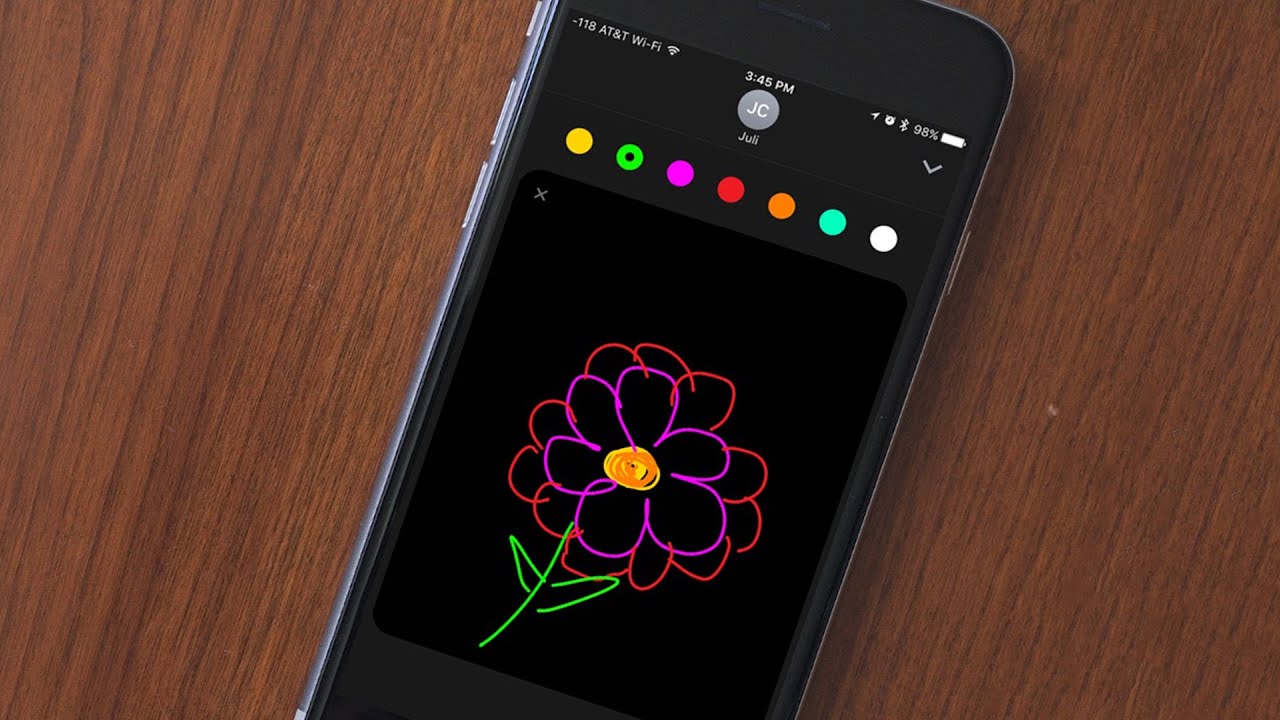

Sketches, taps, and other Digital Touch messages created on your iPhone are also viewable on the Apple Watch and vice versa, giving you plenty of ways to express yourself. Here's how to use the new feature.
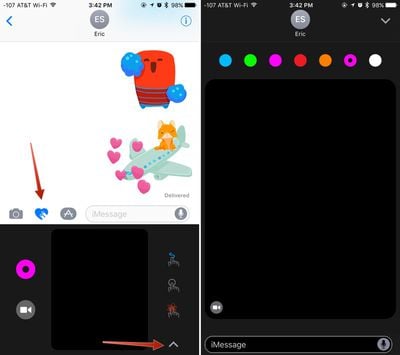
openingdigitaltouch

Accessing Digital Touch

  1. Open the Messages app.
  2. Open an existing conversation or start a new one.
  3. Tap the icon that looks like two fingers over a heart.
  4. Tap on the arrow on the right hand side to expand the Digital Touch window.

You can send taps and drawings by using the smaller Digital Touch interface that replaces the keyboard, but there's more screen real estate to work with when it's expanded to the size of the full iPhone display.

The Digital Touch interface supports several tap-based gestures to send various taps and icons, plus it allows for drawing with a finger and annotating short videos with the included video tool.

Drawing

To draw with Digital Touch, just start sketching in the black Digital Touch box, visible both in standard view mode and full screen mode. When using the standard view, tap the small circle on the left side of the screen to see the different color options. In full screen mode, the colors are all available at the top.

TIP: To access custom colors, long press on any of the color swatches. It'll bring up a color wheel with custom color options for more personalized drawings.
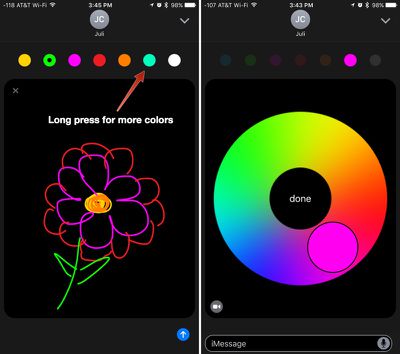
digitaltouchdrawing
On the Apple Watch, Digital Touch drawings are sent as soon as your finger is removed from the screen for a few seconds, but on the iPhone and the iPad, you can take your time because drawings aren't sent until you tap the send arrow.

The person who receives your Digital Touch drawing will see it drawn out in real time, just as you sketched it. If you make a flower, for example, it'll play like a video, showing each petal drawn in succession.

When you receive a Digital Touch drawing in Messages, tap it and you can see it full screen.

Annotating Photos and Videos

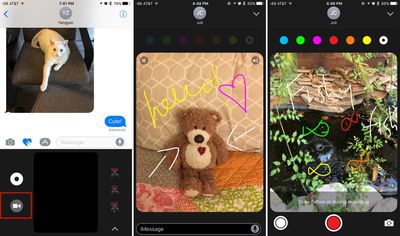
A Digital Touch feature unique to the iPhone and the iPad is the ability to snap photos or record short 10 second videos that can be annotated using Digital Touch sketching tools. Here's how:

  1. In the Digital Touch interface, tap on the Camera icon.
  2. Choose the front-facing or rear-facing camera by pressing the smaller camera icon on the bottom right of the screen. The front-facing camera is the default.
  3. Tap the red button to start recording. While the video is recording, you can use the Digital Touch tools to draw on top of it.

    digitaltouchphotos

  4. Alternatively, if you want to draw on the screen before you start recording, simple start sketching with a finger. When finished, tap record and your video will record with your drawing on top.
  5. To take a photo, press the white button instead of the red button, and then draw on top of it as you would for a video.
  6. In addition to drawing on photos and videos, use tap gestures to add taps, heartbeats, kisses, and more.
  7. Press the blue arrow to send your finished photo or video.
Taps, Kisses, and Heartbeats

There are several different Digital Touch gestures, each with a different effect. You can send kisses, heartbeats, taps, fireballs, and more. Below is a list of the gestures and their effects.

  • Single finger on the screen - Starts a drawing.
  • Single finger tap - Sends circular "taps" in the selected color. One tap sends one circle, and you can send multiples.
  • Single finger press - Sends a fireball. Hold down longer for a longer lasting fireball animation.
  • Two finger tap - Sends a kiss. Tap multiple times to send multiple kisses.
  • Two finger tap and hold - Sends a beating heart.
  • Two finger tap and hold, then a downward drag - Sends a heart that beats and then breaks in two.

Sending Digital Touch content can only be done on an iPhone running iOS 10 or an Apple Watch running watchOS 2 or 3, but it can be viewed on iOS devices running older versions of the operating system and on Macs in the Mac Messages app.
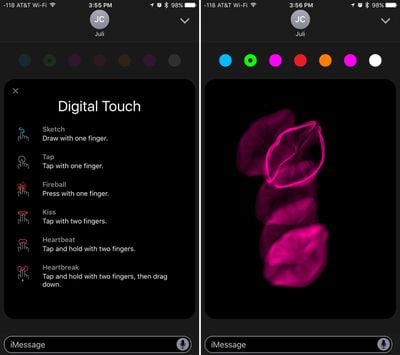
digitaltouchgestures
You can combine all of the photo, sketching, and gesture tools in Digital Touch to create unique multimedia messages to share with friends and family and make communicating more fun.

As a side note, Digital Touch messages are temporary. They will be deleted after a few minutes unless you tap on "Keep" in the messages window to permanently save them.


Related Forum: iOS 10

Top Rated Comments

Cineplex Avatar
133 months ago
Okay. The messages app is a mess! The interface is not clean and intuitive at all. Its is so anti-Apple it's not funny.
Score: 5 Votes (Like | Disagree)
133 months ago
The "digital touch" messages seem to send instantly. Example - I press/hold with one finger to send the "fireball", and as soon as I lift my finger from the screen it automatically sends - no "blue send button", no "do you want to send" prompt...just sends instantly. Am I doing it wrong or missing something? Not really a fan of having these messages just send on their own.
Score: 3 Votes (Like | Disagree)
133 months ago
I would prefer the "adult" setting for Messages, which removes most of the new/cute features. Many of the new features are obviously aimed at the under-16 age group. And yes, the interface with all that cutsie stuff is a mess.
Why is it adult or some other type of irrelevant overgeneralized stereotypical grouping that needs to be used there. You want a set of options to control what is available in the Messages app (and perhaps other places), it's that simple and straightforward. For the time being, simply not using those things mostly does the job in a similar fashion.
Score: 2 Votes (Like | Disagree)

Popular Stories

apple design award 2025

Apple Announces 2025 Design Award Winners Ahead of WWDC 2025

Tuesday June 3, 2025 10:14 am PDT by
As we wait for WWDC to kick off next Monday, Apple today announced the winners of its annual Apple Design Awards, recognizing apps and games for their innovation, ingenuity, and technical achievement. The 2025 Apple Design Award winners are listed below, with one app and one game selected per category: Delight and Fun - CapWords (App) and Balatro (Game) Innovation - Play (App) and PBJ -...
1password deal blue

1Password Security Breach: What Was Accessed and What Wasn't

Wednesday November 25, 2026 1:09 pm PST by
Popular password management app 1Password today said it experienced a security breach earlier this month. 1Password says some customer names and email addresses were accessed, but no customer vault contents were compromised. On November 19, 1Password saw indications that an employee's GitHub account had been breached and began investigating. The company says the breached GitHub account was...
apple store down feature

Here's Why the Apple Store is Going Down

Thursday November 26, 2026 5:49 am PST by
Apple's online store is going down for a few hours on a rolling country-by-country basis right now, but do not get your hopes up for new products. Apple takes its online store down for a few hours ahead of Black Friday every year to tease its annual gift card offer with the purchase of select products. The store is down in Australia, New Zealand, and Thailand, right now, and it will...
Latest Stories
The 50+ Best Apple Black Friday Deals Still Available on AirPods, iPads, and More
57 minutes ago
Apple's M6 and PROLED MacBook Pro Reach New Low Prices for Black Friday
8 hours ago
The MacRumors Show: iPhone Air 2 and iPhone 18 Are Coming
9 hours ago
Apple Store in Brisbane Reopening Next Month With New Design
9 hours ago
The 60+ Best Black Friday Accessory Deals on iPhone Chargers, TVs, Headphones, and More
10 hours ago
GTA VI Now (Barely) Running on Apple Silicon Macs
10 hours ago
The Best Black Friday Streaming Deals on Apple TV, Disney+, and More
11 hours ago
Apple TV's 'Carême' Wins International Emmy for Best Drama
11 hours ago
iPhone 18 Production Delay Leaves Apple Little Time Before Launch
12 hours ago
The Best Black Friday AirPods Deals Still Available
4 hours ago
The Best Black Friday Deals on Apple Home Products
13 hours ago
The Best Black Friday iPhone Deals Still Available
4 hours ago
The Best Black Friday iPad Deals Still Available
4 hours ago
The Best Black Friday Apple Watch Deals Still Available
4 hours ago
The Best Black Friday AirTag Deals Still Available
4 hours ago
The Best Black Friday Mac Deals Still Available
4 hours ago
iPhone Share of US Smartphone Market Hits 57% as Rivals Slip
14 hours ago
iPhone 20 Pro Rumored to Feature 3D-Printed Titanium Frame
16 hours ago
Apple's Official 2026 Black Friday Offer Starts Rolling Out
1 day ago
Halide Adds Fill Light Feature for iPhone Duo
1 day ago
MacBook Air Black Friday Deals Now Live With Massive $399 Savings
1 day ago
Amazon Discounts All MacBook Neo Models by $99 for Black Friday
1 day ago
Kodak Launches Unique AirTag Rival With E-Ink Display
2 days ago
Here's Why the Apple Store is Going Down
2 days ago
Apple Still Working on Giant Foldable iPad That Could Cost $5,000
2 days ago
iPhones Dominate China's Weak Singles' Day Smartphone Sales
2 days ago
iPhone 20 Pro Could Feature Ceramic in Limited-Edition Model
2 days ago
Apple Faces Korean Regulator Review Over iPhone 16 AI Advertising
2 days ago
Apple Watch Ultra 4 Hits New Best-Ever Price of $649.99 for Black Friday
2 days ago
New Apple Store Opening in India, Download the Special Wallpaper Now
2 days ago
Related Apple News: South Africa | Politics | Business | Mac | Health






























