Skip to Content

How to Use the New Control Center in iOS 10

by

Although iOS 10 brings with it a few subtle visual and mechanical changes, some of its alterations to the most-used iPhone software features will probably be pretty easy to spot. One of those is the new Control Center, which has not only received a cosmetic upgrade, but has gotten a few new added abilities as well.


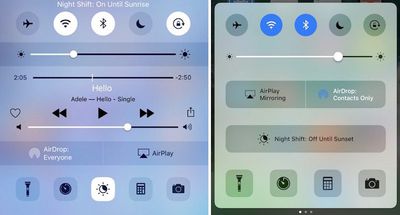
The Control Center, in essence, is no longer a single card stocked with all of the expected iOS features you've become used to seeing (like the flashlight, calculator, and timer) — it's now a sliding collection of three panels. The first is a basic launchpad of settings like Wi-Fi and Bluetooth, the second is dedicated to Apple Music, and the third houses your favorite accessories from Apple's new HomeKit-focused app "Home."
How To Control Center 6

Control Center in iOS 9 (left) and iOS 10 (right)

Some of these shuffled-around buttons can make Control Center in iOS 10 a bit discombobulating when you first bring it up, so follow this guide to get a general impression of how to use Control Center, and how to find your favorite features that may not be where they were before.

Navigating Control Center in iOS 10

From anywhere in iOS 10 (including the main lock screen), swipe up from the bottom of the iPhone to bring up Control Center. The landing tab of Control Center mirrors a lot of the features from iOS 9 and prior versions of iOS, because it's there you'll find Airplane Mode, Wi-Fi, Bluetooth, Do Not Disturb, and Portrait Orientation Lock buttons lined up along the top of the tab, all sitting above the brightness toggle.

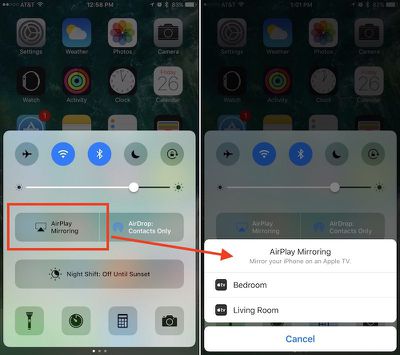
The second row of buttons brings the first major Control Center change in iOS 10: two medium-sized squares for AirPlay Mirroring and AirDrop, whose locations have been flipped this time around. AirPlay Mirroring lets you mirror your iPhone screen on a connected Apple TV, while the AirDrop button lets you toggle between "Receiving Off," "Contacts Only," and "Everyone" for Apple's media sharing tool.
How To Control Center 2
Night Shift has its own dedicated row, so you can enable or disable the feature before its scheduled on/off times — in iOS 9 it was a small icon between timer and calculator. Lastly, at the bottom of the first Control Center tray, you'll find the Flashlight, Timer, Calculator, and Camera, unchanged from iOS 9. New, however, are 3D Touch shortcuts for each app: the Flashlight can change intensity, Timer includes common interval options, Calculator lets you copy the last result, and Camera has multiple picture options.

Controlling Music

While in the first panel of Control Center, swipe left to switch over to the Apple Music panel. With the iOS 10 update, Apple has moved music playback and volume controls into its own separate panel. The change will undoubtedly be a hassle for many iOS users who listen to music regularly, but with a dedicated section of Control Center a few of the controls have been enlarged and a new feature has been added.

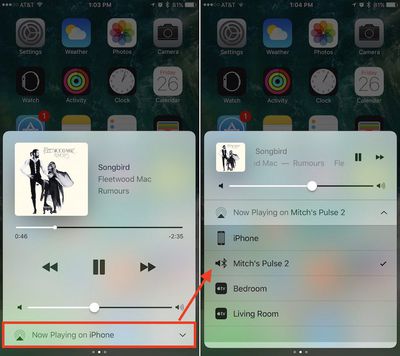
After starting a song in Apple Music, the new panel will come alive with the currently playing track, name of the artist and album, and scrub controls to jump to any section of the song. You can tap on any of these text readouts, and even the album artwork, to jump into the full Apple Music app. In addition to basic play, pause, rewind, and fast-forward buttons, and a volume toggle, Apple has introduced a new broadcast feature in Control Center as well.
How To Control Center 3
The button is located all the way at the bottom of the Apple Music section, and should default to "iPhone," so tap on it to see a list of potential devices you can connect to in order to expand the listening capabilities of the current track to a larger group. These devices could include any Bluetooth speaker within range that you've already set up via Settings, or a 3rd or 4th generation Apple TV. Choose whichever output you prefer to transfer playback to, and you can reset the iPhone as default by returning to Control Center, or simply powering down the connected device.

Controlling Home

If you plan on using Apple's new HomeKit app "Home," the third panel of Control Center should prove useful. Once synced up with any compatible HomeKit accessories in the main app, you can swipe left twice from the Control Center launchpad to gain a few basic controls over your smart light bulbs, thermostat, and more.

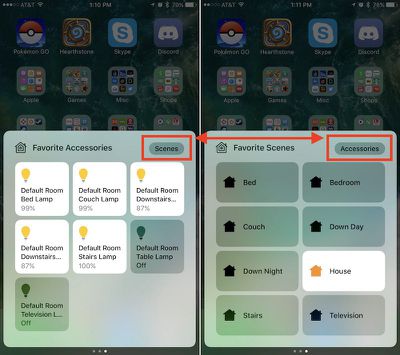
Before you get started in Control Center, make sure you have your accessories installed in Home. On the main screen in the app, tap "Edit" in the top right corner to rearrange your favorite accessories, the top nine of which will appear in Control Center. You can follow the same process to prioritize your favorite scenes to activate in Control Center.
Control Center How To 4
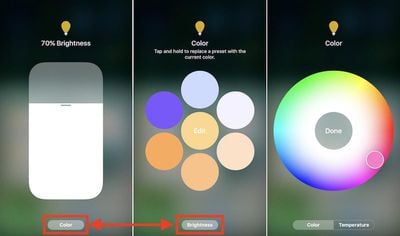
Within its section of Control Center, Home's actions are straightforward: you can tap each accessory to either turn it on or off, depending on its current state. More useful is a clever 3D Touch gesture that brings up a brightness toggle that allows for incremental percentage control of a connected lightbulb such as Hue, for example. Tap "Color" at the bottom of this screen to dive into a dynamic color wheel to pick six preset color options, or edit one to jump into a rainbow color selector to truly customize your lights within Control Center.

A "Temperature" wheel further lets you choose from brighter blue light or softer orange light. Although not automatic, this option is similar to Night Shift, letting you generate softer light at night to encourage better sleep. You can tap any empty space in these 3D Touch menus to return to Control Center.
How To Control Center 5
To get a glimpse of your favorite scenes — which are grouped collections of HomeKit accessories — tap the "Scenes" button in the top right of Control Center's third panel. Here you'll see your top eight favorite scenes, which offer similar on/off controls for each scene, but without any expanded 3D Touch support. Tap "Accessories" to return to the favorite accessories tab.

iOS 10 is full of new features that you'll find when you start playing around with the software update. Keep checking back with MacRumors for more helpful how-tos on everything from creating and sending handwritten text messages to avoiding tolls in Apple Maps to using lyrics in Apple Music and more.


Related Forum: iOS 10

Top Rated Comments

133 months ago
Why does the Night Shift button have to be so huge? There could be place for more buttons for useful settings instead of just this big button...
Score: 14 Votes (Like | Disagree)
133 months ago
Let me summarize:

iOS 9 - swipe up, touch, touch, done.

iOS 10 - swipe up, touch swipe left/right, touch, done

The controls aren't logically grouped either - splitting Airplay sound and Airplay mirroring in particular is just plain dumb.

While I appreciate larger fonts and controls, the whole OS update is cartoonishly large - one of the ugliest iOS versions of all. They've reduced information density and increased the amount of navigation required to complete a task - it's a terribly inefficient UI.

And don't get me started on the music app.
Score: 8 Votes (Like | Disagree)
133 months ago
While I appreciate larger fonts and controls, the whole OS update is cartoonishly large - one of the ugliest iOS versions of all. They've reduced information density and increased the amount of navigation required to complete a task - it's a terribly inefficient UI.

And don't get me started on the music app.
You mean the
Music App?
Score: 6 Votes (Like | Disagree)
133 months ago
I think the new control panel is a step down. Everything use to be in one place which worked for me now it's all divided up making too many swipes or gestures just to do the same thing. It also appears no one was using night mode in iOS 9 as now they are giving it a wider space all to its own (make that wasted space) to do the same thing. There a point where going too simplistic is getting a bit child like. Apple thinks we don't know where to go so they try and make it simpler and simplier and starts to get a little juvenile.
Score: 6 Votes (Like | Disagree)
133 months ago
I'm one of those who quite dislike the new control center, because I listen to music a lot and use the cc controls quite often.
The swiping is a nuisance and I didn't get any new features for it, so I don't really see the point of having that extra page. The album art is not worth it.
Score: 6 Votes (Like | Disagree)
Christoffee Avatar
133 months ago
Why does the Night Shift button have to be so huge? There could be place for more buttons for useful settings instead of just this big button...
Yup. Like power save!
Score: 5 Votes (Like | Disagree)

Popular Stories

apple design award 2025

Apple Announces 2025 Design Award Winners Ahead of WWDC 2025

Tuesday June 3, 2025 10:14 am PDT by
As we wait for WWDC to kick off next Monday, Apple today announced the winners of its annual Apple Design Awards, recognizing apps and games for their innovation, ingenuity, and technical achievement. The 2025 Apple Design Award winners are listed below, with one app and one game selected per category: Delight and Fun - CapWords (App) and Balatro (Game) Innovation - Play (App) and PBJ -...
Apple 2026 Black Friday Event Hero

Apple's Official 2026 Black Friday Offer Starts Rolling Out

Thursday November 26, 2026 8:37 am PST by
Apple's annual four-day Black Friday through Cyber Monday shopping event is now live in Australia, New Zealand, and Thailand, and it will continue to roll out across Europe, the U.S., and Canada as the calendar turns to Friday, November 27 around the world. In the U.S., Apple's terms and conditions say the promotion begins on November 27 at 12 a.m. Pacific Time and ends on November 30 at...
1password deal blue

1Password Security Breach: What Was Accessed and What Wasn't

Wednesday November 25, 2026 1:09 pm PST by
Popular password management app 1Password today said it experienced a security breach earlier this month. 1Password says some customer names and email addresses were accessed, but no customer vault contents were compromised. On November 19, 1Password saw indications that an employee's GitHub account had been breached and began investigating. The company says the breached GitHub account was...
Latest Stories
The 50+ Best Apple Black Friday Deals Still Available on AirPods, iPads, and More
2 hours ago
Here Are the Best Apple Black Friday Leftover Deals You Can Get Today
35 minutes ago
HomePod Mini 2 in (RED) Seemingly Spotted Ahead of Announcement
12 hours ago
Apple's M6 and PROLED MacBook Pro Reach New Low Prices for Black Friday
22 hours ago
The MacRumors Show: iPhone Air 2 and iPhone 18 Are Coming
22 hours ago
Apple Store in Brisbane Reopening Next Month With New Design
23 hours ago
The 60+ Best Black Friday Accessory Deals on iPhone Chargers, TVs, Headphones, and More
27 minutes ago
GTA VI Now (Barely) Running on Apple Silicon Macs
1 day ago
The Best Black Friday Streaming Deals on Apple TV, Disney+, and More
1 day ago
Apple TV's 'Carême' Wins International Emmy for Best Drama
1 day ago
iPhone 18 Production Delay Leaves Apple Little Time Before Launch
1 day ago
The Best Black Friday AirPods Deals Still Available
18 hours ago
The Best Black Friday Deals on Apple Home Products
1 day ago
The Best Black Friday iPhone Deals Still Available
18 hours ago
The Best Black Friday iPad Deals Still Available
18 hours ago
The Best Black Friday Apple Watch Deals Still Available
18 hours ago
The Best Black Friday AirTag Deals Still Available
18 hours ago
The Best Black Friday Mac Deals Still Available
18 hours ago
iPhone Share of US Smartphone Market Hits 57% as Rivals Slip
1 day ago
iPhone 20 Pro Rumored to Feature 3D-Printed Titanium Frame
1 day ago
Apple's Official 2026 Black Friday Offer Starts Rolling Out
2 days ago
Halide Adds Fill Light Feature for iPhone Duo
2 days ago
MacBook Air Black Friday Deals Now Live With Massive $399 Savings
2 days ago
Amazon Discounts All MacBook Neo Models by $99 for Black Friday
2 days ago
Kodak Launches Unique AirTag Rival With E-Ink Display
2 days ago
Here's Why the Apple Store is Going Down
2 days ago
Apple Still Working on Giant Foldable iPad That Could Cost $5,000
2 days ago
iPhones Dominate China's Weak Singles' Day Smartphone Sales
2 days ago
iPhone 20 Pro Could Feature Ceramic in Limited-Edition Model
2 days ago
Apple Faces Korean Regulator Review Over iPhone 16 AI Advertising
2 days ago
Related Apple News: Culture | Iphone | Business | Opinion | Local News






























