Skip to Content

How to Install the iPadOS Public Beta

by

Apple released a public beta of iPadOS for compatible iPad models, enabling users who aren't signed up for the Apple Developer Program to test the software update ahead of its official release in the fall.

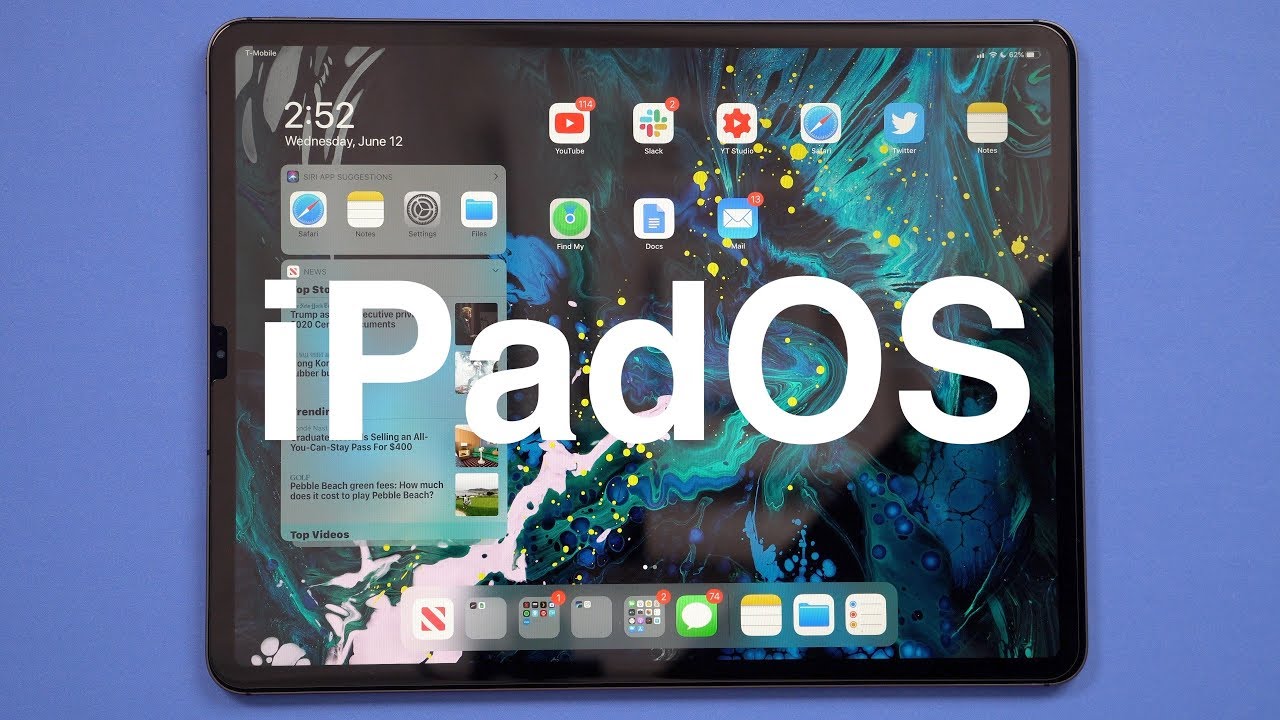
iPadOS is a rebranded version of iOS 13 specially made for iPads, with extra features designed to take advantage of larger tablet displays. It includes an updated Home screen, improved multitasking functionality, new Apple Pencil functionality, support for external drives, folder sharing in Files, text editing improvements, and all of the other new changes in iOS 13.
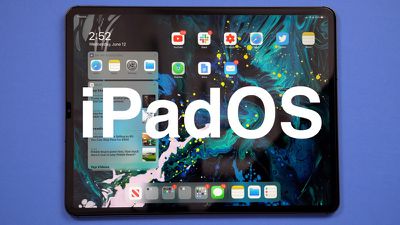
ipados 1
With that said, bear in mind that iPadOS is pre-release software, so installing the public beta on a secondary device is highly recommended. The stability of beta software cannot be guaranteed, as it often contains bugs and issues that have yet to be ironed out, so installing it on your day-to-day device isn't advised.

Is iPadOS Compatible With My iPad?

Apple's list of compatible devices confirms that iPadOS is compatible with all of these ‌iPad‌ models:

  • 12.9-inch iPad Pro 3rd generation
  • 12.9-inch ‌iPad Pro‌ 2nd generation
  • 12.9-inch ‌iPad Pro‌ 1st generation
  • 11-inch ‌iPad Pro‌
  • 10.5-inch ‌iPad Pro‌
  • 9.7-inch ‌iPad Pro‌
  • ‌iPad‌ 6th generation (2018 model)
  • ‌iPad‌ 5th generation
  • iPad Air 3 (2019 model)
  • ‌iPad Air‌ 2
  • iPad mini 5 (2019 model)
  • ‌iPad mini‌ 4

Installing the Public Beta shouldn't take longer than half an hour, but first you should create a backup of your device's contents and settings by following the step-by-step instructions below.

How to Create a Backup of Your iPad in iTunes

  1. Connect your ‌iPad‌ to a Mac or PC using a Lightning to USB cable or a USB-C to USB cable, depending on the model.

  2. Open iTunes.
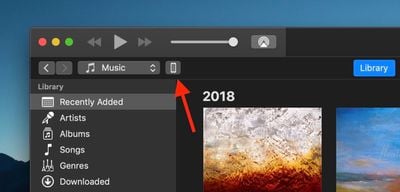
  3. Click the device icon in the top-left menu and select your ‌iPad‌.
    how to install the iPadOS Public Beta 1
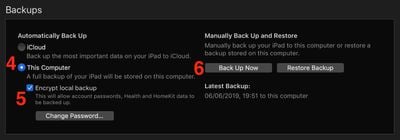
  4. Under Backups, click This computer.
  5. Tick the Encrypt local backup checkbox if you want to securely back up your login credentials and any Health and HomeKit data.
    how to install the iPadOS Public Beta 2
  6. Click Back Up Now.
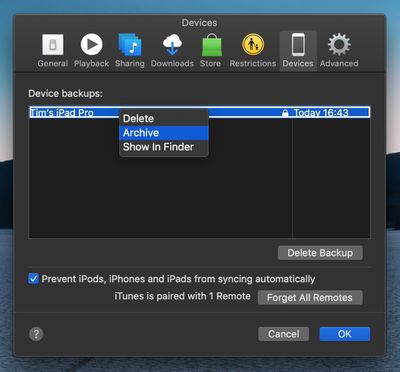
  7. Click iTunes -> Preferences… in the macOS menu bar.
  8. Click the Devices tab.
    how to install the ipados public beta 3
  9. Right-click (or Ctrl-click) the new backup, and select Archive from the contextual dropdown menu.
How to Enroll in the Apple Beta Software Program

Now that you've backed up your device, you're ready to download the iPadOS Public Beta. To do so, you must enroll your ‌iPad‌ in the free Apple Beta Software Program.

  1. Open Safari on your ‌iPad‌ and navigate to the Apple Beta Software Program.
  2. Tap the Sign up button, or sign in if you're already a member.
  3. Enter your Apple ID credentials and tap the Sign in button.
  4. Agree to the Apple Beta Software Program terms and conditions if necessary.
    how to install ipados public beta 4
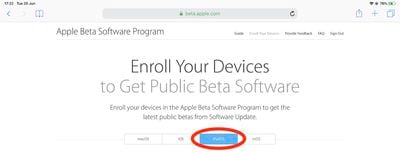
  5. A Guide for Public Betas screen will appear. Select the iPadOS tab, scroll down to the Get Started section and tap enroll your iOS device.
  6. On the Enroll Your Devices screen, with the iPadOS tab selected, scroll down and tap the Download profile button. how to install ipados public beta 5
  7. Tap Allow at the profile prompt.
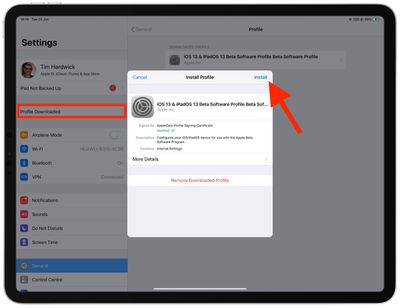
  8. Launch the Settings app on your iOS device and then tap Profile Downloaded below your ‌Apple ID‌ banner.
    how to install the iPadOS Public Beta 7
  9. Tap Install and follow the prompts to install the iOS Beta Software Profile.
  10. Restart your device after installing the profile by tapping the restart popup.
How to Install the iPadOS Public Beta

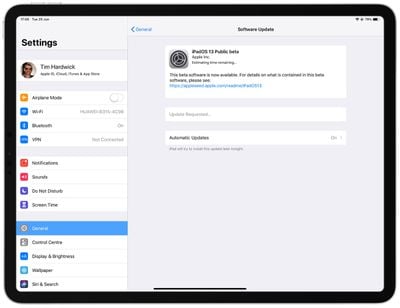
Once you're enrolled in the Apple Beta Software Program, you can install the iPadOS Public Beta on your iOS device just as you would a regular software update.

  1. Launch the Settings app on your ‌iPad‌.
  2. Tap General -> Software Update.
    how to install the iPadOS Public Beta 6
  3. Tap Download and Install.
  4. Tap Install Now.

If you come across any issues installing the iPadOS Public Beta, it may help to clear any previous profiles lingering on your device. You can find these in the Settings app under General -> Profile.

Want to discuss the iPadOS beta? Make sure to check out our iOS 13 discussion forum.


Related Forum: iOS 13

Top Rated Comments

97 months ago
So tempting as I cannot wait for the changes but not sure I want to install on a business critical daily driver!
Score: 3 Votes (Like | Disagree)
magicschoolbus Avatar
97 months ago
Beta testers are the real MVPs. I just want to know if a Sandisk extreme ssd will be able to be read from my lightning port...
Score: 2 Votes (Like | Disagree)
Shirasaki Avatar
97 months ago
iPadOS is only for developers right now, not for Beta testing
iOS13 beta you can install, & iPadOS is available to developers right now :)
[doublepost=1562224357][/doublepost]
no. i used to update the apps in iTunes & actually USE iTunes, but i quit like a year ago haha
No, iPadOS is also available for public beta testing now. Just download profile from beta.apple.com.
Score: 1 Votes (Like | Disagree)
BroTim52 Avatar
97 months ago
So tempting as I cannot wait for the changes but not sure I want to install on a business critical daily driver!
[doublepost=1561679547][/doublepost]I just installed and this is an amazing update. I initially on my iPad Pro 2nd generation and then installed on my new iPad Pro 3rd generation and so far it’s working great for the most part. I really haven’t ran across any major issues.
Score: 1 Votes (Like | Disagree)
paulchat55 Avatar
97 months ago
I am on my second try of installing the public beta. First time was last night and it was taking awhile so I turned it off, back on, and had to do a restore today back to ios12, then to beta 12.4, then install my backup. Now I’m trying again and it’s rebooted and been on the Apple logo for a good hour. It’s a 10.5” iPad Pro.
I have the same issue on my 10.5 iPad Pro. tried the install multiple times.
Score: 1 Votes (Like | Disagree)
Gravydog316 Avatar
97 months ago
Tap the blue person account icon (App Store) and scroll down the short list. You will see any apps that need to be updated.
yeah i found it! i like the old way 'cause i'm obsessed with app updates for some reason haha
Score: 1 Votes (Like | Disagree)

Popular Stories

apple design award 2025

Apple Announces 2025 Design Award Winners Ahead of WWDC 2025

Tuesday June 3, 2025 10:14 am PDT by
As we wait for WWDC to kick off next Monday, Apple today announced the winners of its annual Apple Design Awards, recognizing apps and games for their innovation, ingenuity, and technical achievement. The 2025 Apple Design Award winners are listed below, with one app and one game selected per category: Delight and Fun - CapWords (App) and Balatro (Game) Innovation - Play (App) and PBJ -...
1password deal blue

1Password Security Breach: What Was Accessed and What Wasn't

Wednesday November 25, 2026 1:09 pm PST by
Popular password management app 1Password today said it experienced a security breach earlier this month. 1Password says some customer names and email addresses were accessed, but no customer vault contents were compromised. On November 19, 1Password saw indications that an employee's GitHub account had been breached and began investigating. The company says the breached GitHub account was...
apple store down feature

Here's Why the Apple Store is Going Down

Thursday November 26, 2026 5:49 am PST by
Apple's online store is going down for a few hours on a rolling country-by-country basis right now, but do not get your hopes up for new products. Apple takes its online store down for a few hours ahead of Black Friday every year to tease its annual gift card offer with the purchase of select products. The store is down in Australia, New Zealand, and Thailand, right now, and it will...
Latest Stories
The 50+ Best Apple Black Friday Deals Still Available on AirPods, iPads, and More
9 hours ago
HomePod Mini 2 in (RED) Seemingly Spotted Ahead of Announcement
6 hours ago
Apple's M6 and PROLED MacBook Pro Reach New Low Prices for Black Friday
16 hours ago
The MacRumors Show: iPhone Air 2 and iPhone 18 Are Coming
16 hours ago
Apple Store in Brisbane Reopening Next Month With New Design
17 hours ago
The 60+ Best Black Friday Accessory Deals on iPhone Chargers, TVs, Headphones, and More
18 hours ago
GTA VI Now (Barely) Running on Apple Silicon Macs
18 hours ago
The Best Black Friday Streaming Deals on Apple TV, Disney+, and More
19 hours ago
Apple TV's 'Carême' Wins International Emmy for Best Drama
19 hours ago
iPhone 18 Production Delay Leaves Apple Little Time Before Launch
20 hours ago
The Best Black Friday AirPods Deals Still Available
12 hours ago
The Best Black Friday Deals on Apple Home Products
21 hours ago
The Best Black Friday iPhone Deals Still Available
12 hours ago
The Best Black Friday iPad Deals Still Available
12 hours ago
The Best Black Friday Apple Watch Deals Still Available
12 hours ago
The Best Black Friday AirTag Deals Still Available
12 hours ago
The Best Black Friday Mac Deals Still Available
12 hours ago
iPhone Share of US Smartphone Market Hits 57% as Rivals Slip
22 hours ago
iPhone 20 Pro Rumored to Feature 3D-Printed Titanium Frame
23 hours ago
Apple's Official 2026 Black Friday Offer Starts Rolling Out
2 days ago
Halide Adds Fill Light Feature for iPhone Duo
2 days ago
MacBook Air Black Friday Deals Now Live With Massive $399 Savings
2 days ago
Amazon Discounts All MacBook Neo Models by $99 for Black Friday
2 days ago
Kodak Launches Unique AirTag Rival With E-Ink Display
2 days ago
Here's Why the Apple Store is Going Down
2 days ago
Apple Still Working on Giant Foldable iPad That Could Cost $5,000
2 days ago
iPhones Dominate China's Weak Singles' Day Smartphone Sales
2 days ago
iPhone 20 Pro Could Feature Ceramic in Limited-Edition Model
2 days ago
Apple Faces Korean Regulator Review Over iPhone 16 AI Advertising
2 days ago
Apple Watch Ultra 4 Hits New Best-Ever Price of $649.99 for Black Friday
2 days ago
Related Apple News: Apple Watch Series 10 Rumors | Iphone Duo Split Keyboard Landscape Mode | Wwdc 2024 Announcements | Apple Store | 20th Anniversary Iphone