

Apple has now released the first iPadOS 17 beta to developers, and in a first for the company, it is also giving non-developers the opportunity to download the beta on their iPads for free. Keep reading to learn how it's done.
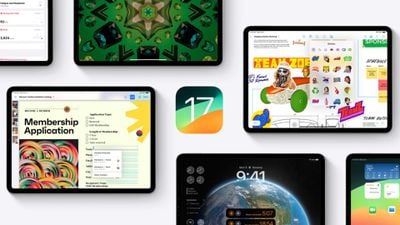
In years past when Apple has announced a major new operating system update, the first wave of betas has officially only been available to download if you are a paying subscriber to Apple's Developer Program, which costs $99 a year. Public betas then become available to users enrolled in Apple's Public Beta Software Program after a delay of a few days or weeks after the developer beta has been released. However, this year you don't have to wait for the public beta to be one of the first to try out iPadOS 17.
In an unexpected change for 2023, anyone who signs in to Apple's developer account website with their Apple ID gets access to developer beta releases as well, even if they are not a paying member of Apple's Developer Program. This means anyone with an Apple ID can download and install the iOS 17, iPadOS 17, and macOS Sonoma betas without waiting for the public betas to launch.
Compatible iPad Models
iPadOS 17 drops support for the iPad Pro (1st generation) and
iPad (5th generation), according to Apple. The new version of iPadOS supports the following iPad models:
- iPad Pro (2nd generation and later)
- iPad Air (3rd generation and later)
- iPad (6th generation and later)
- iPad mini (5th generation and later)
Should I Install iPadOS 17 Developer Beta?
Before downloading the update, it's worth noting that Apple does not recommend installing the iPadOS 17 Beta on your main iPad, so if you have a secondary device, use that. This is beta software, which means there are often bugs and issues that pop up that can prevent software from working properly or cause other problems.
Make an Archived Backup of Your Device First
Before installing the beta, make sure to back up your iOS device before installing the software using the following method, otherwise you won't be able to revert back to iPadOS 16 if things go wrong.
- Plug your iPad into your Mac using the supplied cable.
- Allow the accessory to connect by clicking Allow in the dialog prompt.
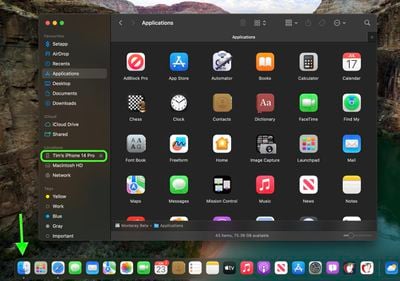
- Open a Finder window by clicking the Finder icon in the Dock.
- Click your iOS device's name in the sidebar.

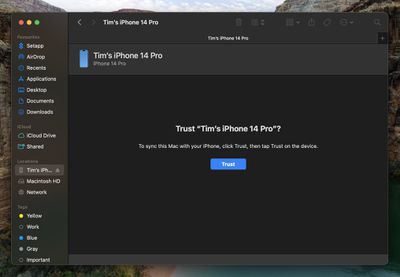
- If this is the first time connecting your device to your Mac, click Trust in the Finder window.
- Tap Trust on your device when prompted, then enter your passcode to confirm.
- In the General tab, click the circle next to where it says Back up all of the data on your iPad to this Mac.
- If you want to encrypt the backup, check the box next to Encrypt local backup, then enter a password to protect your data.
- If you don't want to create an encrypted backup, or you've already set up encrypted backups, click Back Up Now.
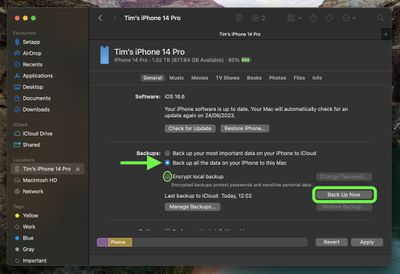
When the backup is finished, you can find the date and time of the last backup in the General tab, just above the Manage Backups button. Remember that this backup will not be overwritten when you manually or automatically back up your iPad in the future, so you can restore it at any time by using the Restore Backup... option in the same Finder screen.
How to Download iPadOS 17 Developer Beta
As of writing, the option to download and install the iPadOS 17 Developer Beta is also available for users who have previously enrolled on Apple's Beta Software Program, and yet the program is officially only supposed to be for Public Betas. This suggests the option is a bug and Apple will likely remove it. But until that happens, if you're currently enrolled to receive Public Betas, you can skip to step 6.
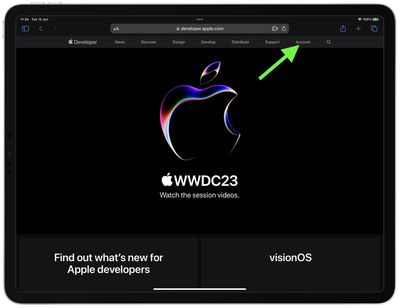
- Open Safari on your iPad and visit developer.apple.com.
- Tap Account at the top of the webpage.
- Under "Sign in to Apple Developer," enter and submit your Apple ID and password using the arrow buttons, then enter the two-factor authentication code sent to your devices.
- Tap Account at the top of the webpage again.
- Accept the legal terms of the Apple Developer Agreement by scrolling down the page, checking the box, and tapping I Agree.
- Make sure your iPad is running iPadOS 16.4 or later by going to Settings -> General -> Software Update. If it is, and you have just completed steps 1-5 to register a developer account, restart your iPad. If it isn't, download and install the latest update to your device, then wait for it to restart.
- Now go back to Settings -> General -> Software Update.
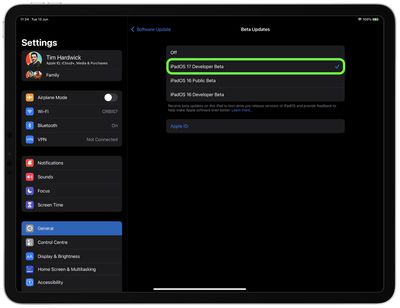
- Tap Beta Updates. If you don't see the option, try switching off Download iPadOS Updates (Automatic Updates -> Download iPadOS Updates), then tap Back and it should appear.
- Select iPadOS 17 Developer Beta in the list, then tap Back.
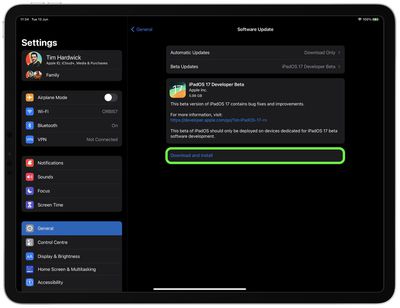
- Wait for the Software Update screen to check Apple's servers. When the iPadOS 17 Developer Beta appears, tap Download and Install, then follow the instructions and wait for installation to complete.
iPadOS 17 Features
iPadOS 17 brings several new features to iPads, including updates to widgets and the Lock Screen that bring more parity with iPhones.
For the first time, iPads will support customized Lock Screens, while Home Screen widgets will be interactive. There's also now support for Live Activities, and the Health app is now available on iPad and takes advantage of the device's larger display sizes.
iPadOS 17 includes also improvements across the Notes, Messages, FaceTime, and Safari apps. In the Messages app, for example, there is a new consolidated sticker drawer that brings all of a user's stickers into one place, including Live Stickers, emoji stickers, and third-party sticker packs. iPad users can also create their own stickers from photos.
Other new features include a journaling app coming later this year, AirPlay in select hotel rooms, improvements to AirPods Pro 2 thanks to a new Adaptive Audio feature, offline Maps, Siri that does not require the "Hey" activation, and improvements to search and spotlight.
iPadOS 17 is expected to get its official public release in the fall, possibly in tandem with the release of iOS 17, or shortly thereafter.

































