Skip to Content

How to Install iOS 26 Public Beta 6 on Your iPhone

by

Apple has made available the sixth public beta of iOS 26, bringing a more stable version of the software to a wider audience following lengthy testing by developers. Keep reading to learn how to prepare your device for the beta software and how to install it.
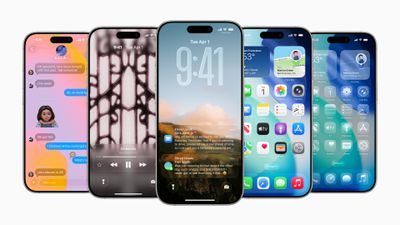
Apple WWDC25 iOS 26 hero 250609
Signing up to get the ‌iOS 26 or ‌iPadOS 26 public beta is simple, and can be done by enrolling an iPhone or iPad in Apple's free Apple Beta Software Program. The steps you need to complete to install the software on your device are provided towards the end of this article, but before you jump ahead, here are a few things worth considering.

Is My iPhone Compatible With iOS 26?

iOS 26 is compatible with the iPhone 11 series and newer. In other words, the following models are supported:

  • iPhone 16e
  • iPhone 16
  • iPhone 16 Plus
  • iPhone 16 Pro
  • iPhone 16 Pro Max
  • iPhone 15
  • iPhone 15 Plus
  • iPhone 15 Pro
  • iPhone 15 Pro Max
  • iPhone 14
  • iPhone 14 Plus
  • iPhone 14 Pro
  • iPhone 14 Pro Max
  • iPhone 13
  • iPhone 13 mini
  • iPhone 13 Pro
  • iPhone 13 Pro Max
  • iPhone 12
  • iPhone 12 mini
  • iPhone 12 Pro
  • iPhone 12 Pro Max
  • iPhone 11
  • iPhone 11 Pro
  • iPhone 11 Pro Max
  • iPhone SE (2nd generation and later)
  • Note that this compatibility list does not mean that all iOS 26 features will work with the above models. Several of the update's features are exclusive to iPhone 15 Pro and iPhone 16 models, since they rely on Apple Intelligence. You can learn more about them here. Note that iOS 26 will come pre-installed on new iPhone 17 models when they launch in September 2025.

Should I Install iOS 26 Public Beta?

Great question! Before downloading the update, it's worth noting that Apple does not recommend installing iOS 26 beta updates on your main iPhone, so if you have a secondary device, use that. This is beta software, which means there are often bugs and issues that pop up that can prevent software from working properly or cause other problems. Apple still has fixes to make before the final release later this month.

Make an Archived Backup of Your Device First

Before installing the beta, make sure to back up your iOS device before installing the software using the following method, otherwise you won't be able to revert back to iOS 18 if things go wrong.

  1. Plug your iPhone into your Mac using the supplied cable.
  2. Allow the accessory to connect by clicking Allow in the dialog prompt.
  3. Open a Finder window by clicking the Finder icon in the Dock.
  4. Click your iOS device's name in the sidebar.
    finder

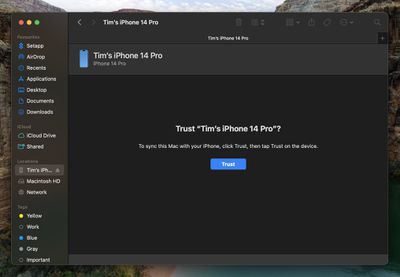
  5. If this is the first time connecting your device to your Mac, click Trust in the Finder window.
    finder

  6. Tap Trust on your device when prompted, then enter your passcode to confirm.
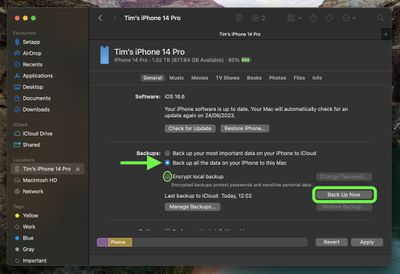
  7. In the General tab, click the circle next to where it says Back up all of the data on your iPad to this Mac.
  8. If you want to encrypt the backup, check the box next to Encrypt local backup, then enter a password to protect your data.
  9. If you don't want to create an encrypted backup, or you've already set up encrypted backups, click Back Up Now.
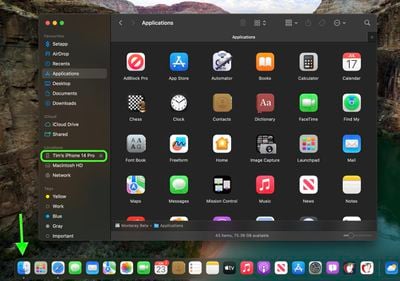
    finder

When the backup is finished, you can find the date and time of the last backup in the General tab, just above the Manage Backups button. Remember that this backup will not be overwritten when you manually or automatically back up your iPhone in the future, so you can restore it at any time by using the Restore Backup... option in the same Finder screen.

How to Download iOS 26 Public Beta

Downloading and install the iOS 26 Public Beta is very straightforward. Simply follow these steps:

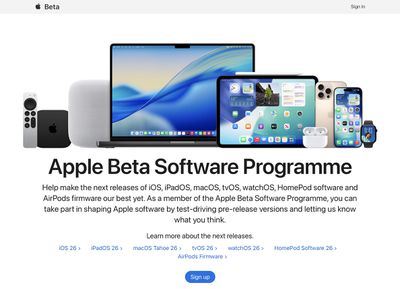
  1. Head over to Apple's Beta Software Program website and sign up using your Apple Account credentials.
    apple public beta program

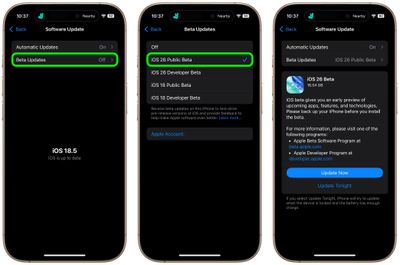
  2. Now go to Settings ➝ General ➝ Software Update on your iPhone.
  3. Tap Beta Updates. If you don't see the option, try switching off Download iOS Updates (Automatic Updates ➝ Download iOS Updates), then tap Back and it should appear.
  4. Select iOS 26 Public Beta in the list, then tap Back.
  5. Wait for the Software Update screen to check Apple's servers. When the iOS 26 Public Beta appears, tap Download and Install, then follow the instructions and wait for installation to complete.
    settings

iOS 26 Features

iOS 26 introduces a striking system-wide redesign built around Liquid Glass, a translucent material that reflects and refracts ambient content and dynamically responds to user input. The new aesthetic applies across the Lock Screen, Home Screen, toolbar controls, navigation elements, app icons, and widgets.

The update also brings new Apple Intelligence features. With Live Translation available in Messages, FaceTime, and Phone, conversations across languages are now seamless and entirely on-device to ensure privacy. New Visual Intelligence capabilities mean you can ask questions about screen content. There are also smarter Shortcuts with intelligent actions to make automation easier.

Communication apps gain smart upgrades too. The revamped Phone app now combines Favorites, Recents, and Voicemails in one view, adds Call Screening, and includes a clever Hold Assist feature. Messages gains filtered inboxes for unknown senders, typing indicators in group chats, custom backgrounds and polls, and Apple Cash transfers.

CarPlay gets a visual refresh aligned with the Liquid Glass design and now includes compact call notifications, tappable Message reactions, pinned conversations, widgets, and Live Activities support.

Apple has also updated some of its key apps: Apple Music adds Lyrics Translation and Pronunciation plus AutoMix DJ-style transitions; Maps introduces privacy-protected "Visited Places" and smarter route preferences; Wallet supports installment/rewards payments, refreshed boarding passes with Live Activities, and deeper integrations with Maps and Find My. Lastly, a new Games app debuts as a central hub for mobile gaming, featuring a unified library, Apple Arcade support, event tracking, and friend status updates.

A general release of iOS 26 is expected in the coming weeks, likely during or shortly after Apple's "Awe dropping" event on Tuesday, September 9, when the new iPhone 17 lineup will be revealed. For a full breakdown of what's new, be sure to check out our dedicated iOS 26 roundup.


Top Rated Comments

Piplodocus Avatar
16 months ago
The real version will be out next week won't it (or the week after at the latest)? So doesn't seem much point this late in the game.
Score: 7 Votes (Like | Disagree)
AusMness Avatar
16 months ago
PSA: for anyone not already using the beta, it probably isn’t worth it this late in the cycle to go to and from a beta. Puts a lot of extra strain on that device for only a week of extra use.
Score: 7 Votes (Like | Disagree)
Rogifan Avatar
16 months ago
I said this in the iOS 26 forum, the Liquid Glass Apple showed off in the WWDC developer sessions feels like vaporware. Sadly it seems Liquid Glass in its current sorry state is what will ship to customers. The first impressions of it will definitely turn people off.

Here’s an example from the current public beta where the Safari address bar renders differently and I have no idea why. Is this a bug or is Liquid Glass so complicated and fussy that it gets confused on what UI it should render?


Attachment Image

Attachment Image
Score: 3 Votes (Like | Disagree)
16 months ago
Functionally the latest beta is good and also battery life is fine.

But there still is a lot of work in the visual department. Lots of UI inconsistencies and also lagging animations skipping frames with lockscreen and app drawer while swiping homescreens. This is especially very noticeable on my iPad Pro
Score: 3 Votes (Like | Disagree)
cesar527 Avatar
16 months ago
I have 0 enthusiasm on installing iOS26 on my daily devices.
I have the last beta on my 2nd iPhone and iPad and I really really dislike it. I have never been less interested on updating my devices
Score: 3 Votes (Like | Disagree)
TechRunner Avatar
16 months ago
Looking forward to checking it out, but definitely waiting until after the official release.
Score: 3 Votes (Like | Disagree)

Popular Stories

apple design award 2025

Apple Announces 2025 Design Award Winners Ahead of WWDC 2025

Tuesday June 3, 2025 10:14 am PDT by
As we wait for WWDC to kick off next Monday, Apple today announced the winners of its annual Apple Design Awards, recognizing apps and games for their innovation, ingenuity, and technical achievement. The 2025 Apple Design Award winners are listed below, with one app and one game selected per category: Delight and Fun - CapWords (App) and Balatro (Game) Innovation - Play (App) and PBJ -...
1password deal blue

1Password Security Breach: What Was Accessed and What Wasn't

Wednesday November 25, 2026 1:09 pm PST by
Popular password management app 1Password today said it experienced a security breach earlier this month. 1Password says some customer names and email addresses were accessed, but no customer vault contents were compromised. On November 19, 1Password saw indications that an employee's GitHub account had been breached and began investigating. The company says the breached GitHub account was...
apple store down feature

Here's Why the Apple Store is Going Down

Thursday November 26, 2026 5:49 am PST by
Apple's online store is going down for a few hours on a rolling country-by-country basis right now, but do not get your hopes up for new products. Apple takes its online store down for a few hours ahead of Black Friday every year to tease its annual gift card offer with the purchase of select products. The store is down in Australia, New Zealand, and Thailand, right now, and it will...
Latest Stories
The 50+ Best Apple Black Friday Deals Still Available on AirPods, iPads, and More
3 hours ago
HomePod Mini 2 in (RED) Seemingly Spotted Ahead of Announcement
34 minutes ago
Apple's M6 and PROLED MacBook Pro Reach New Low Prices for Black Friday
11 hours ago
The MacRumors Show: iPhone Air 2 and iPhone 18 Are Coming
11 hours ago
Apple Store in Brisbane Reopening Next Month With New Design
12 hours ago
The 60+ Best Black Friday Accessory Deals on iPhone Chargers, TVs, Headphones, and More
12 hours ago
GTA VI Now (Barely) Running on Apple Silicon Macs
13 hours ago
The Best Black Friday Streaming Deals on Apple TV, Disney+, and More
13 hours ago
Apple TV's 'Carême' Wins International Emmy for Best Drama
14 hours ago
iPhone 18 Production Delay Leaves Apple Little Time Before Launch
15 hours ago
The Best Black Friday AirPods Deals Still Available
7 hours ago
The Best Black Friday Deals on Apple Home Products
15 hours ago
The Best Black Friday iPhone Deals Still Available
7 hours ago
The Best Black Friday iPad Deals Still Available
7 hours ago
The Best Black Friday Apple Watch Deals Still Available
7 hours ago
The Best Black Friday AirTag Deals Still Available
7 hours ago
The Best Black Friday Mac Deals Still Available
7 hours ago
iPhone Share of US Smartphone Market Hits 57% as Rivals Slip
17 hours ago
iPhone 20 Pro Rumored to Feature 3D-Printed Titanium Frame
18 hours ago
Apple's Official 2026 Black Friday Offer Starts Rolling Out
2 days ago
Halide Adds Fill Light Feature for iPhone Duo
2 days ago
MacBook Air Black Friday Deals Now Live With Massive $399 Savings
2 days ago
Amazon Discounts All MacBook Neo Models by $99 for Black Friday
2 days ago
Kodak Launches Unique AirTag Rival With E-Ink Display
2 days ago
Here's Why the Apple Store is Going Down
2 days ago
Apple Still Working on Giant Foldable iPad That Could Cost $5,000
2 days ago
iPhones Dominate China's Weak Singles' Day Smartphone Sales
2 days ago
iPhone 20 Pro Could Feature Ceramic in Limited-Edition Model
2 days ago
Apple Faces Korean Regulator Review Over iPhone 16 AI Advertising
2 days ago
Apple Watch Ultra 4 Hits New Best-Ever Price of $649.99 for Black Friday
2 days ago
Related Apple News: News | Ipad | Motoring | Local News | Politics