Skip to Content

How to Install iOS 16 and iPadOS 16 Beta

by

If you're keen to try out the new features and improvements in iOS 16 and iPadOS 16, you can test beta versions of the software today. Keep reading to learn how to download and install it on your device.
iOS 16 mock for feature
With iOS 16 and iPadOS 16, Apple is introducing several new features and improvements, including a revamped Lock Screen, editing and undo features for Messages, new SharePlay features, an updated multitasking system for the iPad, and tons more.

When Apple announced iOS 16 and iPadOS 16, it also made developer betas immediately available to test on iPhone and ‌iPad‌. By nature, ‌a beta is pre-release software, so installing the software on a secondary device is highly recommended. The stability of beta software cannot be guaranteed, as it often contains bugs and issues that have yet to be ironed out, so installing it on your day-to-day device isn't advised.

Is iOS 16/iPadOS 16 Compatible With My Device?

Apple's list of compatible devices confirms that ‌iOS 16‌ is compatible with all of these iPhones:

  • iPhone 11
  • iPhone 11 Pro
  • iPhone 11 Pro Max
  • iPhone XS
  • iPhone XS‌ Max
  • iPhone XR
  • ‌iPhone‌ X
  • ‌iPhone‌ 8 and ‌iPhone‌ 8 Plus

The new version of iPadOS is also compatible with a wide range of older devices:

  • All ‌‌iPad‌‌ Pros
  • ‌iPad‌‌ (7th generation)
  • ‌iPad‌‌ (6th generation)
  • ‌iPad‌‌ (5th generation)
  • iPad mini 5
  • iPad Air (3rd generation)

Back Up Your iPhone or iPad First

Installing iOS 16 or iPadOS 16 beta shouldn't take longer than one hour, but before you do, be sure to create a backup of your device's contents and settings. The following step-by-step instructions explain how to back up an ‌iPhone in macOS Catalina.

  1. Plug your iPhone, ‌iPad‌, or iPod touch into your Mac using the supplied cable.
  2. Open a Finder window by clicking the Finder icon in the Dock.
  3. Click your iOS device's name in the sidebar.
    finder

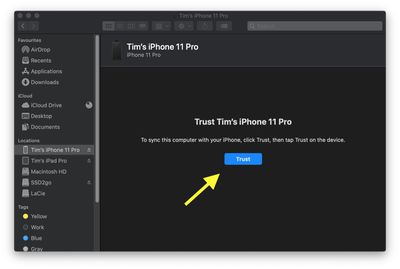
  4. If this is the first time connecting your device to your Mac, click Trust in the Finder window.
    finder

  5. Tap Trust on your device when prompted, then enter your passcode to confirm.
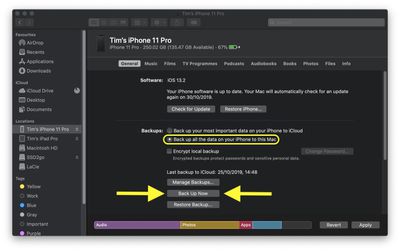
  6. In the General tab, click the circle next to where it says Back up all of the data on your [iPhone/iPad/iPod touch] to this Mac.

  7. If you don't want to create an encrypted backup, or you've already set up encrypted backups, click Back Up Now at the bottom of the General tab.
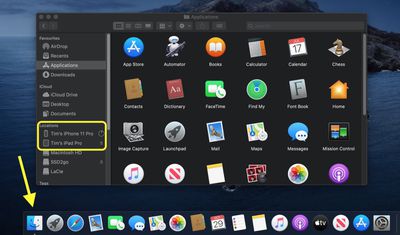
    finder

When the backup is finished, you can find the date and time of the last backup in the General tab, just above the Manage Backups button.

How to Install iOS 16 and iPadOS 16 Developer Betas

To download and install the iOS 16 developer beta, you need to have a developer account, which is a paid membership. If you don't have one yet, you can sign up here.

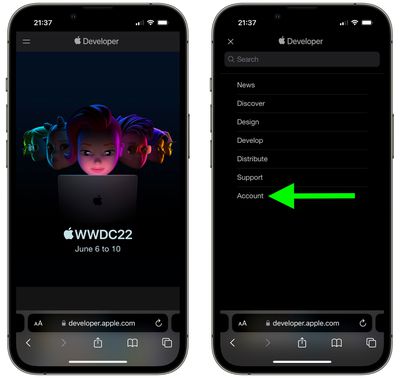
  1. On your iPhone or ‌iPad‌, head to Apple's Developer Program enrollment website.
  2. Tap the two-line icon in the top-left corner of the page and select Account to sign in.
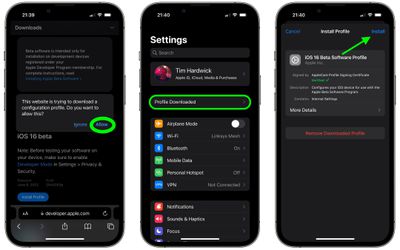
    1install ios 16 beta

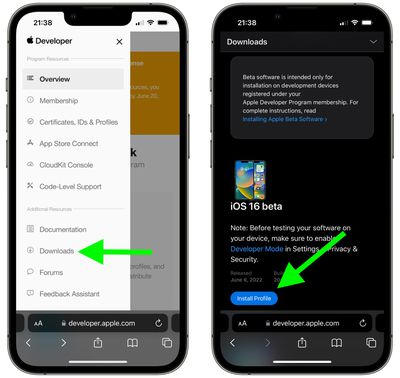
  3. Once you're signed in, tap the two-line icon again and select Downloads.
  4. Swipe down and tap Install Profile under iOS 16 beta or iPadOS 16 beta.
    2install ios 16 beta

  5. Tap Allow to download the profile, then tap Close.
  6. Launch the Settings app on your iOS device and tap Profile Downloaded, which should appear under your Apple ID banner.
  7. Tap Install in the top-right corner of the screen.
    3install ios 16 beta

  8. Enter your passcode.
  9. Tap Install in the top-right corner to agree to the consent text, then tap Install again when prompted.
  10. Tap Done, then tap General in the top-left corner of the screen.
  11. Tap Software Update.
  12. Tap Download and Install.
  13. Tap Install Now.

The update is about 5GB in size, so you'll have to wait a while for it to download, but once it does, your device will restart and automatically install iOS 16 or iPadOS 16.

If you come across any issues installing the iOS 16 or iPadOS 16 Public Beta, it may help to clear any previous profiles lingering on your device. You can find these in the Settings app under General -> Profile.


Related Forum: iOS 16

Popular Stories

apple design award 2025

Apple Announces 2025 Design Award Winners Ahead of WWDC 2025

Tuesday June 3, 2025 10:14 am PDT by
As we wait for WWDC to kick off next Monday, Apple today announced the winners of its annual Apple Design Awards, recognizing apps and games for their innovation, ingenuity, and technical achievement. The 2025 Apple Design Award winners are listed below, with one app and one game selected per category: Delight and Fun - CapWords (App) and Balatro (Game) Innovation - Play (App) and PBJ -...
1password deal blue

1Password Security Breach: What Was Accessed and What Wasn't

Wednesday November 25, 2026 1:09 pm PST by
Popular password management app 1Password today said it experienced a security breach earlier this month. 1Password says some customer names and email addresses were accessed, but no customer vault contents were compromised. On November 19, 1Password saw indications that an employee's GitHub account had been breached and began investigating. The company says the breached GitHub account was...
apple store down feature

Here's Why the Apple Store is Going Down

Thursday November 26, 2026 5:49 am PST by
Apple's online store is going down for a few hours on a rolling country-by-country basis right now, but do not get your hopes up for new products. Apple takes its online store down for a few hours ahead of Black Friday every year to tease its annual gift card offer with the purchase of select products. The store is down in Australia, New Zealand, and Thailand, right now, and it will...
Latest Stories
The 50+ Best Apple Black Friday Deals Still Available on AirPods, iPads, and More
21 minutes ago
Apple's M6 and PROLED MacBook Pro Reach New Low Prices for Black Friday
5 hours ago
The MacRumors Show: iPhone Air 2 and iPhone 18 Are Coming
5 hours ago
Apple Store in Brisbane Reopening Next Month With New Design
5 hours ago
The 60+ Best Black Friday Accessory Deals on iPhone Chargers, TVs, Headphones, and More
6 hours ago
GTA VI Now (Barely) Running on Apple Silicon Macs
6 hours ago
The Best Black Friday Streaming Deals on Apple TV, Disney+, and More
7 hours ago
Apple TV's 'Carême' Wins International Emmy for Best Drama
7 hours ago
iPhone 18 Production Delay Leaves Apple Little Time Before Launch
8 hours ago
The Best Black Friday AirPods Deals Still Available
16 minutes ago
The Best Black Friday Deals on Apple Home Products
9 hours ago
The Best Black Friday iPhone Deals Still Available
16 minutes ago
The Best Black Friday iPad Deals Still Available
16 minutes ago
The Best Black Friday Apple Watch Deals Still Available
15 minutes ago
The Best Black Friday AirTag Deals Still Available
15 minutes ago
The Best Black Friday Mac Deals Still Available
14 minutes ago
iPhone Share of US Smartphone Market Hits 57% as Rivals Slip
10 hours ago
iPhone 20 Pro Rumored to Feature 3D-Printed Titanium Frame
12 hours ago
Apple's Official 2026 Black Friday Offer Starts Rolling Out
1 day ago
Halide Adds Fill Light Feature for iPhone Duo
1 day ago
MacBook Air Black Friday Deals Now Live With Massive $399 Savings
1 day ago
Amazon Discounts All MacBook Neo Models by $99 for Black Friday
1 day ago
Kodak Launches Unique AirTag Rival With E-Ink Display
1 day ago
Here's Why the Apple Store is Going Down
1 day ago
Apple Still Working on Giant Foldable iPad That Could Cost $5,000
1 day ago
iPhones Dominate China's Weak Singles' Day Smartphone Sales
1 day ago
iPhone 20 Pro Could Feature Ceramic in Limited-Edition Model
1 day ago
Apple Faces Korean Regulator Review Over iPhone 16 AI Advertising
1 day ago
Apple Watch Ultra 4 Hits New Best-Ever Price of $649.99 for Black Friday
1 day ago
New Apple Store Opening in India, Download the Special Wallpaper Now
2 days ago
Related Apple News: Opinion | Business | Sport | Technology | Health