Skip to Content

How to Use Screen Time in iOS 12

by

Apple in iOS 12 introduced Screen Time, which is designed to provide you with information on how you're using your time on your iPhone and iPad.

With Screen Time, you can see how often you pick up your iOS device, which apps you're using, which apps are sending the most notifications, and other details.

Accessing Screen Time

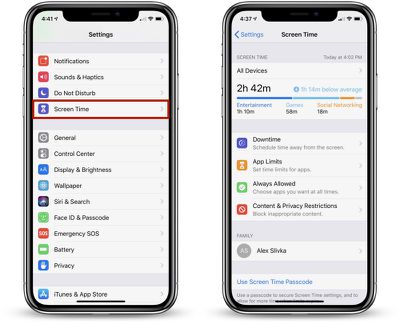
There's no dedicated app for Screen Time, so it might not be immediately obvious how it's accessed when you first install iOS 12. All Screen Time features are actually available in the Settings app.
screentimemainscreen

  1. Open up the Settings app.
  2. Scroll down to the "Screen Time" section that's grouped with Notifications, Sounds, and Do Not Disturb.
  3. Tap on "Screen Time" to see your usage statistics.

Screen Time Syncing

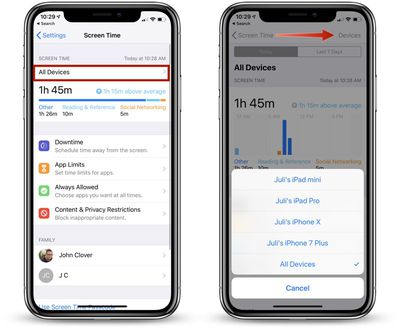
Screen Time statistics are collected from all iOS devices running iOS 12 where you're logged in with your iCloud account. That means it will aggregate data from all iPhones and iPads that you use during the course of a day.
multipledevices
You can view your data across all devices or on a per device basis. To view other devices, tap on the "All Devices" label on the main Screen Time screen and then choose "Devices" from the upper right hand corner.

Info Available in Screen Time

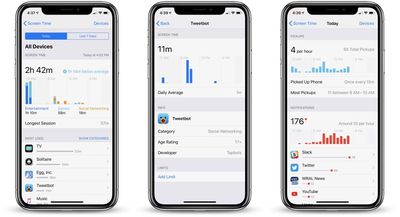
When you open up Screen Time, a chart is displayed with information on your last 24 hours of iPhone usage, organized by each individual app or which app category you've used the most, such as Productivity, Games, Creativity, or Messages.
screentimedata
If you tap on that chart, you can see even more information from either the last 24 hours or the last 7 days, including your longest usage setting, the number of times you picked up your device during the day, and how many notifications you got, along with details on which apps are sending you the most notifications.

Other Screen Time Features

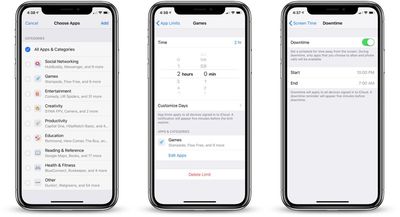
In the Screen Time section, you can set scheduled Downtime for yourself to restrict yourself (or a child) from using apps outside of those that have been allowed with App Limits, you can set specific time limits on app categories like social networking or games, and you can access Content & Privacy Restrictions, useful if you're managing a child's device.
screentimefeatures
If you use Family Sharing with a spouse, friend, or child, and you're the family manager, you'll also see family members' names listed under "Family" and will be able to see and control their app usage.

These features are relatively simple to use, but we'll be looking into them in more depth in future how tos.

Disabling Screen Time

If you don't want to use Screen Time, you can turn it off in the Settings app.
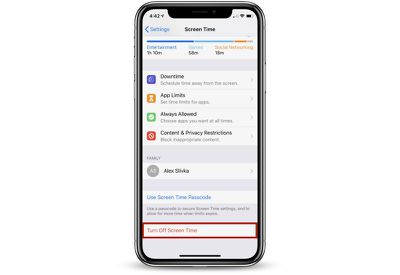
turningoffscreentime

  1. Open the Settings app.
  2. Tap "Screen Time."
  3. Scroll down to "Turn Off Screen Time" and tap it.

Turning off Screen Time on your device will delete all app, website, and notification history. You can re-enable Screen Time at any time, but it does not save data nor does it begin collecting data until enabled.


Related Forum: iOS 12

Top Rated Comments

scottct1 Avatar
109 months ago
Hopefully they fix it, as I installed the beta on my sons phone and turned on Screen time from my iPhone so he can't use his phone after 10pm at night.

He found two ways to disable it.

1) When Screentime goes on and it shuts off his apps, he can still get into settings then into Date and Time settings and change the time to a time when Screentime restrictions are not in place.

2) Even easier is he set his phone to be in 24 hour mode and for some reason Screentime does not understand 24 hour mode so Screentime never kicks in at 10pm, since its 22:00 instead.
Score: 5 Votes (Like | Disagree)
scottct1 Avatar
109 months ago
Yes bug report was submitted. ID # 41976021
Score: 3 Votes (Like | Disagree)
jonnysods Avatar
107 months ago
This is going to be handy to keep tabs on the kids and how much they use their devices.

Soon once we figure out some parameters I'll be able to help them get some control over their device usage. I even need that in my own life!
Score: 2 Votes (Like | Disagree)
one more Avatar
107 months ago
Disabling it altogether is another great option. Spending extra time staring at the screen trying to figure out how much time we spend staring at the screen is kinda ironic!
Score: 2 Votes (Like | Disagree)
106 months ago
My screen time data keeps resetting and erasing my progress for the day.
Same here. Whenever I open the screen time the statistics are gone, but before I open it I am able to see some statistics from the widgets. Are there any sollutions ?
Score: 1 Votes (Like | Disagree)
mtngoatjoe Avatar
107 months ago
I, for one, am really glad Apple added this feature. It may have some bugs, but I'm thankful I can finally monitor how much time my daughter is using her device. She was really hacked when she found out I set a limit, but the next night was not a big deal.
Score: 1 Votes (Like | Disagree)

Popular Stories

apple design award 2025

Apple Announces 2025 Design Award Winners Ahead of WWDC 2025

Tuesday June 3, 2025 10:14 am PDT by
As we wait for WWDC to kick off next Monday, Apple today announced the winners of its annual Apple Design Awards, recognizing apps and games for their innovation, ingenuity, and technical achievement. The 2025 Apple Design Award winners are listed below, with one app and one game selected per category: Delight and Fun - CapWords (App) and Balatro (Game) Innovation - Play (App) and PBJ -...
Apple 2026 Black Friday Event Hero

Apple's Official 2026 Black Friday Offer Starts Rolling Out

Thursday November 26, 2026 8:37 am PST by
Apple's annual four-day Black Friday through Cyber Monday shopping event is now live in Australia, New Zealand, and Thailand, and it will continue to roll out across Europe, the U.S., and Canada as the calendar turns to Friday, November 27 around the world. In the U.S., Apple's terms and conditions say the promotion begins on November 27 at 12 a.m. Pacific Time and ends on November 30 at...
1password deal blue

1Password Security Breach: What Was Accessed and What Wasn't

Wednesday November 25, 2026 1:09 pm PST by
Popular password management app 1Password today said it experienced a security breach earlier this month. 1Password says some customer names and email addresses were accessed, but no customer vault contents were compromised. On November 19, 1Password saw indications that an employee's GitHub account had been breached and began investigating. The company says the breached GitHub account was...
Latest Stories
The 50+ Best Apple Black Friday Deals Still Available on AirPods, iPads, and More
5 hours ago
Here Are the Best Apple Black Friday Leftover Deals You Can Get Today
4 hours ago
HomePod Mini 2 in (RED) Seemingly Spotted Ahead of Announcement
15 hours ago
Apple's M6 and PROLED MacBook Pro Reach New Low Prices for Black Friday
1 day ago
The MacRumors Show: iPhone Air 2 and iPhone 18 Are Coming
1 day ago
Apple Store in Brisbane Reopening Next Month With New Design
1 day ago
The 60+ Best Black Friday Accessory Deals on iPhone Chargers, TVs, Headphones, and More
4 hours ago
GTA VI Now (Barely) Running on Apple Silicon Macs
1 day ago
The Best Black Friday Streaming Deals on Apple TV, Disney+, and More
1 day ago
Apple TV's 'Carême' Wins International Emmy for Best Drama
1 day ago
iPhone 18 Production Delay Leaves Apple Little Time Before Launch
1 day ago
The Best Black Friday AirPods Deals Still Available
21 hours ago
The Best Black Friday Deals on Apple Home Products
1 day ago
The Best Black Friday iPhone Deals Still Available
21 hours ago
The Best Black Friday iPad Deals Still Available
21 hours ago
The Best Black Friday Apple Watch Deals Still Available
21 hours ago
The Best Black Friday AirTag Deals Still Available
21 hours ago
The Best Black Friday Mac Deals Still Available
21 hours ago
iPhone Share of US Smartphone Market Hits 57% as Rivals Slip
1 day ago
iPhone 20 Pro Rumored to Feature 3D-Printed Titanium Frame
1 day ago
Apple's Official 2026 Black Friday Offer Starts Rolling Out
2 days ago
Halide Adds Fill Light Feature for iPhone Duo
2 days ago
MacBook Air Black Friday Deals Now Live With Massive $399 Savings
2 days ago
Amazon Discounts All MacBook Neo Models by $99 for Black Friday
2 days ago
Kodak Launches Unique AirTag Rival With E-Ink Display
2 days ago
Here's Why the Apple Store is Going Down
2 days ago
Apple Still Working on Giant Foldable iPad That Could Cost $5,000
2 days ago
iPhones Dominate China's Weak Singles' Day Smartphone Sales
2 days ago
iPhone 20 Pro Could Feature Ceramic in Limited-Edition Model
2 days ago
Apple Faces Korean Regulator Review Over iPhone 16 AI Advertising
2 days ago
Related Apple News: Buyers Guide | News | Reviews | Mac | Entertainment






























