Skip to Content

How to Add a Recent Items Folder to Your Mac's Dock

by

macos finder iconIn a previous how-to, we explained how to add a special stack to your Mac's Dock that enables quick access to recently opened or favorite items.

This unique stack can be configured to show your most recently opened apps, documents, or servers, but what you can't do is make it show all your recent items, regardless of kind.

One solution is to add a recently opened items folder to your Dock instead. The following steps guide you through the process of creating one using Finder's smart folder feature.

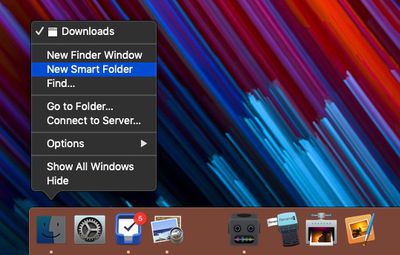
  1. Open a Finder window and select File -> New Smart Folder in the menu bar. Alternatively, right-click (or Ctrl-click) the Finder icon in your Dock and select New Smart Folder.
    create a recent items folder 1

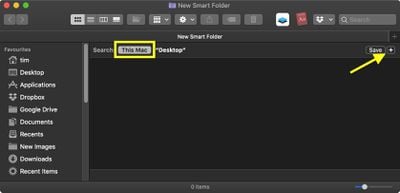
  2. In the Finder window that opens, make sure the search header is selected as This Mac, then click the plus icon in the upper right of the viewing area.
    how to create a recent items folder 01

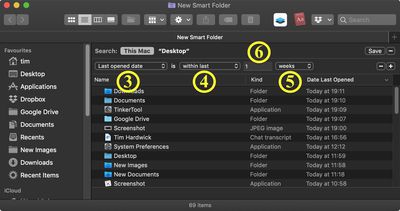
  3. Select Last opened date in the first search criteria dropdown.
  4. Select within last in the second dropdown.
  5. In the third and final dropdown, select how far back you'd like the folder to show recently opened items for. Your options are days, weeks, months, and years.
  6. In the input field to the left of your timescale selection, specify the number of days/weeks/months/years of recently opened files to show.
    how to create a recent items folder 02

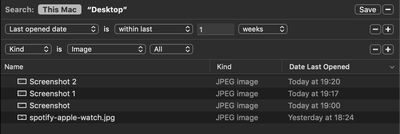
  7. To restrict your recent items folder to a certain kind of file – images, for example – click the plus button to add another row, then select a kind from the second dropdown. (Depending on the kind you select, you may be offered an additional dropdown to further limit the criteria.)
    create a recent items folder 04

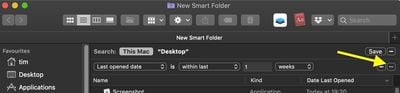
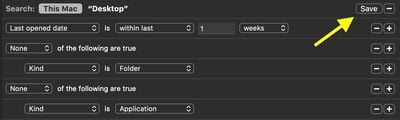
  8. Now, hold down the Option key. Note how the plus icon at the end of the row changes to an ellipsis. Click this, and you'll be able to add search parameters that exclude certain items like applications and folders from your recents list.
    create a recent items folder 03

  9. In the second row dropdown, select None of the following are true.
  10. In the third row, first dropdown, select Kind.
  11. In the third row, second dropdown, select the type of item you wish to exclude.
    how to create a recent items folder 05

  12. If you want to add more exclusion criteria, hold the Option key and click the ellipsis icon in the first row. When you're done, click Save in the upper right of the viewing area.
    how to create a recent items folder 06

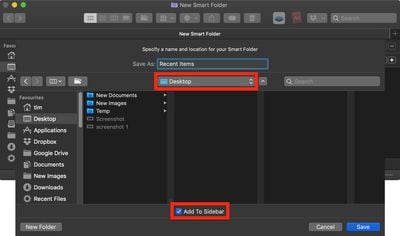
  13. In the save dialog that appears, give your smart folder a name, and select your Desktop as the location for your folder. You can also opt to include the folder in Finder's sidebar by checking the box next to Add to Sidebar.
    create a recent items folder 4

  14. Click Save.
  15. Switch to your Desktop and drag and drop your new smart folder to the right of the the Dock, which will automatically move any existing icons behind the divider to make space for it. (If you like, you can delete the same folder on your Desktop once it's safely docked.)
    create a recent items folder 5

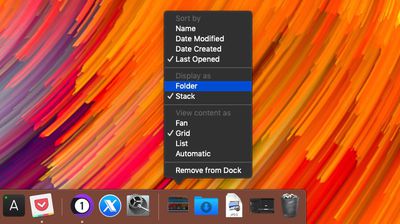
  16. Finally, right-click (or Ctrl-click) the docked smart folder and select Folder in the contextual menu.
    create a recent items folder 6

The last step gives your recently opened items folder a distinctive icon in the Dock.
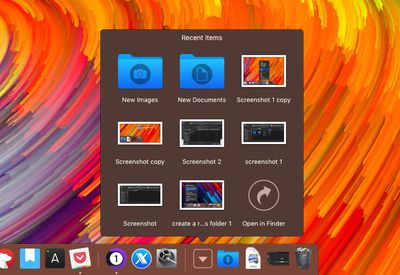
create a recent items folder 7
Note that the same contextual menu also provides view and sort options to further customize the folder's behavior.


Top Rated Comments

104 months ago
Great tip! I'm loving this series.


[LIST=1]
* In the Finder window that opens, click the plus icon in the upper right of the viewing area.


In this screenshot, wouldn't one want to search "This Mac" instead of just the Desktop? Otherwise it's going to be a pretty narrow set of results....


[LIST=1]
* In the save dialog that appears, give your smart folder a name, and select your Desktop as the location for your folder. You can also opt to include the folder in Finder's sidebar by checking the box next to Add to Sidebar.

You don't have to leave it on your Desktop if you don't want to. I chose to save the Smart Folder to my Documents folder where it's out of the way.

Oh, and if anybody's interested, you can edit the Saved Search by opening it in Finder and selecting "Show Search Criteria" from the little gear menu.

It's also worthwhile while doing the search criteria to add additional filters after you specify the date one. Lots of useful options there like restricting your Kind to Documents to filter out apps. You can stack up these search criteria as you see fit and see the results in real-time as you tweak. Worth futzing with, and you can always create separate smart searches for specific things, like "PDFs from the last 30 days with the name XXXXX" or whatever.


Attachment Image
Score: 3 Votes (Like | Disagree)
104 months ago
Or, as he said “(If you like, you can delete the same folder on your Desktop once it's safely docked.)”
You're right, I missed that part. It is handy to keep that .savedsearch file around if you want to edit it, though, and I think you need to keep it somewhere if you want that sidebar shortcut to exist. Interestingly the Dock item is totally independent once you add it, and editing the .savedsearch file has no effect on the dock item.
Score: 2 Votes (Like | Disagree)
timmyh Avatar
104 months ago
In this screenshot, wouldn't one want to search "This Mac" instead of just the Desktop? Otherwise it's going to be a pretty narrow set of results....
Thanks, ignatius, for pointing this out. I'll replace the image and add another step.
Score: 1 Votes (Like | Disagree)
JosephAW Avatar
104 months ago
Did Apple drop the Finder setting for recent documents in Mojave? Tinker tool used to be able to toggle this without a smart folder.
Score: 1 Votes (Like | Disagree)

Popular Stories

apple design award 2025

Apple Announces 2025 Design Award Winners Ahead of WWDC 2025

Tuesday June 3, 2025 10:14 am PDT by
As we wait for WWDC to kick off next Monday, Apple today announced the winners of its annual Apple Design Awards, recognizing apps and games for their innovation, ingenuity, and technical achievement. The 2025 Apple Design Award winners are listed below, with one app and one game selected per category: Delight and Fun - CapWords (App) and Balatro (Game) Innovation - Play (App) and PBJ -...
1password deal blue

1Password Security Breach: What Was Accessed and What Wasn't

Wednesday November 25, 2026 1:09 pm PST by
Popular password management app 1Password today said it experienced a security breach earlier this month. 1Password says some customer names and email addresses were accessed, but no customer vault contents were compromised. On November 19, 1Password saw indications that an employee's GitHub account had been breached and began investigating. The company says the breached GitHub account was...
Apple 2026 Black Friday Event Hero

Apple's Official 2026 Black Friday Offer Starts Rolling Out

Thursday November 26, 2026 8:37 am PST by
Apple's annual four-day Black Friday through Cyber Monday shopping event is now live in Australia, New Zealand, and Thailand, and it will continue to roll out across Europe, the U.S., and Canada as the calendar turns to Friday, November 27 around the world. In the U.S., Apple's terms and conditions say the promotion begins on November 27 at 12 a.m. Pacific Time and ends on November 30 at...
Latest Stories
The 50+ Best Apple Black Friday Deals Still Available on AirPods, iPads, and More
10 hours ago
HomePod Mini 2 in (RED) Seemingly Spotted Ahead of Announcement
7 hours ago
Apple's M6 and PROLED MacBook Pro Reach New Low Prices for Black Friday
17 hours ago
The MacRumors Show: iPhone Air 2 and iPhone 18 Are Coming
17 hours ago
Apple Store in Brisbane Reopening Next Month With New Design
18 hours ago
The 60+ Best Black Friday Accessory Deals on iPhone Chargers, TVs, Headphones, and More
19 hours ago
GTA VI Now (Barely) Running on Apple Silicon Macs
19 hours ago
The Best Black Friday Streaming Deals on Apple TV, Disney+, and More
20 hours ago
Apple TV's 'Carême' Wins International Emmy for Best Drama
20 hours ago
iPhone 18 Production Delay Leaves Apple Little Time Before Launch
21 hours ago
The Best Black Friday AirPods Deals Still Available
13 hours ago
The Best Black Friday Deals on Apple Home Products
22 hours ago
The Best Black Friday iPhone Deals Still Available
13 hours ago
The Best Black Friday iPad Deals Still Available
13 hours ago
The Best Black Friday Apple Watch Deals Still Available
13 hours ago
The Best Black Friday AirTag Deals Still Available
13 hours ago
The Best Black Friday Mac Deals Still Available
13 hours ago
iPhone Share of US Smartphone Market Hits 57% as Rivals Slip
23 hours ago
iPhone 20 Pro Rumored to Feature 3D-Printed Titanium Frame
1 day ago
Apple's Official 2026 Black Friday Offer Starts Rolling Out
2 days ago
Halide Adds Fill Light Feature for iPhone Duo
2 days ago
MacBook Air Black Friday Deals Now Live With Massive $399 Savings
2 days ago
Amazon Discounts All MacBook Neo Models by $99 for Black Friday
2 days ago
Kodak Launches Unique AirTag Rival With E-Ink Display
2 days ago
Here's Why the Apple Store is Going Down
2 days ago
Apple Still Working on Giant Foldable iPad That Could Cost $5,000
2 days ago
iPhones Dominate China's Weak Singles' Day Smartphone Sales
2 days ago
iPhone 20 Pro Could Feature Ceramic in Limited-Edition Model
2 days ago
Apple Faces Korean Regulator Review Over iPhone 16 AI Advertising
2 days ago
Apple Watch Ultra 4 Hits New Best-Ever Price of $649.99 for Black Friday
2 days ago
Related Apple News: Mac Studio Update Rumors | Iphone Duo Smart Take Group Photos | Fixed Focus Digital | Apple Ai Strategy 2024 | Is It Worth Buying A Titanium Apple Watch