Skip to Content

HomePod Guide: How to Create Multiple Timers, Search for Lyrics, Find Your iPhone, and Make Calls

by

Apple's HomePod was updated this week to version 12, which debuted alongside iOS 12 for iPhones and iPads. The HomePod update brings about a handful of new abilities for Apple's smart speaker, including support for multiple timers, lyric search, find my iPhone, making and receiving phone calls, and more.

Because of all the useful and handy new additions arriving on HomePod this week, we've written this guide to provide quick steps that can help you figure out each new feature, and added in some tips as well.

Multiple Timers

On previous HomePod software you could only make one timer and not name it, but with the new software Apple is letting you create and name as many as over 20 timers at once (our testing reached about 23). This should greatly help out HomePod owners, especially those who have placed the speaker in their kitchen.

Note: Because HomePod relies entirely on voice controls for timers (and other features in this guide), there may be other sentence patterns that result in the same responses as the ones we've discovered. With that being said, below you'll find a few examples of Siri commands for multiple timers on HomePod. To create multiple timers, simply begin listing one timer after the other to Siri:

Setting Timers

  • "Hey Siri, set a 15 minute timer for food."
  • "Hey Siri, set a burger timer for 20 minutes."
  • "Hey Siri, set a 25 minute french fries timer."
  • "Hey Siri, set a 45 minute timer for the laundry."
  • "Hey Siri, set a 3 hour timer for the sprinklers."

Checking Individual Timers

  • "Hey Siri, what's left on the food timer?"
  • "Hey Siri, how's the french fries timer?"
  • "Hey Siri, what's the sprinklers timer at?"
  • "Hey Siri, how long until the laundry is done?"
  • "Hey Siri, is the burger timer almost done?"

Checking All Timers

  • "Hey Siri, where are the timers at?"
  • "Hey Siri, how much time is left?"
  • "Hey Siri, list the timers."

The limit of any timer is a maximum of 23 hours (as it was previously). If you create a timer but don't give it a name, Siri will name the timer by its original length, saying something like "There is 1 minute left on the 10 minute timer."

When you have multiple timers running and one ends, the usual timer ending chime will sound, but it will now be interspersed with Siri stating which timer is completed. As usual, you can tap the top of HomePod to silence the timer, or ask Siri to shut it off. If you have numerous timers running simultaneously and want to end them all, you can say "Hey Siri, stop/cancel all of the timers."

Lyric Search

Similar to Apple Music on iOS, you can now search for a song through its lyrics using Siri on HomePod. Try out these commands to start using voice-enabled lyric search:

  • "Hey Siri, search for a song with the lyrics [lyrics]."
  • "Hey Siri, play the song with the lyrics [lyrics]."
  • "Hey Siri, search for the song that goes [lyrics]."
  • "Hey Siri, play the song that goes [lyrics]."

If you just want to perform a search for a song based on its lyrics without playing it, you can say something like "Hey Siri, what song has the lyrics [lyrics]?"

Find My iPhone
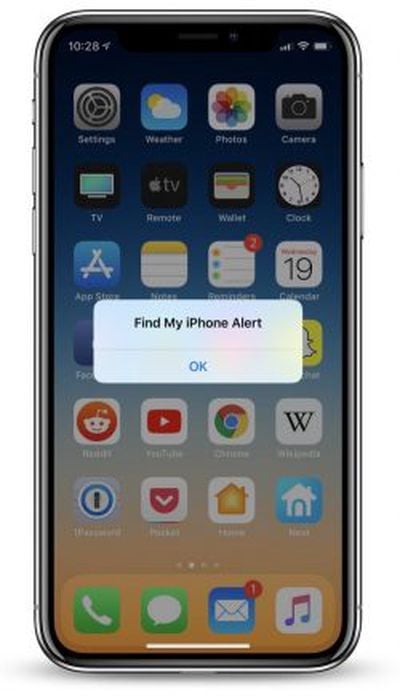
find my iphone homepodIf you've lost track of your iPhone but know it's somewhere nearby, HomePod can now send out a helpful ping so you can more easily locate your misplaced iPhone. Try these commands to get started:

  • "Hey Siri, find my iPhone."
  • "Hey Siri, find [iPhone name]."
  • "Hey Siri, where's my iPhone?"
  • "Hey Siri, ping my iPhone."
  • "Hey Siri, can you find my iPhone?"
  • "Hey Siri, is my iPhone nearby?"
  • "Hey Siri, I can't find my iPhone."

Siri will respond to each one of these commands by asking "Should I try to make it play a sound?", to which you'll need to reply yes or no.

This feature extends to any iOS or macOS device connected to your Apple ID, so you can also search for a missing iPad or MacBook, as long as they're all connected to the internet at the time of the search.

You can provide the specific name of each device to ping, but Siri does have some trouble recognizing custom names at times. When the alert is sent, you'll get a notification on the lost device and an email to your connected Apple ID account.

Phone Calls

One of the biggest new additions to HomePod this week is the ability to make and receive phone calls via your connected iPhone. Make sure your iPhone is on iOS 12 and your HomePod is updated (with Personal Requests turned on), and follow these steps to make calls on HomePod:

homepod phone call mitch Making a call: "Hey Siri, call Ben."
When a call comes in on iPhone: "Hey Siri, answer my phone."
Hanging up: "Hey Siri, hang up."
Checking a missed call: "Hey Siri, who just called?"

During a call, HomePod's top Siri waveform display will turn a bright green, indicating that you're on the phone with someone. If you don't want to speak to Siri to hang up, you can simply tap once on HomePod to end the call. Of course, the usual volume indicators can also make the person on the other end softer or louder.

If you answered a call on iPhone and want to move over to HomePod, follow these steps:

Transferring a call from iPhone to HomePod

  1. Answer or place a call on iPhone
  2. Tap "Audio" in the Phone app while the call is live
  3. Choose your HomePod speaker

Notably, you won't be able to perform any of Siri's basic search or query functionalities while HomePod is being used as a speakerphone. If someone else calls you while you're talking on HomePod, you can tap the green light at the top of HomePod to switch to it, or double tap the green light to end the current call and switch to the new one. To continuously switch between calls, tap the top of HomePod.

More details on HomePod's new update can be found in our launch post, and if you need a refresher on HomePod's overall set of features be sure to visit our full HomePod Roundup.


Related Roundup: HomePod
Buyer's Guide: HomePod (Caution)

Top Rated Comments

Kaibelf Avatar
107 months ago
Yes but before you could just say "Set a timer for x minutes" and it would only have the one timer. It'll then prompt you to amend the existing timer if you set another.

Now you can say "Set 15 minutes for the cuttlefish, set 3 minutes for the asparagus, set 50 minutes for the inevitable toilet break", and it'll have a separate timer for each, which you can also check by saying "How long on the cuttlefish?"

Seems like a reasonable article IMHO; I wouldn't have known this otherwise.
Cuttlefish, asparagus and a toilet break? Isn’t this part of the plot from the iPad episode of South Park?
Score: 1 Votes (Like | Disagree)
keysofanxiety Avatar
107 months ago
Gonna go out on a limb here but the entire point of Siri is that you can tell it what you want to do. So we should be able to assume that you simply ask it to do any of the things this guide includes.

If you want it to set a 15 minute timer, you ask it to set a 15 minute timer?! NO WAY!!
Yes but before you could just say "Set a timer for x minutes" and it would only have the one timer. It'll then prompt you to amend the existing timer if you set another.

Now you can say "Set 15 minutes for the cuttlefish, set 3 minutes for the asparagus, set 50 minutes for the inevitable toilet break", and it'll have a separate timer for each, which you can also check by saying "How long on the cuttlefish?"

Seems like a reasonable article IMHO; I wouldn't have known this otherwise.
Score: 1 Votes (Like | Disagree)

Popular Stories

apple design award 2025

Apple Announces 2025 Design Award Winners Ahead of WWDC 2025

Tuesday June 3, 2025 10:14 am PDT by
As we wait for WWDC to kick off next Monday, Apple today announced the winners of its annual Apple Design Awards, recognizing apps and games for their innovation, ingenuity, and technical achievement. The 2025 Apple Design Award winners are listed below, with one app and one game selected per category: Delight and Fun - CapWords (App) and Balatro (Game) Innovation - Play (App) and PBJ -...
1password deal blue

1Password Security Breach: What Was Accessed and What Wasn't

Wednesday November 25, 2026 1:09 pm PST by
Popular password management app 1Password today said it experienced a security breach earlier this month. 1Password says some customer names and email addresses were accessed, but no customer vault contents were compromised. On November 19, 1Password saw indications that an employee's GitHub account had been breached and began investigating. The company says the breached GitHub account was...
apple store down feature

Here's Why the Apple Store is Going Down

Thursday November 26, 2026 5:49 am PST by
Apple's online store is going down for a few hours on a rolling country-by-country basis right now, but do not get your hopes up for new products. Apple takes its online store down for a few hours ahead of Black Friday every year to tease its annual gift card offer with the purchase of select products. The store is down in Australia, New Zealand, and Thailand, right now, and it will...
Latest Stories
The 50+ Best Apple Black Friday Deals Still Available on AirPods, iPads, and More
1 hour ago
Apple's M6 and PROLED MacBook Pro Reach New Low Prices for Black Friday
5 hours ago
The MacRumors Show: iPhone Air 2 and iPhone 18 Are Coming
5 hours ago
Apple Store in Brisbane Reopening Next Month With New Design
6 hours ago
The 60+ Best Black Friday Accessory Deals on iPhone Chargers, TVs, Headphones, and More
7 hours ago
GTA VI Now (Barely) Running on Apple Silicon Macs
7 hours ago
The Best Black Friday Streaming Deals on Apple TV, Disney+, and More
8 hours ago
Apple TV's 'Carême' Wins International Emmy for Best Drama
8 hours ago
iPhone 18 Production Delay Leaves Apple Little Time Before Launch
9 hours ago
The Best Black Friday AirPods Deals Still Available
57 minutes ago
The Best Black Friday Deals on Apple Home Products
9 hours ago
The Best Black Friday iPhone Deals Still Available
56 minutes ago
The Best Black Friday iPad Deals Still Available
56 minutes ago
The Best Black Friday Apple Watch Deals Still Available
55 minutes ago
The Best Black Friday AirTag Deals Still Available
55 minutes ago
The Best Black Friday Mac Deals Still Available
55 minutes ago
iPhone Share of US Smartphone Market Hits 57% as Rivals Slip
11 hours ago
iPhone 20 Pro Rumored to Feature 3D-Printed Titanium Frame
12 hours ago
Apple's Official 2026 Black Friday Offer Starts Rolling Out
1 day ago
Halide Adds Fill Light Feature for iPhone Duo
1 day ago
MacBook Air Black Friday Deals Now Live With Massive $399 Savings
1 day ago
Amazon Discounts All MacBook Neo Models by $99 for Black Friday
1 day ago
Kodak Launches Unique AirTag Rival With E-Ink Display
1 day ago
Here's Why the Apple Store is Going Down
1 day ago
Apple Still Working on Giant Foldable iPad That Could Cost $5,000
1 day ago
iPhones Dominate China's Weak Singles' Day Smartphone Sales
1 day ago
iPhone 20 Pro Could Feature Ceramic in Limited-Edition Model
1 day ago
Apple Faces Korean Regulator Review Over iPhone 16 AI Advertising
1 day ago
Apple Watch Ultra 4 Hits New Best-Ever Price of $649.99 for Black Friday
2 days ago
New Apple Store Opening in India, Download the Special Wallpaper Now
2 days ago
Related Apple News: Sport | Mac | Ipad Deals | Mac | Find My Network Accessory Program






























