Skip to Content

How to Get Your iPhone Ready for iOS 18

by

Apple officially releases iOS 18 and iPadOS 18 on Monday, September 16, bringing a host of new features to existing iPhones and iPads, such as new Home Screen customization options, an overhauled Control Center, a revamped Photos app, Mail improvements, and more.
iOS 18 on iPhone Feature
This article covers some of the things you can do to prepare your ‌iPhone‌ or iPad for Apple's latest mobile operating system, including storage maintenance tips, backup advice, and a few other useful tidbits to consider before upgrading. First though, you'll need to make sure your ‌device is compatible with the new software.

Is My iPhone Compatible With iOS 18?

iOS 18 is compatible with the iPhone XR, and therefore also the iPhone XS and iPhone XS Max models with the same A12 Bionic chip.

In other words, iOS 18 is compatible with the same iPhone models as iOS 17:

  • iPhone 15
  • iPhone 15 Plus
  • iPhone 15 Pro
  • iPhone 15 Pro Max
  • iPhone 14
  • iPhone 14 Plus
  • iPhone 14 Pro
  • iPhone 14 Pro Max
  • iPhone 13
  • iPhone 13 mini
  • iPhone 13 Pro
  • iPhone 13 Pro Max
  • iPhone 12
  • iPhone 12 mini
  • iPhone 12 Pro
  • iPhone 12 Pro Max
  • iPhone 11
  • iPhone 11 Pro
  • iPhone 11 Pro Max
  • iPhone XS
  • iPhone XS Max
  • iPhone XR
  • iPhone SE (2nd generation)
  • iPhone SE (3rd generation)

iPadOS 18 drops support for iPad models with the A10X Fusion chip, therefore iPadOS 18 is compatible with the following iPad models:

  • iPad Pro: 2018 and later
  • iPad Air: 2019 and later
  • iPad mini: 2019 and later
  • iPad: 2020 and later

Note that iOS 18 will come pre-installed on new iPhone 16 models when they launch on Friday, September 20.

Reclaim Device Storage Space

Before you attempt to make the leap to iOS 18, you'll first want to make sure your device has adequate space to download and install the new operating system over the air.

With that in mind, it's worth looking at what apps you currently have installed on your devices and whether you really need them. Swipe through your home screen and check inside your folders to root out any long-forgotten apps that are taking up precious storage space.
settings
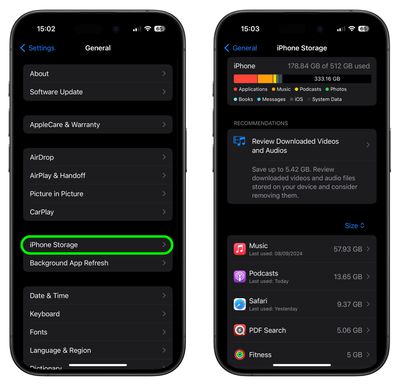
You can delete apps by holding a finger on them and tapping the X that appears at the corner of their icon. Alternatively, go to Settings ➝ General ➝ iPhone/iPad Storage, tap any apps you don't use, and select Delete App. Note that this action can't be undone, but be ruthless – you can always re-install removed apps at a later date if you change your mind.

Check on the size of any social media or messaging apps you have installed, such as Facebook and WhatsApp. These apps can often balloon in size after long periods of activity because of chat history, media caching and the like, so you might want to delete and reinstall them to start afresh.

Also, be sure to heed any personal recommendations on the ‌iPhone‌ Storage screen, like keeping high-resolution photos in iCloud and smaller-size versions on your device, or letting iOS automatically offload any apps you don't use often.

Make an Archived Backup of Your Device on Mac

It's best practice to have a local backup of your device stored on your computer in case something goes awry, or the worst happens and installation of iOS 18 fails. If you need to downgrade shortly after installing a new iOS update, making an archived local backup beforehand is necessary, otherwise you won't be able to revert back to ‌iOS 17/iPadOS 17‌ if things go wrong.

  1. Plug your iPhone into your Mac using the supplied cable.
  2. Allow the accessory to connect by clicking Allow in the dialog prompt.
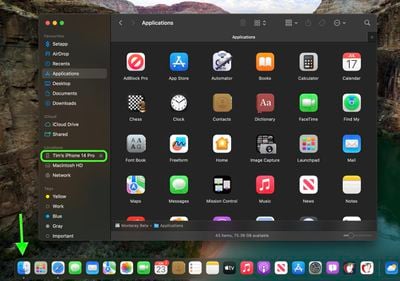
  3. Open a Finder window by clicking the Finder icon in the Dock.
  4. Click your iOS device's name in the sidebar.
    finder

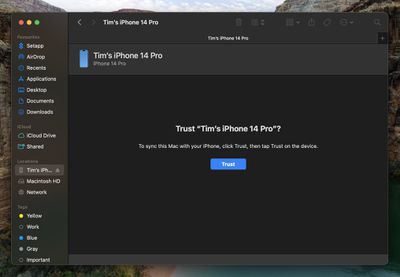
  5. If this is the first time connecting your device to your Mac, click Trust in the Finder window.
    finder

  6. Tap Trust on your device when prompted, then enter your passcode to confirm.
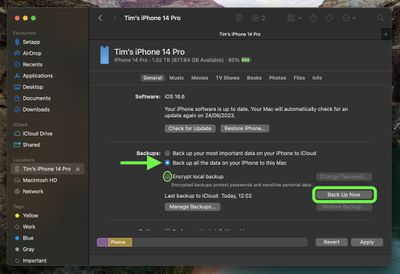
  7. In the General tab, click the circle next to where it says Back up all of the data on your iPad to this Mac.
  8. If you want to encrypt the backup, check the box next to Encrypt local backup, then enter a password to protect your data.
  9. If you don't want to create an encrypted backup, or you've already set up encrypted backups, click Back Up Now. When the backup is finished, you can find the date and time of the last backup in the General tab, just above the Manage Backups button.
    finder

  10. Lastly, archive the backup: Select Manage Backups ➝ Select Backup, then right-click the backup and choose Archive. This protects it from being overwritten by the next local backup or automatically deleted if your Mac is low on storage space.
Remember that this backup will not be overwritten when you manually or automatically back up your iPhone in the future, so you can restore it at any time by using the Restore Backup... option in the same Finder screen.

Make an Archived Backup of Your Device on Windows

The iTunes app is still the main tool for managing a connected iPhone on Windows.

  1. Plug the iPhone into your Windows PC.
  2. In iTunes, click the iPhone button at the top left.
  3. Click Summary.
  4. If you want to encrypt the data, select the Encrypt local backup option and set a password.
  5. Click Back Up Now.
  6. Click Manage Backups.
  7. Right-click the backup you created and choose Archive. This extra step prevents the backup from being overwritten by the next local backup or automatically deleted if the computer runs low on storage space.

Installing iOS 18

When iOS 18 and iPadOS 18 becomes available (likely around 10:00 a.m. Pacific Time/1:00 p.m. Eastern Time on the official release day, based on past releases) as an over-the-air update, make sure your device is fully charged before you start the process over Wi-Fi, as it may take some time to complete.

To check that the update is available, go to Settings ➝ General ➝ Software Update, and wait a moment for your device to contact Apple's servers. If you're in no rush, you can wait for iOS 18 to be delivered to your iPhone when you next plug it into your computer.

Note that the first release versions of ‌iOS 18‌ and ‌iPadOS 18 don't include Apple Intelligence features, with Apple set to introduce the first Apple Intelligence capabilities in an update coming next month.


Related Forums: iOS 18, iPadOS 18

Top Rated Comments

cjsuk Avatar
29 months ago
I am preparing for iOS 18 by turning off automatic updates and watching other people for a few days.
Score: 11 Votes (Like | Disagree)
CharlesShaw Avatar
29 months ago
Years later, when backing an iPhone up to the Mac, I always remember joy of putting the OG iPhone in the included dock.
Score: 9 Votes (Like | Disagree)
turbineseaplane Avatar
29 months ago
Step one:

Charge up your external battery back for the inevitable lower run times until iOS 18.3
Score: 8 Votes (Like | Disagree)
bodonnell202 Avatar
29 months ago

My A10X Fusion iPad Pro really deserves to get iOS 18. From what I can tell, the A12 and A10x are almost equivalent processors. I guess I’ll just be out of date now 🤷🏻‍♂️
Considering the iPad 7th gen which has the A10 and 3GB of RAM is getting iPadOS 18 while the 2nd gen iPad Pros with the A10X and 4 GB of RAM aren't tells me there is no technical reason why the 2nd gen Pros aren't getting the update and they are just dropping devices based on age now.
Score: 6 Votes (Like | Disagree)
Mr_Brightside_@ Avatar
29 months ago
I was today years old when I learned of the archive option.
Score: 4 Votes (Like | Disagree)
29 months ago
My A10X Fusion iPad Pro really deserves to get iOS 18. From what I can tell, the A12 and A10x are almost equivalent processors. I guess I’ll just be out of date now 🤷🏻‍♂️
Score: 4 Votes (Like | Disagree)

Popular Stories

apple design award 2025

Apple Announces 2025 Design Award Winners Ahead of WWDC 2025

Tuesday June 3, 2025 10:14 am PDT by
As we wait for WWDC to kick off next Monday, Apple today announced the winners of its annual Apple Design Awards, recognizing apps and games for their innovation, ingenuity, and technical achievement. The 2025 Apple Design Award winners are listed below, with one app and one game selected per category: Delight and Fun - CapWords (App) and Balatro (Game) Innovation - Play (App) and PBJ -...
1password deal blue

1Password Security Breach: What Was Accessed and What Wasn't

Wednesday November 25, 2026 1:09 pm PST by
Popular password management app 1Password today said it experienced a security breach earlier this month. 1Password says some customer names and email addresses were accessed, but no customer vault contents were compromised. On November 19, 1Password saw indications that an employee's GitHub account had been breached and began investigating. The company says the breached GitHub account was...

apple store down feature

Here's Why the Apple Store is Going Down

Thursday November 26, 2026 5:49 am PST by
Apple's online store is going down for a few hours on a rolling country-by-country basis right now, but do not get your hopes up for new products. Apple takes its online store down for a few hours ahead of Black Friday every year to tease its annual gift card offer with the purchase of select products. The store is down in Australia, New Zealand, and Thailand, right now, and it will...
Latest Stories
The 50+ Best Apple Black Friday Deals Still Available on AirPods, iPads, and More
9 hours ago
HomePod Mini 2 in (RED) Seemingly Spotted Ahead of Announcement
6 hours ago
Apple's M6 and PROLED MacBook Pro Reach New Low Prices for Black Friday
16 hours ago
The MacRumors Show: iPhone Air 2 and iPhone 18 Are Coming
17 hours ago
Apple Store in Brisbane Reopening Next Month With New Design
17 hours ago
The 60+ Best Black Friday Accessory Deals on iPhone Chargers, TVs, Headphones, and More
18 hours ago
GTA VI Now (Barely) Running on Apple Silicon Macs
18 hours ago
The Best Black Friday Streaming Deals on Apple TV, Disney+, and More
19 hours ago
Apple TV's 'Carême' Wins International Emmy for Best Drama
19 hours ago
iPhone 18 Production Delay Leaves Apple Little Time Before Launch
20 hours ago
The Best Black Friday AirPods Deals Still Available
12 hours ago
The Best Black Friday Deals on Apple Home Products
21 hours ago
The Best Black Friday iPhone Deals Still Available
12 hours ago
The Best Black Friday iPad Deals Still Available
12 hours ago
The Best Black Friday Apple Watch Deals Still Available
12 hours ago
The Best Black Friday AirTag Deals Still Available
12 hours ago
The Best Black Friday Mac Deals Still Available
12 hours ago
iPhone Share of US Smartphone Market Hits 57% as Rivals Slip
22 hours ago
iPhone 20 Pro Rumored to Feature 3D-Printed Titanium Frame
1 day ago
Apple's Official 2026 Black Friday Offer Starts Rolling Out
2 days ago
Halide Adds Fill Light Feature for iPhone Duo
2 days ago
MacBook Air Black Friday Deals Now Live With Massive $399 Savings
2 days ago
Amazon Discounts All MacBook Neo Models by $99 for Black Friday
2 days ago
Kodak Launches Unique AirTag Rival With E-Ink Display
2 days ago
Here's Why the Apple Store is Going Down
2 days ago
Apple Still Working on Giant Foldable iPad That Could Cost $5,000
2 days ago
iPhones Dominate China's Weak Singles' Day Smartphone Sales
2 days ago
iPhone 20 Pro Could Feature Ceramic in Limited-Edition Model
2 days ago
Apple Faces Korean Regulator Review Over iPhone 16 AI Advertising
2 days ago
Apple Watch Ultra 4 Hits New Best-Ever Price of $649.99 for Black Friday
2 days ago
Related Apple News: Entertainment | Lifestyle | News | Reviews | Iphone