Skip to Content

How to Get Your iPhone Ready for iOS 13

by

Apple officially releases iOS 13 in just over an hour, and a host of new iPhone features are coming with it, including a system-wide Dark Mode, a Find My app, a revamped Photos app, updated privacy features, and street-level Maps, not to mention hundreds of smaller new changes and tweaks.
test iOS 13
This article covers some of the things you can do to prepare your iPhone for Apple's latest mobile operating system, including storage maintenance tips, backup advice, and a few other useful tidbits to consider before upgrading. First though, you'll need to make sure your iPhone is compatible with iOS 13.

iOS 13 Compatibility Check

If you own an iPhone 6s or later, your device will run the latest operating system. Still unsure? Here's Apple's official compatibility list for iOS 13.

  • iPhone 11
  • iPhone 11 Pro
  • iPhone 11 Pro Max
  • iPhone XS
  • iPhone XS Max
  • iPhone XR
  • iPhone X
  • iPhone 8
  • iPhone 8 Plus
  • iPhone 7
  • iPhone 7 Plus
  • iPhone 6s
  • iPhone 6s Plus
  • iPhone SE
  • iPod touch (7th generation)

Reclaim Device Storage Space

With the release of iOS 13, Apple is improving the way apps in the App Store are packaged together, and it says users can expect app downloads that are up to 50 percent smaller, resulting in less storage space taken up by apps. However, before you can benefit, you'll first want to make sure your device has adequate space to download and install the new operating system.

With that in mind, it's worth looking at what apps you currently have installed on your devices and whether you really need them. Swipe through your home screen and check inside your folders to root out any long-forgotten apps that are taking up precious storage space.
settings
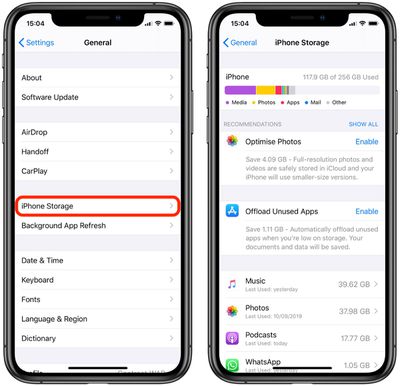
You can delete apps by holding a finger on them and tapping the X that appears at the corner of their icon. Alternatively, go to Settings -> General -> iPhone Storage, tap any apps you don't use, and select Delete App. Be ruthless – you can always re-install removed apps at a later date if you change your mind.

Check on the size of any social media or messaging apps you have installed, such as Facebook and WhatsApp. These apps can often balloon in size after long periods of activity because of chat history, media caching and the like, so you might want to delete and reinstall them to start afresh.

Also, be sure to heed any personal recommendations on the iPhone Storage screen, like keeping high-resolution photos in iCloud and smaller-size versions on your device, or letting iOS automatically offload any apps you don't use often.

Create an Archived iTunes Backup

It's best practice to have an iTunes backup of your device stored on your computer in case something goes awry, or the worst happens and installation of iOS 13 fails. If you need to downgrade shortly after installing a new iOS update, making an archived iTunes backup beforehand is necessary.

An archived iTunes backup saves the current state of your iOS device and prevents it from being accidentally overwritten by subsequent backups. Here's how to do it on a Mac. (Note that if you're a Windows user, the iTunes procedure varies slightly and you will need to rename your iTunes backup folder or move it to another location to prevent it from being overwritten).
encryptedbackup

  1. Connect your iPhone to a Mac with the latest version of iTunes installed (click iTunes -> Check For Updates from the menu bar to make sure) and click on the device's icon in iTunes' interface.
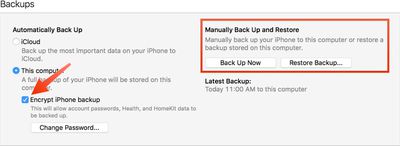
  2. Under backups, select This computer, choose Encrypt iPhone backup and then set a password. An encrypted backup retains all your account passwords as well as your Health and HomeKit data, whereas a non-encrypted backup doesn't.
  3. Click Back Up Now and wait for the backup process to finish. It should take between 5 to 25 minutes to complete depending on how much data is stored on your device.

Archive the Backup
Screen Shot 1 5

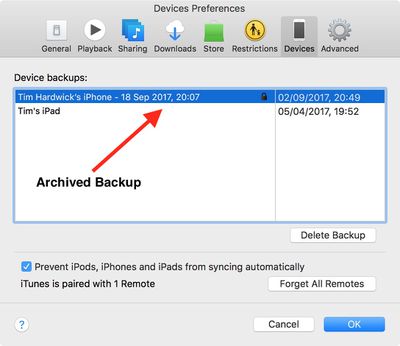
  1. To archive the backup, select Preferences from the iTunes menu and click on the Devices tab. Right-click the new backup and choose the Archive option.
  2. After the archival process is complete, a backup is labeled with the date and the time that it was archived.

Archived backups can be viewed at any time in iTunes' Preferences section. You can also delete an archived backup from here – simply select the backup in question and click the Delete Backup button.

Installing iOS 13

When iOS 13 becomes available (likely around 10 AM PST/1 PM EST on the official release day, based on past releases) it will be delivered to your device either via iTunes when you plug it into your computer, or as an over-the-air update. Make sure your device is fully charged before you start the process over Wi-Fi, as it may take some time to complete.


Related Forum: iOS 13

Top Rated Comments

GadgetBen Avatar
94 months ago

Any thoughts/wisdom/opinions about installing iOS 13 vs. waiting for 13.1? I keep reading about bugs in 13.
Wait for 13.1 I’m on it now and it’s far better. So much so I’m going to update my Pro when it arrives tomorrow to the Beta.
Score: 8 Votes (Like | Disagree)
az431 Avatar
94 months ago

Any thoughts/wisdom/opinions about installing iOS 13 vs. waiting for 13.1? I keep reading about bugs in 13.
Every piece of software ever developed has bugs

The fact that even a dozen people rant about a bug on MR does not mean the bug is widespread (or that it is even a bug)

I've had zero issues with 13.0 or 13.1 aside from mail not always refreshing the unread email account
Score: 5 Votes (Like | Disagree)
94 months ago
Any thoughts/wisdom/opinions about installing iOS 13 vs. waiting for 13.1? I keep reading about bugs in 13.
Score: 4 Votes (Like | Disagree)
bbrks Avatar
94 months ago

Any thoughts/wisdom/opinions about installing iOS 13 vs. waiting for 13.1? I keep reading about bugs in 13.
I see no reason why wouldnt you install IOS 13 and check how it works. IOS 13.1 final will come within next couple of weeks anyway. So.......
Score: 3 Votes (Like | Disagree)
Ronlap Avatar
94 months ago
Better to wait for iOS 13.1 at the end of the month since iOS 13 contains a vulnerability that could allow anyone to bypass the lockscreen protection on your iPhone and access sensitive information.

Jose Rodriguez ('https://twitter.com/VBarraquito'), a Spanish security researcher, contacted The Hacker News and revealed that he discovered a lockscreen bypass bug in iOS 13 that allowed him to access the full list of Contacts on his iPhone—and every piece of information saved on them.
Score: 3 Votes (Like | Disagree)
94 months ago

Any thoughts/wisdom/opinions about installing iOS 13 vs. waiting for 13.1? I keep reading about bugs in 13.
I researched and concluded i’ll wait for iOS 13.1; taking advantage of this atypical around the corner semi-major update (sept 30th)

iOS 13 does have several bugs.
Score: 3 Votes (Like | Disagree)

Popular Stories

apple design award 2025

Apple Announces 2025 Design Award Winners Ahead of WWDC 2025

Tuesday June 3, 2025 10:14 am PDT by
As we wait for WWDC to kick off next Monday, Apple today announced the winners of its annual Apple Design Awards, recognizing apps and games for their innovation, ingenuity, and technical achievement. The 2025 Apple Design Award winners are listed below, with one app and one game selected per category: Delight and Fun - CapWords (App) and Balatro (Game) Innovation - Play (App) and PBJ -...
1password deal blue

1Password Security Breach: What Was Accessed and What Wasn't

Wednesday November 25, 2026 1:09 pm PST by
Popular password management app 1Password today said it experienced a security breach earlier this month. 1Password says some customer names and email addresses were accessed, but no customer vault contents were compromised. On November 19, 1Password saw indications that an employee's GitHub account had been breached and began investigating. The company says the breached GitHub account was...
apple store down feature

Here's Why the Apple Store is Going Down

Thursday November 26, 2026 5:49 am PST by
Apple's online store is going down for a few hours on a rolling country-by-country basis right now, but do not get your hopes up for new products. Apple takes its online store down for a few hours ahead of Black Friday every year to tease its annual gift card offer with the purchase of select products. The store is down in Australia, New Zealand, and Thailand, right now, and it will...
Latest Stories
The 50+ Best Apple Black Friday Deals Still Available on AirPods, iPads, and More
2 hours ago
Apple's M6 and PROLED MacBook Pro Reach New Low Prices for Black Friday
6 hours ago
The MacRumors Show: iPhone Air 2 and iPhone 18 Are Coming
6 hours ago
Apple Store in Brisbane Reopening Next Month With New Design
7 hours ago
The 60+ Best Black Friday Accessory Deals on iPhone Chargers, TVs, Headphones, and More
7 hours ago
GTA VI Now (Barely) Running on Apple Silicon Macs
8 hours ago
The Best Black Friday Streaming Deals on Apple TV, Disney+, and More
8 hours ago
Apple TV's 'Carême' Wins International Emmy for Best Drama
9 hours ago
iPhone 18 Production Delay Leaves Apple Little Time Before Launch
10 hours ago
The Best Black Friday AirPods Deals Still Available
2 hours ago
The Best Black Friday Deals on Apple Home Products
10 hours ago
The Best Black Friday iPhone Deals Still Available
2 hours ago
The Best Black Friday iPad Deals Still Available
2 hours ago
The Best Black Friday Apple Watch Deals Still Available
2 hours ago
The Best Black Friday AirTag Deals Still Available
2 hours ago
The Best Black Friday Mac Deals Still Available
2 hours ago
iPhone Share of US Smartphone Market Hits 57% as Rivals Slip
12 hours ago
iPhone 20 Pro Rumored to Feature 3D-Printed Titanium Frame
13 hours ago
Apple's Official 2026 Black Friday Offer Starts Rolling Out
1 day ago
Halide Adds Fill Light Feature for iPhone Duo
1 day ago
MacBook Air Black Friday Deals Now Live With Massive $399 Savings
1 day ago
Amazon Discounts All MacBook Neo Models by $99 for Black Friday
1 day ago
Kodak Launches Unique AirTag Rival With E-Ink Display
1 day ago
Here's Why the Apple Store is Going Down
1 day ago
Apple Still Working on Giant Foldable iPad That Could Cost $5,000
1 day ago
iPhones Dominate China's Weak Singles' Day Smartphone Sales
1 day ago
iPhone 20 Pro Could Feature Ceramic in Limited-Edition Model
1 day ago
Apple Faces Korean Regulator Review Over iPhone 16 AI Advertising
2 days ago
Apple Watch Ultra 4 Hits New Best-Ever Price of $649.99 for Black Friday
2 days ago
New Apple Store Opening in India, Download the Special Wallpaper Now
2 days ago
Related Apple News: South Africa | Opinion | World News | Ipad | Mac






























