Skip to Content

How to Get the Old Apple Mail Back

by

With recent software updates, Apple has made some major changes to the way its stock Mail app looks and works on iPhone, iPad, and Mac. Keen to roll back these changes and revert to how Apple Mail functioned before the updates? Keep reading to learn how it's done.
General macOS Mail Feature
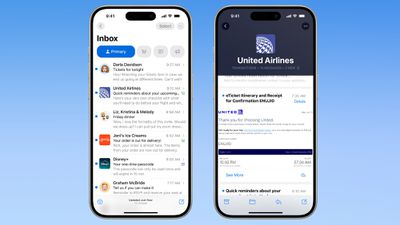
When Apple released iOS 18.1, it added a priority messages feature to the Mail app for devices with Apple Intelligence. Then in iOS 18.2, it brought us new Categories that automatically sort your emails into four distinct sections: Primary, Transactions, Updates, and Promotions. The change also added contact photos and business logos for conversations in your inbox.

With the release of iOS 18.4, iPadOS 18.4, and macOS Sequoia 15.4, Apple has now fully rolled out these changes across iPhone, iPad, and Mac. Fortunately, if you don't like the new Mail interface, Apple has also included ways for users to bring back the old functionality. Let's break it down.

How to Disable Mail Categories

The new Categories view, while helpful for some, might not suit your email management style. For example, it has attracted criticism for introducing complexity where many users value simplicity and predictability. One major issue is the disconnect between how Mail now organizes email and how long-time users are accustomed to processing their messages via a chronological inbox view.

Categories don't physically move emails out of the inbox, but they impose a new visual and functional structure that can feel unintuitive and inconsistent, especially when emails appear in multiple places at once.

The relationship between Primary and Priority messages adds further confusion, with overlapping but not identical functionality, and badges that only reflect a subset of new mail. And for users who silo accounts across apps or depend on a feed-like view of their inbox, this layered system can feel like a solution in search of a problem – more disruptive than helpful, and out of sync with how many people actually manage their email.

On iPhone and iPad, you can swipe left across the categories to switch to an "All Mail" view (the same option can be found on Mac to the right of the new category buttons). But if you want to remove the categories completely, follow these steps:

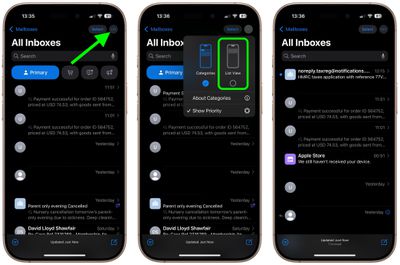
  1. Open the Mail app on your iPhone or iPad.
  2. Tap the More button (three dots) in the upper right corner of your inbox.
  3. On iPhone/iPad, select List View from the pop-up menu.
mail

The More menu also has an "About Categories" section where you can see how your messages have been categorized over the course of the last week, but there is no option to tell the Mail app if you believe an email has been put into the wrong category.

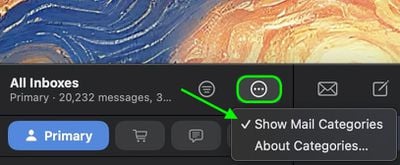
On Mac, there is a More button (three dots) at the top of the inbox view. Click this, and you will see an option to uncheck Show Mail Categories.
mail

You can also find the same option in the Mail menu bar (View ➝ Show Mail Categories).

Once you switch to List View, your inbox will return to showing all emails in chronological order, just as it did before. The change takes effect immediately. While categorization is not perfect, it's likely something that Apple will improve over time. You can always switch back to Categories view using the same menu if you want to try it again later.

How to Get Rid of Contact Photos in Mail
ios 18 mail app
Contact photos have been added to the Mail app in an effort to make it easier to identify the senders of all the emails you receive. However, if Apple can't recognize a business, or a contact doesn't have an associated photo, it can end up making your inbox look a bit of a mess.

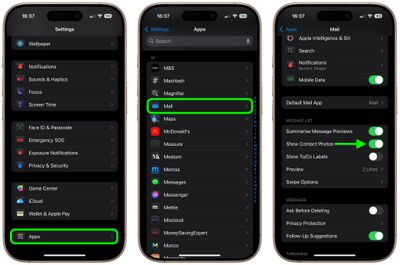
Fortunately, you can easily turn off the little pictures completely by following these steps:

  1. Open the Settings app on your iPhone or iPad.
  2. Swipe to the bottom of the menu and tap Apps.
  3. Search for or scroll to Mail in the list of apps.
  4. Under "Message List," toggle off the switch next to Show Contact Photos.
settings

That's all you need to do on iPhone and iPad. To reinstate the contact pictures, simply turn on the same option in Settings. In iOS 18.5, currently in beta, Apple will add a more convenient option to disable contact photos right from the Mail app.

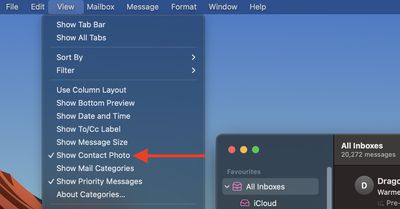
If you want to be rid of Mail contact photos on Mac, simply click Mail ➝ View in the menu bar, and uncheck the Contact Photos option in the dropdown menu.
mail

How to Disable Priority Messages

Devices that have Apple Intelligence support will show priority emails in the Primary inbox. This idea behind the feature is that it lets you see what's most important first. However, the underlying AI is not fully fleshed out, and there may be times when Mail flags junk mail – or worst case, even phishing scams – as a priority message.

To avoid such scenarios, you can turn off the Priority in the following way:

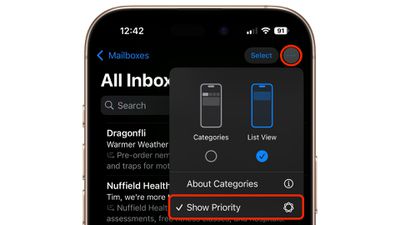
  1. On iPhone/iPad, tap the More button (three dots) in the upper right corner of your inbox.
  2. Uncheck Show Priority.

mail

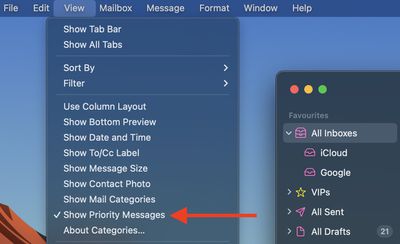
On Mac, simply click Mail ➝ View in the menu bar, and uncheck the Priority Messages option in the dropdown menu.
mail

Note that this option won't appear on devices without Apple Intelligence support.

Summing Up

As Apple continues to refine the Mail experience across its platforms, it's clear the company is laying the groundwork for a more intelligent and organized inbox. But with such sweeping changes, user preferences can easily be overlooked. Thankfully, Apple has provided ways to disable or revert many of the new features, offering a degree of customization that hasn't always been guaranteed in past updates.

While the current implementation may not suit everyone – and in some situations can leave users completely confused – there's hope that Apple will listen to feedback and make the system smarter, more flexible, and less intrusive in future updates.


Top Rated Comments

21 months ago
It's really telling that with all of Apple's "amazing" new features lately, all most of us want to do is go back to how it was. Apple seems to be going backwards with software.
Score: 24 Votes (Like | Disagree)
21 months ago

why would u do that. the old email sucks.
Because the new design sucks more.
Score: 20 Votes (Like | Disagree)
21 months ago
What a mess of poorly thought out junk that just adds unecessary complexity and half-baked AI garbage. I can tell ehich emails are important without any help, I have the ability to read a few words.
Score: 11 Votes (Like | Disagree)
g-7 Avatar
21 months ago
Or just live in Poland. Mail categories not available, priority notifications not available, summaries not available, Apple Intelligence not available, Siri not available, Scribble not available, iPhone mirroring not available, etc… We always get a pretty vanilla experience, no need to turn anything off :)
Score: 10 Votes (Like | Disagree)
TechWhisperer Avatar
21 months ago
Fire Federighi already! The guy’s becoming a total joke. Apple’s software is buggy as hell these days but he’s too busy doing his little song and dance to fix anything. Remember when Apple stuff actually used to wow us? Bring back the golden age of Apple, please!
Score: 6 Votes (Like | Disagree)
dannyyankou Avatar
21 months ago
I like some of the changes in concept, but some things need fine-tuning.
Score: 5 Votes (Like | Disagree)

Popular Stories

apple design award 2025

Apple Announces 2025 Design Award Winners Ahead of WWDC 2025

Tuesday June 3, 2025 10:14 am PDT by
As we wait for WWDC to kick off next Monday, Apple today announced the winners of its annual Apple Design Awards, recognizing apps and games for their innovation, ingenuity, and technical achievement. The 2025 Apple Design Award winners are listed below, with one app and one game selected per category: Delight and Fun - CapWords (App) and Balatro (Game) Innovation - Play (App) and PBJ -...
1password deal blue

1Password Security Breach: What Was Accessed and What Wasn't

Wednesday November 25, 2026 1:09 pm PST by
Popular password management app 1Password today said it experienced a security breach earlier this month. 1Password says some customer names and email addresses were accessed, but no customer vault contents were compromised. On November 19, 1Password saw indications that an employee's GitHub account had been breached and began investigating. The company says the breached GitHub account was...
apple store down feature

Here's Why the Apple Store is Going Down

Thursday November 26, 2026 5:49 am PST by
Apple's online store is going down for a few hours on a rolling country-by-country basis right now, but do not get your hopes up for new products. Apple takes its online store down for a few hours ahead of Black Friday every year to tease its annual gift card offer with the purchase of select products. The store is down in Australia, New Zealand, and Thailand, right now, and it will...
Latest Stories
The 50+ Best Apple Black Friday Deals on AirPods, iPads, MacBooks, and More
3 hours ago
Apple's M6 and PROLED MacBook Pro Reach New Low Prices for Black Friday
3 hours ago
The MacRumors Show: iPhone Air 2 and iPhone 18 Are Coming
3 hours ago
Apple Store in Brisbane Reopening Next Month With New Design
4 hours ago
The 60+ Best Black Friday Accessory Deals on iPhone Chargers, TVs, Headphones, and More
4 hours ago
GTA VI Now (Barely) Running on Apple Silicon Macs
5 hours ago
The Best Black Friday Streaming Deals on Apple TV, Disney+, and More
5 hours ago
Apple TV's 'Carême' Wins International Emmy for Best Drama
6 hours ago
iPhone 18 Production Delay Leaves Apple Little Time Before Launch
7 hours ago
The Best Black Friday AirPods Deals
7 hours ago
The Best Black Friday Deals on Apple Home Products
7 hours ago
The Best Black Friday iPhone Deals
8 hours ago
The Best Black Friday iPad Deals
8 hours ago
The Best Black Friday Apple Watch Deals
8 hours ago
The Best Black Friday AirTag Deals
8 hours ago
The Best Black Friday Mac Deals
8 hours ago
iPhone Share of US Smartphone Market Hits 57% as Rivals Slip
9 hours ago
iPhone 20 Pro Rumored to Feature 3D-Printed Titanium Frame
10 hours ago
Apple's Official 2026 Black Friday Offer Starts Rolling Out
1 day ago
Halide Adds Fill Light Feature for iPhone Duo
1 day ago
MacBook Air Black Friday Deals Now Live With Massive $399 Savings
1 day ago
Amazon Discounts All MacBook Neo Models by $99 for Black Friday
1 day ago
Kodak Launches Unique AirTag Rival With E-Ink Display
1 day ago
Here's Why the Apple Store is Going Down
1 day ago
Apple Still Working on Giant Foldable iPad That Could Cost $5,000
1 day ago
iPhones Dominate China's Weak Singles' Day Smartphone Sales
1 day ago
iPhone 20 Pro Could Feature Ceramic in Limited-Edition Model
1 day ago
Apple Faces Korean Regulator Review Over iPhone 16 AI Advertising
1 day ago
Apple Watch Ultra 4 Hits New Best-Ever Price of $649.99 for Black Friday
1 day ago
New Apple Store Opening in India, Download the Special Wallpaper Now
2 days ago
Related Apple News: Ipad | Motoring | Business | Mac | Mac